Should I Buy My Own Router? ISP Router vs. Your Own, Compared
Your own router can cut costs over time, improve speed and coverage across your home, and give you more control over your network settings. You might be wondering, “should I buy my own router?” It depends on your home's size, how well your Internet service provider's (ISP's) equipment performs, and whether you're paying a monthly fee.
If some rooms get a weak signal, pages load slowly, or a rental fee shows up on every bill, you’re likely weighing what to change. Many people assume slow Internet means they need a faster plan. The ISP router can be the bottleneck instead, holding back speed you already pay for. Knowing which one is the limit helps you avoid paying more for speed your home can’t use.
This article explains how ISP routers work and how to tell whether your router or your plan is behind slow speeds. You’ll also see how an ISP router compares with your own and which signs suggest switching is worth it. From there, you’ll learn how a standard router vs. mesh system covers a home based on its size and layout. The last section explains how to switch.
Key Takeaways
- An ISP router is the router your Internet provider supplies, often built into a gateway that also works as your modem.
- Compare wired and Wi-Fi speed tests with your plan’s speed before paying for a faster plan, to see whether the router is the limit.
- Your own router can add settings control, coverage options, and newer Wi-Fi features, and it stays with you if you change providers.
- An ISP router may be enough for a smaller home with light use, especially if you value one place to call for support.
- A mesh system can be a better fit for larger homes or rooms the signal doesn’t reach, and you can add units as needs grow.
What Is an ISP Router?
An ISP router is the router your Internet service provider supplies to connect your devices to the Internet. Many providers give you a gateway, a single device that combines a modem and a router. The modem brings the Internet connection into your home, and the router shares that connection with your devices over Wi-Fi or a wired link.
How Getting a Router From Your Provider Works
A service provider router comes with your Internet service, either included in the price or rented separately. Your provider sets it up or activates it, and replaces it if it fails. The details vary by provider; check your plan's terms.
What ISP Routers Do Well
An ISP router's main strength is convenience: it arrives with your service, the provider handles setup, and you have one number to call for help. Setting up your own takes a little more effort, though with the right equipment it can be easy and straightforward.
Where ISP Routers Can Fall Short
An ISP router can fall short on control, coverage, and cost, depending on the provider and model. Some models limit which settings you can change. Coverage may not reach every room in a larger home, and features differ from one model to the next.
If a rental fee applies, it adds to every monthly bill. Placement can be another limit. Some ISP-provided routers, gateways, and modems need to sit where the cable enters your home. That spot may be far from the rooms where you use Wi-Fi most.
Many ISP routers also work like a standard router, sending Wi-Fi from a single unit, so they can share its limits, such as a signal that fades in a larger home.
Diagnosing Slow Internet: ISP Plan vs. Router
Slow Internet doesn't always mean you need a plan upgrade, because the ISP router may be holding your speeds back. A few quick tests can show whether the limit is your plan or your router before you pay for a faster plan.
- Find the download speed included in your plan.
- Run a speed test on a device wired to the router with an Ethernet cable, if you can.
- Run the same test over Wi-Fi next to the router.
- Repeat the Wi-Fi test in a room farther from the router.
- Compare each result with your plan's speed.
What the results may mean:
- If wired speeds are close to your plan's listed speed but Wi-Fi speeds are lower, the router or its coverage may be the cause.
- Wired speeds well below your plan's listed speed may point to the line or the plan. Check in with your provider to get the full picture.
If the router is the bottleneck, a non-ISP router may help you get the speeds you already pay for. Your plan still sets your speed, but the right equipment can carry it more reliably to more rooms.
Benefits of Buying Your Own Router
The main reasons for buying your own router are more control, coverage that fits your home, and savings over time:
- Control over settings and features: Depending on the model, you can adjust settings yourself, such as setting up a guest network to keep visitors off your main devices.
- Coverage options matched to your home: Pick a single router for a smaller space or a mesh system for a larger home, so the signal reaches the rooms you use.
- Newer Wi-Fi features: You choose your Wi-Fi standard, the generation of wireless technology a router uses. Wi-Fi 7, the current generation, has more capacity than older standards for homes with many devices online at once.
- Security and updates: Firmware is the software built into your router, and keeping it current helps protect your home network security. Most TP-Link routers can install updates automatically through their companion app. On compatible TP-Link routers and Deco systems, HomeShield protection includes automated software updates and other essentials at no extra cost, with optional paid plans for more protection and controls.
- Placement flexibility: You have more choice in where your router sits, and a mesh system lets you put extra units near rooms with a weak signal.
- Lower cost over time: Owning your router is a one-time purchase, which can cost less over time than paying a monthly rental fee.
- Equipment that moves with you: If you change providers, your router stays with you.
ISP Router vs. Your Own Router
An ISP router trades control for convenience, while your own router gives you more choice but requires you to handle the setup yourself.
|
Factor |
ISP router |
Your own router |
|
Cost over time |
May include a monthly rental fee |
One-time purchase, which can cost less than renting over time |
|
Setup |
Set up or activated by the provider |
You set it up yourself, with easy app setup on many TP-Link models |
|
Settings and control |
May be limited |
More access to settings, such as a guest network, depending on the model |
|
Coverage options |
Single unit; placement may be limited |
Single router or a mesh system for whole-home coverage |
|
Wi-Fi features |
Vary by model |
You choose the standard and features, such as Wi-Fi 7 |
|
Updates |
Vary by provider and model |
Vary by model; most TP-Link routers offer automatic updates |
|
Support |
One place to call for help |
Router maker supports the router; provider supports your Internet service |
|
Changing providers |
Belongs to the provider when rented |
Stays with you if you switch providers |
Is it better to buy your own router? It depends on your household and how well your current setup keeps up.
Should I Buy My Own Router? When Switching Makes Sense
Switching makes sense when your current equipment no longer fits your home or your budget. These signs suggest buying your own may be worth it:
- Coverage gaps or weak signal in some rooms
- A rental fee on your monthly bill
- Limited settings you'd like to change
- Many connected devices competing for Wi-Fi
- Plans to upgrade your Internet plan or change providers
An ISP router may be enough if you have:
- A smaller home
- Light everyday use
- A preference for having your provider handle support
If you're not ready to replace your router, you can try other ways to boost your home Wi-Fi first.
Standard Router or Mesh System?
Both a standard router and a mesh system can work well. The right choice depends on your home's layout, its building materials, and how many devices connect.
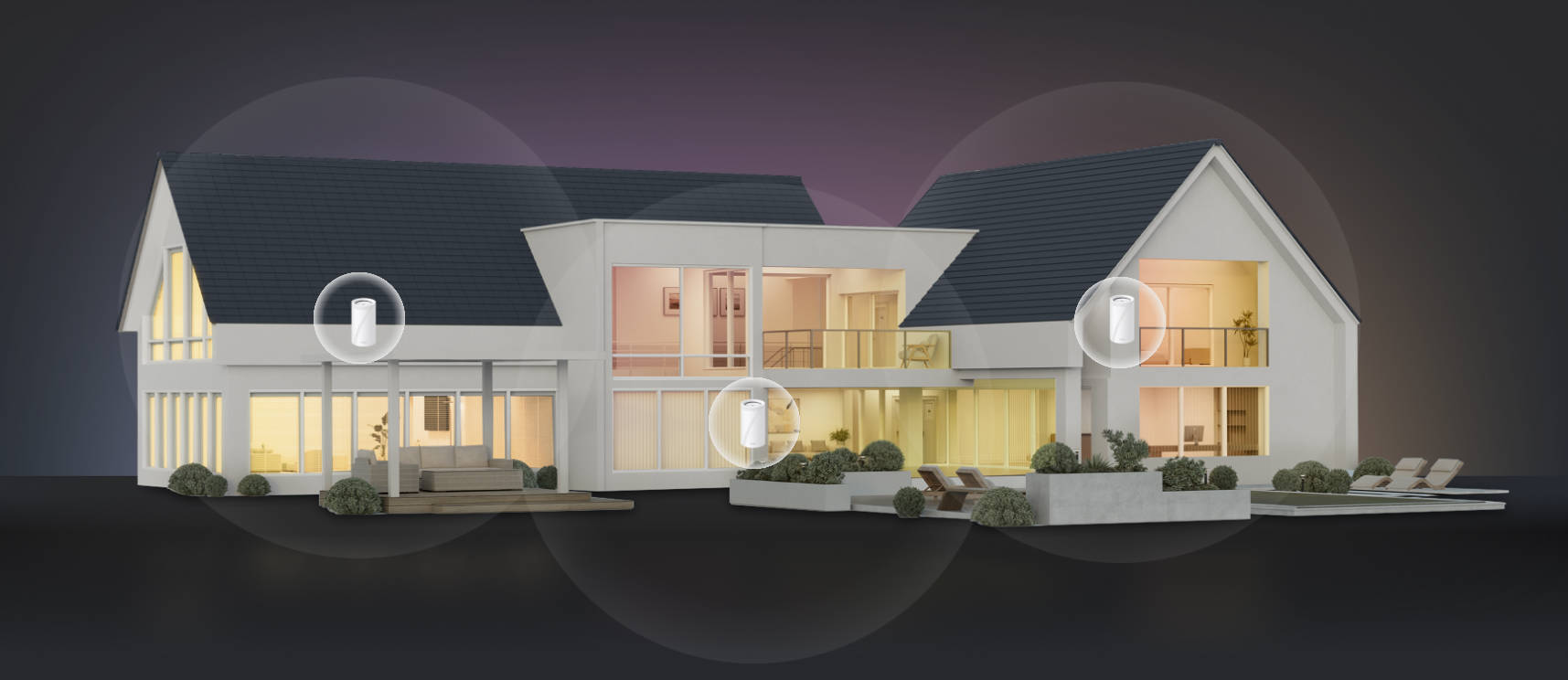
A standard router sends Wi-Fi from a single unit, which can cover a smaller home or apartment well. A mesh system uses a main unit connected to your modem plus additional units, called nodes, placed around your home. Each node broadcasts Wi-Fi from its own spot and links back to the main unit, extending coverage to rooms one unit may not reach. All the nodes share one network name, so as you move from room to room, your devices switch between them automatically to keep your signal strong.
An upgraded router is a solid choice on its own. A mesh system is designed for whole-home Wi-Fi coverage, and it's worth weighing in a larger or multi-story home.
Thick walls and multiple floors can limit how far one router's signal travels, leaving weak spots it may not reach. Many ISP routers share that limit. Mesh nodes carry the signal past a router’s fixed spot, such as where the cable enters your home. Mesh also grows with you, since you can add compatible Deco units if you move to a larger home or find a dead zone.
A standard router or a mesh system can each replace the router your provider supplied. A TP-Link router or the main Deco unit connects to your modem and takes over sharing your Internet connection with your devices.
How to Switch to Your Own Router
Can you buy your own router instead of renting one? Yes. Switching means choosing a router or mesh system for your home and connecting it to the modem or gateway you already have. Ask your provider which equipment you have, since your setup steps depend on it.
If You Have a Standalone Modem
A standalone modem, which is a modem without a built-in router, connects straight to your own router. Here’s how to get Internet with your own router when you have a standalone modem. Connect the router to the modem with an Ethernet cable. Then restart both, plugging in the modem first, then the router.
If You Have a Gateway
Can I use my own router if my provider gave me a gateway? In many setups, yes, and you connect it to the gateway with an Ethernet cable. If the gateway supports bridge mode, turning it on lets your router take over network management, so only one device manages the network. Bridge mode may also turn off the gateway’s Wi-Fi; check with your provider first.
If your gateway doesn’t support bridge mode, ask your provider what it offers instead. Some routers can also run in access point mode, which extends the gateway’s network without adding a second layer of routing.
How Hard Is Setting Up Your Own Router?
Setup takes more effort than having your provider do it, but TP-Link routers and Deco mesh systems are built around simple app setup. After you connect the hardware, you can finish setup in the app on your phone in just a few taps.
Find the Right Router or Mesh System for Your Home
An ISP router can work well for some homes, but owning your own gives you control and more coverage options.
Should you buy your own router, then? The decision comes down to your home’s size, the number of devices you use, and any rental fee on your bill. These three checks help narrow down what to look for:
- Coverage: A single router suits a smaller space, and a mesh system suits a larger home or one where the signal fades. Select Deco systems come in multi-unit packs, and you can add compatible Deco units later.
- Devices: If many devices compete for Wi-Fi, look for a model that supports a newer Wi-Fi standard, such as Wi-Fi 7.
- Cost: Add up the rental fees you pay now and compare them with a one-time purchase.
When you’re ready to see what’s available, browse TP-Link Wi-Fi routers for single-unit options or the Deco mesh Wi-Fi lineup for multi-unit systems. Check each model’s specifications for the Wi-Fi standard and coverage that fit your home.
Frequently Asked Questions
Do I have to use the router provided by my ISP?
In many cases, no. Your provider's modem or gateway brings in the connection, and your router can take over sharing it with your devices. Policies and equipment differ by provider, and you’ll need to ask yours what it supports before you switch.
Can I just unplug my old router and plug in a new one?
Sometimes. If your old router is a separate box from your modem, you can replace it with a new router. A gateway stays in place as your connection, so ask your provider about bridge mode before adding a new router.
What's the average lifespan of a router?
There isn't one set number, since useful life depends on how you use a router and how your needs change. If a router is five or more years old and regularly slows down, drops connections, or leaves rooms without a usable signal, it may be worth replacing.
Do expensive routers make a difference?
They can, but a higher price doesn't guarantee better results in your home. What matters is whether a router's features fit your space and how your household uses Wi-Fi. A small apartment with light use may not benefit from features a large, busy home would use.
What is an ISP router?
An ISP router is the Wi-Fi equipment your Internet provider gives you when you sign up. If that one box connects to the line coming into your home and also broadcasts Wi-Fi, it's likely a gateway doing both jobs.