Best Wi-Fi Card for PC and Gaming: TP-Link's Complete Buying Guide
A Wi-Fi card for PC adds a wireless connection to a desktop that doesn't have one. If your desktop already has onboard Wi-Fi, a card can upgrade it to a newer Wi-Fi generation. TP-Link makes a range of PCIe Wi-Fi cards spanning Wi-Fi 6, Wi-Fi 6E, and Wi-Fi 7, built for desktops and gaming PCs. This guide covers TP-Link's lineup only and compares models to help you find the right one for your setup.
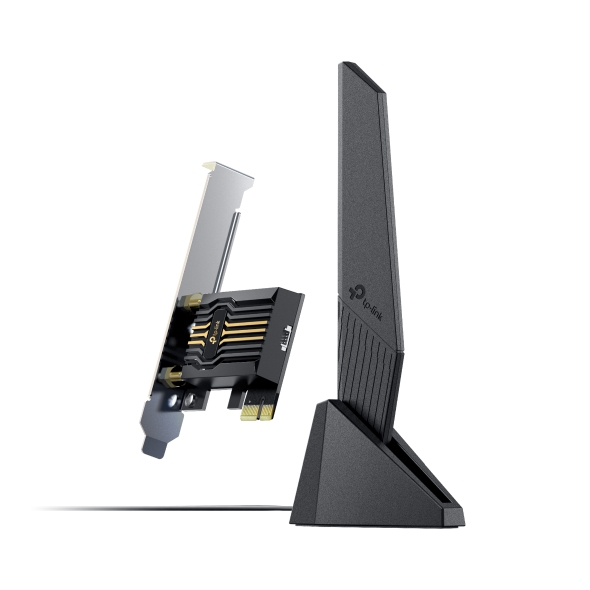
A PCIe Wi-Fi card installs inside your case, in a PCIe x1 slot on the motherboard. Each TP-Link model in this guide also adds Bluetooth and comes with external antennas you can position for better reception.
The right card depends on your router's Wi-Fi generation, your Windows version, and whether your motherboard has a free slot and USB header. If you use wireless peripherals, Bluetooth needs to be on your list, too. No single card is right for every desktop, so check those factors before you compare models.
The Archer TBE552E is TP-Link’s best overall pick for a Wi-Fi 7 router, and the Archer TBE550E suits gaming with wireless controllers and headsets. On a Wi-Fi 6E router running Windows 11, the Archer TXE75E can use the 6 GHz band. On a Wi-Fi 6 router, the Archer TX3000E is in the top Wi-Fi 6 speed tier, and the Archer TX20E is the affordable upgrade.
TP-Link PCIe Wi-Fi Cards by Generation
TP-Link's PCIe Wi-Fi card lineup includes models across three generations: Wi-Fi 6. Wi-Fi 6E, and Wi-Fi 7.
|
Wi-Fi Generation |
Models |
|
Wi-Fi 6 |
Archer TX3000E, Archer TX55E, Archer TX20E |
|
Wi-Fi 6E |
Archer TXE75E, Archer TXE72E, Archer TXE73E |
|
Wi-Fi 7 |
Archer TBE553E, Archer TBE552E, Archer TBE550E, Archer TBE400E |
Full specs for each model are in the TP-Link PCIe Wi-Fi Cards section below.
Why Shop TP-Link PCIe Wi-Fi Cards
TP-Link's PCIe cards span three Wi-Fi generations, so you can choose a PC Wi-Fi card that matches the router you already own.
Each card pairs Wi-Fi with Bluetooth and ships with external antennas, and select models mount them on a magnetized base. A low-profile bracket for smaller cases comes in the box with all 11 models. Most Wi-Fi 6 and Wi-Fi 6E cards support Windows 10 and 11, while most Wi-Fi 7 cards need Windows 11. Features vary by model, so check each card's specs before you buy.
How to Choose a PCIe Wi-Fi Card
Choose a PCIe Wi-Fi card by checking how well it fits your router, your Windows version, and your PC. That covers slot and case fit, a free Bluetooth header, antenna design, and the Wi-Fi features you can use.
Wi-Fi Generation: 6, 6E, or 7
Wi-Fi 6 (802.11ax) uses orthogonal frequency-division multiple access (OFDMA) and multi-user, multiple-input, multiple-output (MU-MIMO) technology on the 2.4 GHz and 5 GHz bands. These let your router serve several devices at once instead of one at a time. Wi-Fi 6E is Wi-Fi 6 extended to the 6 GHz band, a newer band with less traffic from older devices.
Wi-Fi 7 (802.11be) adds 320 MHz channels on the 6 GHz band and Multi-Link Operation (MLO). A 320 MHz channel is twice as wide as the widest Wi-Fi 6 channel, so it can carry more data at once. MLO lets a Wi-Fi 7 card use more than one band at once or switch between bands to improve throughput and latency, depending on the model.
A driver update can't turn a Wi-Fi 6 card into a Wi-Fi 7 card, because generation support is built into the hardware. Match your card's Wi-Fi generation to your router's, rather than buying the newest generation by default. A newer card can still connect to an older router, but the connection uses the newest standard and features both devices support. To get Wi-Fi 6E or Wi-Fi 7 benefits, confirm that your router, operating system, and driver support the band and features you want.
Bluetooth Support
All of TP-Link's PCIe cards in this guide include Bluetooth. One card handles your Wi-Fi and your wireless gaming gear, like a mouse, headset, or controller. The Bluetooth version varies by model, with Bluetooth 5.4 on all four Wi-Fi 7 cards. Bluetooth 5.4 adds reliability and security improvements over Bluetooth 5.3. A more reliable connection helps a controller or headset stay connected when you’re farther from your PC.
PCIe Slot and Motherboard Compatibility
A PCIe Wi-Fi card needs an open PCIe x1 slot or larger on your motherboard. That means opening your case to install it, not plugging it into a port. Before you buy, confirm a slot is free, there's clearance for the card, and you have the right standard or low-profile bracket for your case. For Bluetooth, you'll also need a free internal USB 2.0 header, which the card's header cable plugs into.
Band Count: Dual-Band vs. Tri-Band
A dual-band card connects on 2.4 GHz and 5 GHz, while a tri-band card adds the 6 GHz band. On compatible Wi-Fi 6E or Wi-Fi 7 equipment, 6 GHz can provide cleaner spectrum and wider channels. That may reduce congestion and increase the theoretical link rate. Real-world results still depend on range, interference, router support, OS support, drivers, traffic, and your Internet connection.
In TP-Link's lineup, the Wi-Fi 6 cards are dual-band, and the Wi-Fi 6E and Wi-Fi 7 cards are tri-band.
Antenna Design and Range
Antenna count and placement affect how well a card picks up your router's signal. Antennas attached to the back of the card sit behind the metal case. A movable antenna base can help position the antennas away from a metal PC case and closer to a clearer signal path.
Select models include a magnetized base on a cable: 1 m cable on the Archer TX3000E, Archer TXE75E, and Archer TBE550E, and 0.8 m cable on the Archer TBE553E. Reception still depends on the router, distance, obstacles, interference, antenna design, and the surrounding environment.
What Drives the Price of a Wireless Network Card
The price of a wireless network card goes up with its Wi-Fi generation and speed tier. Speed tiers like AX3000 or BE9300 add up a card's maximum signal rates across its bands, so a higher number means more total capacity.
Entry-level cards cost the least. The Archer TX20E pairs Wi-Fi 6 with a lower speed tier (AX1800) and Bluetooth 5.2, which suits everyday use on a Wi-Fi 6 router. Mid-tier cards cost more because they step up to a faster Wi-Fi 6 tier or add the 6 GHz band with Wi-Fi 6E, often with Bluetooth 5.3.
Flagship cards are at the top of the price range. They use Wi-Fi 7 at the BE9300 tier with Bluetooth 5.4, and select models add additional features, like a magnetized antenna base and status lighting.
Mistakes to Avoid When Buying a PCIe Wi-Fi Card
Most PCIe Wi-Fi card problems trace back to a mismatch with your PC, your router, or your Windows version. These are the most common ones to avoid:
- Buying before checking for a free slot. The card needs an open PCIe x1 slot on your motherboard.
- Pairing a new card with an older router. A Wi-Fi 7 card on a Wi-Fi 6 router connects using Wi-Fi 6, so you won't get the Wi-Fi 7 features.
- Shopping on price alone. A more expensive card only helps if your router supports what it adds.
- Skipping the Windows check. Several Wi-Fi 7 cards need Windows 11, and some features depend on your Windows version.
- Expecting 6 GHz or MLO to work automatically. Both need a compatible router and Windows version, and MLO on some cards needs Windows 11 version 24H2 or later.
- Forgetting the USB 2.0 header. Bluetooth connects through a cable to an internal USB 2.0 header, so without a free one, Bluetooth won't work.
- Ignoring case size. Check that the card has room to fit, and use the low-profile bracket if your case is small.
- Reading signal rates as real-world speed. Published rates are theoretical maximums, and actual speed depends on your router, distance, interference, and Internet plan.
TP-Link PCIe Wi-Fi Cards
TP-Link's PCIe Wi-Fi cards come in three generations, each suited to a different router. The tables below list each card's speed, bands, Bluetooth version, security, and supported operating system. Published wireless rates are theoretical physical-layer signal rates, not guaranteed Internet or device throughput.
Wi-Fi 6 PCIe Cards
A Wi-Fi 6 PCIe card suits everyday desktop use and general upgrades when you don't need the newest standard.
|
Model Name |
Max Speed |
Bands |
Bluetooth Version |
WPA3 Support |
Supported Operating System |
|
AX3000 (2402 + 574 Mbps) |
Dual-band |
5.3 |
Yes |
Windows 11/10 (64-bit) |
|
|
AX3000 (2402 + 574 Mbps) |
Dual-band |
5.2 |
Yes |
Windows 11/10 (64-bit) |
|
|
AX1800 (1201 + 574 Mbps) |
Dual-band |
5.2 |
Yes |
Windows 11/10 (64-bit) |
Wi-Fi 6E PCIe Cards
A Wi-Fi 6E wireless card adds access to the 6 GHz band, which only Wi-Fi 6E and newer devices can use. It's best suited to a desktop on a Wi-Fi 6E router in a busy area. Using the 6 GHz band requires a compatible Wi-Fi 6E router, a supported driver, and Windows 11. On Windows 10, these cards still connect on 2.4 GHz or 5 GHz, but without the full 6 GHz benefit.
|
Model Name |
Max Speed |
Bands |
Bluetooth Version |
WPA3 Support |
Supported Operating System |
|
AXE5400 (2402 + 2402 + 574 Mbps) |
Tri-band |
5.3 |
Yes, with a compatible router |
Windows 11/10 (64-bit) |
|
|
AXE5400 (2402 + 2402 + 574 Mbps) |
Tri-band |
5.3 |
Yes, with a compatible router |
Windows 11/10 (64-bit) |
|
|
AXE5400 (2402 + 2402 + 574 Mbps) |
Tri-band |
5.3 |
Yes, with a compatible router |
Windows 11/10 (64-bit) |
Wi-Fi 7 PCIe Cards
If you have a Wi-Fi 7 router and want your desktop to use its newer features, especially for gaming, a Wi-Fi 7 PCIe card is the natural match. TP-Link's Wi-Fi 7 cards are tri-band, reach higher signal rates than earlier generations, and include Bluetooth 5.4.
Wi-Fi 7 features need a Wi-Fi 7 router, a supported Windows version, and current drivers. The Archer TBE400E, Archer TBE550E, and Archer TBE552E support Windows 11 (64-bit). The Archer TBE553E supports Windows 10 and 11, but its MLO support requires Windows 11 version 24H2 or later, and 6 GHz requires Windows 11.
|
Model Name |
Max Speed |
Bands |
Bluetooth Version |
WPA3 Support |
Supported Operating System |
|
BE9300 (5764 + 2882 + 688 Mbps) |
Tri-band |
5.4 |
Yes, with a compatible router |
Windows 11/10 (64-bit) |
|
|
BE9300 (5760 + 2880 + 688 Mbps) |
Tri-band |
5.4 |
Yes, with a compatible router |
Windows 11 (64-bit) |
|
|
BE9300 (5764 + 2882 + 688 Mbps) |
Tri-band |
5.4 |
Yes, with a compatible router |
Windows 11 (64-bit) |
|
|
BE6500 (2882 + 2882 + 688 Mbps) |
Tri-band |
5.4 |
Yes, with a compatible router |
Windows 11 (64-bit) |
Best TP-Link PCIe Wi-Fi Cards
For most desktops, the Archer TBE552E is the Wi-Fi 7 card that best balances performance and value in TP-Link's lineup. The picks below cover five more situations.
Best Overall PCIe Wi-Fi Card: Archer TBE552E
The Archer TBE552E brings Wi-Fi 7 with Multi-Link Operation (MLO) at a mid-range price. It shares the top BE9300 speed tier and Bluetooth 5.4 with the Archer TBE550E, without the magnetized antenna base and status lighting.
- Wi-Fi 7 (BE9300), tri-band
- Up to 5760 Mbps (6 GHz) + 2880 Mbps (5 GHz) + 688 Mbps (2.4 GHz)
- MLO support with a compatible Wi-Fi 7 router
- Bluetooth 5.4
- Two high-performance antennas
- Windows 11 (64-bit) only
Best Wi-Fi 6 PCIe Card: Archer TX3000E
The Archer TX3000E is in the top Wi-Fi 6 speed tier and has the newest Bluetooth version among TP-Link's Wi-Fi 6 cards.
- Wi-Fi 6 (AX3000), dual-band
- Up to 2402 Mbps (5 GHz) + 574 Mbps (2.4 GHz)
- Bluetooth 5.3
- Magnetized antenna base with a 1 m cable
- Windows 11/10 (64-bit)
Best Wi-Fi 6E PCIe Card: Archer TXE75E
The Archer TXE75E is the flagship Wi-Fi 6E pick, for full use of a Wi-Fi 6E router's 6 GHz band.
- Wi-Fi 6E (AXE5400), tri-band
- Up to 2402 Mbps (6 GHz) + 2402 Mbps (5 GHz) + 574 Mbps (2.4 GHz)
- Bluetooth 5.3
- Magnetized antenna base with a 1 m cable
- Windows 11/10 (64-bit), with 6 GHz on Windows 11
Best Wi-Fi 7 PCIe Card: Archer TBE550E
The Archer TBE550E is TP-Link's top-tier Wi-Fi 7 PCIe card. It pairs the BE9300 speed tier and Bluetooth 5.4 with a magnetized antenna base and multicolor lighting that shows your connection status.
- Wi-Fi 7 (BE9300), tri-band
- Up to 5764 Mbps (6 GHz) + 2882 Mbps (5 GHz) + 688 Mbps (2.4 GHz)
- MLO support with a compatible Wi-Fi 7 router
- Bluetooth 5.4
- Magnetized antenna base with a 1 m braided cable
- Windows 11 (64-bit) only
Best Budget PCIe Card: Archer TX20E
The Archer TX20E is the entry-level pick in the Wi-Fi 6 tier, for a straightforward, affordable upgrade on a desktop with no built-in Wi-Fi.
- Wi-Fi 6 (AX1800), dual-band
- Up to 1201 Mbps (5 GHz) + 574 Mbps (2.4 GHz)
- Bluetooth 5.2
- Two high-gain antennas
- Windows 11/10 (64-bit)
Best PCIe Card for Gaming: Archer TBE550E
For the best Wi-Fi card for gaming PC setups with wireless peripherals, look at the Archer TBE550E. It shares Wi-Fi 7, the BE9300 speed tier, and Bluetooth 5.4 with the Archer TBE552E and Archer TBE553E. What sets it apart is the multicolor status lighting in its antenna base. Different lighting patterns show when there's no Internet connection, when the adapter is working properly, and when it's connecting to an MLO network, so you can check your connection without leaving your game.
- Multicolor status lighting in the antenna base, with a touch switch
- MLO for lower latency with a compatible Wi-Fi 7 router and Windows 11
- Up to 6452 Mbps combined signal rate with MLO (6 GHz + 2.4 GHz), with a compatible Wi-Fi 7 router and Windows 11
- Bluetooth 5.4 for controllers, headsets, and mice
- Magnetized antenna base with a 1 m braided cable
Which PCIe Wi-Fi Card Is Right for You?
The right Wi-Fi adapter for PC gaming or everyday use depends on your router and how you use your desktop. Match your situation to a model in the table below.
|
Situation |
Recommended Generation |
Recommended Model |
|
Desktop with no built-in Wi-Fi, general use |
Wi-Fi 6 |
Archer TX20E |
|
Streaming and general upgrade on a Wi-Fi 6E router |
Wi-Fi 6E |
Archer TXE72E |
|
Frequent video calls while others stream on the same network |
Wi-Fi 7 |
Archer TBE552E |
|
Gaming setup with wireless peripherals (mouse, headset, controller) |
Wi-Fi 7 |
Archer TBE550E |
|
Newer Wi-Fi 7 router, entry-level upgrade |
Wi-Fi 7 |
Archer TBE400E |
Match Your Card to Your Router and Your Setup
The right Wi-Fi card for PC use is the one that matches your router's Wi-Fi generation, since that determines which of its features you can use.
For gaming setups with wireless peripherals, Bluetooth support is the next thing to compare. Once you've checked your router, Windows version, and Bluetooth needs, browse the full PCIe adapter lineup to compare models side by side.
Frequently Asked Questions
What does a Wi-Fi card do on a PC?
A Wi-Fi card for desktop PCs connects your computer to your router without an Ethernet cable. Its antennas send and receive the signal, and their placement affects reception. TP-Link's PCIe cards also add Bluetooth for your wireless headset, controller, or keyboard.
Can you add a Wi-Fi card to a PC?
Yes, most desktops can take one if the hardware lines up. Look for an empty PCIe x1 slot and space in your case, and use the bracket that fits your case's size. The card also needs Windows and driver support. For Bluetooth, your motherboard needs a spare USB 2.0 header for the card's cable.
What Wi-Fi card should I get for my PC?
Start with your router and pick a card from the same Wi-Fi generation that supports your Windows version. If you want the 6 GHz band or MLO, you'll need Wi-Fi 6E or Wi-Fi 7 plus a router that supports them. After that, compare antenna designs, check for a free Bluetooth header, and set your budget.
Is a PCIe Wi-Fi card better than a USB Wi-Fi adapter?
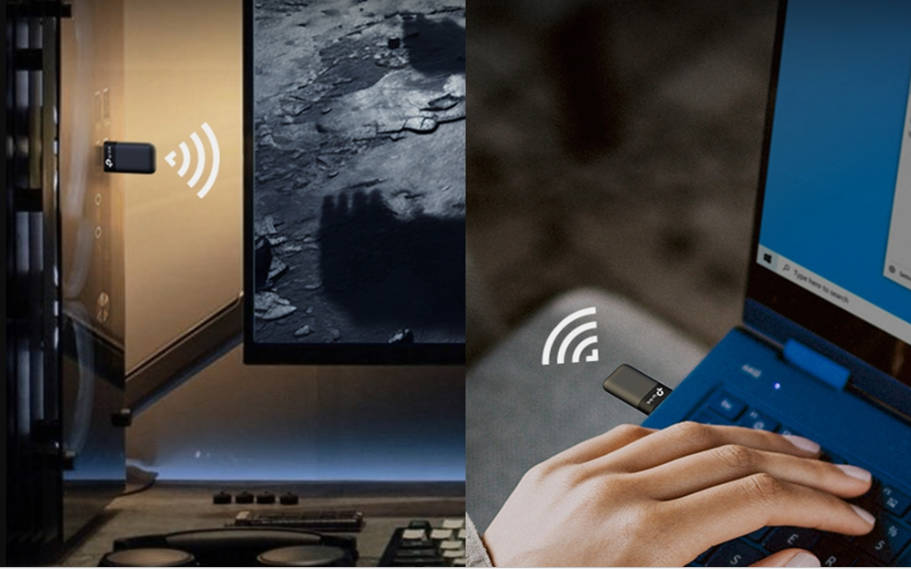
Not automatically. Performance depends on the Wi-Fi generation, radio configuration, interface, antenna placement, drivers, router, and your home's layout. A PCIe card stays inside your desktop and comes with external antennas you can position. A USB adapter plugs into a port and moves between computers, which suits some setups. TP-Link's guide to USB versus PCIe Wi-Fi cards covers the trade-offs.
Does a PCIe Wi-Fi card affect gaming performance?
It can affect your connection, but it won't raise your frame rate. A card influences connection quality, throughput, latency, and stability, which shows up as lag or dropped connections in online games. Your graphics card and processor determine frame rate. Results also depend on your router, signal, interference, Internet connection, and the game server.