Whole House Wi-Fi: What a Large Home Actually Needs
In a large home, whether that means added square footage or multiple floors, Wi-Fi that works great in the living room often drops by the time you reach the back bedroom or the upstairs office. If you've ever lost a video call while walking to another room, you already know the problem whole house Wi-Fi is meant to solve.
Getting reliable coverage in every room of a larger home takes more than a stronger router. It takes a different kind of network altogether.
This guide explains what a large home needs, why a standard setup falls short at that scale, and what the right whole house Wi-Fi solution looks like for a home of your size.
Key Takeaways
- Whole house Wi-Fi means consistent coverage in every room. You move through the house with no dead zones and no dropped connections.
- A single router struggles to cover large or multi-floor homes. Signal weakens with distance, walls, and floors.
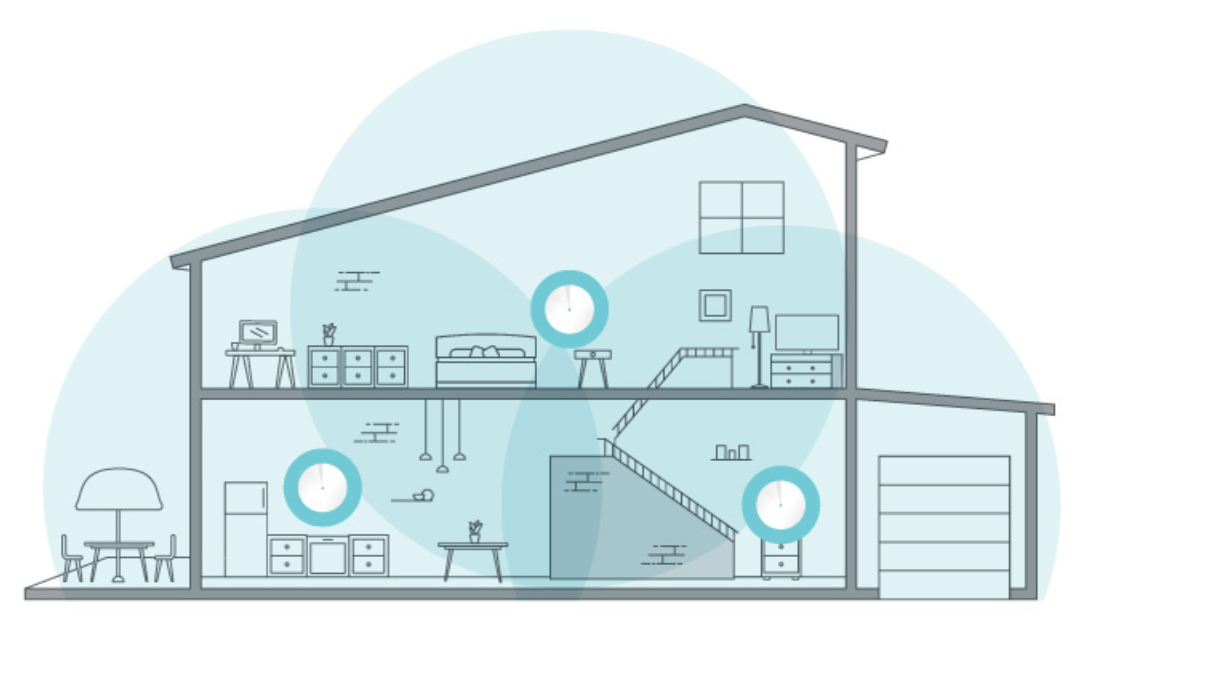
- Mesh Wi-Fi systems fix this with multiple nodes that work together as one network. Instead of broadcasting from a single point, the nodes share coverage across the whole home.
- Most homes between 2,500 and 4,000 square feet need two to three mesh nodes. Layout and building materials can change that number.
- Prioritize coverage capacity, node count, and Wi-Fi generation over any single spec. These are the factors that matter most when choosing a system.
What a Whole House Wi-Fi Setup Looks Like
Whole house Wi-Fi means every room in a large home gets a strong, stable connection. No buffering, no dropped calls, no dead zones as you move from room to room or floor to floor.
A single router connected to your modem does not count as whole house Wi-Fi in a larger home. That standard setup broadcasts from one fixed point, so if your coverage is spotty in some rooms or your signal weakens the farther you get from the router, you don't have true whole house coverage yet.
Mesh Wi-Fi systems close that gap by distributing multiple connected devices throughout the home rather than relying on a single router to broadcast everywhere. In a home around 2,500 to 4,000 square feet or spread across multiple floors, a single router might cover the rooms closest to it just fine, while the farther rooms and upper floors are left with a much weaker signal.
Why a Single Router Isn't Enough for a Large Home
A router broadcasts its signal from a single fixed point, and that signal weakens as it travels through walls and floors and over distance.
In a larger home, rooms at the far end of the house or on a different floor often sit outside the router's reliable range. This is the most common reason for dead zones, and it is also why many people turn to Wi-Fi extenders, which can help but often introduce their own slowdowns and connection handoff issues.
Upgrading to a more powerful single router helps some, but it does not solve the underlying problem. Wi-Fi is limited by physics and by how far your devices can transmit back to the router, so the signal still has to cross the same distance and the same obstacles.
Covering a larger home adequately requires a home network built on multiple access points working together, distributing signal throughout the space rather than pushing it from a single source.
Why Large Homes Need Mesh Wi-Fi
A mesh Wi-Fi system is a whole home network made up of multiple nodes that communicate with each other and work together as a unified network.
Instead of one signal traveling a long distance across the entire house, mesh breaks that trip into several short hops between nodes. Each node only has to cover the short distance to the next one, so the signal never has to travel far enough to weaken.
This is a structural fix for a structural problem. A large home spreads distance and obstacles across more square footage than any single device can broadcast through, no matter how strong it is. Adding more nodes changes the layout of the network itself, which is the only thing that actually solves it.
As you move through the house, your devices connect to the closest node, a process called seamless roaming. You never have to switch networks between rooms manually.
Mesh systems come in different configurations, and the number of nodes you need depends on your home's size and layout. If you want to go deeper into how the technology works, this guide to mesh Wi-Fi breaks it down further.
How Many Nodes Does Your Home Need?
As a starting point, here is how home size typically maps to node count for a whole home mesh Wi-Fi system.
|
Home Size |
Typical Node Count |
|
Under 1,500 sq. ft. |
1 node |
|
1,500 to 2,500 sq. ft. |
1 to 2 nodes |
|
2,500 to 4,000 sq. ft. |
2 to 3 nodes |
|
4,000+ sq. ft. |
3 or more nodes |
These are general guidelines, not fixed rules. Floor count, wall materials, and an unusual layout can increase the number of nodes needed.
What to Look for in a Whole House Wi-Fi System
Once you know you need a mesh system, a few factors separate the best home Wi-Fi setups from those that still leave gaps in larger homes.
Coverage Capacity
Confirm the system is rated for your home's square footage. For example, a 3,000-square-foot home needs a system built for that range, not a smaller one stretched to its limit and left with weak spots in the far corners or on upper floors.
Number of Nodes Included
Check whether the system comes as a two-pack or three-pack, and if you can add more nodes later. A multi-floor layout often needs one node per floor at minimum, so room to expand matters more than it would in a smaller home.
Internet Speed
If you subscribe to a 1GB-or-faster Internet plan, look for a system with multi-gig ports so your wired connections can keep up. A large home also tends to run more devices at once, so that extra headroom matters more than it would with just a couple of devices online.
Wi-Fi Generation
Newer standards like Wi-Fi 7 handle more connected devices more efficiently. That efficiency is important in a larger household, where phones, laptops, smart home devices, and streaming boxes are often all online in different rooms at the same time.
Seamless Roaming
The system should automatically connect your devices to the nearest node, without any manual switching. In a multi-level home, this is what keeps a call or a stream from cutting out as you walk from one floor to another.
Easy Setup and Management
App-based setup and monitoring simplify ongoing management. With more nodes spread across a larger home, being able to check and adjust the whole network from one app matters more than it does with a single router.
TP-Link Deco: Whole House Wi-Fi for Larger Homes
If you are looking for multi-node coverage, seamless roaming, and consistent performance across a larger home, TP-Link's Deco lineup is a home Wi-Fi system designed specifically for that job.
Deco systems are available across Wi-Fi generations, including Wi-Fi 6 and Wi-Fi 7, in configurations suited to homes of different sizes. You can also add more Deco units to an existing system as your coverage needs grow, so your network scales with your home.
Dependable Coverage Without Complexity: Deco BE25
The Deco BE25 delivers dual-band Wi-Fi 7 coverage up to 6,600 square feet and connects up to 150 devices at once, making it TP-Link's most affordable way to bring Wi-Fi 7 mesh into your home.
Setup and management happen entirely in the Deco app, so there's no separate configuration for each node. For a large home, that means one network to manage instead of several devices to keep track of.
For Heavier Demands: Deco BE65 Pro
The Deco BE65 Pro delivers 11 Gbps of combined tri-band Wi-Fi 7 speeds across the 6 GHz, 5 GHz, and 2.4 GHz bands, making it a strong option for larger households running multiple high-bandwidth devices simultaneously.
It also includes two 5 Gbps ports and one 2.5 Gbps port for wired connections, so devices like a gaming PC or a home server can plug in directly for maximum speed instead of competing for wireless bandwidth.
For a large home with a high volume of demanding devices, that combination of tri-band capacity and multi-gig wired ports keeps performance consistent as you add more to your network.
Maximum Performance: Deco BE85
The Deco BE85 is TP-Link's highest-performance mesh system, delivering 22 Gbps of combined 12-stream tri-band Wi-Fi 7 speed across the 6 GHz, 5 GHz, and 2.4 GHz bands. It also includes a 10 Gbps Ethernet/Fiber combo port, a second 10 Gbps port, and two 2.5 Gbps ports for wired connections, giving it more wired capacity than any other Deco system.
If your household is streaming, gaming, and running a handful of security cameras at the same time, this is the system with enough bandwidth to keep all of it operating at full speed.
Coverage Beyond the Walls of Your Home: Deco BE25-Outdoor
The Deco BE25-Outdoor is rated IP65 for dust and water resistance and works both indoors and outdoors, so it holds up through rain, heat, and everyday weather. It supports pole mounting, wall mounting, and tabletop placement, and it runs on Power over Ethernet, so a single cable handles both data and power.
If your Wi-Fi needs to reach the backyard, a detached garage, or a pool area, this extends your mesh network there without running a separate setup for outdoor gear.
Get Reliable Wi-Fi in Every Room of Your Home
A single router can't cover 3,000 square feet or multiple floors on its own. No matter how strong the router is, the signal still has to travel through walls and floors, and it runs out of strength before it reaches the far end of the house.
A whole home Wi-Fi system fixes this by placing multiple mesh nodes throughout your home rather than broadcasting from a single spot. The back bedroom gets the same strong connection as the room right next to your router. The upstairs office stops dropping video calls. Streaming, gaming, and video calls can all run at the same time, in different rooms, without competing for a signal that was never capable of reaching that far.
If you'd like to learn more about the technology, here's a closer look at how mesh Wi-Fi works. Or browse TP-Link's Deco lineup to find a solution sized for your home.
FAQs
What is whole home Wi-Fi?
Whole home Wi-Fi means every room in your home gets a strong, stable internet connection, with no dead zones or dropped signals as you move around. In a large or multi-floor home, this usually requires more than one device working together to distribute coverage.
How many mesh nodes do I need for a 3,000 square foot home?
Most homes in the 2,500 to 4,000 square foot range need two to three mesh nodes. The exact number depends on your layout, the number of floors, and the building materials in your walls.
Is mesh Wi-Fi better than a Wi-Fi extender for a large home?
For larger homes, mesh Wi-Fi generally performs better than extenders. A mesh system creates one unified network with seamless handoffs between nodes, while extenders often create a separate network that can cause slowdowns or connection drops as you move around.
What is the difference between a mesh system and a regular router?
A regular router broadcasts Wi-Fi from a single point, and the signal weakens with distance. A mesh system uses multiple connected nodes placed throughout your home, so every room stays close to a signal source.
Does a mesh Wi-Fi system work on multiple floors?
Yes. Mesh systems are designed to cover multiple floors by placing a node on each level or wing of the home, which keeps the signal strong throughout the entire house rather than just the floor closest to your router.
Can I use a mesh Wi-Fi system with my internet provider's gateway?
Yes. In most homes, you can keep your Internet service provider's gateway and simply connect a mesh Wi-Fi system to it. The mesh system takes over broadcasting Wi-Fi throughout your home, so you get fast, reliable coverage in every room without switching providers or replacing your existing equipment. It's a simple way to eliminate dead zones and get true whole-home coverage