
Long-Range Ethernet Extender Options for Home Networks
An Ethernet extender brings a wired network connection to a device that’s too far from your router. Running a cable there isn’t practical, and the Wi-Fi signal may be weak. A long-range Ethernet extender helps in spots like a detached garage, a backyard shed, or a finished basement gaming room.
Two common options for home networks are Wi-Fi range extenders with an Ethernet port and powerline adapters. A range extender connects back to your router over Wi-Fi, so you only run cable for the last few feet to your device, not a long Ethernet run. For a garage or shed, it needs your router’s Wi-Fi to still reach that spot. Powerline adapters send the signal through your home’s electrical wiring, so they can work if the garage or shed is on the same electrical panel.
Key Takeaways
- An Ethernet extender carries a wired connection farther than a standard cable can reach. The term covers several devices and methods.
- A standard Ethernet cable reliably carries a signal up to about 100 meters (328 feet). Signal begins to weaken past that point.
- A Wi-Fi range extender with an Ethernet port still connects to your router over Wi-Fi, not through a long cable run.
- Powerline adapters use your home’s existing electrical wiring to bring a wired connection to another room without running new cable.
- Not every Wi-Fi extender has an Ethernet port, so check a model’s specifications before you buy if you need a wired connection.
What Is an Ethernet Extender?
An Ethernet extender is any device or method that carries a wired network connection farther than a standard Ethernet cable can reliably reach. The name is a catch-all for several different approaches.
Some are simple home solutions. Others are heavy-duty gear built for business networks, such as Power over Ethernet (PoE) extenders and fiber media converters. This guide focuses on the home side: options you can plug in yourself, without pulling new cable through your walls.
How Far Can You Extend an Ethernet Connection?
A standard Ethernet cable can reliably carry a signal up to about 100 meters (328 feet). Past that point, data loss becomes a problem. That limit is the reason extenders exist.
How far you can go beyond it depends on the approach. Home solutions like range extenders and powerline adapters typically cover a house. Industrial options built for long-range Ethernet may reach hundreds of meters or more, depending on the equipment and setup.
Think of distance as a spectrum, with home options at the short end and commercial gear at the long end. For most households, the useful question is which home option fits the room you're trying to connect.
Ways to Extend a Wired Connection at Home
This guide covers two consumer-friendly approaches: Wi-Fi range extenders with an Ethernet port, and powerline adapters. Both work as Ethernet extenders, one over Wi-Fi and one over your existing wiring.
If you decide to run Ethernet cable instead and the run passes 100 meters, add a switch partway along it. The switch gives the signal a fresh 100 meters.
Wi-Fi Range Extenders with an Ethernet Port
A range extender picks up your router's Wi-Fi signal. Its Ethernet port lets you plug in a device that needs a cable. Speed at that port is capped by the wireless link back to the router. That's also why placement matters, since the extender needs a strong signal from the router to share with your devices.
A Wi-Fi extender with an Ethernet port is a good fit if you want a wired connection for one device. For example, you might want one for a smart TV or game console in a room your router's Wi-Fi still reaches.
So, does a Wi-Fi extender have an Ethernet port? Some models do, and some don't. If you want a wired connection, check the specifications before you buy. TP-Link's range extender lineup includes models with Gigabit (1 Gbps) and 2.5 gigabits per second (Gbps) ports.
Powerline Adapters (Ethernet Over Powerline)
A powerline adapter sends a network signal over your home's existing electrical wiring. You connect one adapter to your router with an Ethernet cable. Then you plug a second adapter into an outlet in the room that needs a connection. Together, the pair works as an Ethernet extender adapter, turning an ordinary outlet into a wired network connection.
Range depends on the model, and some can reach up to 300 meters (1,000 feet) over existing electrical wiring. To check a detached garage or backyard shed, look at your breaker box: powerline can work if the building’s power runs from the same panel as your home. Ethernet over powerline performs better when both adapters are on the same electrical circuit, meaning outlets on the same breaker. For best results, plug each adapter directly into a wall outlet, not a power strip or surge protector.
To compare models and port options, explore TP-Link powerline adapters.
TP-Link Options for a Wired Connection Farther From Your Router
Each of these TP-Link models gives a far-off device a wired connection in a different way. Two are Wi-Fi range extenders with an Ethernet port, and one is a powerline kit.
RE653BE: Extra Wired Capacity for Busy Households
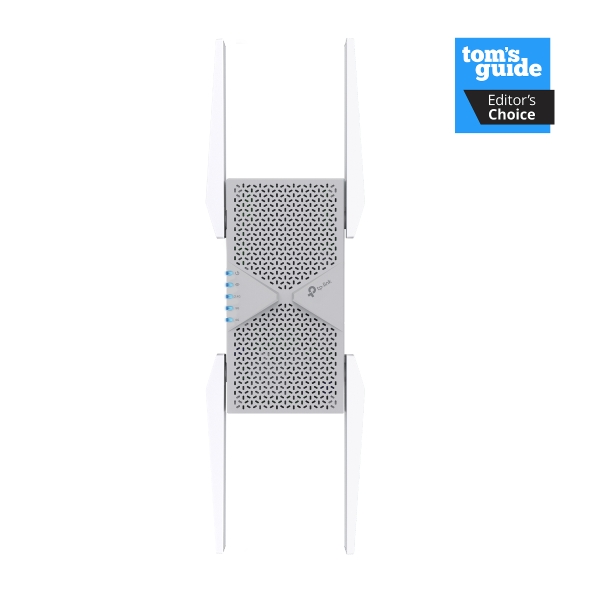
The RE653BE Wi-Fi 7 range extender is tri-band, which means it spreads traffic across three bands: 6 GHz, 5 GHz, and 2.4 GHz. That helps reduce crowding when many devices are online. It offers Wi-Fi speeds up to 10.2 Gbps across all three bands combined, plus one 2.5 Gbps Ethernet port.
The 6 GHz band has more room and less interference from neighboring networks and older devices. Multi-Link Operation (MLO) lets devices that also support it use more than one band at once, for quicker responses and a steadier connection. The 2.5 Gbps port can handle more than a standard Gigabit port. Its real speed still depends on the Wi-Fi link to your router, your Internet service, and network conditions.
The RE653BE suits a PC or console that needs more than Gigabit wired speed.
RE615X: A Wired Smart TV and Wi-Fi Coverage You Adjust in an App
The RE615X Wi-Fi 6 range extender is dual-band, with Wi-Fi speeds up to 1.8 Gbps combined. It has one Gigabit Ethernet port.
The Gigabit port gives a smart TV, computer, or game console a wired connection of up to 1 Gbps. In the TP-Link Tether app, you can adjust the extender’s Wi-Fi coverage with three strength levels. The lowest level keeps the signal focused on a single room, and the highest spreads it across a whole floor. Choose the level that fits the space you want to cover.
The RE615X suits a single wired device that needs a Gigabit connection, like a desktop computer in a spare bedroom.
TL-PA9020P KIT: Wired Internet in Another Room Without New Cable
The TL-PA9020P KIT powerline starter kit includes two adapters. Each has two Gigabit Ethernet ports and a built-in power socket. The kit supports powerline speeds up to 2000 Mbps, though that's a theoretical maximum. Actual speeds can be limited by the Gigabit ports, your wiring, electrical noise, and network traffic.
It uses 2x2 MIMO (Multiple-Input Multiple-Output), which works like adding extra lanes to a highway for faster, more stable connections. Beamforming helps keep speeds up during busy hours and improves performance between outlets that are far apart.
Two ports per adapter let you wire up a desktop and a smart TV in the same room. Its built-in power socket lets you plug other electronics into that outlet. The TL-PA9020P KIT suits a spot where running cable isn’t practical, but you still want wired devices, like a finished basement or a detached garage on the same electrical panel as your home.
How the TP-Link Options Compare
Each option connects and performs a little differently. This table puts the key details side by side, so you can see what each one offers.
|
Model |
How it connects |
What limits speed |
Suited for |
Setup tip |
|
RE653BE |
Wi-Fi 7 to your router; 2.5 Gbps Ethernet port to your device |
The Wi-Fi link to your router, your Internet service, and network conditions |
A PC or console that needs more than Gigabit wired speed |
Place it where it gets a strong router signal |
|
RE615X |
Wi-Fi 6 to your router; Gigabit Ethernet port to your device |
The Wi-Fi link to your router and the 1 Gbps port |
One wired device, like a desktop in a spare bedroom |
Place it within reach of your router’s Wi-Fi |
|
TL-PA9020P KIT |
Your home’s electrical wiring, with one adapter wired to your router |
Your wiring, electrical noise, network traffic, and the Gigabit ports |
Wired devices in a room or outbuilding where running cable isn’t practical |
Plug both adapters into the same circuit |
Choosing a Long-Range Ethernet Extender for Your Home
A long-range Ethernet extender brings a wired connection to a device your router can't easily reach. At home, a Wi-Fi range extender with an Ethernet port links to your router wirelessly, while a powerline adapter uses your existing wiring.
Which option fits depends on your setup. Start with where your device sits and how strong your Wi-Fi is there. Then compare TP-Link range extenders with the powerline options above.
Frequently Asked Questions
What is the maximum distance an Ethernet extender can cover?
The distance depends on the type. Extenders made for homes are designed to cover the house itself. Some powerline kits are rated for up to 300 meters/1000 feet over existing electrical wiring. Commercial extenders built for business networks reach much farther, up to several kilometers.
Powerline or extender with an Ethernet port: which is faster?
Neither option is faster in every home. Powerline adapters generally give a more stable wired link with less lag, which helps with gaming and video calls. A range extender's port speed depends on its Wi-Fi connection to your router. Old wiring or outlets on separate circuits can slow powerline down.
How do you extend Ethernet over 100 meters?
You have three main options: a network switch, fiber cable, or a wireless bridge. Adding a switch midway on the cable run resets the 100-meter limit. Fiber sends data as pulses of light and spans much longer distances than copper cable. A wireless bridge links two points, such as two buildings, over the air.
Can you plug an Ethernet cable into a Wi-Fi extender?
Yes, as long as the extender has an Ethernet port. The RE653BE and RE615X both have one, so you can plug a computer, smart TV, or game console straight in. They also offer Access Point mode, where you run a cable from your router to the extender, and it broadcasts that wired connection as a new Wi-Fi signal

4.0_package_1568103121723d.jpg)