TP-Link's Best Powerline Adapter: The Complete Buying Guide
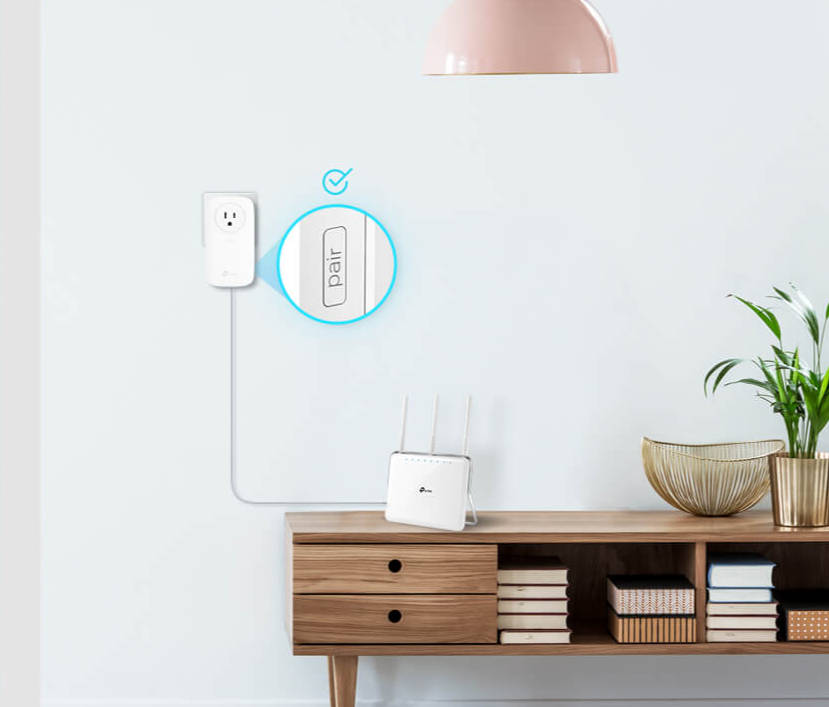
A powerline adapter turns your home's electrical wiring into a data connection. That means a wired device in another room doesn’t need a new Ethernet cable run through the walls. Plug one adapter into an outlet near your router, then plug the second adapter into an outlet near the device that needs a connection.
The two adapters communicate over your home's existing wiring. It is one of the fastest ways to get Ethernet over power to a spot Wi-Fi does not reach reliably.
TP-Link offers a range of powerline adapters, including simple standard kits and Wi-Fi combo models that extend your wireless network at the same time. This guide compares the full lineup, so you can find the best powerline adapter for your home, your devices, and your budget.
In this guide:
- Comparison table of TP-Link's most versatile powerline adapters
- Why shop TP-Link powerline adapters
- How to choose a powerline adapter: key factors
- Things to know before you buy
- Standard adapters versus Wi-Fi combo kits
- TP-Link's best powerline adapters, by need
- Frequently asked questions
Comparison Table
The table below covers eight of TP-Link's most versatile powerline adapters, chosen for the range of speeds, ports, and Wi-Fi options they cover. Further down this guide, you will find a selection of TP-Link powerline kits, spanning speeds from AV1000 through AV2000, in both Ethernet-only and Wi-Fi combo models.
|
Model Name |
Speed Rating |
Passthrough |
Wi-Fi Combo |
Best For |
|
TL-PA7017 KIT |
AV1000 |
No |
No |
A simple, budget-friendly wired connection for a single device |
|
TL-PA7017P KIT |
AV1000 |
Yes |
No |
A wired connection that does not cost you the outlet you plugged into |
|
TL-PA9020P KIT |
AV2000 |
Yes |
No |
Higher speed and two ports for connecting more than one wired device |
|
TL-WPA7510 KIT |
AV1000 |
No |
Yes |
A wired connection plus a Wi-Fi boost, in one kit |
|
TL-WPA7617 KIT |
AV1000 |
Yes |
Yes |
A balanced pick for wired and wireless coverage together |
|
TL-WPA8630 KIT |
AV1300 |
No |
Yes |
More ports plus Wi-Fi 5 speed for busier households |
|
TL-WPA8631P KIT |
AV1300 |
Yes |
Yes |
A multi-port, passthrough kit for several wired devices plus Wi-Fi |
|
TL-WPA7817 KIT |
AV1000 |
No |
Yes |
A Wi-Fi 6 extender pick for wired and wireless needs together |
Why Shop TP-Link Powerline Adapters
TP-Link's powerline lineup spans speed ratings from AV1000 through AV2000. That range means there is a kit suited to a single console in a spare bedroom, and one for a home office with several wired devices. Passthrough models keep the wall outlet you plugged into free for another device. Multi-port models let you wire more than one device from a single remote adapter.
Standard kits deliver a wired connection alone. Wi-Fi combo kits add a wireless extender to the remote adapter, so a single kit can fix a wired gap and a weak Wi-Fi signal at the same time. TP-Link's powerline Ethernet adapters connect to your router through a standard Ethernet cable, so they typically work regardless of the router's brand or software.
How to Choose a Powerline Adapter: Key Factors
A few specs decide how well a powerline adapter fits your home: its speed rating, whether it's passthrough, how many ports it has, whether it adds Wi-Fi, and how your electrical panel is wired. Here's what each one means for you.
Speed Rating
A powerline adapter's speed rating, shown as AV1000, AV1300, or AV2000, is the top possible speed over your home's wiring. Real-world speed almost always falls below that number. Your electrical wiring, breaker layout, and even your home's age affect how much of the rated speed actually reaches your device.
Your Internet plan also caps what you will notice. A powerline adapter rated AV2000 will not deliver a faster connection than your Internet plan itself allows. A higher AV rating provides more potential powerline capacity, but it doesn’t guarantee that a device will receive the full speed of your Internet plan.
Passthrough vs. Non-Passthrough
A passthrough adapter includes a built-in outlet, so plugging it into the wall does not block that outlet from another device. A non-passthrough adapter takes up the entire outlet. If you only have one outlet to work with, a passthrough model keeps it free for a lamp, a power strip, or anything else nearby.
Number of Ethernet Ports
Most powerline adapters include one Ethernet port on the remote unit, enough for a single wired device like a smart TV or a game console. Some adapters include multiple ports instead, so you can connect more than one wired device, such as a console and a streaming box, from the same remote adapter.
Standalone vs. Wi-Fi-Combo Kits
A standard powerline kit sends only a wired Ethernet signal to the remote adapter. A Wi-Fi combo kit does that too, and it also works as a powerline Wi-Fi extender. The remote adapter broadcasts its own Wi-Fi signal, so a weak spot in your home gets a boost while also getting a wired connection. If you only need one wired device covered, a standard kit is the simpler choice.
Electrical Circuit Compatibility
Powerline performance depends on how your home's electrical system is laid out. Adapters with HomePlug AV2, the technology standard that sends data over your home's electrical wiring, can often communicate across breakers when outlets are on the same main electrical system, but different panels, phases, filtering breakers, or complex wiring can weaken or prevent the connection.
Things to Know Before You Buy
- For the best chance of a strong connection, use outlets on the same electrical system. Breakers, phases, panels, wiring layout, and electrical noise can all affect whether the adapters communicate and how fast the links perform.
- Actual speed depends on your Internet plan and your home's wiring age and quality, not just the adapter's rated speed.
- If your router is several years old, upgrading to a newer Wi-Fi standard may solve more of your connectivity problem than a powerline adapter alone.
- Large appliances on the same circuit, like a portable air conditioner, can cause interference and connection drops.
TP-Link Powerline Adapters
TP-Link makes both standard and Wi-Fi combo kits for powerline networking, across a range of speeds and price points. There’s a model suited to almost any home setup. A "P" at the end of a model name, like TL-PA9020P, indicates a passthrough power outlet. TL-PA models are Ethernet-only, while TL-WPA models include Wi-Fi.
Standard Powerline Adapters
Standard kits send a wired Ethernet signal only, with no Wi-Fi component. TL-PA7017 KIT is a dependable powerline extender if you only need to wire up one device, like a smart TV or a game console. It's the right choice when you just want a reliable wired connection.
|
Model Name |
Speed Rating |
Passthrough |
Ports |
|
TL-PA7017 KIT |
AV1000 |
No |
1 |
|
TL-PA7017P KIT |
AV1000 |
Yes |
1 |
|
TL-PA9020P KIT |
AV2000 |
Yes |
2 |
Powerline Wi-Fi Combo Kits
Wi-Fi combo kits add a wireless extender to the remote adapter, so the same kit fixes a wired gap and a wireless dead zone at once. They're a good fit if you want one kit to solve both problems. That could mean a compact pick like TL-WPA7510 KIT, or a multi-port option like TL-WPA8630 KIT for a busier household.
|
Model Name |
Speed Rating |
Passthrough |
Ports |
Wi-Fi Standard |
|
TL-WPA7510 KIT |
AV1000 |
No |
1 |
Wi-Fi 5 (802.11ac) |
|
TL-WPA7617 KIT |
AV1000 |
Yes |
1 |
Wi-Fi 5 (802.11ac) |
|
TL-WPA8630 KIT |
AV1300 |
No |
3 |
Wi-Fi 5 (802.11ac) |
|
TL-WPA8631P KIT |
AV1300 |
Yes |
3 |
Wi-Fi 5 (802.11ac) |
|
TL-WPA7817 KIT |
AV1000 |
No |
1 |
Wi-Fi 6 (802.11ax) |
TP-Link's Best Powerline Adapters
These are TP-Link's best picks for the most common reasons people shop for a powerline adapter. Each one stands out for a specific need, not as a universal answer for every home.
Best Overall Powerline Adapter
TL-WPA7617 KIT is the best balance of speed, reliability, and value for most homes, pairing an AV1000 powerline connection with a built-in Wi-Fi 5 extender.
- Powerline speed: AV1000
- Wi-Fi standard: Wi-Fi 5 (802.11ac), up to 1200 Mbps combined
- Ethernet ports: 1
- Passthrough: Yes
- Range: up to 300 meters (1,000 feet) over existing electrical wiring
- Security: 128-bit AES encryption (powerline), WPA-PSK/WPA2-PSK/WEP (wireless)
Best Powerline Ethernet Adapter
TL-PA7017P KIT is a pure, no-Wi-Fi pick if you only need a wired connection and want to keep the outlet free.
- Powerline speed: AV1000
- Ethernet ports: 1
- Passthrough: Yes
- Range: 300 meters (1,000 feet) over an electrical circuit
- Security: 128-bit AES encryption
Best Powerline Adapter for Gaming
TL-PA9020P KIT gives a console or gaming PC a stable, wired connection instead of relying on Wi-Fi. It also has two ports for connecting more than one gaming device.
- Powerline speed: AV2000
- Ethernet ports: 2
- Passthrough: Yes
- Quality of Service: 4-level QoS support for prioritizing traffic on a busy network
- Range: up to 300 meters (1,000 feet) over existing electrical wiring
Best Powerline Wi-Fi Extender
TL-WPA7817 KIT pairs an AX1500 Wi-Fi 6 extender with a wired Ethernet connection if you want both from the same kit.
- Powerline speed: AV1000
- Wi-Fi standard: Wi-Fi 6 (802.11ax)
- Ethernet ports: 1
- Passthrough: No
- Range: up to 300 meters (1,000 feet) over existing electrical wiring
Best Powerline Adapter Kit for Multiple Devices
TL-WPA8631P KIT is worth considering if you're connecting more than one wired device, with three Ethernet ports and a passthrough outlet on the same kit.
- Powerline speed: AV1300
- Wi-Fi standard: Wi-Fi 5 (802.11ac)
- Ethernet ports: 3
- Passthrough: Yes
- Security: 128-bit AES encryption (powerline), WPA-PSK/WPA2-PSK/WEP (wireless)
Find the Powerline Adapter That Fits Your Home
Speed rating and electrical circuit compatibility are the two biggest factors in the real-world performance you get from a powerline adapter. If your router is old, upgrading it may solve more of your connectivity problems than a powerline adapter on its own.
Once you know which factors matter for your setup, browse TP-Link's full range of powerline adapters to find the kit that gets internet over power to the room that needs it.
Frequently Asked Questions
How does a powerline adapter work?
A powerline adapter uses your home's wiring as an Ethernet cable. One unit plugs into an outlet next to your router and connects to it directly; a second unit plugs in wherever you need a connection, and the two pair automatically to carry data between them over the electrical circuit.
Do powerline adapters really work?
Yes, powerline adapters work reliably in most homes, though real-world speed depends on your wiring's age, its quality, and how far apart the adapters are. They tend to perform best when both adapters sit on the same electrical circuit and no large appliances draw power from it.
What is better than a powerline adapter?
The best alternative to a powerline adapter depends on the problem you're solving. A direct Ethernet connection offers the most predictable wired performance when running cable is practical. Mesh Wi-Fi or a newer router may be a better fit for broader wireless coverage. Powerline is useful when you want to extend a wired connection using existing electrical wiring instead of installing new Ethernet.
Which powerline adapter is the fastest?
Among the models compared in this guide, the TL-PA9020P KIT has the highest rated speed at AV2000, plus a passthrough outlet and two Ethernet ports. Actual speed still depends on your home's wiring and your Internet plan, not the rating alone.
Can I use a powerline adapter with any router?
Yes, in most cases. Powerline adapters plug into a wall outlet and link to your router with a basic Ethernet cable, so the router's brand or software rarely matters. What limits compatibility is your home's electrical panel, since both adapters need to share a circuit rather than match a particular router.
KIT-4.0-package_1569220530663e.jpg)
2.0-R1-package_1551163834829i.jpg)
2.0_1508142049083d.jpg)