What Is a Managed Switch? Features, Benefits, and Uses
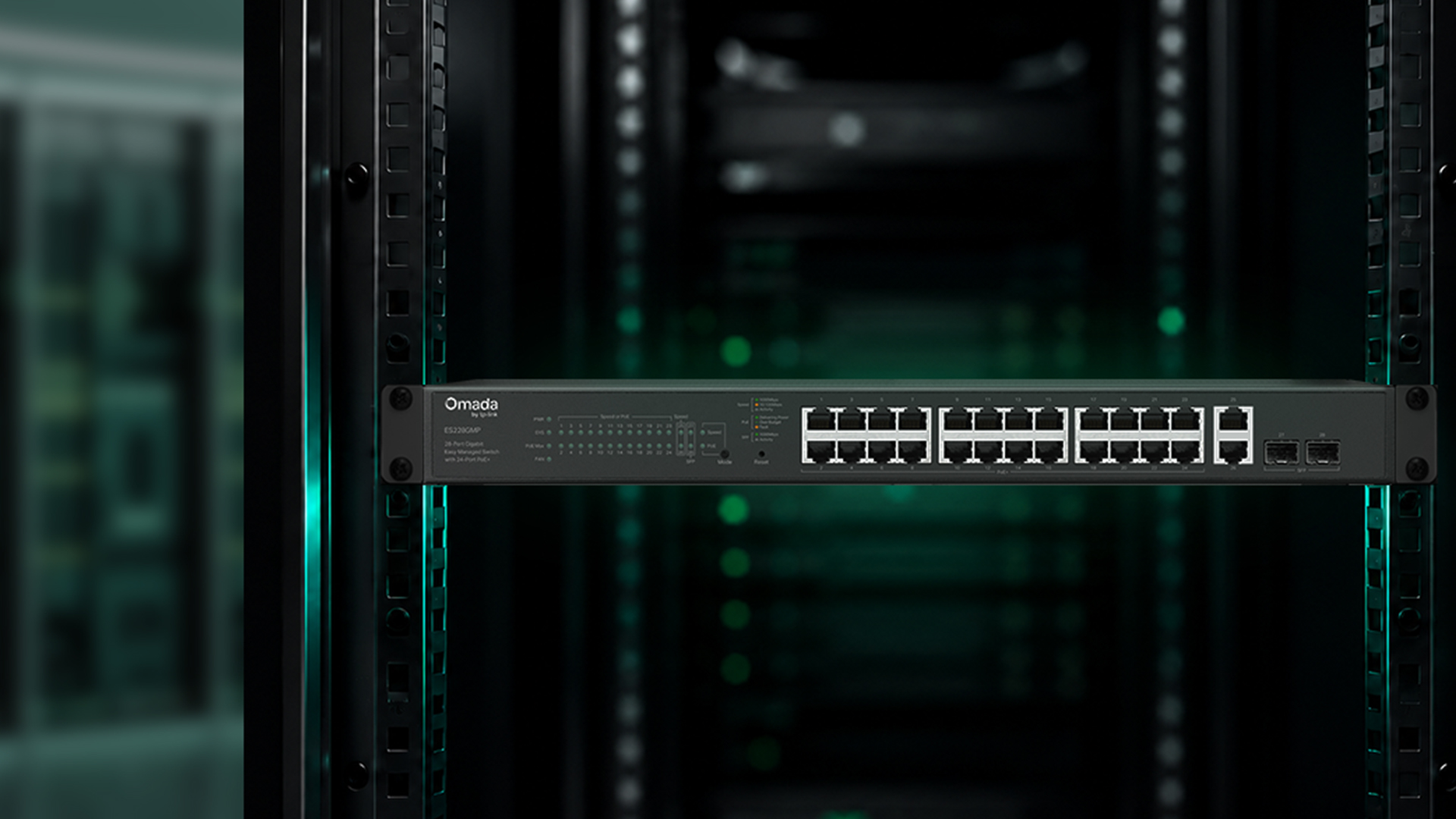
A managed switch is a network switch that lets administrators configure how traffic is forwarded, segmented, prioritized, and monitored across a network. Unlike a plug-and-play unmanaged switch, a managed switch is configurable through a web interface, command-line interface (CLI), or centralized controller. That configurability is what makes it the right choice when a network needs VLANs, traffic prioritization, PoE power scheduling, or visibility into what's happening across every port.
For growing businesses such as multi-department offices, retail chains with camera systems, and schools managing separate staff and student networks, a managed switch gives administrators the visibility and control that a basic plug-and-play network can't provide.
This guide covers what managed switches do, how they compare to unmanaged and easy smart/easy managed switches, the core features that matter most, and a practical framework for deciding whether your network needs one.
Key Takeaways
-
A managed switch lets administrators configure VLANs, Quality of Service (QoS), Power over Ethernet (PoE) management, security policies, and monitoring — where an unmanaged switch simply forwards traffic with no configuration.
-
The three main switch types are unmanaged (plug-and-play, no configuration), smart (basic web-managed), and managed (full L2 or L2+/L3 control with CLI, SNMP, and ACL support).
-
Managed switches are the right choice when you need network segmentation, traffic prioritization for VoIP or point-of-sale systems, remote troubleshooting across sites, or visibility into network health.
-
Core managed switch features include VLAN segmentation (IEEE 802.1Q), QoS, PoE/PoE+/PoE++ power management, link aggregation, SNMP and syslog monitoring, and access control lists (ACLs).
-
For SMBs that want enterprise-grade control without enterprise complexity, Omada's Access and L3 managed switch lines pair full L2+ or L3 management with centralized cloud or on-premise control through the Omada SDN platform.
What Is a Managed Switch?
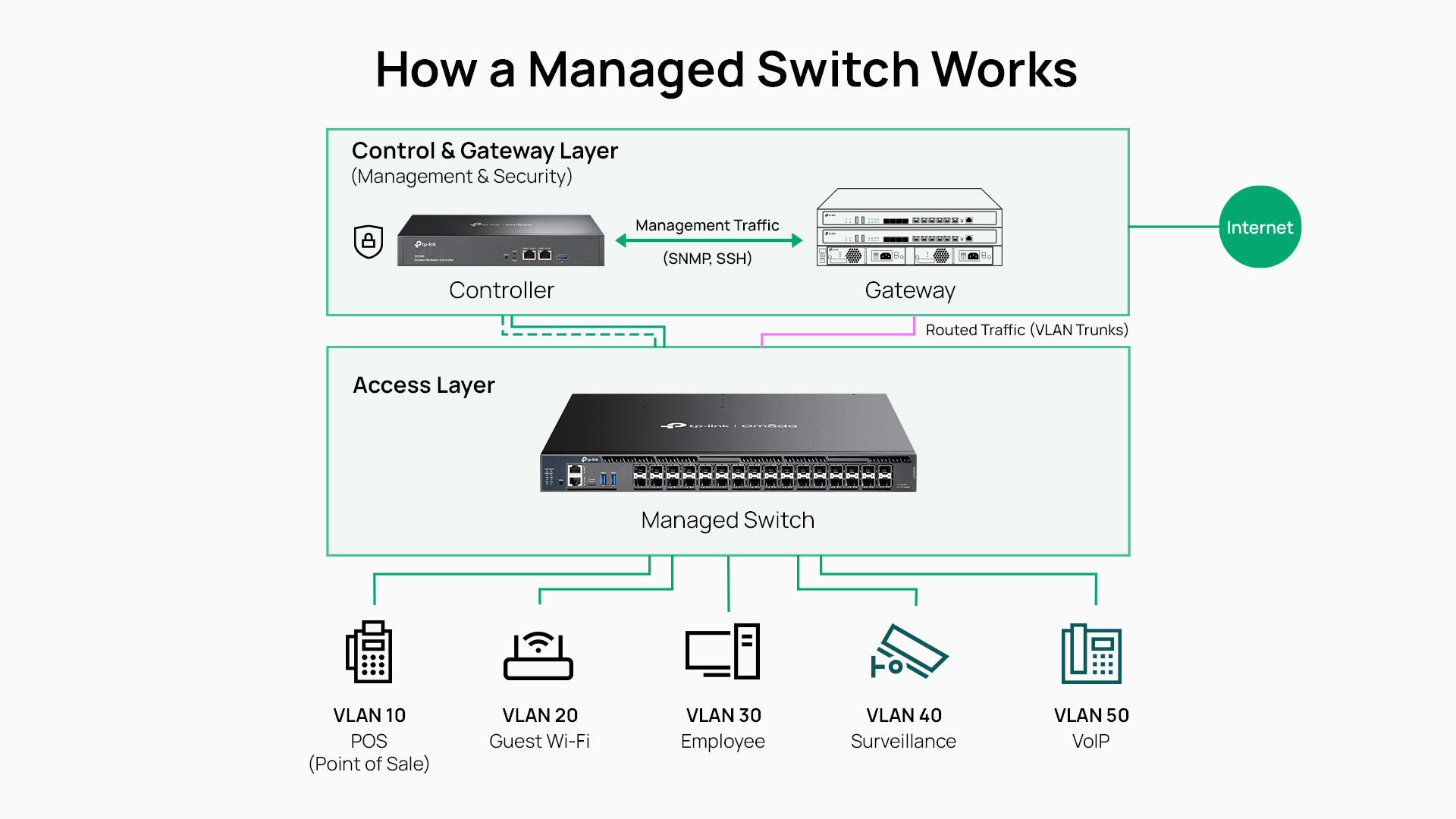
A managed switch is a network device that forwards Ethernet frames between connected devices at Layer 2, with full administrator control over how that forwarding happens. On some models, Layer 3 capabilities extend that to IP routing between VLANs. What distinguishes a managed switch from simpler options is configurability: every port, every VLAN, every QoS policy, every security rule is adjustable through a web GUI, CLI, or centralized controller.
In practice, this means an IT manager can assign a camera system to an isolated VLAN, prioritize VoIP traffic during peak hours, set power budgets for PoE devices, and check port statistics from a single management interface, all without being on-site. That level of control is unavailable on an unmanaged switch, and only partially available on an easy smart/easy managed switch.
A managed switch is also distinct from a router. A router operates at Layer 3 and connects different networks, such as a local network to the internet. A managed switch operates primarily at Layer 2 and controls how traffic moves within a network. Some managed switches include Layer 3 routing features that allow them to route traffic between VLANs, but they still serve a fundamentally different role than a router at the network edge.
The Three Types of Network Switches
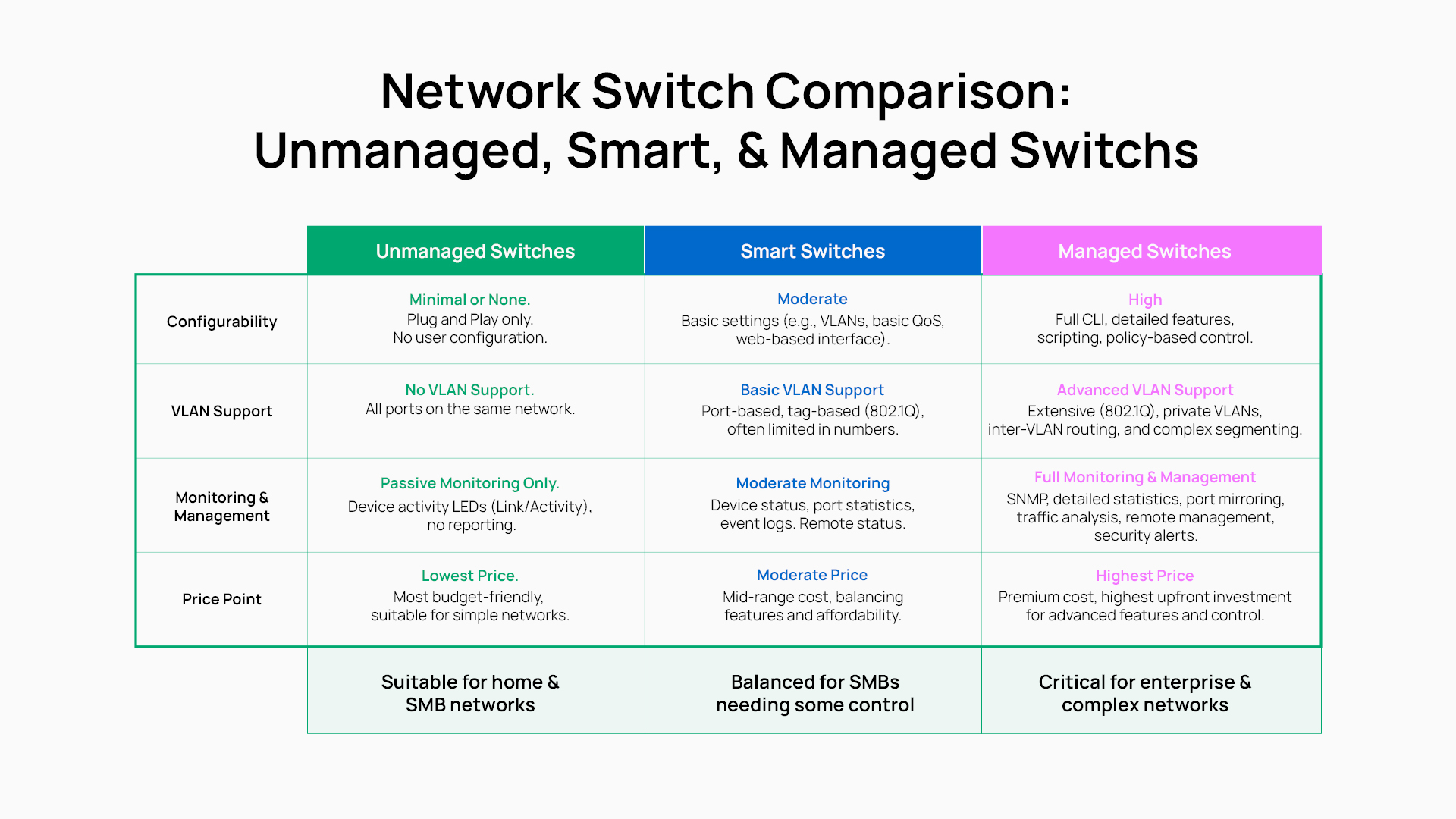
Not every network needs a managed switch. The right choice depends on what level of control you need. The three tiers — unmanaged, easy smart/easy managed , and managed — represent progressively more capability, and understanding each makes it easier to match a switch to the deployment.
Unmanaged Switches
An unmanaged switch is plug-and-play: connect devices, and it forwards traffic with no configuration required. There are no VLANs, no QoS, no monitoring, and no security policies. Every port operates on the same flat network.
Unmanaged switches are the right fit for small home networks, very simple office setups, or adding ports off a managed switch in a location where no configuration is needed. They're the lowest-cost option because they offer the least control.
Explore Omada unmanaged switches for plug-and-play options across port counts and form factors.
Smart Switches (Web-Managed)
An easy smart/easy managed switch sits between unmanaged and fully managed. It provides a web interface for basic configuration: simple VLAN assignment, port-based QoS, and basic port monitoring. What it typically lacks is a CLI, robust ACL support, SNMP monitoring, and the depth of protocol support that a full managed switch provides.
Easy smart/easy managed (basic web-managed) switches are a practical middle tier for small offices that need light segmentation — separating a guest network from employee traffic, for example — without the operational complexity of full management.
Explore Omada smart switches for web-managed options designed for SMB environments.
Managed Switches
A managed switch provides full configurability: CLI and web GUI access, Layer 2 and Layer 2+/L3 feature support, robust security capabilities (ACLs, 802.1X authentication, DHCP snooping), and comprehensive monitoring through SNMP, syslog, and port mirroring. Omada managed switches also integrate with the Omada SDN controller for centralized management across multiple sites.
Key Features of a Managed Switch
The capabilities below are what separate a managed switch from simpler options. Each one solves a specific problem that unmanaged and easy smart/easy managed switches can't address.
VLAN Segmentation
The most common reason to choose a managed switch is VLAN segmentation. A VLAN creates separate logical networks within a single physical switch, using IEEE 802.1Q/ MAC VLAN/ protocol VLAN tagging to keep traffic isolated.
In a restaurant or retail environment, this means point-of-sale traffic travels on its own isolated network segment, completely separate from the guest Wi-Fi. In an office, IoT devices can be isolated from corporate workstations.
Quality of Service (QoS)
QoS lets a managed switch prioritize specific traffic types so that critical applications get bandwidth even when the network is under load. VoIP calls stay clear during a large file transfer. Video conferencing doesn't stutter when a backup job runs. The switch uses DSCP (Differentiated Services Code Point) and 802.1p priority tagging to classify traffic and enforce queue assignments per port or per flow.
PoE and PoE+ Power Management
Power over Ethernet (PoE) lets a switch power access points, IP cameras, VoIP phones, and other devices over the same Ethernet cable that carries data, eliminating separate power adapters. Managed switches add control over that power: administrators can set port-level power budgets, schedule PoE off and on for device reboots, and use PoE auto-recovery to automatically restart unresponsive cameras.
Omada managed switches support 802.3af PoE, 802.3at PoE+, and select models support 802.3bt PoE++. For surveillance deployments specifically, managed PoE switches can simplify the installation.
Security and Access Control
A managed switch enforces access policies that prevent unauthorized devices from joining the network. ACLs define which devices can communicate with which network resources, while IEEE 802.1X authentication requires devices to authenticate before being granted network access. DHCP snooping prevents rogue DHCP servers from assigning IP addresses. Port security limits the number of MAC addresses permitted per port, and storm control prevents broadcast storms from degrading network performance.
These capabilities contain the blast radius when a device is compromised, limiting lateral movement between network segments.
Monitoring, Logging, and Remote Management
When a managed switch is deployed at a remote site, the value of SNMP, syslog, and port mirroring is clear. Instead of dispatching staff to investigate a slow segment, an administrator can check port utilization, review event logs, mirror traffic to a capture device, and identify the problem from a laptop. Omada managed switches also integrate with the Omada SDN controller, which provides a centralized dashboard for traffic statistics, event alerts, and configuration management across all connected devices.
Link Aggregation and Redundancy
Link aggregation combines multiple physical ports into a single logical connection using IEEE 802.3ad LACP (Link Aggregation Control Protocol), multiplying the available bandwidth between a switch and an uplink, server, or another switch. Spanning Tree Protocol variants (STP, RSTP, and MSTP) provide loop prevention and redundancy, automatically recovering from a cable or port failure by rerouting traffic along a backup path.
Managed vs. Unmanaged Switch: Side-by-Side Comparison
The table below compares unmanaged, easy smart/easy managed , and managed switches across the features that matter most when evaluating which tier fits your network.
|
Feature |
Unmanaged |
Easy Smart/Easy Managed |
Managed |
|
Configuration interface |
None |
Web GUI only |
Web GUI, CLI, controller |
|
VLAN support |
None |
Basic |
Full VLAN tape |
|
QoS |
None |
Basic port-based |
DSCP, 802.1p, per-flow |
|
PoE management |
Power delivery only |
Limited |
Per-port budgets, scheduling, auto-recovery |
|
Monitoring |
None |
Basic port stats |
SNMP, syslog, port mirroring, RMON |
|
Security features |
None |
Basic |
ACLs, 802.1X, DHCP snooping, port security |
|
CLI access |
No |
No |
Yes |
|
L3 routing |
No |
No |
On select models |
|
Typical use |
Home, simple offices |
Small offices, light segmentation |
SMBs, multi-site, surveillance, VoIP |
Benefits of Upgrading to a Managed Switch
The case for upgrading from unmanaged to managed switches comes down to what your network has to do reliably.
Stronger security through segmentation. Flat networks give every connected device access to the same traffic. A managed switch changes that: IoT devices, guest networks, surveillance systems, and corporate workstations each operate on isolated VLANs. A compromised IoT device can't reach the POS system or internal file servers.
Predictable performance under load. QoS prevents one application from degrading another. In a multi-office environment with VoIP, calls stay clear even when large files are syncing in the background.
Faster troubleshooting. SNMP, port mirroring, and syslog turn reactive troubleshooting into a proactive discipline. Administrators can identify a saturated uplink or a misbehaving device before it becomes a user complaint, and investigate remotely rather than on-site.
Lower long-term operational cost. PoE consolidation reduces the number of power adapters and outlets required. Remote management reduces the need for on-site visits. Centralized configuration management through the Omada SDN controller means changes propagate across all managed devices simultaneously, rather than requiring per-device configuration.
Scalability as the network grows. Network management, VLAN policies, and security rules that are configured on a managed switch today carry forward as new devices are added. A flat unmanaged network becomes increasingly difficult to segment and secure as device count grows.
When Does Your Business Need a Managed Switch?
A managed switch is the best choice for your deployment when any of the following applies:
-
VLANs are required. Separating guest Wi-Fi from POS, isolating IoT devices from corporate traffic, or segmenting departments all require 802.1Q VLAN support.
-
VoIP or video conferencing is in heavy use. QoS prevents voice and video traffic from degrading under load.
-
PoE devices are on the network. Access points, IP cameras, and VoIP phones all benefit from managed PoE with per-port control and auto-recovery.
-
Multi-site or remote management is needed. Remote visibility and centralized configuration management aren't possible with unmanaged switches.
-
Security or compliance requirements exist. 802.1X, ACLs, DHCP snooping, and port security are all features that unmanaged switches don't provide.
-
Surveillance cameras are deployed. A managed PoE switch with VLAN isolation and PoE auto-recovery simplifies camera management significantly.
-
Network throughput is a concern. If you're connecting Wi-Fi 6 or Wi-Fi 7 access points or NAS devices, consider whether your uplinks support 2.5 GbE or 10 GbE speeds. See future-proofing with multi-gigabit switches for more on matching switch uplinks to device requirements.
Choosing the Right Managed Switch for Your Network
Selecting the right managed switch is determined by a few practical criteria: port count, PoE power budget, uplink speed, feature tier (L2 vs. L2+ vs. L3), controller compatibility, and whether physical stacking is required.
For most SMB access-layer deployments, an L2+ managed switch with gigabit ports, PoE+, and 10 GbE SFP+ uplinks covers common uses: powering and connecting access points, IP cameras, VoIP phones, and workstations, with full VLAN, QoS, ACL, and SNMP support. Where advanced redundancy features like OSPF and VRRP are needed, L3 managed switches handle those requirements at the distribution or core layer.
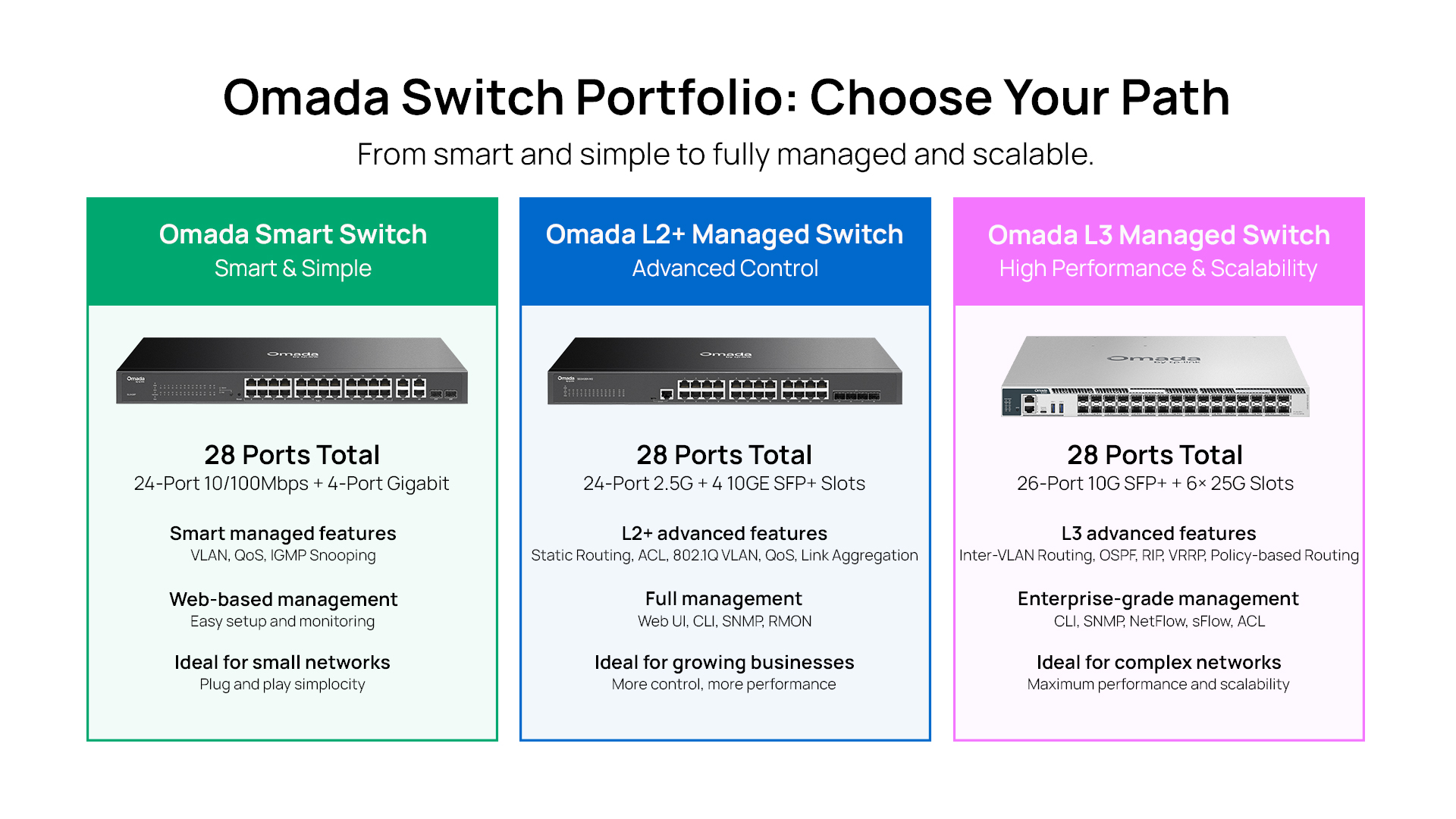
Omada's managed switch portfolio includes desktop and rack-mount form factors with gigabit, 2.5 GbE, 10 GbE, and 25 GbE options, all manageable through the Omada SDN controller or standalone web interface.
Explore the Omada managed switch collection for a full view of available options.
Frequently Asked Questions
What is the purpose of a managed switch?
A managed switch gives network administrators control over how traffic is forwarded, segmented, and prioritized across a network. Its primary purpose is to enable VLAN segmentation, traffic prioritization through QoS, PoE power management, security policies, and network monitoring — capabilities that allow a network to be customized to the specific needs of a business environment.
What is the difference between a managed and an unmanaged switch?
A managed switch is fully configurable through a web interface, CLI, or controller, supporting VLANs, QoS, ACLs, SNMP monitoring, and PoE management. An unmanaged switch is plug-and-play with no configuration options — it forwards traffic automatically but provides no segmentation, prioritization, or visibility. The right choice depends on whether your network requires isolation, prioritization, or monitoring.
Do I really need a managed switch?
If your network has multiple device types that should be isolated from each other, VoIP or video conferencing traffic that needs prioritization, PoE devices like cameras or access points, or remote sites that need to be managed without on-site visits, then yes — a managed switch addresses those requirements directly. A flat unmanaged network is adequate for very simple environments but becomes a security and performance liability as complexity grows.
Is a managed switch the same as a router?
No. A managed switch operates primarily at Layer 2 of the OSI model and controls how traffic moves between devices within a network. A router operates at Layer 3 and connects different networks, most commonly, a local network to the internet. Some managed switches include L3 routing features that allow inter-VLAN routing, but they serve a different function than a router at the network edge.
What is the difference between a managed switch and a smart switch?
An easy smart/easy managed switch provides a web interface for basic VLAN and QoS configuration but typically lacks a CLI, robust ACL support, and full SNMP monitoring. A managed switch adds CLI access, comprehensive security features (802.1X, DHCP snooping, port security), full SNMP and syslog monitoring, and on select models, L3 routing capabilities. Easy smart/easy managed switches are a middle tier for environments with light segmentation needs; managed switches are the right choice when full control and visibility are required.
How do I configure a managed switch?
Most managed switches are configured through a web-based GUI accessible from any browser on the same network. Business-grade managed switches also provide CLI access via console port or SSH for scripted configuration and advanced troubleshooting. In an Omada SDN deployment, managed switches are configured through the Omada controller — cloud-based or on-premises — which allows batch configuration, template-based deployment, and centralized policy management across all connected switches and sites.
_20260728184505e.jpg)