What Is NAT? Network Address Translation Explained

Every device on your network needs an IP address to communicate, but there aren't enough public IP addresses to give one to every laptop, phone, printer, and IP camera in your office. Network address translation (NAT) is what makes that work. It allows an entire network of private devices to share a single public IP address when communicating with the internet, and it runs automatically on the gateway or router connecting your network to your ISP.
This article explains what NAT is, how the translation process works, the main NAT types, and why it shapes decisions about gateway selection, VPN access, and network design.
Key Takeaways
● NAT (network address translation) lets many devices on a private network share a single public IP address to reach the internet.
● NAT runs on your gateway or router and rewrites IP addresses — and usually port numbers — on traffic as it crosses between your LAN and the internet.
● The three main types are static NAT, dynamic NAT, and PAT (also called NAT Overload). PAT is what most SMB networks use.
● NAT conserves scarce public IPv4 addresses, adds a basic layer of privacy by hiding internal IPs from outside observers, and simplifies addressing on the LAN.
● NAT can complicate hosting servers and VPNs, issues usually resolved with port forwarding, proper gateway configuration, or eliminating double NAT.
What Is NAT?
Network address translation (NAT) is a method by which a router or gateway rewrites the source or destination IP addresses on packets as they pass between a private internal network and the public internet, allowing multiple private devices to share a single public IP address.
NAT exists because of a structural limitation in IPv4 addressing. The IPv4 protocol supports approximately 4.3 billion unique addresses — a number that looked enormous in the early 1980s but proved insufficient as internet-connected devices proliferated. Rather than replace the entire addressing system immediately, engineers developed NAT as a practical mechanism to stretch the available public address space, letting organizations use private, non-routable IP addresses internally while presenting a single public address to the internet.
The device where NAT runs is your gateway, which also handles WAN connectivity and sits at the boundary between your internal network and your ISP. Every time a device on your LAN sends traffic to the internet, the gateway performs the translation invisibly.
How Does NAT Work?
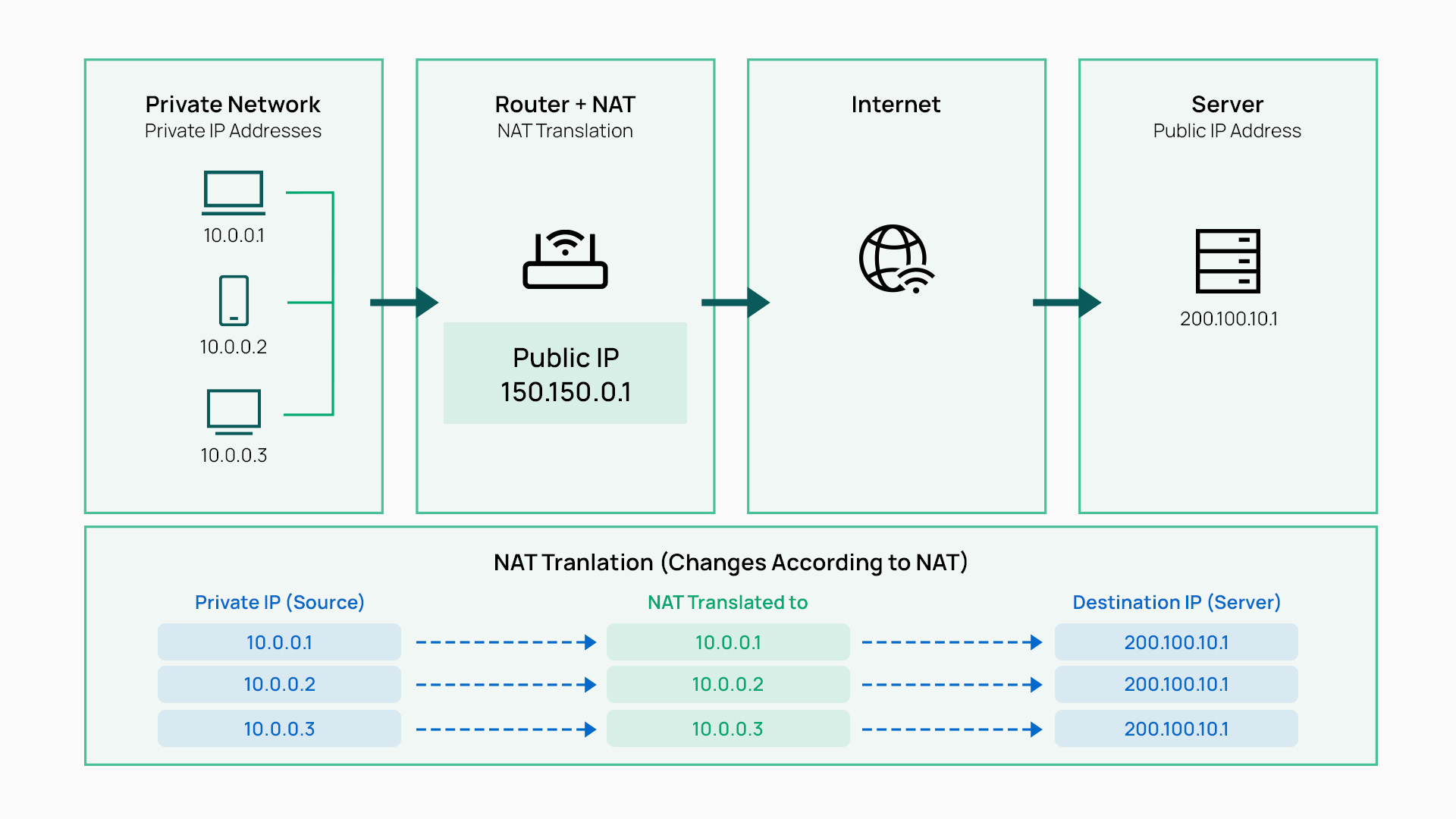
Understanding NAT starts with understanding what changes at the gateway. Private IP addresses travel inside your network, but they can't be routed across the public internet. The gateway's job is to rewrite those addresses on outbound traffic, track the sessions in progress, and reverse the translation when responses come back.
Private vs. Public IP Addresses
Private IP addresses fall into three ranges: 10.0.0.0–10.255.255.255 (/8), 172.16.0.0–172.31.255.255 (/12), and 192.168.0.0–192.168.255.255 (/16). These addresses can be reused freely across any private network because they are never routed on the public internet. Public IP addresses, by contrast, are globally unique and allocated by internet registries. They're what the rest of the internet uses to reach your network.
Because private addresses aren't routable on the public internet, devices using them can't send or receive internet traffic directly. NAT resolves this by substituting a routable public address at the gateway before packets leave the network.
The NAT Translation Process, Step by Step
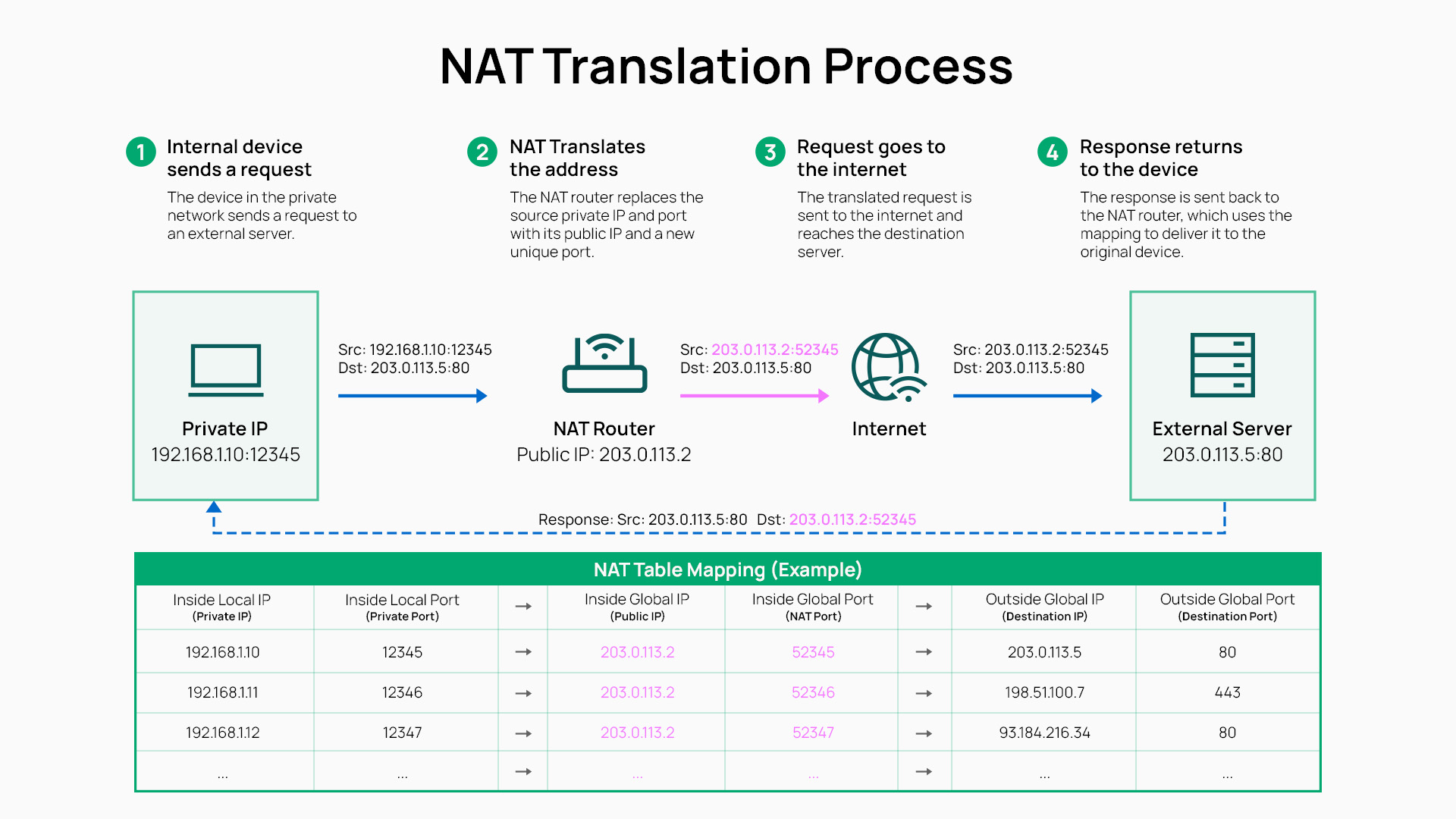
When a laptop at 192.168.1.20 sends a request to a web server, the gateway intercepts the outbound packet. It replaces the source IP address with its own public IP — say, 203.0.113.45 — and, in the case of PAT (the most common NAT type), also assigns a unique source port number. The modified packet then continues to the destination server.
When the server responds, it addresses the reply to 203.0.113.45. The gateway receives the packet, checks its NAT table, and determines which internal device the session belongs to. It rewrites the destination address back to 192.168.1.20 and delivers the packet to the correct device. The NAT table is simply a record the gateway maintains of active sessions, mapping each internal IP-and-port combination to its corresponding translated public IP-and-port.
Types of NAT
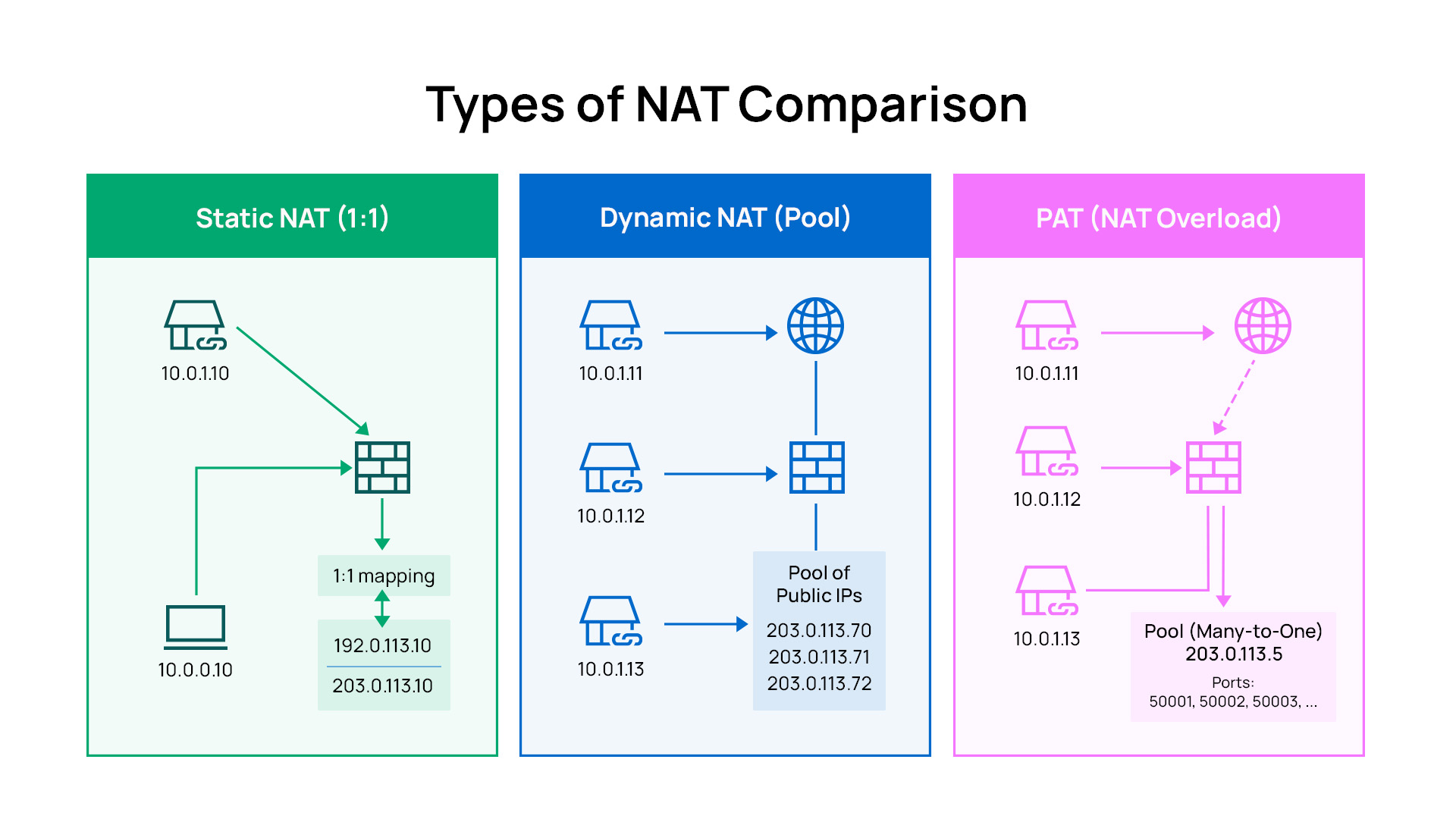
NAT comes in several configurations, and most networks use PAT whether administrators know it by that name or not. The differences matter when you're evaluating a gateway, troubleshooting connectivity problems, or designing a network that needs to host services.
Static NAT
Static NAT creates a fixed, one-to-one mapping between a single private IP address and a single public IP address. Traffic from that private address always exits through the same public address, and inbound connections to that public address are always delivered to the same internal device.
The most common use for static NAT is hosting an internet-accessible service — a web server, an IP camera, or a VoIP gateway — that needs a stable, predictable public address. It requires a dedicated public IP per device, which limits its use in environments with constrained address space.
Dynamic NAT
Dynamic NAT maps private addresses to public addresses drawn from a configured pool, assigning them on demand as sessions are opened. Unlike static NAT, the mapping changes each session rather than staying fixed.
Dynamic NAT is uncommon in SMB environments today because it still requires a pool of public IP addresses — a resource that has become scarce. It appears more often in larger enterprise networks where public address blocks were allocated before IPv4 scarcity became acute.
PAT (NAT Overload / Port Address Translation)
PAT — also known as NAT Overload or, in Linux networking, masquerading — is the NAT type most commonly used in SMB networks. It maps many private IP addresses to a single public IP address simultaneously, differentiating sessions by assigning unique port numbers to each connection rather than unique IP addresses.
A gateway using PAT can support hundreds of simultaneous internet sessions from devices on the LAN, all sharing the same public IP. Because only one public IP is required, PAT is the practical solution to IPv4 scarcity for most organizations.
Carrier-Grade NAT (CGNAT)
Carrier-Grade NAT (CGNAT) is NAT performed by the ISP, not the customer. The ISP assigns multiple customers to a shared pool of public IP addresses, placing an additional layer of translation between the customer's gateway and the public internet.
CGNAT affects deployments that rely on port forwarding, hosted services, or inbound VPN connections, because the customer's public IP is shared and not directly controllable. Some ISPs offer dedicated public IP addresses to business customers specifically to avoid these limitations.
Why NAT Matters: The Benefits
NAT delivers several benefits beyond its original purpose of address conservation. These are the operational reasons it remains foundational to modern network design.
● IPv4 address conservation. A single public IP address supports an entire network of private devices. This was NAT's original purpose and remains essential while IPv4 remains the dominant addressing scheme.
● Basic privacy and address obscurity. Internal device IP addresses are not visible to outside systems — the public internet sees only the gateway's public IP. NAT is not a firewall and does not replace proper security controls, but it does prevent external parties from directly identifying or targeting specific internal devices by IP address.
● ISP flexibility. Because internal devices use addresses independent of the public IP, changing ISPs or public IPs doesn't require re-addressing internal devices or reconfiguring applications.
● Consistent LAN addressing. Organizations can use the same private addressing scheme across multiple offices or branches without conflict, since those addresses are never exposed to the public network. Pair this with VLAN configuration to segment traffic types within each site while maintaining a coherent private address space.
NAT Limitations and Common Issues
NAT simplifies outbound internet access, but it introduces complications for inbound connections, specific protocols, and deployments where external visibility matters. Understanding these tradeoffs helps you design around them rather than troubleshoot them after the fact.
Hosting Services Behind NAT
NAT translation tables are built from outbound sessions — a device inside your network initiates a connection, the gateway records it, and return traffic is matched to the entry. Inbound connections have no pre-existing entry, so they are dropped by default.
To host an internet-accessible service behind NAT, you need either port forwarding (directing a specific inbound port to a specific internal IP) or static NAT. This is a deliberate design tradeoff: inbound traffic is blocked unless explicitly permitted.
VPNs and Remote Access
VPN protocols like IPsec, WireGuard, and OpenVPN are designed to work across NAT, but the interaction requires attention during configuration. IPsec in particular uses protocols that don't include port numbers in their headers, so gateways use NAT Traversal (NAT-T) to encapsulate traffic in UDP packets that NAT can track normally.
For SMBs deploying remote access VPNs, a gateway with native VPN support handles this automatically. The Omada wired gateways collection includes gateways that support IPsec, WireGuard, OpenVPN, and L2TP/IPsec VPN protocols, handling NAT-T without additional configuration. The ER605 is a desktop-form-factor gateway that supports up to three WAN connections alongside the full VPN protocol set — a practical option for small offices deploying remote access for the first time. It also supports BYOD network segmentation practices that pair well with VPN remote access policies.
Double NAT
Double NAT occurs when two devices on the same path each perform NAT — typically when an ISP-provided modem/router is left in routing mode and a separate gateway is added behind it. The result is two layers of translation between the internal network and the internet.
Symptoms include broken port forwarding, problems with hosted services, and VPN connectivity issues. The fix is straightforward: put the upstream ISP device in bridge or passthrough mode so it no longer performs NAT, leaving translation to a single device. Alternatively, removing one of the two NAT devices from the chain resolves the issue.
NAT and Peer-to-Peer Applications
Peer-to-peer connections, including VoIP calls, video conferencing, and file transfers, can behave unpredictably behind certain NAT configurations. Symmetric NAT assigns a different public port for each destination a device communicates with, which can prevent direct peer-to-peer sessions from establishing because the remote party can't predict the correct port to initiate contact.
Solutions are enabling UPnP on the gateway (which allows applications to request port mappings automatically), configuring manual port forwarding for specific services, or eliminating double NAT by putting the upstream device in bridge mode.
Building Your Gateway Around NAT
For most SMB networks, NAT is invisible — it runs in the background and simply works. But when your requirements extend to hosting services, managing remote access VPNs, supporting multi-site connectivity, or troubleshooting double NAT, the gateway's NAT capabilities become a spec worth evaluating.
Gateways publish NAT throughput specifications alongside firewall throughput and VPN throughput because these are distinct processing tasks. A gateway optimized for small office use differs from one designed to handle multi-WAN configurations and concurrent VPN tunnels at higher traffic volumes.
For SMBs looking for an integrated solution, Omada gateways handle NAT, firewall filtering, VPN termination, and multi-WAN failover on the same device.
The Omada Fusion gateway collection and Omada standard router collection range from compact desktop gateways suitable for single-office deployments to rackmount models for larger networks.
All Omada gateways integrate with centralized cloud management, so NAT, firewall, and VPN configuration is handled from a single interface across all sites.
NAT lives on the same device as your firewall and, typically, your VPN termination. Consolidating these three functions reduces infrastructure complexity for teams managing networking alongside many other responsibilities.
Getting Your Network Infrastructure Right
NAT translates private IP addresses to public ones so your entire network can share a single internet connection. Your gateway is where NAT, your firewall, and your VPN come together, which makes gateway selection a decision that shapes how well your network handles remote access, hosted services, and future expansion.
Explore the Omada Fusion gateway collection to see how SMB-grade gateways handle NAT alongside the security and connectivity features your network depends on.
FAQs
What does NAT stand for?
NAT stands for network address translation. It is the process by which a gateway rewrites IP addresses on traffic crossing between a private network and the public internet, allowing many private devices to share a single public IP address.
Is NAT the same as a firewall?
No. NAT and a firewall serve different purposes, though they often run on the same device. NAT translates IP addresses so that private network devices can reach the internet. A firewall inspects and filters traffic based on security rules to block unauthorized access. NAT does create a degree of address obscurity as a side effect of translation, but firewalls are purpose-built for threat detection and traffic filtering.
What is the difference between NAT and PAT?
NAT is the general term for network address translation. PAT (Port Address Translation) — also called NAT Overload — is a specific type of NAT that maps many private IP addresses to a single public IP address by assigning each session a unique port number. Most SMB networks use PAT rather than other NAT types, because it requires only one public IP address regardless of how many internal devices are active simultaneously.
What is double NAT and should I disable it?
Double NAT occurs when two devices on the same network path both perform NAT — typically an ISP modem/router operating in routing mode and a separate gateway behind it. The result is two layers of address translation, which breaks port forwarding and causes VPN connectivity problems. To resolve it, configure the upstream device (typically the ISP modem) in bridge or passthrough mode so it forwards traffic without translating addresses, leaving NAT to a single gateway.
Does NAT work with IPv6?
IPv6 is designed to provide enough addresses that NAT is not needed. Each device can receive a globally unique public IPv6 address, eliminating the address scarcity that NAT was created to solve. In a pure IPv6 environment, NAT is typically not used. Most networks today operate in dual-stack mode (supporting both IPv4 and IPv6 simultaneously), so NAT continues to handle IPv4 traffic while IPv6 traffic routes directly.
How do I know what type of NAT my network uses?
Most SMB networks use PAT by default: it is the standard configuration on virtually all business gateways. You can verify this in your gateway's NAT or firewall settings, where the WAN-facing translation mode is typically listed. If you see "NAT Overload," "masquerade," or a single WAN IP shared by all LAN devices, your gateway is using PAT.