What Is a Layer 3 Switch? A Guide for Growing Networks
A Layer 3 switch is a network switch that combines Layer 2 switching and Layer 3 routing in a single device. It forwards traffic within VLANs the way any switch does, but it also routes between them — in hardware, at near-wire-speed — without sending that traffic to a separate router. For networks that have grown beyond a single subnet, that distinction becomes the difference between a network that scales and one that bottlenecks. If you're evaluating whether a Layer 3 switch belongs in your architecture, this guide can help you decide.
Key Takeaways
-
A Layer 3 switch combines hardware-based packet forwarding (Layer 2 switching) with routing intelligence (Layer 3), performing both functions in a single device.
-
The defining capability is inter-VLAN routing handled in hardware via ASIC (application-specific integrated circuit), eliminating the bottleneck of router-on-a-stick configurations.
-
Layer 3 switches are designed for routing inside a LAN; routers are still required at the network edge for WAN connectivity, NAT, and advanced firewall and security policies.
-
Common routing protocols supported by Layer 3 switches include Static Routing, OSPF (Open Shortest Path First), VRRP (Virtual Router Redundancy Protocol), and RIP (Routing Information Protocol) — used to scale segmentation across larger campus, multi-VLAN, and aggregation deployments.
-
Choose a Layer 3 switch when your network has multiple VLANs with significant inter-VLAN traffic, or when you need core or aggregation capability that a router-on-a-stick configuration can't sustain.
What Is a Layer 3 Switch?
A Layer 3 switch is a network switch that operates at both Layer 2 (data link) and Layer 3 (network) of the OSI (Open Systems Interconnection) model, performing MAC-based switching and IP-based routing on the same hardware. In the OSI model, Layer 2 devices forward frames based on MAC addresses within a single broadcast domain, while Layer 3 devices route packets between different subnets using IP addresses.
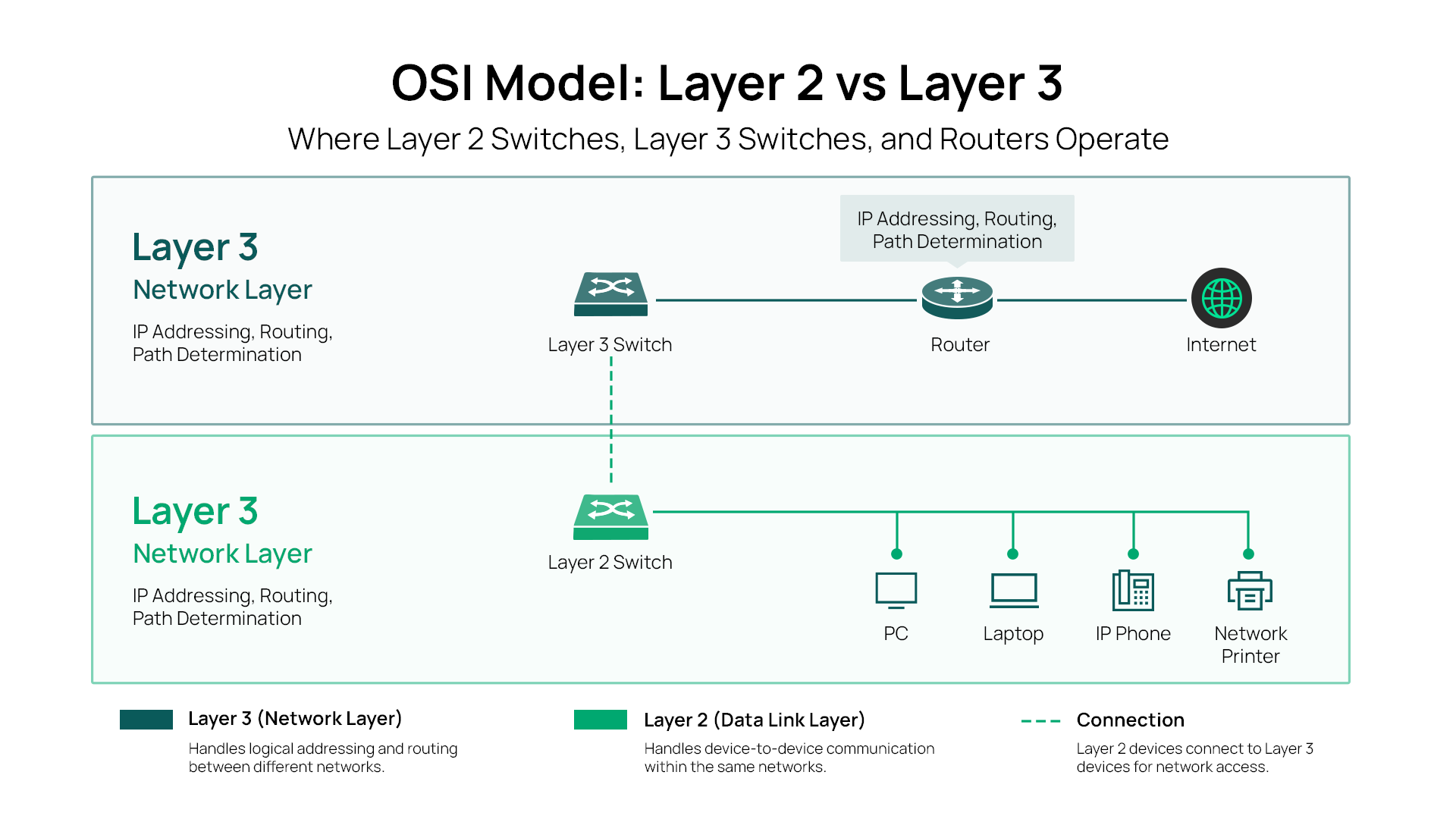
That difference in hardware has real performance implications. Layer 3 switches handle routing in ASICs — dedicated chips designed for line-rate packet forwarding — rather than in software running on a general-purpose CPU. Traditional routers make routing decisions in software, which makes them more flexible for complex edge functions but slower for high-volume inter-VLAN routing inside a LAN. This is why Layer 3 switches outperform routers for internal routing at scale: the switching fabric handles both Layer 2 and Layer 3 decisions at the same hardware speed, without the CPU bottleneck a software-based routing path creates.
How Does a Layer 3 Switch Work?
When a packet arrives at a Layer 3 switch, the device makes a rapid decision: does this traffic need to stay within the same VLAN, or does it need to cross into a different subnet? That decision determines the forwarding path.
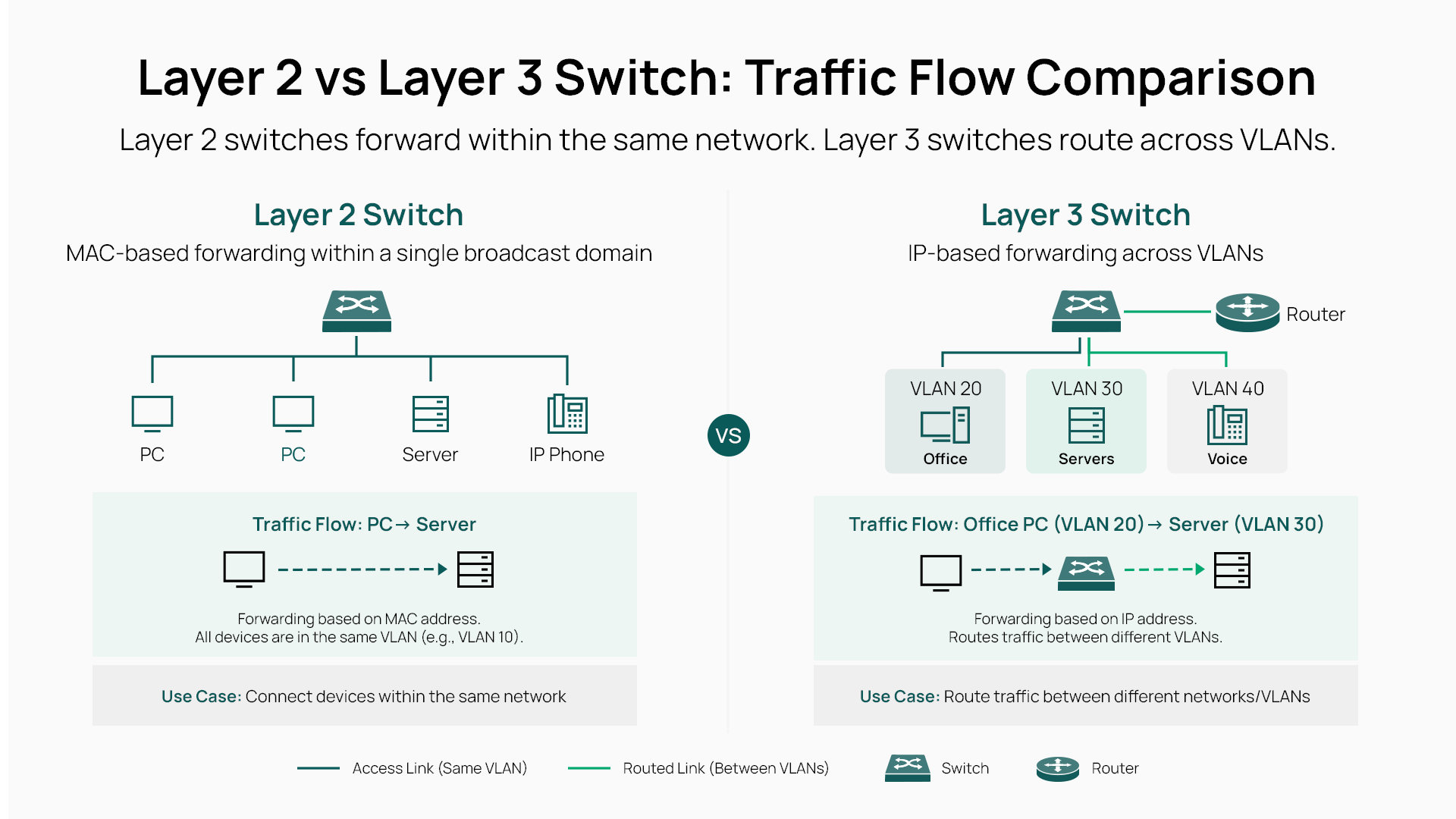
For same-VLAN traffic, the switch forwards based on MAC addresses — standard Layer 2 behavior. For cross-VLAN traffic, the switch consults its IP routing table and ARP (Address Resolution Protocol) table to determine the next hop. Each VLAN is assigned its own subnet and a switched virtual interface (SVI), which acts as the default gateway for devices on that VLAN. The switch routes between SVIs in hardware, so the traffic never has to leave the switch and travel to a separate router.
On every routed packet, the switch performs Layer 3 operations: inspecting the IP header, decrementing the TTL (time to live) value by one, and rewriting the source and destination MAC addresses for the next hop. This is standard IP routing behavior, but done at hardware speed rather than through a software process.
Layer 3 switches support a range of routing protocols depending on the deployment. Static Routing is sufficient for straightforward segmentation. OSPF enables dynamic route discovery in larger multi-switch deployments. VRRP provides gateway redundancy, so a standby switch takes over automatically if the primary fails.
Layer 2 Switch vs. Layer 3 Switch: What's the Difference?
The core distinction is the forwarding decision and scope. A Layer 2 switch forwards frames based on MAC addresses and operates within a single broadcast domain. A Layer 3 switch routes packets based on IP addresses and can move traffic across multiple subnets.
|
Feature |
Layer 2 Switch |
Layer 3 Switch |
|
Forwarding decision |
MAC address |
IP address |
|
OSI layer |
Layer 2 (Data Link) |
Layers 2 and 3 |
|
Routing capability |
None |
Yes (inter-VLAN and static/dynamic routing) |
|
Typical deployment |
SMB |
Enterprise |
|
Inter-VLAN handling |
Requires an external router |
Handled natively in hardware |
|
Relative cost |
Lower |
Higher |
|
Example Omada models |
SG2210P, SG2210XMP-M2 |
S6500-48MPP6Y, S7500-24Y4C |
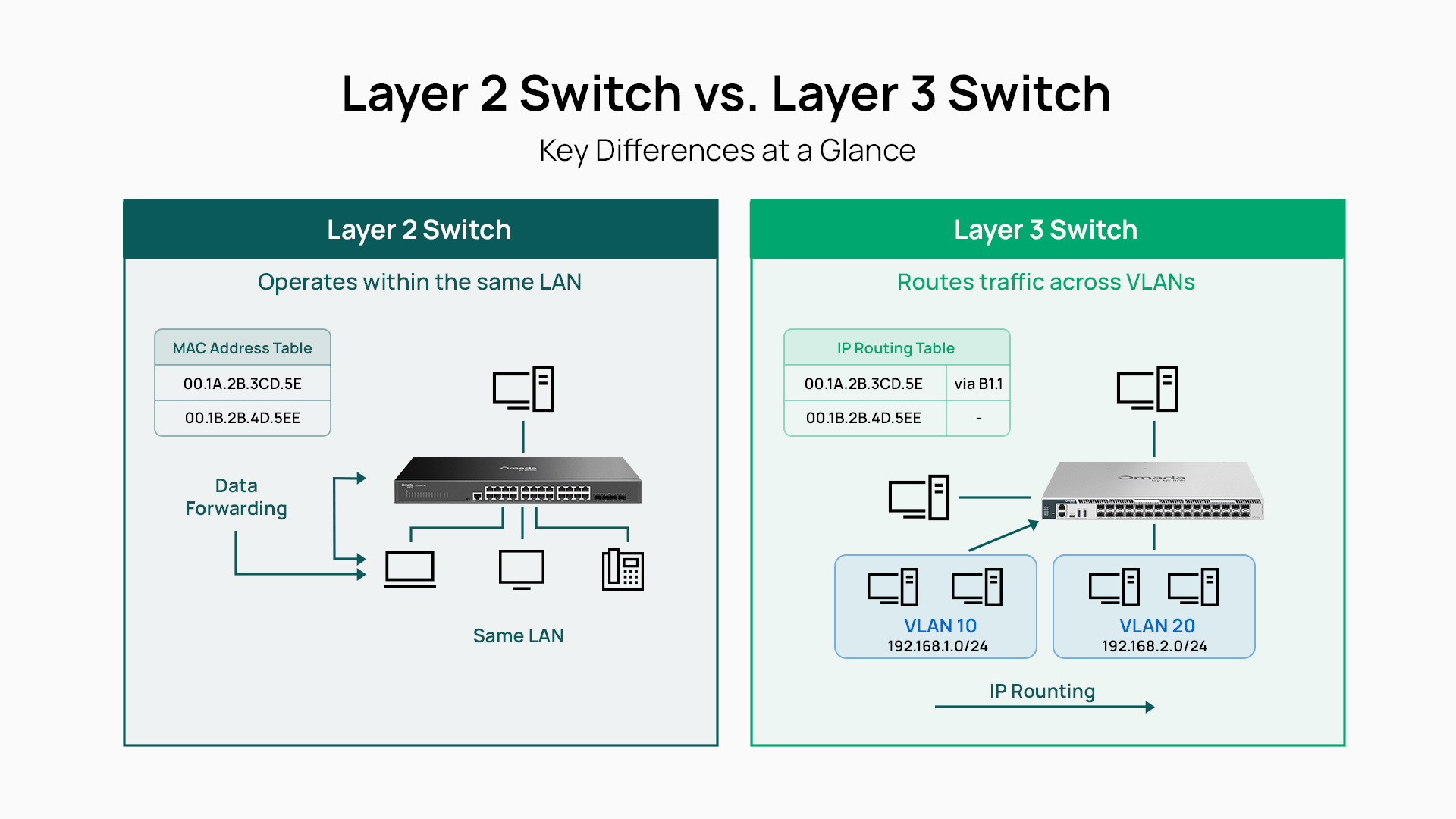
For growing networks, the limitation of relying solely on Layer 2 switching becomes clear when you start segmenting traffic into multiple VLANs. Guest Wi-Fi, staff devices, IP cameras, and VoIP phones each benefit from their own VLAN for security and QoS (Quality of Service) reasons. But once those VLANs need to communicate — for example, a staff device needs to reach a shared file server — you need routing. A Layer 3 switch handles that routing inside the LAN without a dedicated routing device.
Is there a Layer 4 switch? In load-balancing contexts, devices that make forwarding decisions based on TCP/UDP port numbers are sometimes described as Layer 4 switches. These are a specialized category of application delivery controllers rather than general-purpose switching infrastructure, and they solve a different problem than inter-VLAN routing.
Layer 3 Switch vs. Router: When to Use Each
Layer 3 switches and routers both perform IP routing, but they are optimized for different environments and serve different roles in a network.
A Layer 3 switch routes between VLANs within a LAN at line rate. It is designed for high-throughput internal routing where the traffic is staying inside the building or campus network. A router handles WAN connections, NAT (Network Address Translation), advanced firewall and security policies, and routing between different networks over a public or private internet connection.
|
Function |
Layer 3 Switch |
Router |
|
Inter-VLAN routing (LAN) |
✓ Hardware-speed |
✓ Possible, but creates bottleneck |
|
WAN connectivity |
✗ |
✓ |
|
NAT |
✗ |
✓ |
|
Advanced firewall |
✗ |
✓ |
|
Dynamic routing |
✓ |
✓ |
|
PoE delivery |
Select models |
Rarely |
|
Primary deployment |
Distribution/core layer |
Network edge |
Most business networks need both devices working together. The Layer 3 switch serves as the LAN's internal routing engine, handling inter-VLAN traffic at scale. The router sits at the edge, managing the WAN connection, enforcing security policies at the perimeter, and handling NAT so internal IP addresses don't need to be exposed to the internet.
Explore Omada wired routers if you're also evaluating the edge side of this architecture.
Is a Layer 3 switch worth it? For networks with a single VLAN or minimal inter-VLAN traffic, a Layer 2 switch and a router-on-a-stick configuration (where a router handles inter-VLAN routing through VLAN subinterfaces on a single uplink) is workable. As traffic volume and VLAN count grow, that uplink becomes a bottleneck. A Layer 3 switch eliminates that constraint by routing internally at hardware speed.
When to Use a Layer 3 Switch: Real-World Business Cases
Layer 3 switching solves a specific operational problem: routing between VLANs inside a LAN without creating a bandwidth or latency bottleneck. Here are the scenarios where that need is most common.
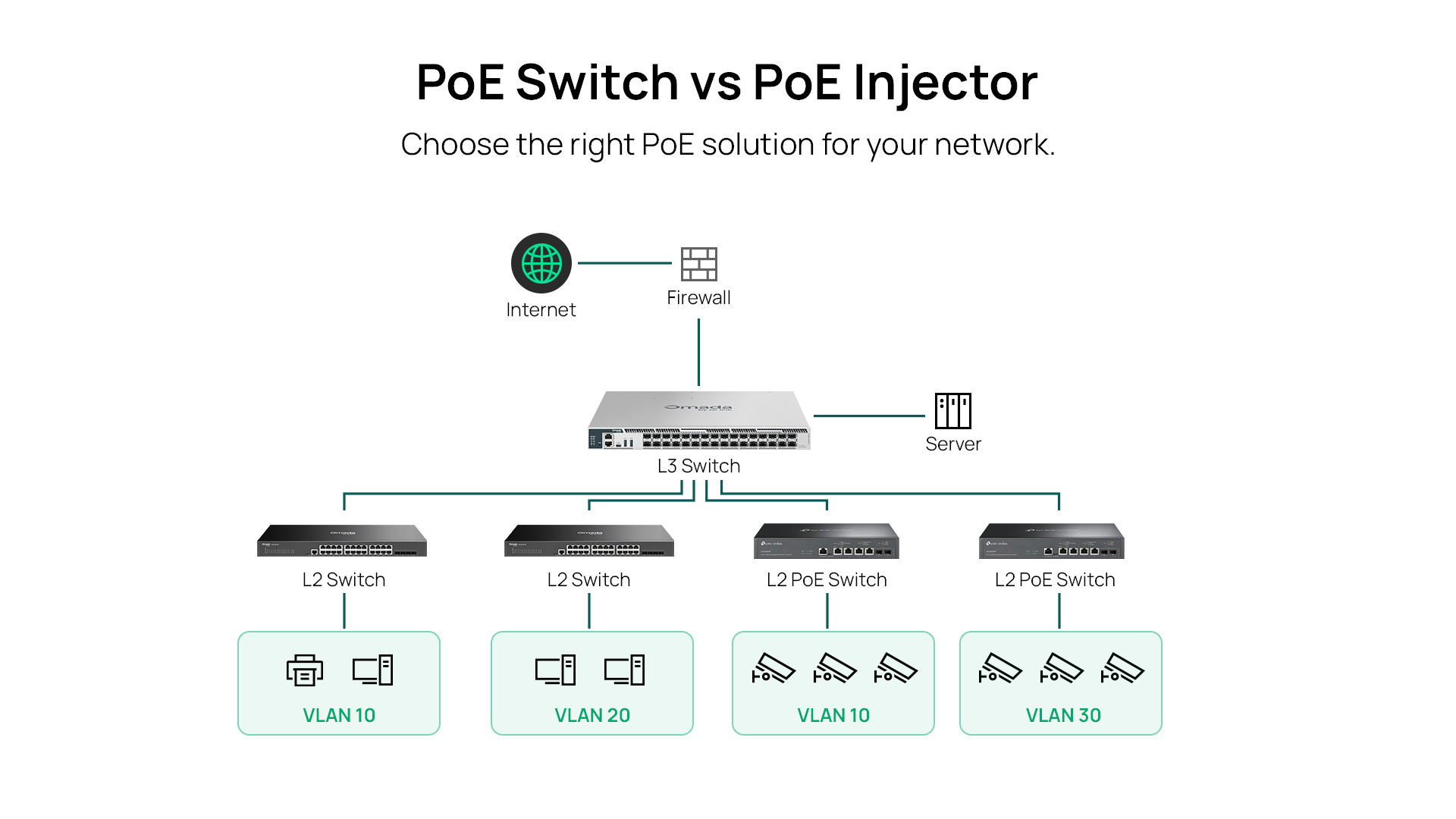
Multi-VLAN office or campus with throughput bottlenecks. When a single router is handling inter-VLAN routing for a growing office — staff on one VLAN, IoT devices on another, guest Wi-Fi on a third — the single uplink between the router and the switch becomes the chokepoint for all cross-VLAN traffic. Moving that routing to a Layer 3 switch eliminates the bottleneck and lets each VLAN communicate at full switch fabric speed.
Hospitality and retail. Hotels and retail locations typically run separate VLANs for surveillance cameras, POS systems, guest Wi-Fi, and staff devices. Keeping these traffic types isolated is both a security requirement and an operational one — you don't want guest video streaming affecting POS transaction reliability. A Layer 3 switch routes between these segments where needed while maintaining isolation where it's enforced.
For guidance on VLAN configuration in these environments, see how to configure VLANs with Omada.
Aggregation layer in a multi-switch deployment. When you have multiple access-layer switches connecting devices across floors or buildings, you need a central switch that can aggregate uplinks and route between subnets. This is the classic aggregation deployment, where a Layer 3 switch sits between the access layer and the WAN edge.
The Omada aggregation switch lineup is built specifically for this tier.
School and campus deployments. A school network might run separate VLANs for student devices, staff devices, administrative systems, IP cameras, and wireless infrastructure. With dozens of access switches feeding traffic back to a central distribution switch, hardware-speed inter-VLAN routing is essential to prevent the core from becoming a bottleneck under concurrent load.
The Omada campus switch lineup is purpose-built for these multi-VLAN, high-availability deployments.
PoE-powered branch deployments. When the same Layer 3 switch also needs to power access points, IP cameras, and VoIP phones via PoE, models that combine L3 routing with PoE+ delivery reduce infrastructure complexity. A single device handles both the routing and the power distribution across the access layer, rather than requiring a separate PoE injector or power switch tier.
How to Choose a Layer 3 Switch
Selecting the right Layer 3 switch comes down to matching the hardware specifications and routing capabilities to your deployment requirements.
Port count and speed. Start with how many devices you're connecting and at what speed. Most campus and aggregation deployments use gigabit access ports with 10G SFP+ uplinks for inter-switch connections. If you're connecting Wi-Fi 7 or Wi-Fi 6E access points that have 2.5G or higher ports, make sure the switch can support those speeds at the access tier.
PoE standard and budget. If the switch also needs to power access points, IP cameras, or IP phones, verify the total PoE budget against your device count. PoE (802.3af) delivers up to 15.4W per port, PoE+ (802.3at) up to 30W, and PoE++ (802.3bt) up to 60W or 90W per port, depending on type. A deployment with many high-wattage APs or PTZ cameras needs a switch with a correspondingly large PoE budget.
Routing protocols. For simple multi-VLAN segmentation, Static Routing is sufficient. If you're building a larger network where routing decisions need to adapt automatically to topology changes, OSPF enables dynamic route discovery between L3 switches. VRRP (Virtual Router Redundancy Protocol) provides gateway redundancy, so if a primary switch fails, a standby takes over without requiring manual reconfiguration.
Stackability. Physical stacking lets you manage multiple switches as a single logical unit, addressed by a single IP. This simplifies configuration at scale and allows you to expand port count without adding management complexity.
Management model. Omada's L3 managed switch lineup integrates with the Omada SDN controller — available as a cloud service, hardware controller, or software controller — with no per-seat licensing fees. This gives you centralized management, zero-touch provisioning, and batch configuration across your entire switching infrastructure from a single interface.
Explore the Omada managed switch lineup to see the full range of options.
Building the Right Network Around a Layer 3 Switch
A Layer 3 switch solves a specific problem that grows acute as networks scale: routing between VLANs at LAN speeds without creating a bottleneck at the core. If you have multiple VLANs with significant inter-VLAN traffic, or if you need core or aggregation capability that a router-on-a-stick can't sustain, a Layer 3 switch belongs in your architecture.
The router still has its place at the network edge, handling WAN connectivity, NAT, and perimeter security. The Layer 3 switch handles internal routing at a scale and speed that a router-based approach can't match.
To explore Omada's Layer 3 managed switch options across port counts, PoE budgets, and routing capabilities, visit the Omada managed switch lineup.
Frequently Asked Questions
What does a Layer 3 switch do?
A Layer 3 switch routes IP traffic between VLANs and subnets within a LAN, handling both Layer 2 switching (MAC-based forwarding within a VLAN) and Layer 3 routing (IP-based forwarding between VLANs) in hardware. This allows different network segments to communicate at near-wire-speed without sending traffic through a separate router.
What is the difference between a Layer 2 switch and a Layer 3 switch?
A Layer 2 switch forwards traffic based on MAC addresses within a single broadcast domain and has no routing capability. A Layer 3 switch adds IP routing, allowing it to move traffic between different VLANs and subnets. The result is that a Layer 3 switch can replace both a Layer 2 switch and a dedicated inter-VLAN router in many LAN deployments.
Is a Layer 3 switch worth it?
For networks with multiple VLANs and meaningful inter-VLAN traffic — common in growing offices, retail locations, schools, and hospitality environments — a Layer 3 switch eliminates the throughput bottleneck created by routing inter-VLAN traffic through a single router uplink. For simpler networks with a single VLAN or minimal cross-segment traffic, the added cost may not suit your needs.
Do you need both a router and a Layer 3 switch?
In most business networks, yes. The Layer 3 switch handles inter-VLAN routing inside the LAN at hardware speed. The router sits at the network edge and manages WAN connectivity, NAT, and perimeter security policies — functions a Layer 3 switch is not designed to perform.
Can a Layer 3 switch replace a router?
A Layer 3 switch can replace a router for inter-VLAN routing within a LAN, but it cannot replace a router at the network edge. Routers handle WAN connectivity, NAT, advanced firewall functions, and routing between distinct networks over public internet links — capabilities that Layer 3 switches don't include.
Is there a Layer 4 switch?
In load-balancing contexts, devices that make forwarding decisions based on Layer 4 information — specifically TCP/UDP port numbers — are sometimes described as Layer 4 switches. These are application delivery controllers optimized for server load balancing, not general-purpose switching infrastructure for LAN segmentation.
What is inter-VLAN routing on a Layer 3 switch?
Inter-VLAN routing on a Layer 3 switch is the process of forwarding IP traffic between two or more VLANs using the switch's built-in routing engine. Each VLAN is assigned a subnet and a switched virtual interface (SVI) that acts as the default gateway for devices on that VLAN. The switch routes packets between SVIs in hardware, allowing devices on different VLANs to communicate without an external router.
What routing protocols do Layer 3 switches support?
The routing protocols supported depend on the model. Many Layer 3 switches support Static Routing for straightforward segmentation. Other models add dynamic routing protocols: OSPF for automatic route discovery in larger topologies, RIP for smaller deployments, and VRRP for gateway redundancy. Omada L3 managed switches also support ERPS (Ethernet Ring Protection Switching) for resilient ring topologies.
_20260728184505e.jpg)