
Come visionare i video della videosorveglianza IP
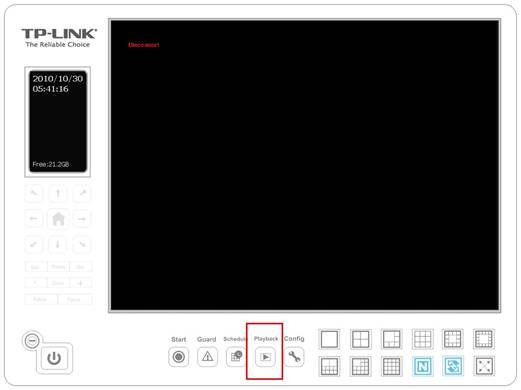
Passo 1. Fare clic su Playback sulla pagina principale per aprire il sotto menu.
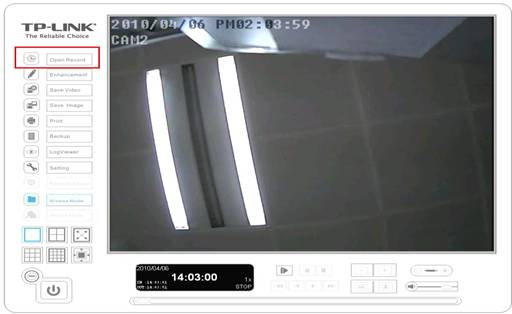
Passo 2. Fare clic su Open Record sulla sinistra per aprire la registrazione che è già stata salavata.
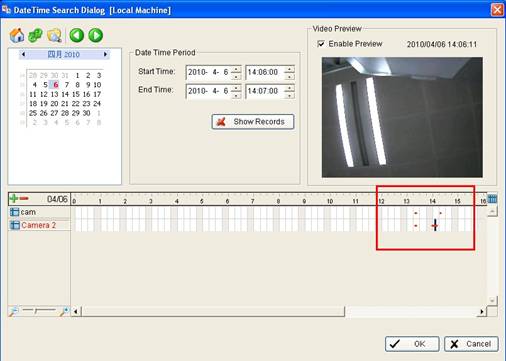
Passo 3. Fare doppio clic sul time frame che è rosso e poi fare clic su OK. Poi fare clic su Play per vedere il video.

Passo 4. Fare clic su Cue In e Cue Out per selezionare il tempo di inizio e di fine del video.
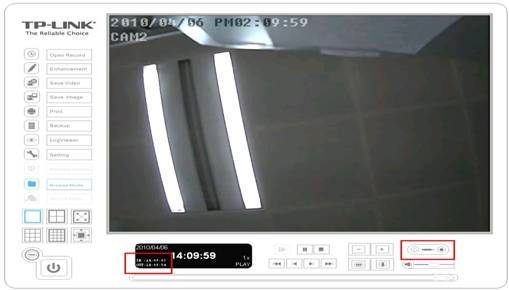
Nota: Se volete salvare la videoripresa, fate clic su Save Video sul lato sinistro per salvare il video.
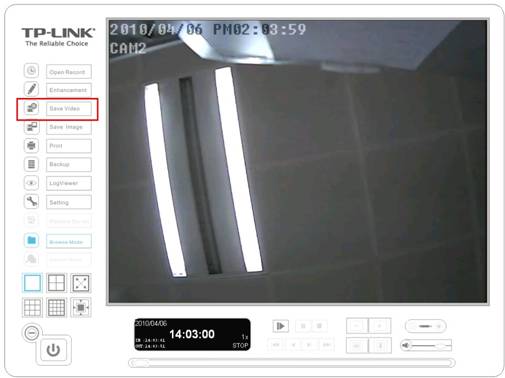
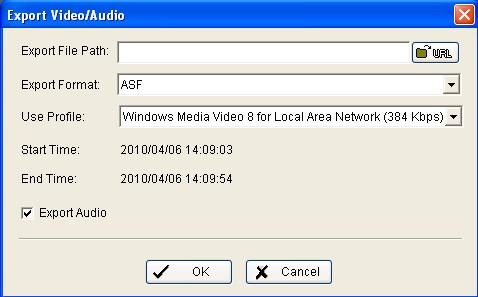
Se volete salvare anche l'audio, non dimenticate di spuntare anche la voce Export Audio.
Questa faq è utile?
Your feedback helps improve this site.


TP-Link Community
Still need help? Search for answers, ask questions, and get help from TP-Link experts and other users around the world.