
Catalog
Tapo RV30 Max Plus Gen 2 & RV30 Max Turbo_Installation and User Guide
SAFETY INSTRUCTIONS
IMPORTANT SAFETY INSTRUCTIONS
READ ALL INSTRUCTIONS
BEFORE USING THIS APPLIANCE
WARNING – To reduce the risk of fire, electric shock, or injury:
• Do not leave appliance when plugged in. Unplug from outlet when not in use and before servicing.
• Do not use outdoors or on wet surfaces.
• Do not allow to be used as a toy. Close attention is necessary when used by or near children.
• Use only as described in this manual. Use only manufacturer’s recommended attachments.
• Do not use with damaged cord or plug. If appliance is not working as it should, has been dropped, damaged, left outdoors, or dropped into water, return it to a service center.
• Do not pull or carry by cord, use cord as a handle, close a door on cord, or pull cord around sharp edges or corners. Do not run appliance over cord. Keep cord away from heated surfaces.
• Do not unplug by pulling on cord. To unplug, grasp the plug, not the cord.
• Do not handle plug or appliance with wet hands.
• Do not use to pick up flammable or combustible liquids, such as gasoline, or use in areas where they may be present.
• Keep hair, loose clothing, fingers, and all parts of body away from openings and moving parts.
• Turn off all controls before unplugging.
• Do not put any object into openings. Do not use with any opening blocked; keep free of dust, lint, hair, and anything that may reduce air flow.
• Do not pick up anything that is burning or smoking, such as cigarettes, matches, or hot ashes.
• Do not use without dust bag and/or filters in place.
• Use extra care when cleaning on stairs.
WARNING: Do not charge non-rechargeable batteries.
WARNING: Read all safety warnings and instructions. Failure to follow the warnings and instructions may result in electric shock, fire and/or serious injury.
Risk of explosion. Floor sanding can result in an explosive mixture of fine dust and air. Use floor-sanding machine only in a well-ventilated area free from any flame or match.
• Prevent unintentional starting. Ensure the switch is in the off-position before connecting to battery pack, picking up or carrying the appliance. Carrying the appliance with your finger on the switch or energizing appliance that have the switch on invites accidents.
• Recharge only with the charger specified by the manufacturer. A charger that is suitable for one type of battery pack may create a risk of fire when used with another battery pack.
• Use appliances only with specifically designated battery packs. Use of any other battery packs may create a risk of injury and fire.
• Under abusive conditions, liquid may be ejected from the battery; avoid contact. If contact accidentally occurs, flush with water. If liquid contacts eyes, additionally seek medical help. Liquid ejected from the battery may cause irritation or burns.
• When battery pack is not in use, keep it away from other metal objects, like paper clips, coins, keys, nails, screws or other small metal objects, that can make a connection from one terminal to another. Shorting the battery terminals together may cause burns or a fire.
• Do not use a battery pack or appliance that is damaged or modified. Damaged or modified batteries may exhibit unpredictable behavior resulting in fire, explosion or risk of injury.
• Do not expose a battery pack or appliance to fire or excessive temperature. Exposure to fire or temperature above 130°C may cause explosion.
• Follow all charging instructions and do not charge the battery pack or appliance outside of the temperature range specified in the instructions. Charging improperly or at temperatures outside of the specified range may damage the battery and increase the risk of fire.
• Do not charge the battery at ambient temperature below 32°F (0°C) or above 104 °F (40°C). Also keeping the temperature range of between 32-104°F when storing unit or during use.
• Have servicing performed by a qualified repair person using only identical replacement parts. This will ensure that the safety of the product is maintained.
• Do not modify or attempt to repair the appliance except as indicated in the instructions for use and care.
• Place the cords from other appliances out of the area to be cleaned.
• Do not operate the vacuum in a room where an infant or child is sleeping.
• Do not operate the vacuum in an area where there are lit candles or fragile objects on the floor to be cleaned.
• Do not operate the vacuum in a room that has lit candles on furniture that the vacuum may accidentally hit or bump into.
• Do not allow children to sit on the vacuum.
• Do not use the vacuum on a wet surface.
• To reduce the risk of electric shock, this appliance has a polarized plug (one blade is wider than the other). This plug will fit in a polarized outlet only one way. If the plug does not fit fully in the outlet, reverse the plug. If it still does not fit, contact a qualified electrician to install the proper outlet. Do not change the plug in any way.
• Household use only
• The charging dock must only be supplied at safety extra-low voltage defined in the standard of EN 60335-1 corresponding to the marking on the charging dock. (for EU region)
• This charging dock can only charge lithium batteries and can only charge one battery at a time. The capacity of the battery does not exceed 2600mAh.
SAVE THESE INSTRUCTIONS
About This Guide
This guide provides a brief introduction to the Tapo robot vacuum and the Tapo app, as well as regulatory information. Please note that features available in Tapo may vary by model and software version. Tapo availability may also vary by region. All images, steps, and descriptions in this guide are only examples and may not reflect your actual Tapo robot vacuum experience.
Conventions
In this guide, the following convention is used:
| Convention | Description |
|---|---|
| Blue | Key information appears in blue, including management page text such as menus, items, buttons and so on. |
| Underline | Hyperlinks are in blue and underlined. You can click to redirect to a website. |
| Note |
Ignoring this type of note might result in a malfunction or damage to the device. |
More Info
Specifications can be found on the product page at https://www.tapo.com.
Our Technical Support and troubleshooting information can be found at https://www.tapo.com/support/.
The setup video can be found at https://www.tp-link.com/support/setup-video/.
Introduction
Zero Tangles. Hyper Suction. Compact Design.
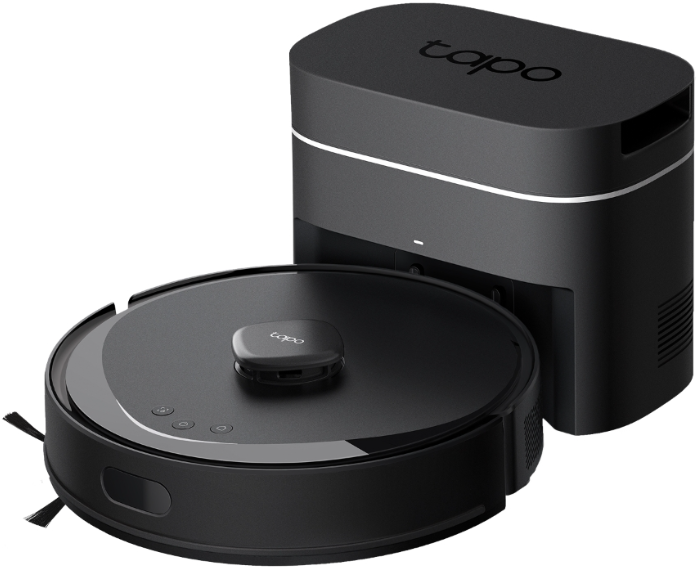
· 13,000Pa Suction Fan - Delivers 2.45× the suction power of the previous generation, lifting everything from fine dust to large debris with ease.
· 100% Tangle-Free System - Removes hair from floors, then automatically detangles in the dock. Truly effective, tangle-free.
· Up to 90 Days Hands-Free - With a 3.3L dust bag and high-frequency auto-emptying, it continuously clears debris from the dustbin.
· Enhanced Edge-to-Corner Cleaning - Lengthened side brush sweeps deeper along walls, around furniture, and into corners.
· New-Generation dToF LiDAR - Navigates smoothly around obstacles with greater precision.
· Vacuum and Mop in One Go - Vacuums and mops simultaneously to handle dust, debris, and spills in a single pass.
· Knows How to Treat Every Carpet - Automatically detects carpets or lets you manually set cleaning preferences.
· Matrix Full-Floor Coverage - Leave no spot untouched, ensuring a more thorough and comprehensive clean.
· 3+1 Multi-Floor Maps - Accurately detects different floors and creates 3+1 multi-floor local-stored maps to shape a full view of your house.
· Avoids Drops and Stairs - Detects edges and drop-offs to prevent falls
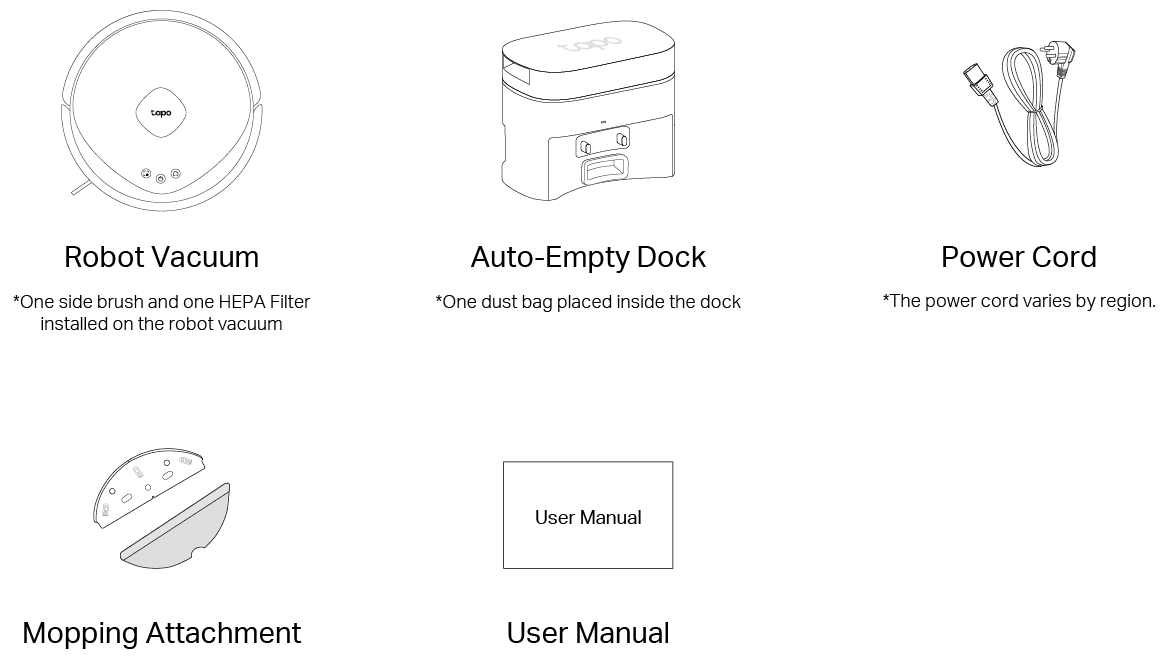
Package Contents
Overview
Robot Vacuum
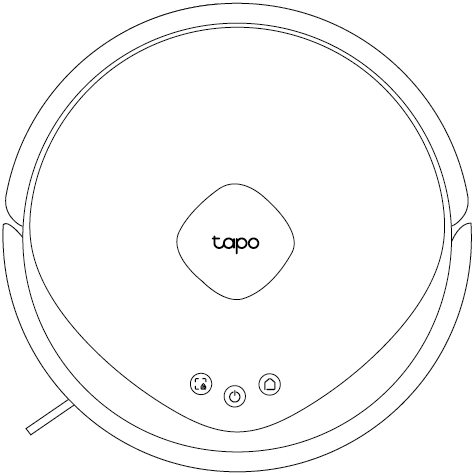
| Buttons | Indication | Status |
|---|---|---|
|
|
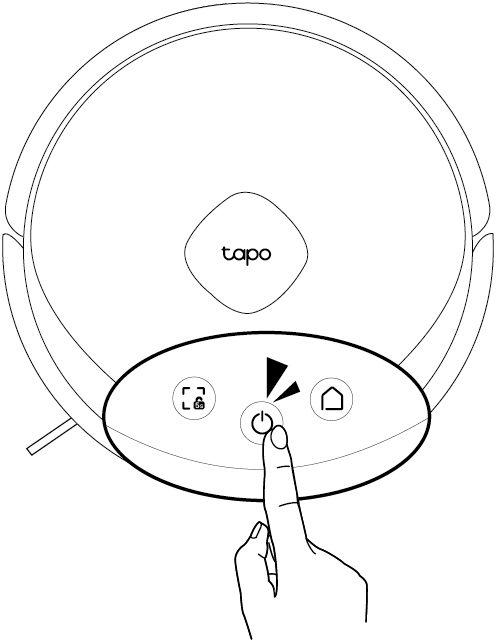
Power/Clean | • Press and hold for 3 seconds: Turn on/off the robot vacuum. • Press once: Start/pause cleaning. |
 |
Dock | • Return to the dock to charge. • Empty the dustbin when docked. |
 |
Spot Cleaning/Child Lock | • Press once: Start spot cleaning. • Press and hold for 5 seconds: Turn on/off the child lock. |
 |
Combo Button | • Press and hold for 5 seconds: Enter setup mode; reset Wi-Fi. • Press and hold for 10 seconds: Restore to factory default settings. |
|
LED Status | • Pulse/Flash Red: Battery level < 15%; Error • Pulse Orange: Battery level between 15% and 80% (Charging) • Pulse Green : Battery level > 80% (Charging); Turning on • Solid Green: Fully charged |

Appearance
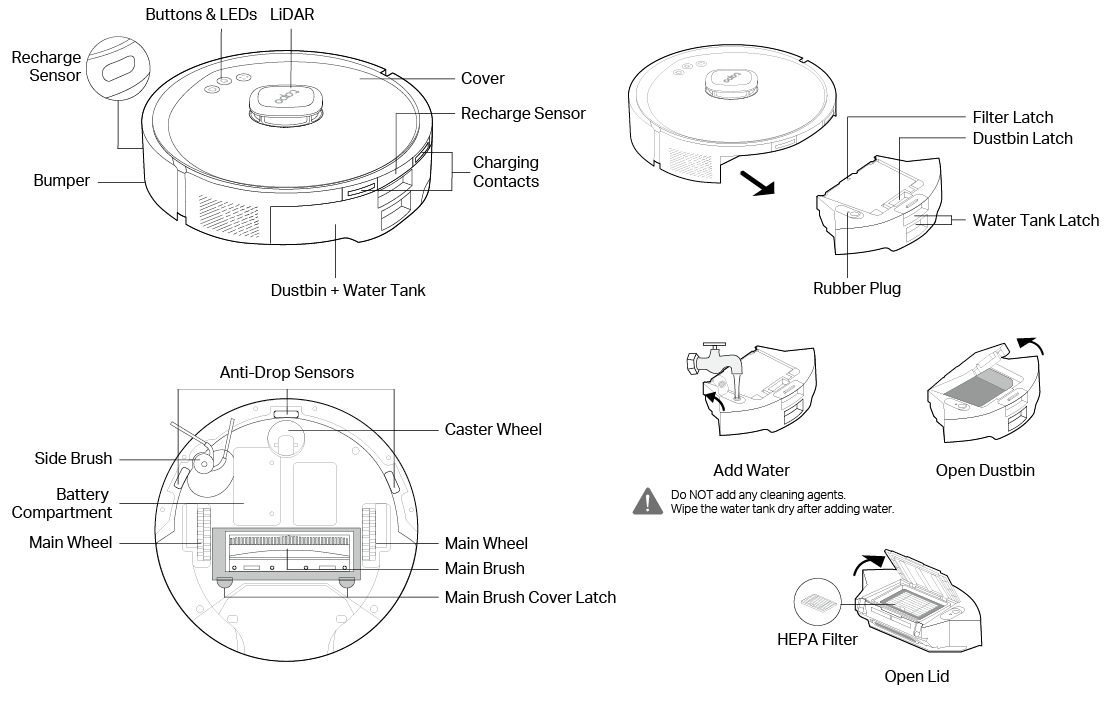
Auto-Empty Dock
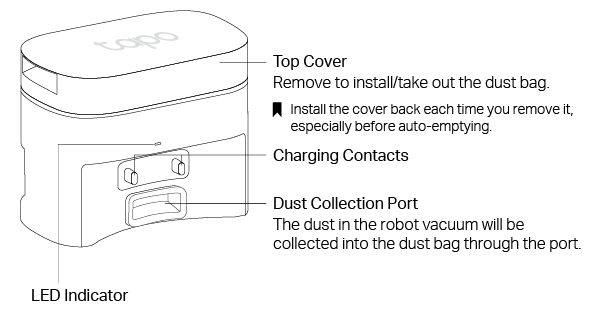
| LED | • Off: Powered off; charging; collecting dust • White: Powered on but robot vacuum not on the dock • Blinking White 3 Times: Charging starts; dust collection starts/ends • Red: Low clean water level; dirty water tank full/missing; cleaning tray overflow |
Set Up Your Robot Vacuum
Important Tips
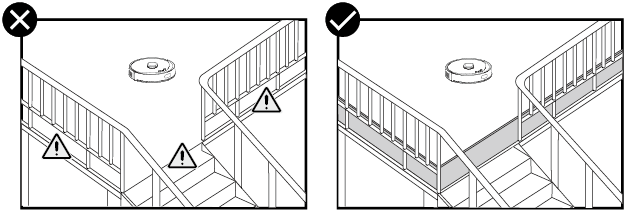
Install a physical barrier when using the robot vacuum on elevated surfaces (e.g., lofts or split-level floors) to prevent accidental falls and avoid injury or damage.
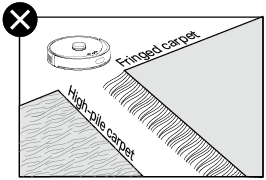
Do not use on high-pile or fringed carpets.
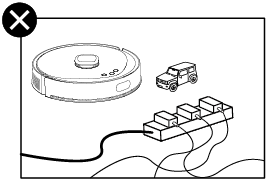
Remove power cords and small objects from the floor.
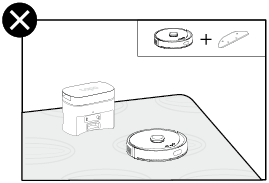
Avoid placing the dock on carpet when using the mopping attachment; if necessary, place the dock on the hard floor or a waterproof pad.
Step 1 Position the Dock
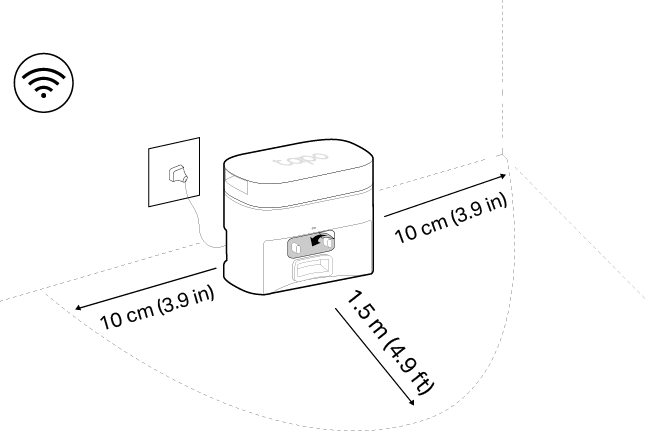
1. Position the dock on a hard, level surface against a wall, ensuring 1.5 m (4.9 ft) of clear space in front and 10 cm (3.9 in) to the left and right.
2. Connect the power cord to the dock and power source. Keep the cable tidy.
Notes:
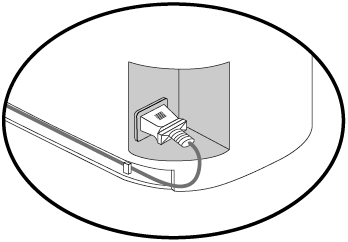
• Route the power cable on the back of the dock.
• Peel off the protective film for optimal performance.
• Ensure the area has a strong Wi-Fi signal and is not exposed to direct sunlight.
• Always keep the dock powered on; otherwise, the robot vacuum will not automatically return. Do not move the dock frequently.
Step 2 Remove the Protective Strips and Films
Remove the protective strips on both sides of the front bumper and all protective films.
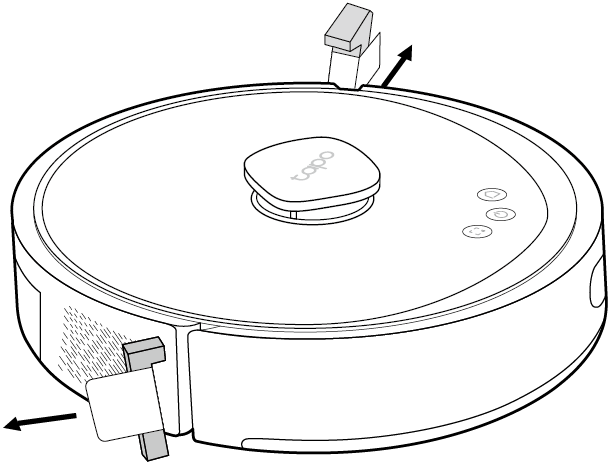
Step 3 Turn On the Robot Vacuum
Press and hold  for 3 seconds to turn on the robot vacuum. You will hear either "Turning On" or a beep, indicating a successful power-on.
Step 4 Charge the Robot Vacuum
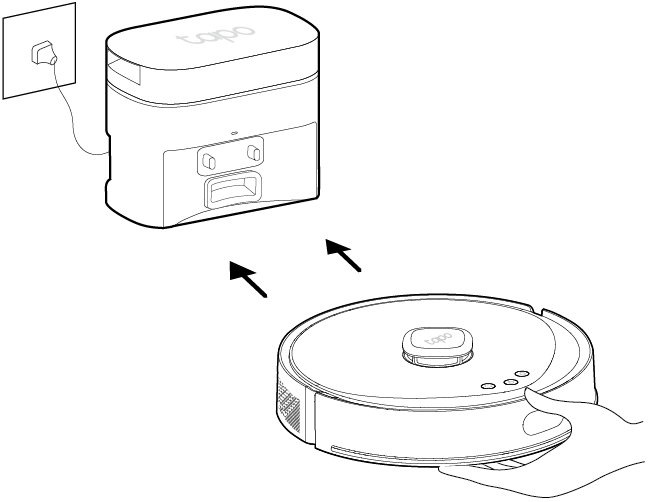
Place the robot vacuum on the charging dock or tap  to send it back to the dock to charge. It will return to the dock at the end of a cleaning job and whenever it needs to recharge.
Notes:
• When you place the robot vacuum on the charging dock, the robot vacuum will turn on automatically.
• Charging begins when the charging dock's LED blinks three times.
• We recommend that you fully charge the robot vacuum for about 4 hours prior to starting its first cleaning job.
• The robot vacuum enters the network standby mode about 5 minutes after being fully charged. To wake it up, start a task or remove it from the dock.
Step 5 Download the Tapo App and Connect to Wi-Fi
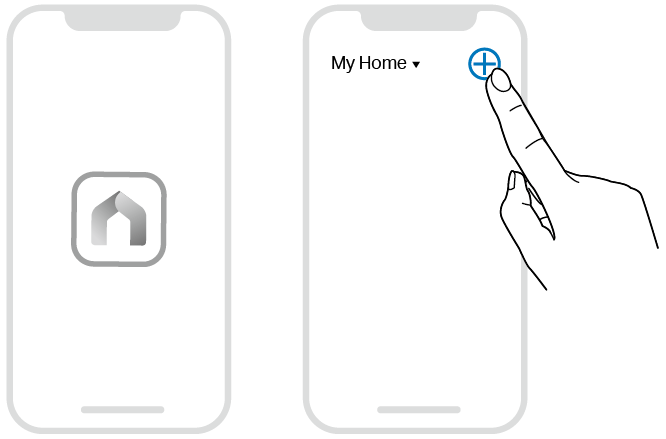
1. Download the Tapo app from the App Store or Google Play, then log in.

2. Open the Tapo app, tap the  icon, and select your model. Follow the step-by-step instructions to set up your robot vacuum and connect to your home Wi-Fi.
Mopping
Before Mopping
• Avoid using the mopping attachment on thick or high-pile carpets.
• Vacuum floors before starting the first mopping cycle.
• To prevent wetting the carpet, add a no-go zone, virtual wall, or carpet area on the Tapo app.
• The ability to cross obstacles is reduced when mopping.
• It is recommended to wash the mop cloth after each use.
Install the Mopping Attachment
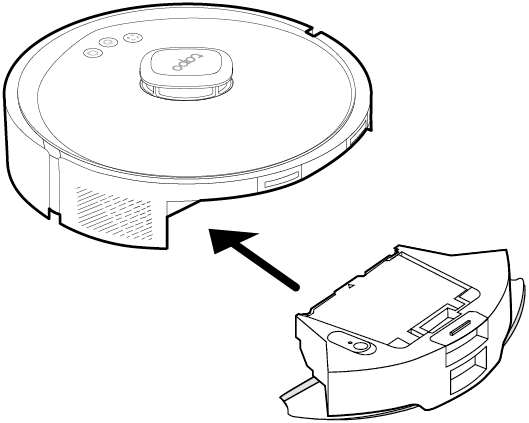
1. Take out the dustbin and water tank.
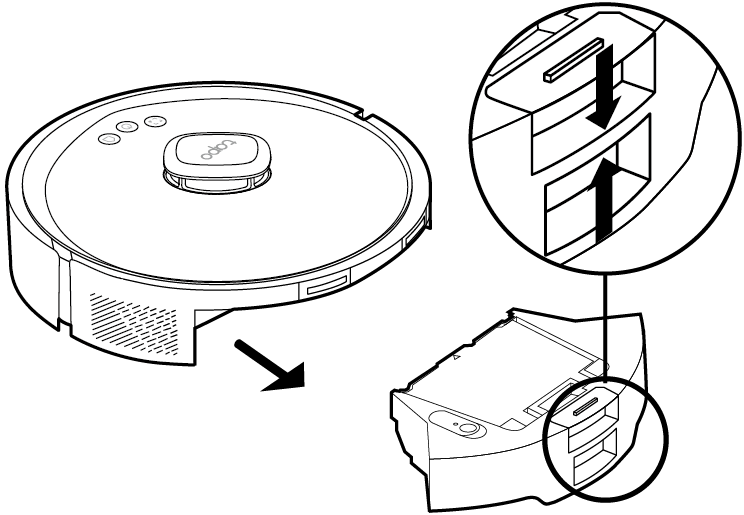
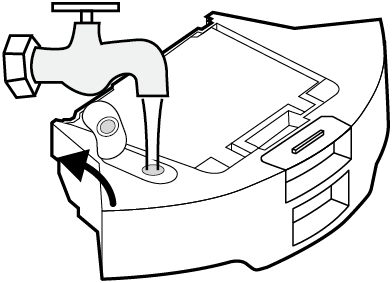
2. Remove the rubber plug and add water to the water tank.
To prevent corrosion, do NOT add any cleaning agents. Only use cool or room temperature water and be careful not to wet the metal contacts.
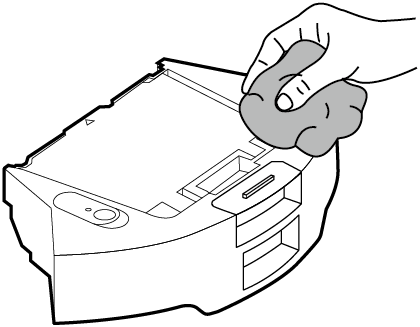
3. Wipe the water tank with a clean, dry cloth.
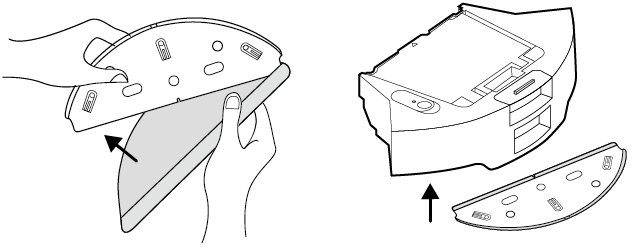
4. Install the washable mop cloth and the mop cloth mount.
5. Re-install the dustbin and water tank.
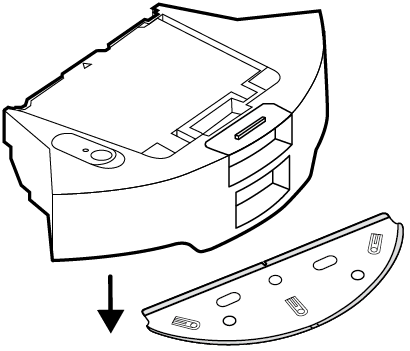
Clean the Mopping Attachment
1. Remove the mop cloth mount.
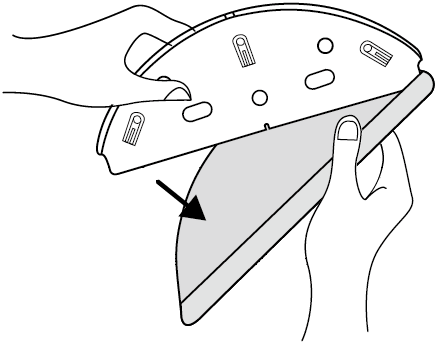
2. Remove the washable mop cloth.
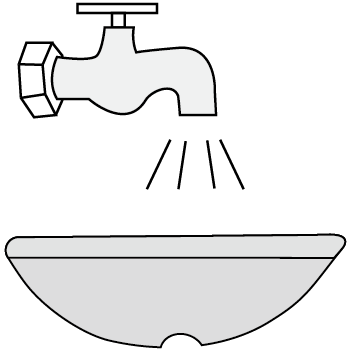
3. Clean the mop cloth.
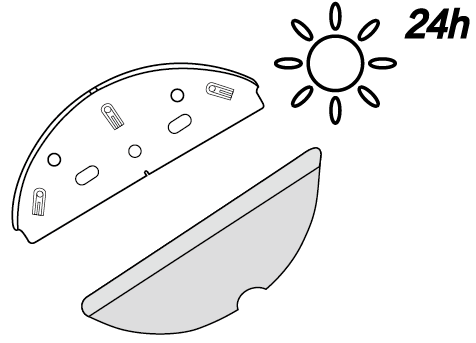
4. Sun dry the mop cloth and mop cloth mount.
Care and Maintenance
To maintain optimal performance, maintain the robot vacuum according to the following guidelines.
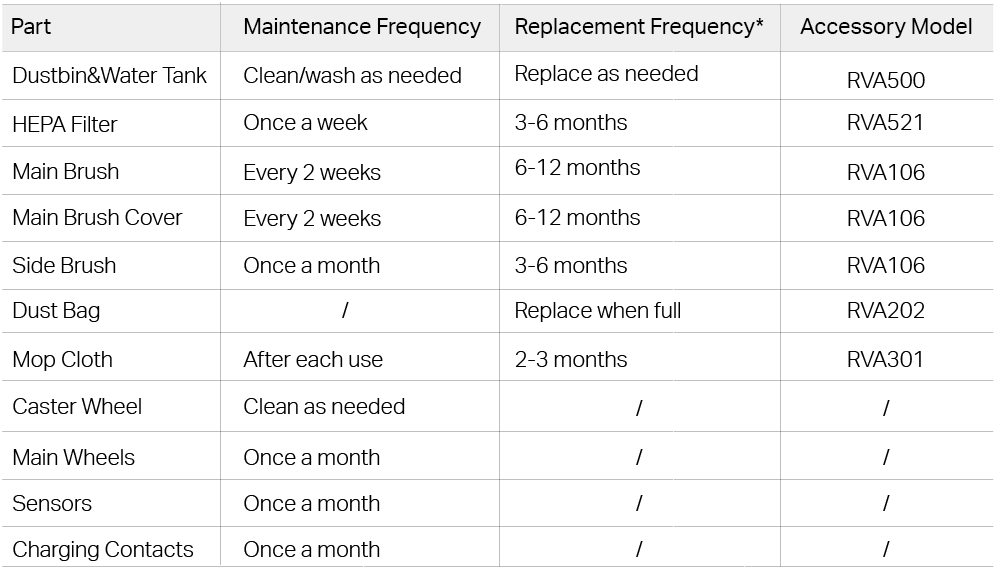
*Replacement frequency may vary depending on the actual situation. Parts should be replaced if visible wear appears.
Empty the Dustbin
Option 1: Auto-Empty
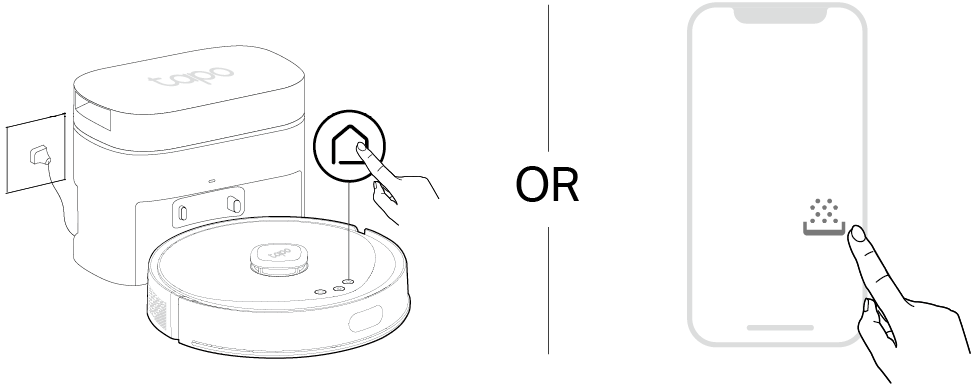
The robot vacuum automatically empties the dustbin after cleaning. You can also press  on the robot vacuum when docked or tap the Empty button on the Tapo app to suck up dust and debris in the dustbin to the dust bag.
Note: Remember to install the dock cover back for auto-emptying.
Option 2: Empty Manually
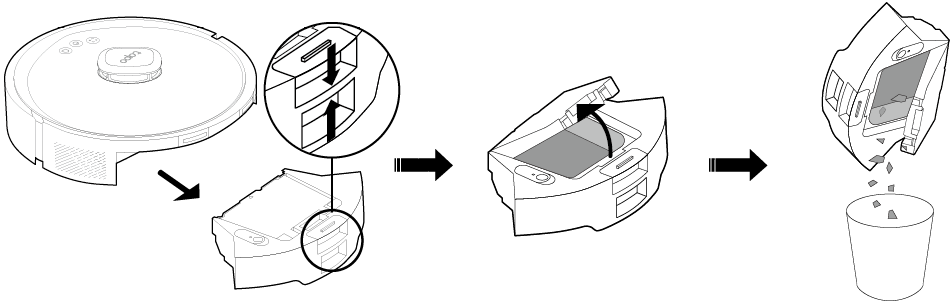
Remove and open the dustbin to empty the dustbin.
Clean the Filter
1. Remove the dustbin and open the lid.
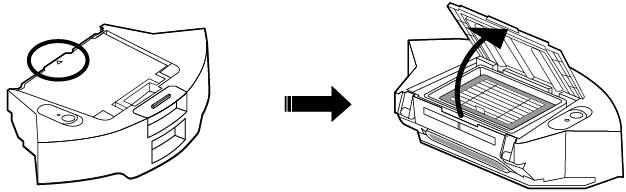
2. Remove the filter and clean the filter.
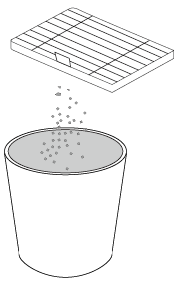
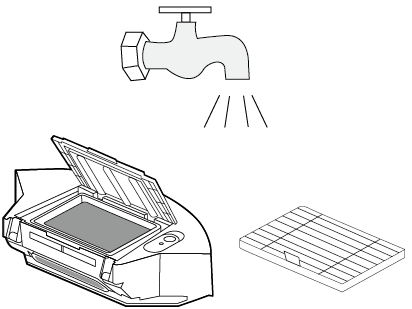
3. Wash the dustbin and filter. Note that do not wash with hot water or detergent.
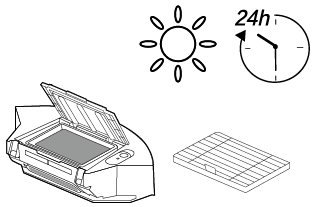
4. Air-dry the dustbin and filter thoroughly, then reinstall the filter as it was originally positioned.
Clean the Main Brush
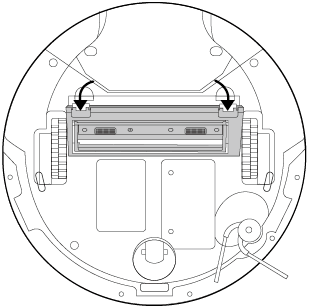
1. Turn the robot vacuum over, then unlatch and remove the main brush cover.
Note: If you have installed the mopping attachment, uninstall it from the robot vacuum first.
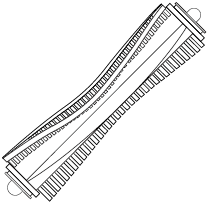
2. Remove any hair or debris.
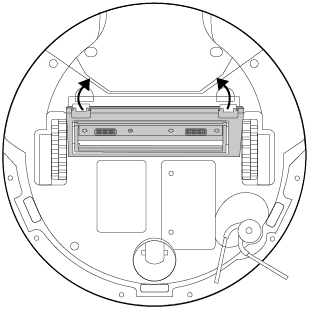
3. Press on the main brush cover and listen for a click to lock it in place.
Clean the Side Brush
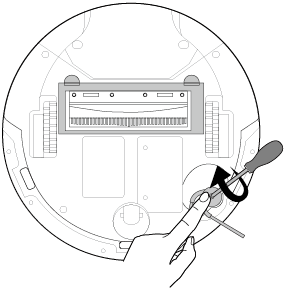
1. Use a screwdriver to unscrew the side brush clockwise, remove debris, and wipe with a damp cloth if necessary.
2. Turn the side brush anticlockwise to secure it tightly and ensure it is properly installed.
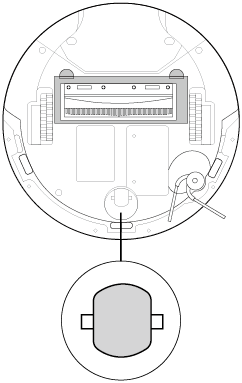
Clean the Caster Wheel
1. Pull firmly to remove the caster wheel and remove hair or dirt.
2. Reinstall the caster wheel and press it firmly into place.
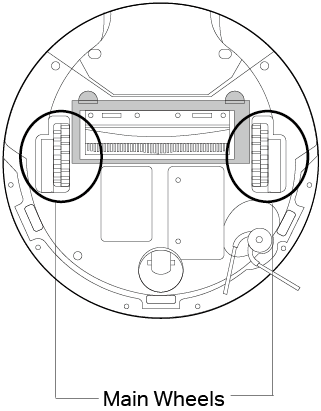
Clean the Main Wheels
Wipe the main wheels with a clean, dry cloth.
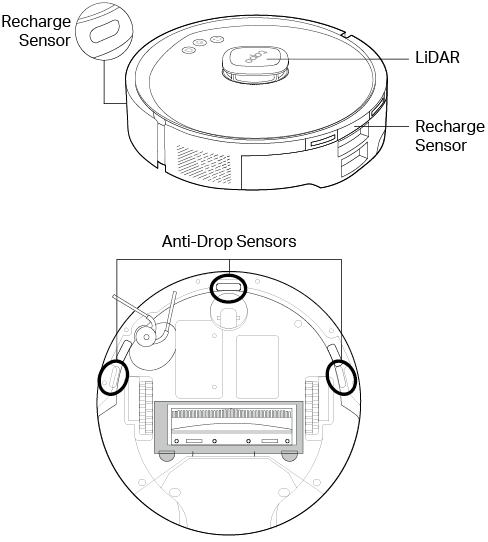
Clean the Sensors
Wipe the sensors with a clean, damp cloth, then dry them with a dry cloth.
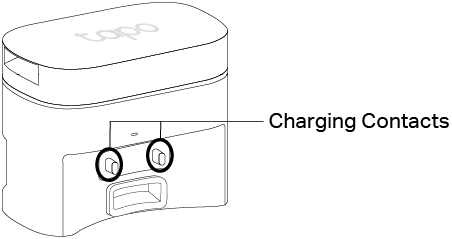
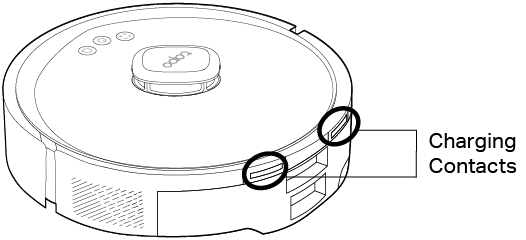
Clean the Charging Contacts
1. Power off the robot vacuum and dock.
2. Wipe the charging contacts with a clean, damp cloth, then dry them with a dry cloth. If necessary, use an alcohol-dampened cloth.
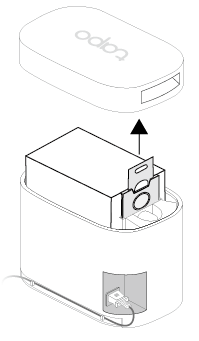
Replace the Dust Bag
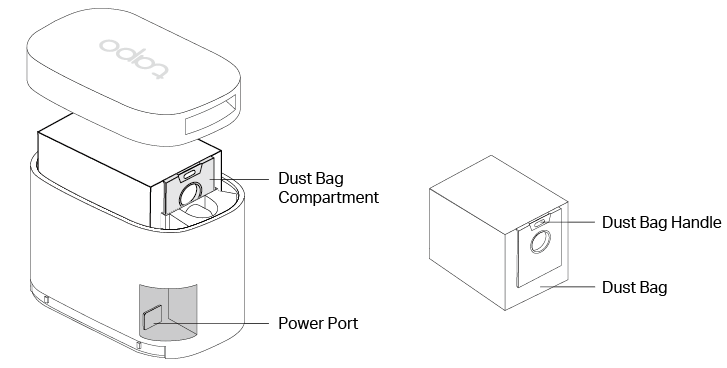
1. Remove the cover and pull up the handle of the dust bag.
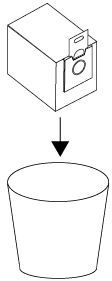
2. Throw away the used dust bag when it is full.
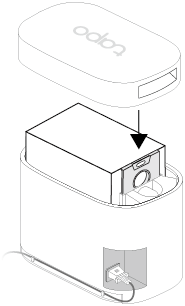
3. Install a new dust bag and put the cover back on.
Note: Install the cover back each time you remove it, especially before auto-emptying.
Troubleshooting
Refer to the table for troubleshooting.
| Issue | Solution |
|---|---|
| Setup failure | 1. Check if the robot vacuum is turned on. If not, press and hold  for 3 seconds to turn it on. for 3 seconds to turn it on.2. The battery level is low. Please place the robot vacuum on the dock to charge, and the robot vacuum will turn on automatically when it is ready. |
| Failed to find the device in the Tapo app | 1. Check if the robot vacuum is turned on. If not, press and hold for 3 seconds to turn it on. 2. Ensure your phone/tablet's Bluetooth is turned on. 3. Move your phone/tablet closer to the robot vacuum. 4. Simultaneously press and hold  and and  for more than 5 seconds to put your robot vacuum into setup mode, then try again. for more than 5 seconds to put your robot vacuum into setup mode, then try again.5. If the problem persists, try using another phone or tablet to download the Tapo app and set it up again. |
| Failed to connect to Home Wi-Fi | 1. Ensure your home Wi-Fi is a 2.4GHz network. 2. Ensure you have entered the correct Wi-Fi password. 3. The Wi-Fi signal may be too weak. Please move the robot vacuum closer to the router. 4. Simultaneously press and hold and for more than 5 seconds to put your robot vacuum into setup mode, then try again.5. If the problem persists, try using another phone or tablet to download the Tapo app and set it up again. |
| Charging failure | 1. Please check whether the LED of the dock is on and make sure that the power adapter of the dock is plugged in. 2. Poor contact. Please clean up the spring contacts on the dock and the charging contacts on the robot vacuum. |
| Recharge failure | 1. Remove the protective film from the robot vacuum and dock before use. 2. Ensure that there are no foreign objects obstructing the bottom of the dock. 3. Ensure the robot vacuum starts cleaning from the dock every time and the map on the Tapo app shows the icon of the dock. 4. There may be many obstacles near the dock. Please check and place the dock in an open area. 5. The robot vacuum may be far from the dock. Please place the robot vacuum near the dock and try again. |
| Abnormal Noise | There may be foreign matter entangled in the main brush, side brush, or wheels. Please clean up after shutdown. |
| Poor Cleaning | 1. There may be too much dust on the floor. Please increase the vacuum power in the Tapo app and set two or more cleaning times. 2. The dustbin may be full. Please tap the Empty button in the Tapo app or press on the robot vacuum to empty the dustbin.3. The main brush may be entangled by foreign matter. Please check and clean the main brush. 4. The filter may be clogged. Please clean or replace the filter. |
| Poor emptying or brush tangled | • If dust/hair emptying is poor, try enabling High-Frequency Dust Collection in the Tapo app. • If the main brush is frequently tangled, try enabling High-Frequency Hair Cutting in the Tapo app or clean manually. |
| Failed to automatically collect the dust | 1. Ensure the dock is powered on and you have closed the cover of the dock. 2. Automatic dust collection will not start until the robot vacuum has cleaned for more than 30 minutes in total. 3. Don’t collect the dust again within 10 minutes. 4. Check if Do Not Disturb is set in the Tapo app. 5. Check if a dust bag is installed properly. If not installed or improperly installed, the dock LED will flash. 6. Check if the dust bag is full and replace it. |
| Schedule is not working | 1. The battery level may be low. Please charge the battery until it is above 20% (not docked) or 30% (docked). 2. The cleaning is already in progress when the schedule starts. 3. Check if Do Not Disturb is set in the Tapo app. Make sure the schedule is not within the set Do Not Disturb period. 4. There is no internet access for your Wi-Fi network and your robot vacuum has restarted. Make sure your network has internet. |
| Offline | 1. Ensure the Tapo app and the robot vacuum firmware is up to date. 2. Ensure the area receives good Wi-Fi signals. 3. Ensure your router is working properly. Reboot the router and robot vacuum. 4. Try to change the router's channel to 6, and width to 20MHz. 5. Try to change the router's DNS to 8.8.8.8. 6. If the robot vacuum does not respond, press and hold for 5 seconds to force shutdown, then press and hold for 3 seconds to turn it on and check. |
If the problem persists, please contact our Technical Support at https://www.tapo.com/support/
Voice Prompts for Issues
Refer to the table for troubleshooting.
| Voice Prompt | Solution |
|---|---|
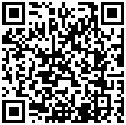
| Error 1 - 7 | Press and hold the power button for 3 seconds to turn the robot vacuum off, then press and hold for another 3 seconds to turn it back on to reboot. If the issue persists, please scan the QR code on the page to contact the technical support. |
| Unable to find charging base. Stop heading home. | Please refer to the FAQ "What to do if my Tapo Robot Vacuum cannot recharge?" (https://www.tp-link.com/support/faq/3496/) for help. |
| Restricted area detected. Please move to a new location to start. | Check if the robot vacuum is in a no-go zone or on a restricted carpet (No Cleaning/Vacuum Only). Move it to a new location or adjust carpet settings in the Tapo app. |
| Failed to locate. Stop cleaning. | 1. Check if the map matches the current environment. 2. Check if you have enabled the Auto Switch feature for map management in the Tapo App. 3. Make sure the dock is placed in a spacious area with no obstacles around it. 4. Check if the LiDAR is dirty or obscured and clean it. 5. Reboot and try again. |
| The laser sensor is stuck or entangled. Please check. | 1. Check if there are any foreign objects stuck in the LiDAR sensor and clean it with a clean, soft, and dry cloth. 2. Reboot and try again. If the issue persists, please scan the QR code on the page to contact technical support. |
| Anti-drop sensor blocked. Please wipe. | Check if the robot vacuum is near the edge of a drop-off or on dark-colored or long-pile carpets. If so, set no-go zones for these areas in the Tapo app. If not, turn over the robot vacuum, check if the anti-drop sensors are dirty, and clean it with a clean, soft, and dry cloth. |
| Front bumper stuck. Please check. | 1. Check if there are any foreign objects stuck in the front bumper and clean it with a clean and dry cloth. 2. Manually press the front bumper gently from different angles to check if it rebounds normally. If the issue persists, please scan the QR code on the page to contact technical support. |
If the problem persists, please contact our Technical Support at https://www.tapo.com/support/
Authentication
FCC compliance information statement

Product Name: Robot Vacuum Cleaner & Auto-Empty Dock
Model Number: Tapo RV30 Max Plus Gen 2 / Tapo RV30 Max Turbo
Responsible Party:
TP-Link Systems Inc.
Address: 10 Mauchly, Irvine, CA 92618
Website: http://www.tp-link.com/us/
Tel: +1 626 333 0234
Fax: +1 909 527 6804
E-mail: sales.usa@tp-link.com
This equipment has been tested and found to comply with the limits for a Class B digital device, pursuant to part 15 of the FCC Rules. These limits are designed to provide reasonable protection against harmful interference in a residential installation. This equipment generates, uses and can radiate radio frequency energy and, if not installed and used in accordance with the instructions, may cause harmful interference to radio communications. However, there is no guarantee that interference will not occur in a particular installation. If this equipment does cause harmful interference to radio or television reception, which can be determined by turning the equipment off and on, the user is encouraged to try to correct the interference by one or more of the following measures:
Reorient or relocate the receiving antenna.
Increase the separation between the equipment and receiver.
Connect the equipment into an outlet on a circuit different from that to which the receiver is connected.
Consult the dealer or an experienced radio/ TV technician for help.
This device complies with part 15 of the FCC Rules. Operation is subject to the following two conditions:
This device may not cause harmful interference.
This device must accept any interference received, including interference that may cause undesired operation.
Any changes or modifications not expressly approved by the party responsible for compliance could void the user’s authority to operate the equipment.
Note: The manufacturer is not responsible for any radio or TV interference caused by unauthorized modifications to this equipment. Such modifications could void the user’s authority to operate the equipment.
FCC RF Radiation Exposure Statement
This equipment complies with FCC RF radiation exposure limits set forth for an uncontrolled environment. This device and its antenna must not be co-located or operating in conjunction with any other antenna or transmitter.
“To comply with FCC RF exposure compliance requirements, this grant is applicable to only Mobile Configurations. The antennas used for this transmitter must be installed to provide a separation distance of at least 20 cm from all persons and must not be co-located or operating in conjunction with any other antenna or transmitter.”
We, TP-Link Systems Inc., has determined that the equipment shown as above has been shown to comply with the applicable technical standards, FCC part 15. There is no unauthorized change is made in the equipment and the equipment is properly maintained and operated.
Issue Date: 2026-09-23
CE Mark Warning

OPERATING FREQUENCY (the maximum transmitted power)
For EU/UK Region:
2400MHz~2483.5MHz / 20dBm (Wi-Fi)
2402MHz~2480MHz / 10dBm (Bluetooth)
EU Declaration of Conformity
For Robot Vacuum:
TP-Link hereby declares that the Robot Vacuum is in compliance with the essential requirements and other relevant provisions of directives 2014/53/EU, 2009/125/EC, 2011 /65/EU and (EU) 2015/863. The original EU declaration of conformity may be found at https://www.tapo.com/en/support/ce/
For Auto-Empty Dock:
TP-Link hereby declares that the Auto-Empty Dock is in compliance with the essential requirements and other relevant provisions of directives 2014/30/EU, 2014/35/EU, 2009/125/EC, 2011/65/EU and (EU)2015/863. The original EU declaration of conformity may be found at https://www.tapo.com/en/support/ce/
RF Exposure Information
This device meets the EU requirements (2014/53/EU Article 3.1a) on the limitation of exposure of the general public to electromagnetic fields by way of health protection.
The device complies with RF specifications when the device used at 20 cm from your body.
The Auto-Empty Dock (station) and the robotic vacuum need to communicate continuously for the purpose of real-time remote control via wireless technology. If the product enters the off or standby mode, communication and product intended function usage cannot be realized. Therefore, the product does not provide the off or standby modes.
UKCA Mark

UK Declaration of Conformity
For Robot Vacuum:
TP-Link hereby declares that the Robot Vacuum is in compliance with the essential requirements and other relevant provisions of the Radio Equipment Regulations 2017.
The original UK declaration of conformity may be found at https://www.tapo.com/support/ukca/
For Auto-Empty Dock:
TP-Link hereby declares that the Auto-Empty Dock is in compliance with the essential requirements and other relevant provisions of the Electromagnetic Compatibility Regulations 2016 and Electrical Equipment (Safety) Regulations 2016.
The original UK declaration of conformity may be found at https://www.tapo.com/support/ukca/
Canadian Compliance Statement
This device contains licence-exempt transmitter(s)/receiver(s) that comply with Innovation, Science and Economic Development Canada’s licence-exempt RSS(s). Operation is subject to the following two conditions:
(1) This device may not cause interference.
(2) This device must accept any interference, including interference that may cause undesired operation of the device.
L’émetteur/récepteur exempt de licence contenu dans le présent appareil est conforme aux CNR d’Innovation, Sciences et Développement économique Canada applicables aux appareils radio exempts de licence. L’exploitation est autorisée aux deux conditions suivantes :
1) L’appareil ne doit pas produire de brouillage;
2) L’appareil doit accepter tout brouillage radioélectrique subi, même si le brouillage est susceptible d’en compromettre le fonctionnement.
Radiation Exposure Statement:
This equipment complies with IC radiation exposure limits set forth for an uncontrolled environment. This equipment should be installed and operated with minimum distance 20cm between the radiator & your body.
Déclaration d'exposition aux radiations:
Cet équipement est conforme aux limites d'exposition aux rayonnements IC établies pour un environnement non contrôlé. Cet équipement doit être installé et utilisé avec un minimum de 20 cm de distance entre la source de rayonnement et votre corps.
Industry Canada Statement
CAN ICES-003 (B)/NMB-003(B)
Korea Warning Statements:
당해 무선설비는 운용중 전파혼신 가능성이 있음.
NCC Notice & BSMI Notice
注意!
取得審驗證明之低功率射頻器材,非經核准,公司、商號或使用者均不得擅自變更頻率、加大功率或變更原設計之特性及功能。
低功率射頻器材之使用不得影響飛航安全及干擾合法通信;經發現有干擾現象時,應立即停用,並改善至無干擾時方得繼續使用。
前述合法通信,指依電信管理法規定作業之無線電通信。
低功率射頻器材須忍受合法通信或工業、科學及醫療用電波輻射性電機設備之干擾。
為避免本器材影像畫面遭偷窺或擷取,本器材使用者應先修改預設密碼,並定期更新密碼。
安全諮詢及注意事項
請使用原裝電源供應器或只能按照本產品注明的電源類型使用本產品。
清潔本產品之前請先拔掉電源線。請勿使用液體、噴霧清潔劑或濕布進行清潔。
注意防潮,請勿將水或其他液體潑灑到本產品上。
插槽與開口供通風使用,以確保本產品的操作可靠並防止過熱,請勿堵塞或覆蓋開口。
請勿將本產品置放於靠近熱源的地方。除非有正常的通風,否則不可放在密閉位置中。
不要私自拆開機殼或自行維修,如產品有故障請與原廠或代理商聯繫。
請勿更換不正確類型的電池,以免破壞保護措施。 請勿將電池丟入火源或烤箱、使用機械擠壓或切割電池,否則將導致爆炸。
請勿將電池放置於可能爆炸或洩漏易燃液體、氣體的高溫環境中;請勿將電池置於低氣壓環境下,這將導致爆炸或易燃液體、氣體洩漏。
產品適用於家居環境的地面清潔,請勿用在室外、非地面、商用或工業環境。
本設備不適合身體、感官或精神能力下降或缺乏經驗和知識的人(包括兒童)使用,除非他們已由負責其安全的人員對設備的使用進行監督或指導。
應監督兒童,確保他們不會把玩本設備。 本設備只能與包裝隨附的電源配件一起使用。
警告:若要幫電池充電,只能使用設備包裝內附的可充電配件。
限用物質含有情況標示聲明書
| 設備名稱:二合一掃地機器人 型號(型式):Tapo RV30 Max Plus Gen 2 / Tapo RV30 Max Turbo Equipment name Type designation (Type) |
||||||
|---|---|---|---|---|---|---|
| 單元 Unit |
限用物質及其化學符號 Restricted substances and its chemical symbols |
|||||
| 鉛 Lead (Pb) |
汞 Mercury (Hg) |
鎘 Cadmium (Cd) |
六價鉻 Hexavalent chromium (Cr+6) |
多溴聯苯 Polybrominated biphenyls (PBB) |
多溴二苯醚 Polybrominated diphenyl ethers (PBDE) |
|
| 內部配線 | ○ | ○ | ○ | ○ | ○ | ○ |
| 印刷電路板 | ○ | ○ | ○ | ○ | ○ | ○ |
| 馬達 | ○ | ○ | ○ | ○ | ○ | ○ |
| 開關 | ○ | ○ | ○ | ○ | ○ | ○ |
| 外殼塑料 | ○ | ○ | ○ | ○ | ○ | ○ |
| 備考1.〝超出0.1 wt %〞及〝超出0.01 wt %〞係指限用物質之百分比含量超出百分比含量基準值 Note 1:“Exceeding 0.1 wt %” and “exceeding 0.01 wt %” indicate that the percentage content of the restricted substance exceeds the reference percentage value of presence condition. 備考2.〝○〞係指該項限用物質之百分比含量未超出百分比含量基準值。 Note 2:“○” indicates that the percentage content of the restricted substance does not exceed the percentage of reference value of presence. 備考3.〝-〞係指該項限用物質為排除項目。 Note 3:The “−” indicates that the restricted substance corresponds to the exemption. |
||||||

Продукт сертифицировано згідно с правилами системи УкрСЕПРО на відповідність вимогам нормативних>Продукт сертифіковано згідно с правилами системи УкрСЕПРО на відповідність вимогам нормативних документів та вимогам, що передбачені чинними законодавчими актами України.

Safety Information
Keep the device away from water, fire, humidity or hot environments.
This appliance contains batteries that are only replaceable by skilled persons.
Do not attempt to disassemble, repair, or modify the device. If you need service, please contact us.
If the supply cord is damaged, it must be replaced by the manufacturer, its service agent or similarly qualified persons in order to avoid a hazard.
| Avoid replacement of a battery with an incorrect type that can defeat a safeguard. Avoid disposal of a battery into fire or a hot oven, or mechanically crushing or cutting of a battery, that can result in an explosion. Do not leave a battery in an extremely high temperature surrounding environment that can result in an explosion or the leakage of flammable liquid or gas; Do not leave a battery subjected to extremely low air pressure that may result in an explosion or the leakage of flammable liquid or gas. |
Children should be supervised to ensure that they do not play with the appliance.
The appliance is only to be used with the charging dock (Tapo RVD102) provided with the appliance.
The appliance contains a 5200mAh lithium-ion battery.
This appliance can be used by children aged from 8 years and above and persons with reduced physical, sensory or mental capabilities or lack of experience and knowledge if they have been given supervision or instruction concerning use of the appliance in a safe way and understand the hazards involved. Children shall not play with the appliance. Cleaning and user maintenance shall not be made by children without supervision.
Operating Temperature: 32 ~ 104°F (0 ~ 40℃)
Storage temperature: -4 ~ 140°F (-20 ~ 60℃)
When the battery is charged: 32 ~ 104°F (0 ~ 40℃)
Tapo RV30 Max Plus Gen2 and Tapo RVD102 together:
1. Power consumption in networked standby: 1.8W
2. Power consumption in networked standby when all wireless network ports are activated: 1.8W
3. The default period of time after which the power management function switches the equipment automatically into a condition providing networked standby: 20 minutes.
Tapo RVD102 only:
1. Power consumption in low power mode: 0.3 W.
2. The default period of time after which the power management function switches the equipment automatically into a condition providing low power mode: 20 minutes.
Explanation of the symbols on the product label
Note: The product label is on the bottom of the product and its power supply. Symbols may vary from products.
| Symbol 符號解釋 |
Explanation 解釋 |
|---|---|
 |
Class II equipment Class II 設備 |
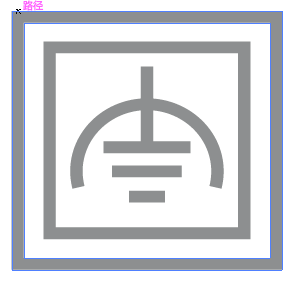 |
Class II equipment with functional earthing 具有功能接地的Class II 設備 |
 |
Alternating current 交流電 |
 |
DC voltage 直流電壓 |
 |
Polarity of output terminals 輸出端子極性 |
 |
Indoor use only 僅限室內使用 |
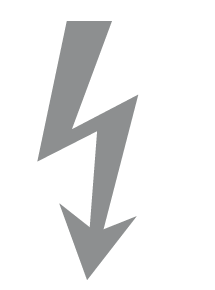 |
Dangerous voltage 危險電壓 |
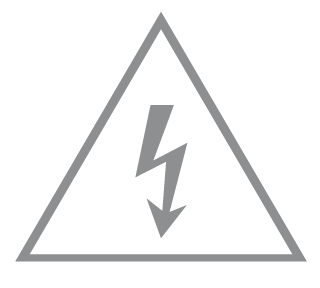 |
Caution, risk of electric shock 注意,有觸電危險 |
 |
Energy efficiency Marking 能源效率標示 |
 |
Protective earth 保護地線 |
 |
Earth 地線 |
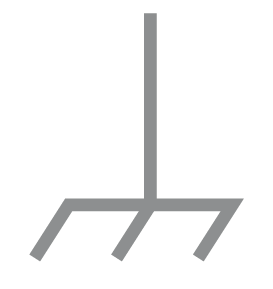 |
Frame or chassis 機架接地 |
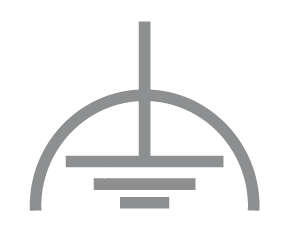 |
Functional earthing 功能地線 |
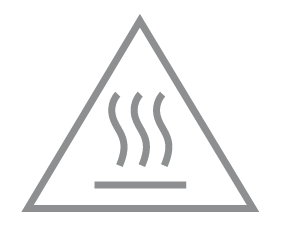 |
Caution, hot surface 警告,表面高溫 |
 |
Caution 警告 |
 |
Operator’s manual 操作手冊 |
 |
Stand-by 待機 |
 |
“ON”/”OFF” (push-push) 「開」/「關」 ( 按壓式) |
 |
Fuse 保險絲 |
 |
Fuse is used in neutral N 保險絲用於中性線N |
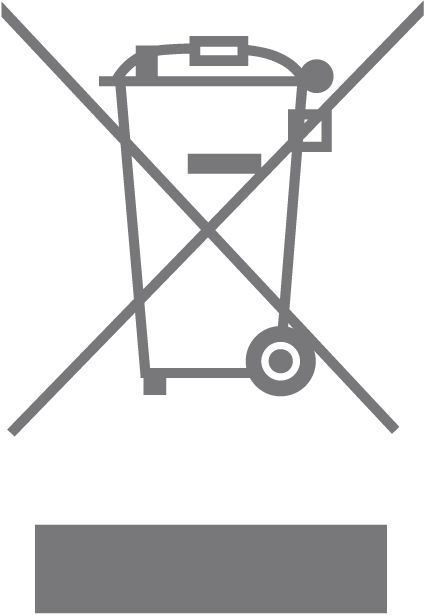 |
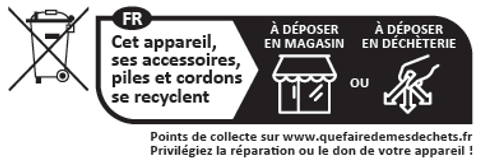
RECYCLING This product bears the selective sorting symbol for Waste electrical and electronic equipment (WEEE). This means that this product must be handled pursuant to European directive 2012/19/EU in order to be recycled or dismantled to minimize its impact on the environment. User has the choice to give his product to a competent recycling organization or to the retailer when he buys a new electrical or electronic equipment. 回收利用 本產品標示有「廢棄電氣電子設備(WEEE)」的分類回收標誌。這表示本產品必須依據歐盟指令 2012/19/EU 進行妥善回收或拆 解,以減少對環境的影響。 使用者可選擇將本產品交給合格的回收機構,或在購買新電器或電子設備時,交回給零售商進行回收處理。 |
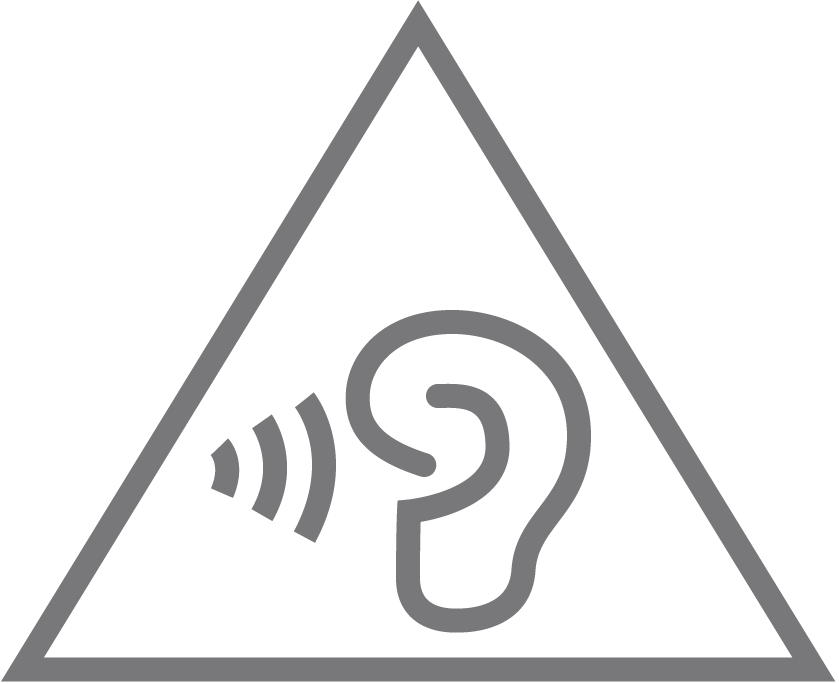 |
Caution, avoid listening at high volume levels for long periods 注意,避免長時間以高音量收聽 |
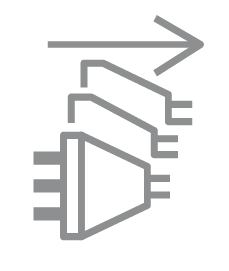 |
Disconnection, all power plugs 斷開所有電源插頭 |