


Desktop Access Points
for Business Networks
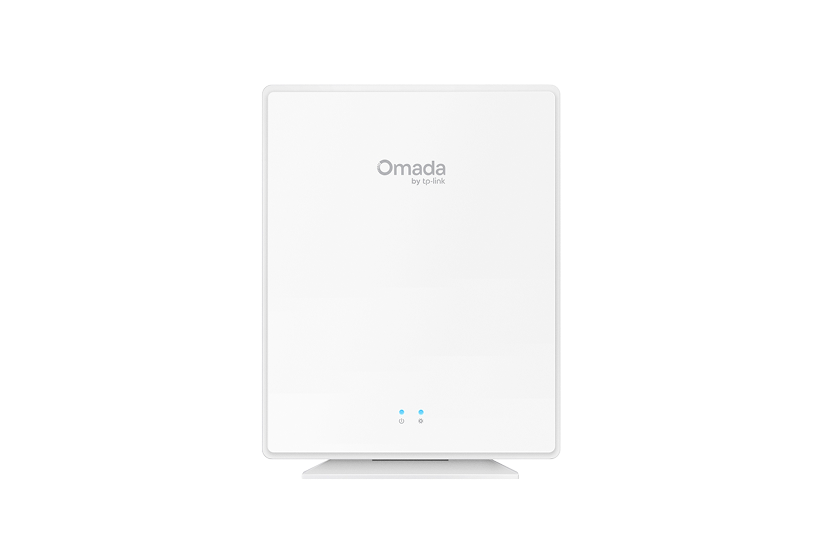
Omada desktop access points provide Wi-Fi 6 connectivity and four gigabit Ethernet ports that deploy instantly on any flat surface. The EAP650-Desktop combines wireless coverage with wired device connectivity for workspaces, retail counters, and reception areas, managed through the same centralized Omada controller platform coordinating your entire Omada by TP-Link network infrastructure.

Business Benefits

No Installation Required
Desktop device sits on any flat surface without mounting hardware, eliminating installation time and costs associated with ceiling-mount or wall-plate deployments while providing immediate connectivity where you need it.

Multiple Device Connectivity
Four gigabit Ethernet ports connect wired devices like desktop computers, IP phones, and printers directly to the access point, reducing the need for separate desktop switches in workspaces with limited Ethernet drops.

Flexible Power Options
Supports both 802.3af/at/bt PoE and DC power adapter (included), allowing deployment through PoE switches for centralized power management or standard wall outlets where PoE infrastructure doesn't exist.

Wi-Fi 6 Performance
Supports 250+ simultaneous connections, ensuring employees, customers, and IoT devices maintain consistent connectivity during peak business hours.

Wall-Mounting Flexibility
Includes wall-mounting kit for space-saving vertical installation when desk surface area is limited, providing deployment options that adapt to workspace constraints in restaurant, hospitality, and office environments.

Seamless Omada Integration
Managed through cloud, hardware, or software controllers alongside Omada switches and gateways, enabling consistent network policies, VLAN segmentation, and remote troubleshooting across single or multi-site deployments with centralized visibility.
Solving Connectivity Challenges
Desktop access points keep businesses connected where ceiling or wall mounting requires expensive installation, structural modifications, or extended downtime.

Deploy at checkout counters to provide wireless connectivity for mobile payment devices while connecting wired POS terminals, receipt printers, and barcode scanners through built-in gigabit ports without running cables across the floor.

Position on shared desks or collaboration tables to deliver both Wi-Fi access and wired Ethernet connections for laptops, monitors, and IP phones in flexible workspace environments where fixed installation isn't feasible.

Install at front desk areas and business centers to provide guest Wi-Fi access while connecting reception computers, printers, and property management system terminals through available Ethernet ports.

Deploy in short-term retail locations, trade show booths, or seasonal spaces where quick network setup is essential, with simple desktop placement and PoE or DC power options.

Serve as primary wireless coverage in small offices or remote locations where a single access point with wired port expansion eliminates the need for separate switches and access points, reducing equipment costs and installation complexity.

Place on conference tables to provide dedicated wireless access for presentation devices and video conferencing equipment while connecting wired peripherals like displays and conference phones without additional wall drops.
FAQs
What is a desktop Wi-Fi access point, and how is it different from a ceiling-mounted AP? 
A desktop access point sits on flat surfaces like desks, counters, or shelves without requiring mounting hardware or ceiling installation. The EAP650-Desktop includes four gigabit Ethernet ports for connecting wired devices directly to the access point, while ceiling-mount models focus primarily on wireless coverage without built-in wired expansion. Desktop APs work best where ceiling installation isn't practical or where you need both wireless connectivity and wired port expansion in the same location.
Are Omada desktop access points suitable for business and professional environments?
Yes, the EAP650-Desktop is designed for business environments like offices, restaurants, and hotels where you need both wireless and wired connectivity in one device. It delivers Wi-Fi 6 speeds of 2,402 Mbps on 5 GHz and 574 Mbps on 2.4 GHz, while four gigabit ethernet ports handle wired connections for equipment like computers, printers, and IP phones. You can power it through PoE from your switch or use the included power adapter, and it works on desktops or mounts to walls.
Do Omada desktop Wi-Fi APs support centralized cloud or on-premises management?
Yes, desktop access points integrate with Omada's Software-Defined Networking (SDN) platform through cloud-based controllers, hardware controllers, or software controllers installed on local servers. The same controller manages desktop APs alongside ceiling-mount models, switches, and gateways, providing unified configuration, monitoring, and troubleshooting across all sites from a single interface.
Can desktop Wi-Fi access points be powered via PoE or do they require a power adapter?
The EAP650-Desktop supports both 802.3af/at/bt PoE input and DC power through the included adapter. When connected to PoE-capable switches, the access point receives both power and data through a single ethernet cable, eliminating the need for nearby power outlets. DC power option provides flexibility for locations without PoE infrastructure.
How many devices can an Omada desktop access point support simultaneously?
The EAP650-Desktop supports 250+ concurrent wireless client connections using Wi-Fi 6 technologies, including 2×2 MU-MIMO and OFDMA to distribute airtime efficiently across connected devices.
Can Omada desktop Wi-Fi access points be integrated with Omada switches and gateways?
Yes, desktop access points operate as part of the unified Omada SDN platform alongside switches and gateways under centralized controller management. This integration enables features like VLAN segmentation across wired and wireless networks, coordinated security policies, seamless roaming between desktop and ceiling-mount access points, and unified network monitoring. Configuration changes pushed through the controller apply consistently across all managed devices, regardless of form factor.