Mesh WiFi vs WiFi Extender: The Full Comparison for Philippine Homes
Published: March 5, 2024 · Last Updated: July 2026
Quick Answer: Mesh WiFi vs WiFi Extender
-
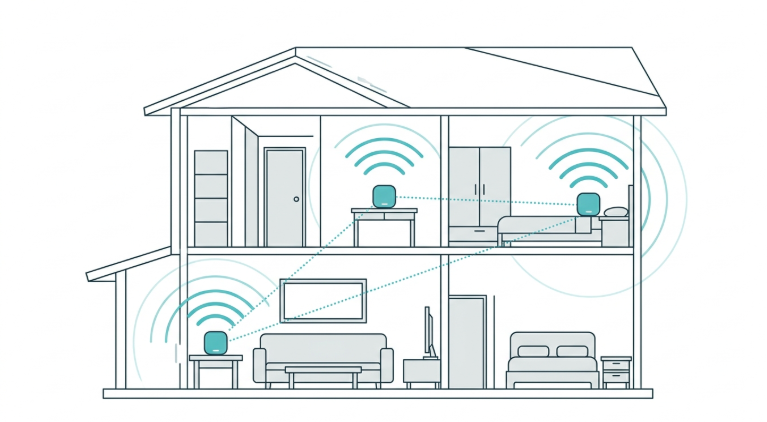
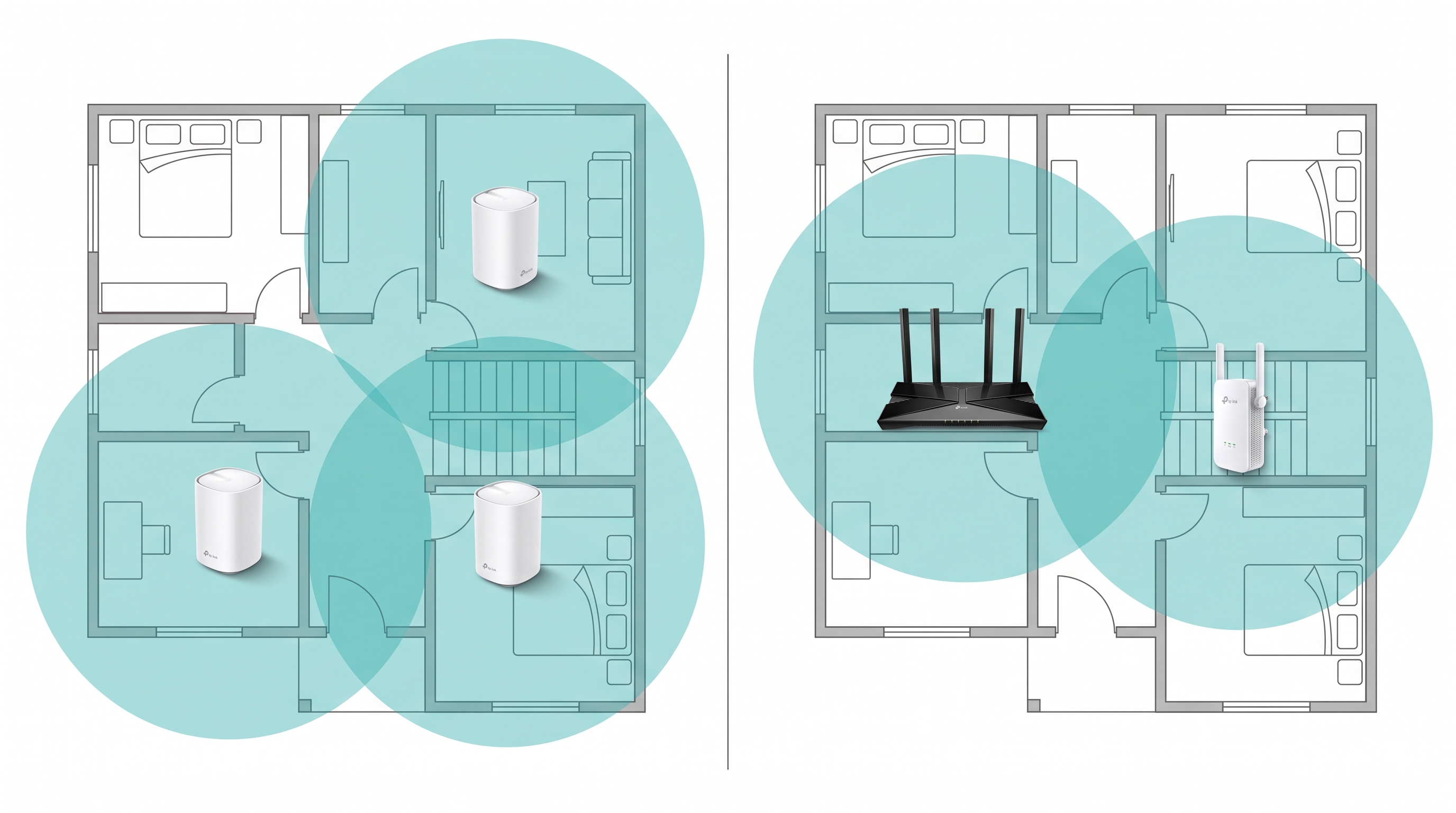
A mesh WiFi system uses multiple nodes that form one unified network, giving you seamless whole-home coverage with a single network name. It's the right choice for multi-floor homes, thick-walled concrete houses, and households with many connected devices.
-
WiFi extenders plug into an outlet and rebroadcast your existing signal to one weak spot, making them the right choice for a single dead zone in a smaller home where your main router is otherwise strong.
-
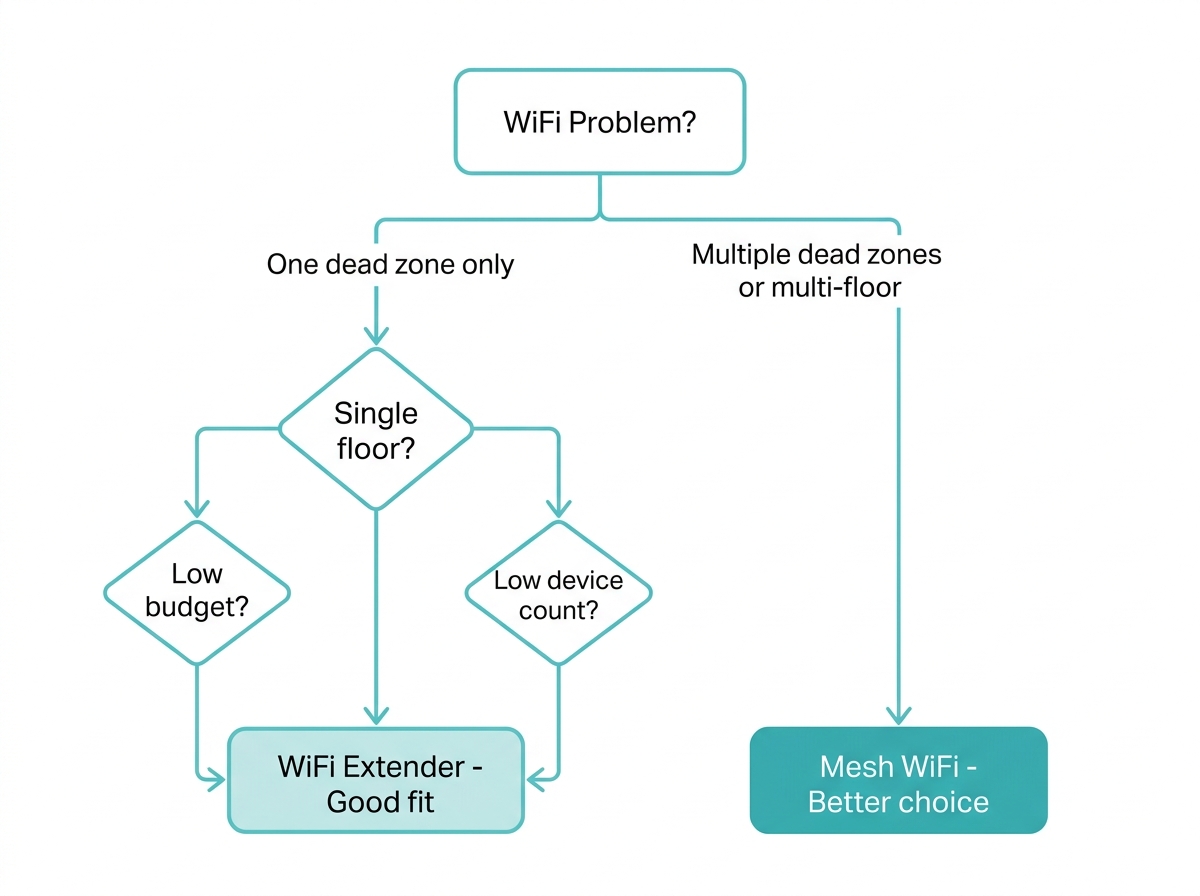
The decision comes down to how many problem areas you have: one isolated dead zone favors an extender, while two or more dead zones, multiple floors, or a whole-home coverage gap favor a mesh system.
A consistent Wi-Fi signal is essential to everything from video calls with family abroad to keeping kids streaming and workers productive, but in most Philippine homes, that consistency is exactly what a single router fails to deliver.
Mesh WiFi systems and WiFi extenders both exist to close that gap, but they do it differently, at different costs, and with different long-term results. This article compares both directly so you can choose the right one for your specific setup.
Table of Contents
Mesh WiFi vs WiFi Extender: The Key Differences
Which Is Right for Your Philippine Home
Factors to Consider When Choosing
TP-Link Products for Every Setup
What Is Mesh WiFi
Like Mesh Wi-Fi systems, these are multi-node setups where several wireless access points work together as one unified network. Every node communicates with the others, and your devices automatically connect to the strongest signal as you move through your home, all under a single network name and password, with no manual switching.
For a full explainer of how mesh technology works under the hood, see What Is a Mesh WiFi Network and How Does It Work.
What Is a WiFi Extender
Wi-Fi extenders, also known as range extenders or Wi-Fi repeaters, are devices that receive your router's existing signal, amplify it, and rebroadcast it to an area your router cannot reach. They are simpler in concept than mesh: plug one in between your router and the dead zone, and coverage extends into that area. Unlike mesh systems, most extenders create a separate network name for the extended signal, which means your device may stay connected to the weaker router signal rather than switching to the stronger extender signal automatically.
If you want to understand how extenders compare to boosters, two terms that are often used interchangeably, see Wi-Fi Extender vs. Booster: Which One Is Best for You for the full breakdown on that specific distinction.
Mesh WiFi vs WiFi Extender: The Key Differences
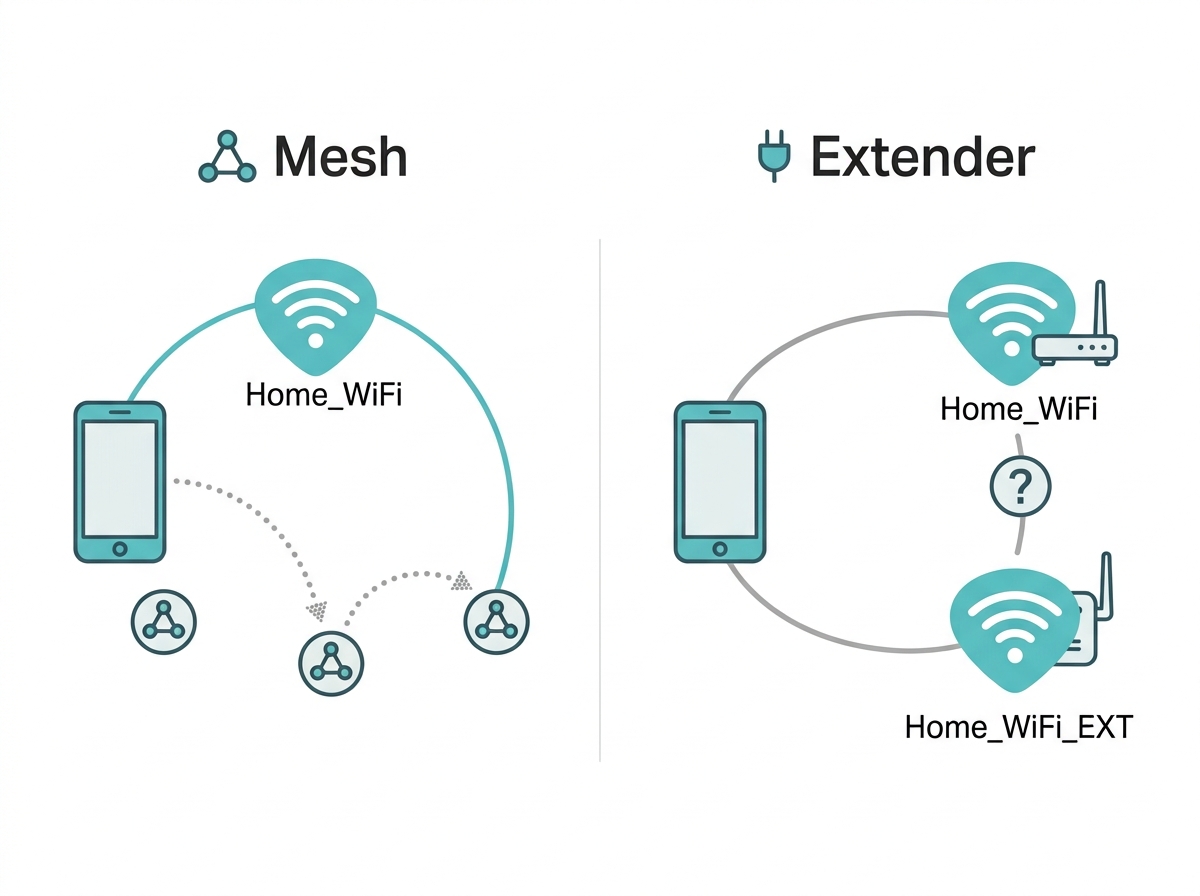
The table below covers the key differences at a glance.
|
Factor |
Mesh WiFi System |
WiFi Extender |
|---|---|---|
|
Coverage |
Whole home via multiple nodes |
Single zone extension only |
|
Network name |
One unified SSID |
Separate SSID per extender |
|
Device roaming |
Automatic, seamless |
Manual switching is often required |
|
Dead zones |
Eliminated across the entire home |
Reduced in one targeted area |
|
Speed on the extended band |
Minimal loss with dedicated backhaul |
Up to 50% reduction on single-band models |
|
Scalability |
Add nodes anytime, no reconfiguration |
Adding more extenders creates complexity |
|
Self-healing |
Yes, automatic rerouting if a node fails |
No |
|
Setup complexity |
Moderate - app-guided, 15 to 30 minutes |
Simple - WPS or browser, under 10 minutes |
|
Upfront cost (PH market) |
Higher - typically PHP 5,000 to PHP 20,000 plus |
Lower - typically PHP 1,500 to PHP 5,000 |
|
Best for |
Multi-floor homes, 4+ rooms, many devices |
One isolated dead zone in an otherwise strong network |
Performance Comparison
Mesh Wi-Fi systems consistently outperform WiFi extenders in the scenarios that matter most to Filipino households: large homes, multi-floor setups, and high device density during peak hours (7 to 10 PM, when PLDT, Globe, and Converge lines carry the heaviest household traffic).
The core performance advantage of mesh comes from backhaul. Premium mesh systems use a dedicated wireless band exclusively for node-to-node communication, which means the bandwidth your devices use is not shared with the traffic between nodes. An extender, by contrast, must use the same band to receive the signal from your router and then rebroadcast it to your device, cutting the usable throughput by up to 50 percent on single-band models.
Mesh Wi-Fi systems like Deco X50 switch your device to the nearest node in under 0.3 seconds, seamlessly and without any action from you. When an original signal is weak or congested, an extender-based setup often fails to hand your device over automatically, leaving it clinging to the weaker router signal even when the extender is closer and stronger.
Where Wi-Fi extenders do deliver solid performance is in a focused, single dead-zone scenario. If your router covers 90 percent of your home and there is one corner room or back bedroom that falls short, a good WiFi 6 extender like the RE705X resolves that cleanly at a fraction of the cost of a full mesh system.
Which Is Right for Your Philippine Home
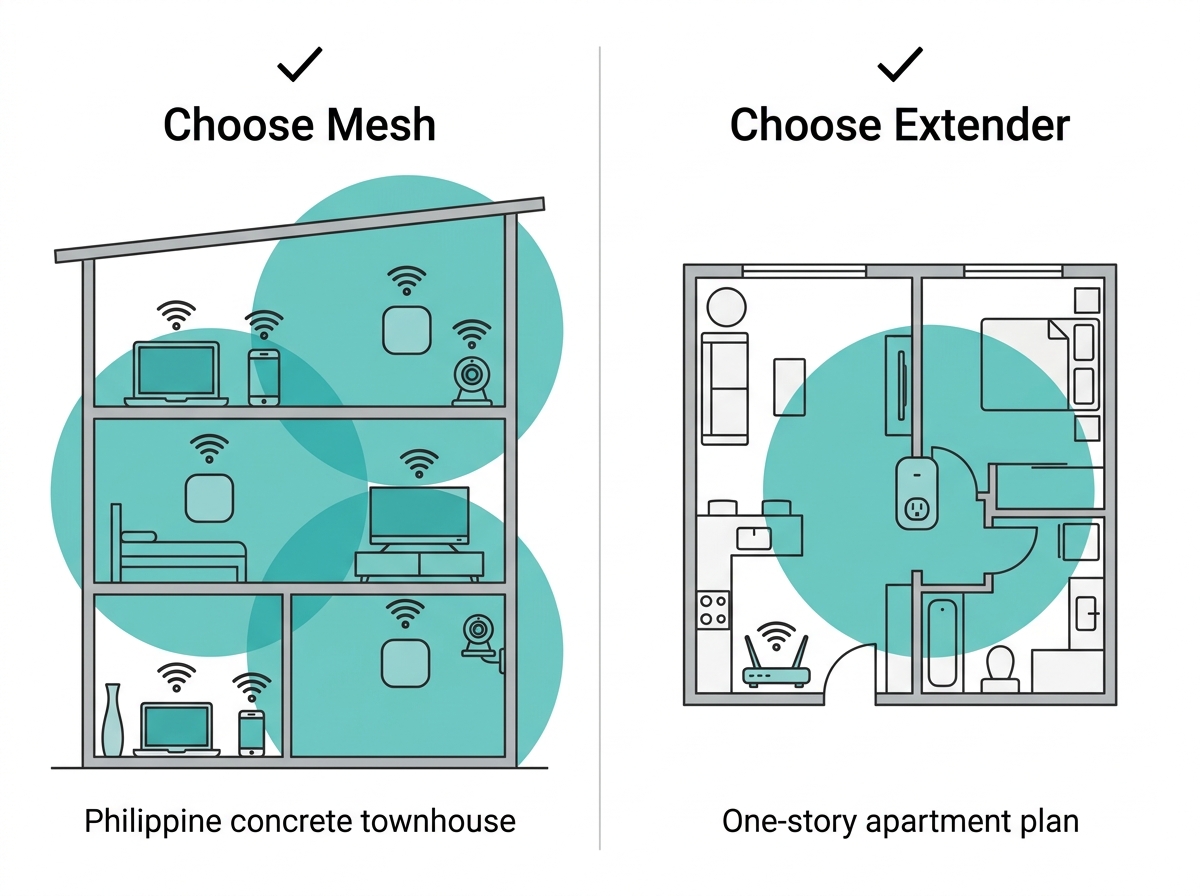
Choose mesh WiFi if:
-
Your home has two or more floors. A standard three-story Philippine townhouse needs at least three nodes, one per floor, to achieve consistent coverage across concrete floor slabs
-
You have thick concrete walls between rooms, common in Philippine subdivisions and condos, which absorb the 2.4 GHz signal by 70 to 90 percent per wall
-
You have persistent dead zones in more than one location that a repositioned router has not fixed
-
Your household runs more than 20 devices simultaneously: phones, laptops, smart TVs, IP cameras, and smart home devices, all connected at once
-
You work from home and need a stable video call and upload performance at a specific desk or room away from your router
-
You live in an OFW household that relies on reliable video calling with family abroad during evening peak hours
Choose a WiFi extender if:
-
You have one specific dead zone in an otherwise well-covered home, a far bedroom, a balcony, or a ground-floor garage
-
Your home is a small apartment or single-floor unit where the router covers most of the space already
-
You need a fast, low-cost fix without changing your existing network setup
-
You rent and cannot install additional wired infrastructure
Factors to Consider When Choosing
Coverage area. Mesh systems suit homes larger than approximately 100 to 150 sqm or any home with more than two floors. Wi-Fi 6 extenders are enough for extending coverage in a smaller, single-floor space.
Number of devices. An office with multiple devices and dense household networks benefits from mesh, which is designed for high device density. An extender is adequate for adding coverage in a low-device space.
Internet speed requirements. If your PLDT, Globe, or Converge plan delivers 100 Mbps or more, you want a mesh system to carry that speed to every room. A single-band extender will halve it on the extended signal.
Budget. Wi-Fi extenders are the more affordable entry point, typically PHP 1,500 to PHP 5,000 for a quality WiFi 6 model. Mesh systems cost more upfront but deliver a better long-term return for homes where coverage is a persistent problem.
Ease of setup and use. Extenders are the faster fix: plug in, press WPS, or open a browser, done in under 10 minutes. Mesh requires app-based setup with node placement decisions, taking 15 to 30 minutes. Neither requires technical expertise.
Scalability. Mesh Wi-Fi systems are highly scalable. Add a node, and the system integrates it automatically. Adding a second or third extender creates a more complex, less reliable network where each hop loses more speed.
Compatibility. Most Wi-Fi extenders work with any existing router, making them compatible with whatever modem your ISP provided. Mesh systems work best as a complete replacement system rather than an add-on.
Internet of Things (IoT) devices. Smart home setups with cameras, smart bulbs, sensors, and voice assistants benefit from mesh, which provides stable, whole-home coverage that keeps IoT devices reliably connected regardless of where they are placed.
TP-Link Products for Every Setup
Here are three TP-Link options that match the most common scenarios Filipino households face.
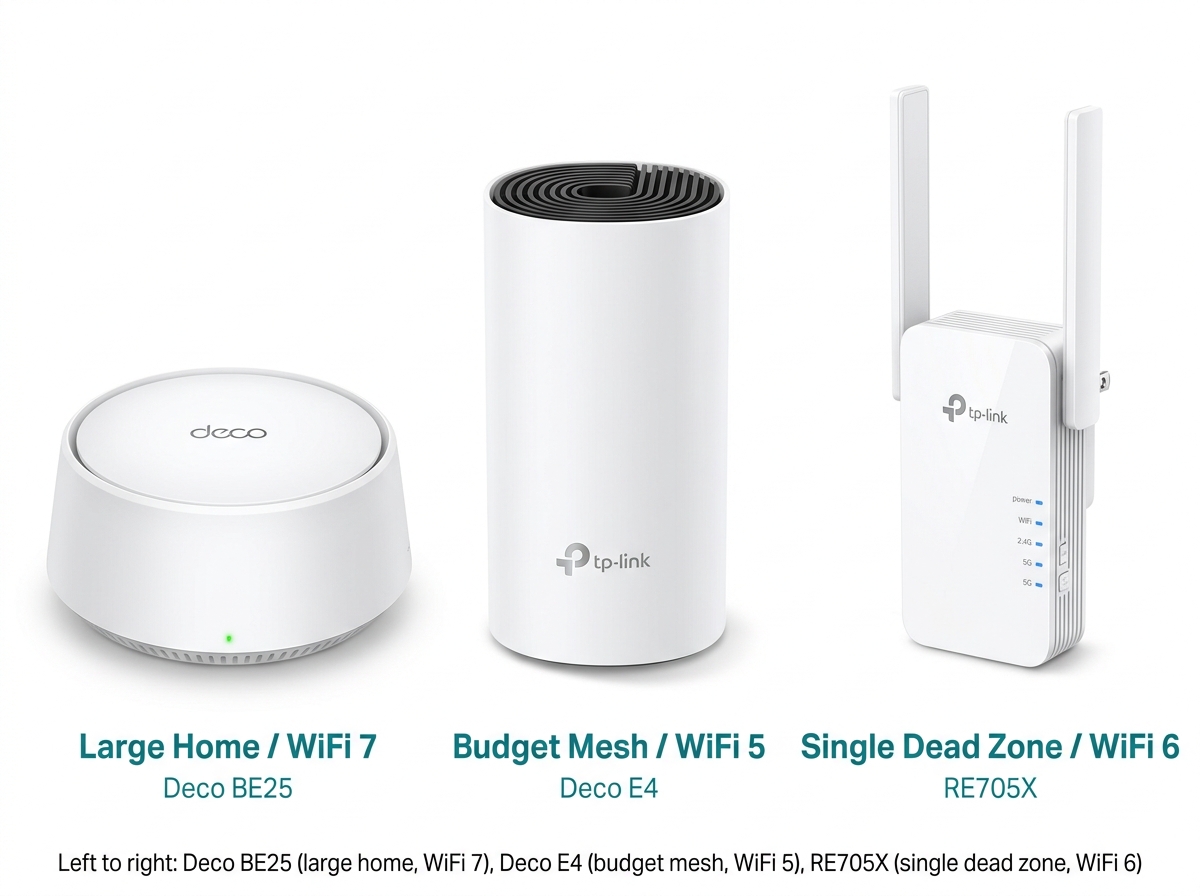
Deco BE25 Whole Home Mesh WiFi 7 System - The flagship mesh choice for large homes and future-proof setups. WiFi 7 with BE5000 speeds (4324 Mbps at 5 GHz, 688 Mbps at 2.4 GHz), two 2.5 Gbps Ethernet ports per unit, combined wireless and wired backhaul, and TP-Link HomeShield for comprehensive network protection and parental controls. Compatible with all WiFi generations and any internet service provider and modem.
Deco E4 (AC1200) Whole Home Mesh Wi-Fi System - The budget-friendly mesh entry point. A Deco E4 two-pack covers up to 2,800 sq ft (EU spec, approximately 260 sqm) at speeds up to 1167 Mbps, with app-based setup, parental controls, and full compatibility with the Deco ecosystem for future expansion. Ideal for medium-sized homes that want whole-home coverage without the premium price.
RE705X (AX3000) Mesh WiFi 6 Extender - The best single dead-zone fix for homes that are otherwise well-covered. WiFi 6 with AX3000 speeds (2402 Mbps at 5 GHz, 574 Mbps at 2.4 GHz), EasyMesh-compatible for homes with a qualifying EasyMesh router, and a Gigabit Ethernet port for wired device connections. Note: The RE705X uses EasyMesh technology and is not designed to pair with Deco mesh nodes. If you already have a Deco system, extend it by adding another Deco node rather than an RE705X.
Browse the full Deco Whole-Home Mesh WiFi System lineup or the full range extender catalog to find the right fit for your home, budget, and ISP plan. If you need help choosing between specific models with deeper spec comparisons and PH pricing, the Best Mesh WiFi System Philippines roundup covers that in detail.
And if you are ready to set up whichever you choose, see the dedicated guides: mesh WiFi setup and advantages of Wi-Fi extenders, alongside how to set one up from scratch.
Frequently Asked Questions
Which provides better coverage and performance - mesh or extender?
Mesh systems deliver better whole-home coverage and more consistent performance in nearly every real-world scenario. Multiple nodes under one unified network eliminate dead zones, while extenders reduce them in one targeted spot but leave the rest of the network unchanged. For large homes or multi-floor setups, mesh systems like WiFi routers provide the kind of whole-home reliability that extenders cannot match at scale.
Which is more cost-effective?
A WiFi extender costs less upfront, PHP 1,500 to PHP 5,000 for a quality WiFi 6 model versus PHP 5,000 to PHP 20,000 and up for a mesh system. For a home with one dead zone, an extender is genuinely the more cost-effective solution. For a home with persistent multi-room coverage problems, an extender is a lower-cost fix that often leads to a second purchase when the first one does not fully solve the problem.
Can I use both mesh WiFi and a WiFi extender on the same network?
Technically, yes, but it is rarely useful and often counterproductive. Mesh systems already handle whole-home coverage through their own nodes, so adding an extender on top typically adds complexity without adding meaningful coverage. The exception is using an EasyMesh-compatible extender like the RE705X with an EasyMesh-compatible router to extend coverage in a standards-compatible way. In a Deco mesh system, the right way to expand coverage is to add another Deco node, not an external extender.
Which is better for gaming and streaming?
Mesh WiFi is the better choice for gaming and streaming across multiple rooms or floors. It delivers consistent speeds, seamless roaming between nodes, and the advanced features that boost speed and reduce latency that serious gaming requires. A WiFi extender can work for a gamer or streamer in one fixed room if the extender is placed well and the original signal is strong, but the 50 percent speed reduction on single-band models and the lack of seamless roaming make extenders a weaker choice for demanding use.
Will a WiFi extender slow down my internet?
A single-band extender will reduce throughput on the extended signal by up to 50 percent because it uses the same band to receive from the router and rebroadcast to your device simultaneously. Dual-band WiFi 6 extenders like the RE705X handle this better by separating bands and supporting more efficient WiFi 6 protocols, but some throughput reduction is still expected. Your devices also need to be connected to the strongest signal source automatically, which many devices fail to do without manual prompting.
Does mesh WiFi work with my existing router from PLDT, Globe, or Converge?
Yes. Deco mesh systems are compatible with any standard modem or gateway router provided by PLDT, Globe, or Converge. You connect the primary Deco node to your ISP modem via Ethernet, and the Deco system manages the rest. The modem stays in place; the Deco system replaces your existing router's function and takes over WiFi distribution throughout your home.
How many extenders do I need to cover a three-story home?
A three-story Philippine concrete home is generally not a good use case for extenders. Each extender hop cuts your speed, and the concrete floor slabs between stories cause severe signal attenuation. The math typically works out to two or three extenders needed, each losing 50 percent throughput, delivering a fraction of your planned speed to upper floors. A three-node mesh system, one per floor, solves this more cleanly, maintains better speeds throughout, and costs less in total than three quality extenders purchased separately.
Should I choose Mesh Wi-Fi based on my ISP plan speed?
Your ISP plan speed should factor into the decision. If you are on a 100 Mbps plan from PLDT or Globe, an extender's 50 percent throughput reduction means 50 Mbps reaches the extended zone, which may be acceptable. If you are on a 500 Mbps or 1 Gbps Converge Fiber plan, you want a mesh system with a dedicated backhaul to carry that full speed to every room. A mesh system scales with faster plans; an extender becomes the bottleneck.
Final Thoughts
The choice between mesh WiFi and a WiFi extender is not about which technology is "better" in the abstract; it is about matching the right tool to your specific home. An extender is a fast, affordable fix for one dead zone in an otherwise well-served space. Mesh is the right foundation for any home where coverage has been a persistent, multi-room problem.
For most Philippine households dealing with thick concrete walls, multiple floors, and peak-hour congestion from PLDT, Globe, or Converge connections shared across a whole family, mesh is the more durable long-term answer. If the budget is not enough, start with an entry-level mesh system like the Deco E4 rather than stacking extenders that each degrade performance further.
Ready to explore your options? Browse the Deco Whole-Home Mesh WiFi System range or the full Extends network coverage extender catalog to find the right fit for your home. For TP-Link's broader network solutions, including enterprise data security and business-grade networking, the Omada Pro lineup covers those needs separately.
Last updated: July 2026 by Laviet Joaquin, Head of Marketing, TP-Link Philippines.