
Descarga para Tapo D230S1
IMPORTANTE: La disponibilidad del modelo y la versión de hardware varía según la región. Consulte el sitio web regional de TP-Link para determinar la disponibilidad del producto.
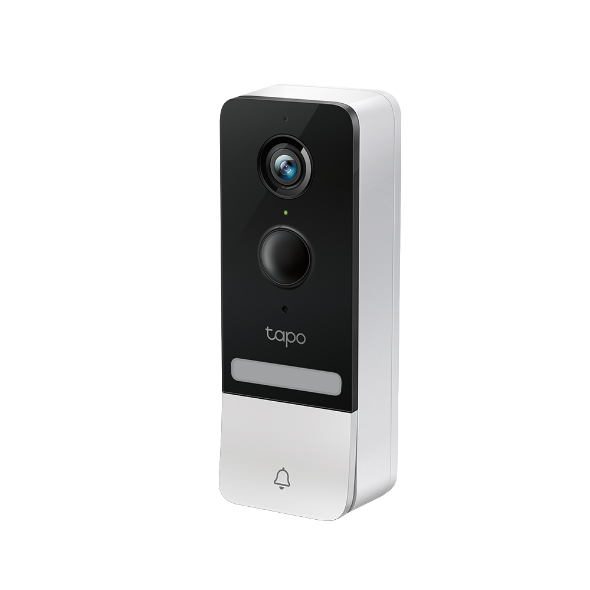 Timbre Inteligente con Cámara y Batería
Setup Video
-
How to Set Up Your Tapo Video Doorbell Camera Kit (Tapo D230S1)
With Tapo Video Doorbell Camera Kit, you always know what happens in front of your door through the Tapo app. The starlight sensor and 2K 5MP resolution help the doorbell captures all the fine details even in low-light environments.
More Fold -
How to Install Your Tapo Video Doorbell Camera Kit (Tapo D230S1)
With Tapo Video Doorbell Camera Kit, you always know what happens in front of your door through the Tapo app. The starlight sensor and 2K 5MP resolution help the doorbell captures all the fine details even in low-light environments.
More Fold
Preguntas Frecuentes
- How to Check the Wi-Fi Signal Strength of Your Tapo and Kasa Device
- How to Unbind a Tapo or Kasa Device from your TP-Link Account
- How to Connect Tapo and Kasa Devices to Amazon Alexa: Two Setup Methods
- Tapo Smart Actions: How to Set Up Automations and Shortcuts on the Tapo App
- Frequently Asked Questions About Third-Party Compatibility
- How to Re-Register a Tapo or Kasa Device to Another TP-Link Account
- How to Factory Reset Your Tapo Doorbell
- How to Download/Delete Videos from Your Tapo Camera or Doorbell
- Can I Control Tapo Smart Door Lock With the Existing Tapo Doorbell?
- Notifications: How to Set Up and Manage Tapo & Kasa Alerts in the Tapo App
- Understanding AI Chat Usage Limits in Aireal
- What Is Wake-Up Sensitivity on the Tapo Battery Camera or Doorbell
- How to Configure Homes and Rooms in the Tapo App
- Frequently Asked Questions About Tapo D230S1
- How to Delete Your TP-Link Account (TP-Link ID)
- Tapo Doorbell Chime Setup: Add Tapo Chime, Hub, or Smart Speaker
- How to Enable, Pause, or Disable the Anti-theft Alarm on Tapo Doorbells
- How to Set Up Geofencing on the Tapo/Kasa App
- How to Stream Tapo / Kasa Camera on Google Device
- Why Can't I Receive the SMS Verification Code from the Tapo App? How to Fix It
- How to Pair and Connect Tapo Sensor/Button/Switch to Tapo Hub
- How to get the log of Tapo app
- General Questions about Tapo Care
- Understanding the TapoCare Refund Policy and Managing Your TapoCare Subscription
- How to Use Widgets to Control Tapo Devices
- What Is the Subscription Pricing of the Tapo Care Plan?
- How to Get Diagnostic Logs from Tapo Cameras and Doorbells
- ¿Cómo encuentro la versión del firmware de mi dispositivo TP-Link?
- Tapo SD Card Playback Issues: Fix Video Playback Problems on Your Camera
- How Secure Are Tapo Devices? Security Standards and Privacy Features Explained
- Announcement: IFTTT Services Ending for Tapo and Kasa Products
- How to Reset a Forgotten TP-Link ID Password for Tapo and Kasa Devices
- How to Redeem Your Tapo Care Redemption Code
- Tapo Camera Battery Draining Fast? Find Out How to Fix It!
- Kasa and Tapo Smart Devices Not Working with Alexa: Troubleshooting Guide
- Tapo Home Mode and Away Mode: What They Are and How to Set Them Up on Kasa and Tapo Cameras and Doorbells
- How to Update Tapo and Kasa Device Firmware via the Tapo App
- Fail to sign up or activate the TP-Link ID
- How to add new cameras to my Tapo Care plan
- How to Fix No Sound and Audio Quality Issues on Your Tapo Camera or Doorbell
- How to Troubleshoot Tapo and Kasa Notifications Not Working or Delayed
- General Questions about Tapo/Kasa Geofencing
- How to extend the battery life of Tapo Camera/Doorbell
- What should I do when email shows that the link expired when I register cloud account or reset my password?
- How to set up routines for Tapo devices via Alexa app
- The most frequent asked questions about TP-Link Sales
- How to Add A Group for Your Tapo Devices
- How to turn on Precise Location for the Tapo App
- How can I conduct 3DS authentication when purchasing Tapo Care
- What can I do if the Smart Action/Automation doesn’t take effect as expected?
- What should I do if my battery-powered camera can't detect the motion?
- How to use the Alexa Announcement feature of the Tapo Camera and Doorbell
- How to unlink third-party accounts from your TP-Link ID
- How to verify if it’s the hardware issue of TP-Link smart home
- Why does TP-Link require my email address?
- FAQs about migrating devices between Tapo Hubs
- Why do I receive a "We Noticed a New Login" email?
- How to create 3D Map in the Tapo App for Pad
- Set Privacy Zone for Tapo Camera and Doorbell
- Can Tapo/Kasa Doorbell work with my existing Chime?
- What can I do if the Tapo app is not working properly (smart plug, smart camera, smart bulb)?
- How to configure the spotlight of Tapo Camera
- How to set up your Tapo D230S1
- How to update or change the payment method for Tapo Care or Kasa Care
- Which Tapo Hubs Support Doorbell Ring?
- Tapo/Kasa Devices Appear Offline After Changing or Resetting the Router
- ¿Qué debo hacer si no recibo el correo electrónico cuando registro una cuenta en la nube o restablezco mi contraseña?
- Tapo Camera SD Card Installation and Format Guide
- Why do I need to give Local Network permission to TP-Link apps in iOS devices?
- How to Fix Tapo or Kasa Camera and Doorbell SD Card Not Formatting or Being Recognized
- What can I do if Tapo/Kasa Smart Devices fail to update the firmware?
- Tapo and Kasa Smart Devices Not Working with Google Home: Troubleshooting Guide
- Share Tapo and Kasa Devices with Family or Multiple Users (Device Sharing 1.0)
- Kasa and Tapo Siri Integration: How to Control Smart Devices with Siri
- How to Find the Model Number of Your TP-Link Device
- TP-Link ID Explained: What It Is and How to Create One
- How to Find the Serial Number (S/N) on Your TP-Link Device
- ¿Cómo encontrar la versión del hardware en un dispositivo TP-Link?
Apps

- TP-Link Tapo
- TP-Link Tapo provides the easiest way to manage and control your smart life products.


