
如何取得 Tapo 攝影機的系統日誌(log)?
1) 將 SD 卡插入攝影機。
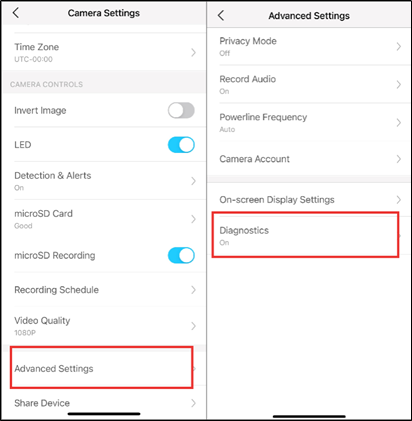
2) 開啟 Tapo app-> 點擊攝影機畫面右上角的齒輪圖案 -> 前往攝影機設定 -> 進階設定 -> 開啟 診斷。系統日誌檔案將儲存在SD卡中。
3) 讓攝影機運行一段時間,等待問題再次發生。
4) 將攝影機中的SD卡取出,將SD卡插入電腦的SD插槽中或是使用轉卡器讓電腦可以讀取SD卡。
5) 在SD卡中可看到 ‘diagnose_log’ 的log檔。
Looking For More
這篇faq是否有用?
您的反饋將幫助我們改善網站



TP-Link Community
Still need help? Search for answers, ask questions, and get help from TP-Link experts and other users around the world.