
如何刪除Deco的家長監控設定檔?
您想要刪除家長監控的設定,讓設定檔中的設備可以不受限制地享受網路。
下面是刪除設定檔的詳細說明,我們以Deco M5為例。
請注意,不同的Deco型號,畫面可能不相同。
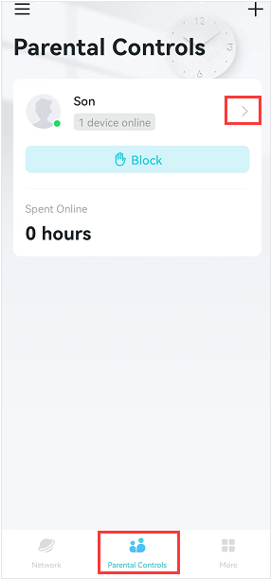
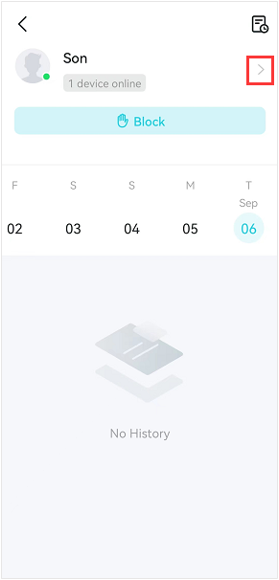
步驟1.進入Deco app的家長監控畫面,點“>”圖示,進入家長監控管理畫面。
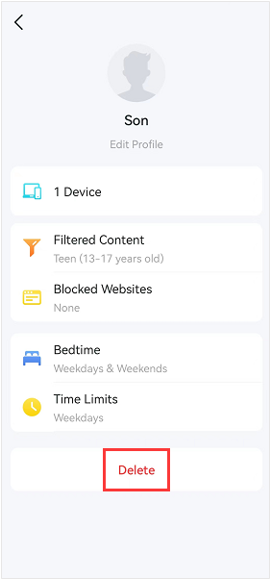
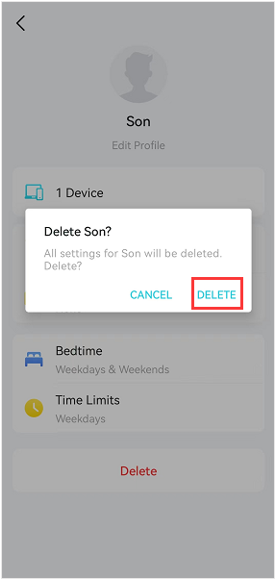
步驟2.按刪除會再次跳出確認移除的視窗,並點擊刪除。
這篇faq是否有用?
您的反饋將幫助我們改善網站



TP-Link Community
Still need help? Search for answers, ask questions, and get help from TP-Link experts and other users around the world.