
How to set up IPv6 service for some specific ISP like BT/Hyperoptic or SKY etc on the wireless router
This article is suitable for some ISP who only assign IPV6 address for the LAN side of the router. If your ISP is on the list, you can refer to this FAQ to set up IPV6:
BT(United Kingdom)
SKY(United Kingdom)
dom.ru(Russia)
Metro(Russia)
turkeynet(Turkey)
IDC(Romania)
airtel(India)
Naxi(Brazil)
JKS Telecom(Brazil)
Telia(Estonia)
MEO(Portugal)
NOTE: Please make sure that you are provided IPv6 internet service by your internet provider. If not, please contact your Internet provider first.
This article is only suitable for the scenario where our router is working as the main router.
Step 1. Log in to the router’s web-based management page, and please click here if you don’t know how to log in.
Step 2. Go to “IPv6” on the left side menu.
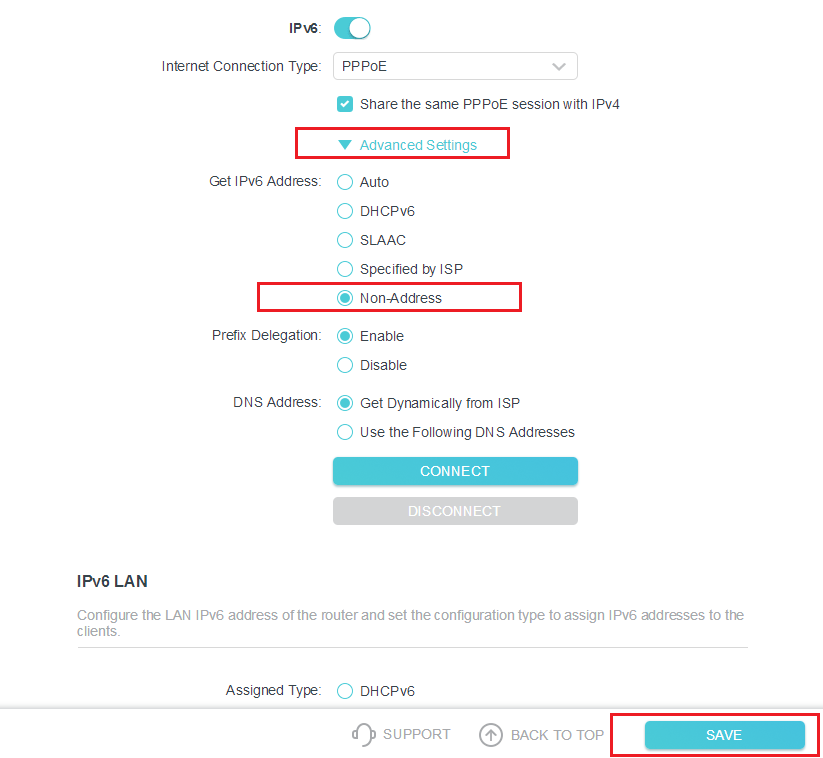
Step 3. Please make sure the IPv6 function is enabled. Select “PPPoE” as Internet Connection Type and check the box “Share the same PPPoE session with IPv4”.
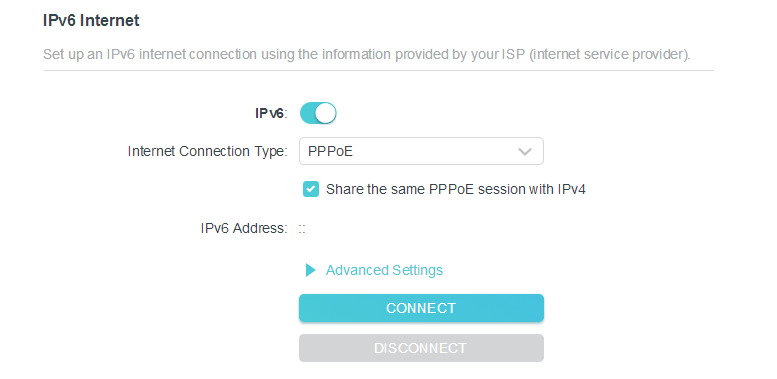
Step4. Please click “Advance Settings” and select “Non-Address” option then click save button.
這篇faq是否有用?
您的反饋將幫助我們改善網站


TP-Link Community
Still need help? Search for answers, ask questions, and get help from TP-Link experts and other users around the world.