
在 Mac Pro 上,如何設定 PPPoE 連線
步驟 1 :
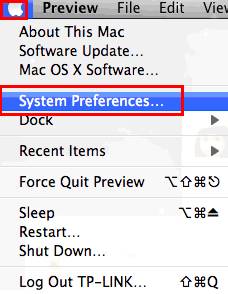
按一下 [Apple] 功能表  ,然後選取 [System Preferences] 。
步驟 2 :
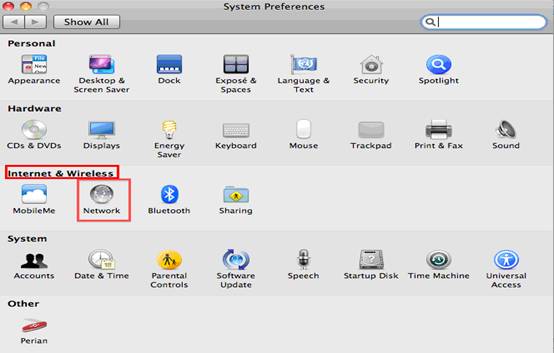
出現 [System Preferences] 畫面時,前往 [Internet & Wireless] 區塊並且按一下 [Network] 。
步驟 3 :
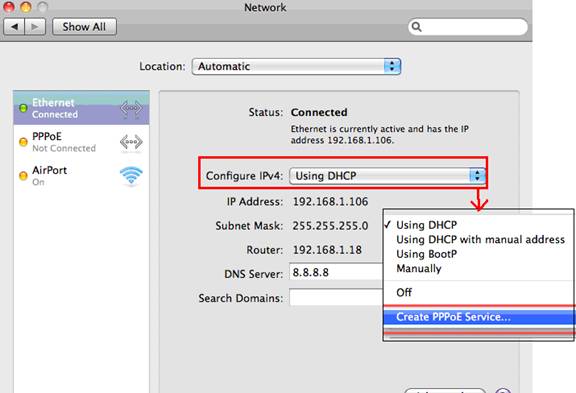
在 [Network] 畫面中,選取 [Ethernet . 。 在 [Configure IPV4] 方塊,選取 [Create PPPoE Service] 。
步驟 4 :
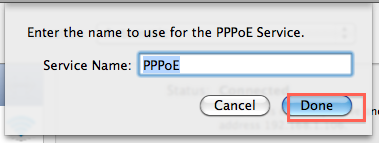
輸入 [Service Name] ( 這是選擇性的,您可以聯絡 ISP 進行確認 ) ,然後按一下 [Done] 。
步驟 5 :
輸入 ISP 提供的 [username] 和 [password] ,然後按一下 [Apply] 和 [Connect] 。

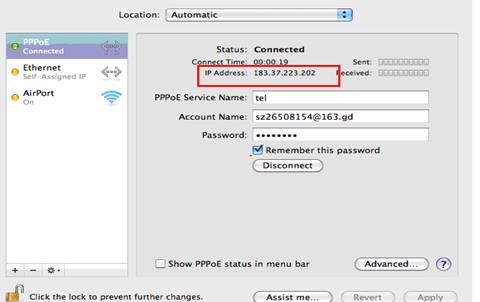
如果成功,您會看到 IP 位址,如下圖所示:
這篇faq是否有用?
您的反饋將幫助我們改善網站




TP-Link Community
Still need help? Search for answers, ask questions, and get help from TP-Link experts and other users around the world.