
如何檢查網路卡驅動程式是否安裝成功
請依照下列步驟檢查您的 TP-Link 網路卡驅動程式是否安裝成功。
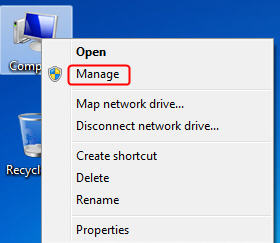
步驟 1 在電腦上,以滑鼠右鍵按一下 [ 我的電腦 ] 圖示,然後選取 [ 管理 ] 。
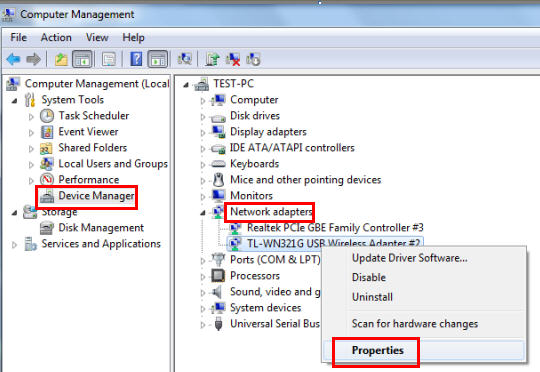
步驟 2 開啟 [ 裝置管理員 ] , 前往 [ 網路介面卡 ] ,然後找到相對應的 TP-Link 網路卡 , 按右鍵然後 前往 [ 內容 ] 。
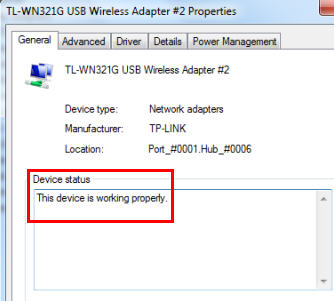
步驟 3 如果您看到紅色方塊的 [ 這個裝置已正確地運作。 ] 句子,表示您已經成功安裝驅動程式。
這篇faq是否有用?
您的反饋將幫助我們改善網站



TP-Link Community
Still need help? Search for answers, ask questions, and get help from TP-Link experts and other users around the world.