
如何變更Deco 的LAN IP位址?
Deco 的預設LAN IP位址為192.168.0.1。 在某些情況下,您可能需要更改LAN IP位址以避免衝突。
注意:LAN IP位址變更功能僅適用於Deco M5、P7和M9 Plus,其他型號未來將透過韌體更新來支援此功能。
1. 開啟Deco APP並選取畫面右下角的更多選項。
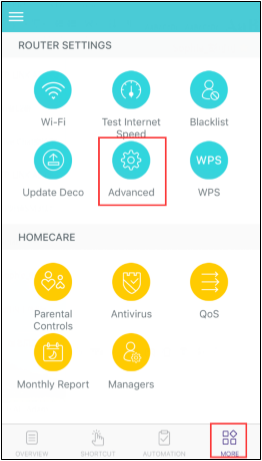
2. 點選進階的(齒輪圖示)按鍵

3. 選取LAN IP位址

4. 將它更改為您想使用的LAN 位址並儲存。

更多相關文章
這篇faq是否有用?
您的反饋將幫助我們改善網站



TP-Link Community
Still need help? Search for answers, ask questions, and get help from TP-Link experts and other users around the world.