
ดาวนโหลดสำหรับ Tapo C245D
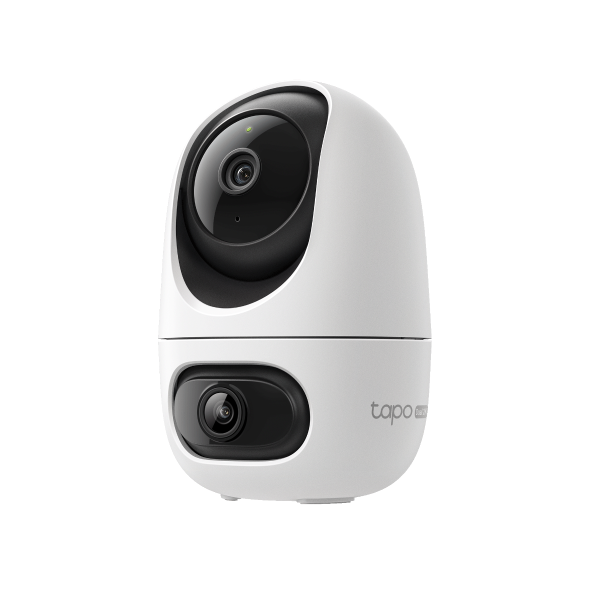 Dual Lens Pan/Tilt Security Camera
วิดีโอการตั้งค่า
-
How to Mount Your Dual Lens Pan/Tilt Security Camera (Tapo C245D) | TP-Link
See Wide, Zoom Sharp, Secure Everything. With Tapo Dual Lens Pan/Tilt Security Camera, you can monitor two separate areas at the same time with just one device. The 122° FOV wide-angle lens and 6mm telephoto lens, it ensures all-around awareness and down-to-the-detail protection of your home. The two cameras dynamically work together to ensure you never miss a moment – when the fixed lens detects events like motion, people, and pets, the pan/tilt lens will automatically pivot to focus on and track the moving object.
เพิ่มเติม พับเก็บ -
How to Set Up Your Dual Lens Pan/Tilt Security Camera (Tapo C245D) | TP-Link
See Wide, Zoom Sharp, Secure Everything. With Tapo Dual Lens Pan/Tilt Security Camera, you can monitor two separate areas at the same time with just one device. The 122° FOV wide-angle lens and 6mm telephoto lens, it ensures all-around awareness and down-to-the-detail protection of your home. The two cameras dynamically work together to ensure you never miss a moment – when the fixed lens detects events like motion, people, and pets, the pan/tilt lens will automatically pivot to focus on and track the moving object.
เพิ่มเติม พับเก็บ
คำถามที่พบบ่อย
- Notifications: How to Set Up and Manage Tapo & Kasa Alerts in the Tapo App
- Tapo Camera Not Connecting to Wi-Fi: How to Fix It
- Understanding AI Chat Usage Limits in Aireal
- How to Configure Homes and Rooms in the Tapo App
- How to Factory Reset Your Tapo Camera: Two Methods
- How to Delete Your TP-Link Account (TP-Link ID)
- วิธีดูกล้อง Tapo บนพีซี/NAS/NVR ผ่านโปรโตคอล RTSP/Onvif
- How to Set Up Geofencing on the Tapo/Kasa App
- How to Configure the Smart Dual Tracking Feature for Tapo Dual-Lens Camera
- How to Configure the Tap to Focus Feature for Tapo Dual-Lens Camera
- How to Connect Tapo and Kasa Smart Devices to Google Home
- How to Stream Tapo / Kasa Camera on Google Device
- How to troubleshoot Smart Camera Tampering Detection issues
- How to Cast TP-Link Camera/Doorbell to TV via Tapo Smart CentralHub
- ทำไมฉันถึงไม่ได้รับรหัสยืนยันทาง SMS จากแอป Tapo
- How to Set Up Your Tapo Camera Using the Tapo App
- คำถามทั่วไปเกี่ยวกับ Tapo Care
- Tapo Care การยกเลิกและการขอคืนเงิน
- How to Use Widgets to Control Tapo Devices
- What to Do When You Can't Find Your Tapo Camera on the Tapo App
- รายการกล้องที่รองรับฮับ Tapo H200/H500
- How to Get Diagnostic Logs from Tapo Cameras and Doorbells
- Tapo SD Card Playback Issues: Fix Video Playback Problems on Your Camera
- Announcement: IFTTT Services Ending for Tapo and Kasa Products
- How to Reset a Forgotten TP-Link ID Password for Tapo and Kasa Devices
- How to Redeem Your Tapo Care Redemption Code
- Kasa and Tapo Smart Devices Not Working with Alexa: Troubleshooting Guide
- Tapo Home Mode and Away Mode: What They Are and How to Set Them Up on Kasa and Tapo Cameras and Doorbells
- ทำไมฉันถึงลงทะเบียนไม่ได้?
- วิธีเพิ่มกล้องใหม่เข้าไปในแผน Tapo Care ของฉัน
- How to upgrade or downgrade my Tapo Care subscription
- How to Fix No Sound and Audio Quality Issues on Your Tapo Camera or Doorbell
- How to Troubleshoot Tapo and Kasa Notifications Not Working or Delayed
- General questions about playback of Tapo Dual-Lens cameras
- General Questions about Tapo/Kasa Geofencing
- วิธีการเชื่อมต่อ Tapo Wi-Fi Cameras/doorbells กับ Tapo Hub
- What is Video Summary
- How to fix a flickering issue on Live View of the Tapo Camera
- How to set up routines for Tapo devices via Alexa app
- วิธีการสร้างแผนที่ 3 มิติในแอป Tapo สำหรับ Pad / Tablet
- How to use Alexa Snapshot with Tapo Cameras
- The most frequent asked questions about TP-Link Sales
- How can I conduct 3DS authentication when purchasing Tapo Care
- How to unlink third-party accounts from your TP-Link ID
- How to verify if it’s the hardware issue of TP-Link smart home
- ทำไม TP-Link ต้องการที่อยู่อีเมลของฉัน
- Why do I receive a "We Noticed a New Login" email?
- Set Privacy Zone for Tapo Camera and Doorbell
- How to update or change the payment method for Tapo Care or Kasa Care
- Tapo/Kasa Devices Appear Offline After Changing or Resetting the Router
- ควรทำอย่างไรหากไม่ได้รับอีเมลเมื่อลงทะเบียนบัญชีระบบคลาวด์หรือรีเซ็ตรหัสผ่าน?
- How to Check and Fix an Unstable Tapo or Kasa Network Connection
- Tapo Camera SD Card Installation and Format Guide
- Why do I need to give Local Network permission to TP-Link apps in iOS devices?
- How to view camera SD card recordings on a computer
- How to Connect Tapo and Kasa Devices to Amazon Alexa: Two Setup Methods
- How to Fix Tapo or Kasa Camera and Doorbell SD Card Not Formatting or Being Recognized
- What can I do if Tapo/Kasa Smart Devices fail to update the firmware?
- Tapo and Kasa Smart Devices Not Working with Google Home: Troubleshooting Guide
- TP-Link ID คืออะไร
- How to Reduce Noise on Tapo Cameras
- จะค้นหาเวอร์ชั่นฮาร์ดแวร์บนอุปกรณ์ TP-Link ได้อย่างไร
- How to Find the Model Number of Your TP-Link Device
- How to Find the Serial Number (S/N) on Your TP-Link Device