
Source Code Template for External Web Portal (EAP Controller_v1.1.3)
Suitable for: EAP Controller_V1.1.3.
When configuring Portal authentication function on EAP Controller with external web portal server, you need to establish an external web server firstly. In addition, there are some requirements for establishing an external web server in order to work well with EAP Controller and EAP devices.
The below interactive process among wireless client, EAP device and External Web Portal server may help you to know more about the requests of establishing an external web server.
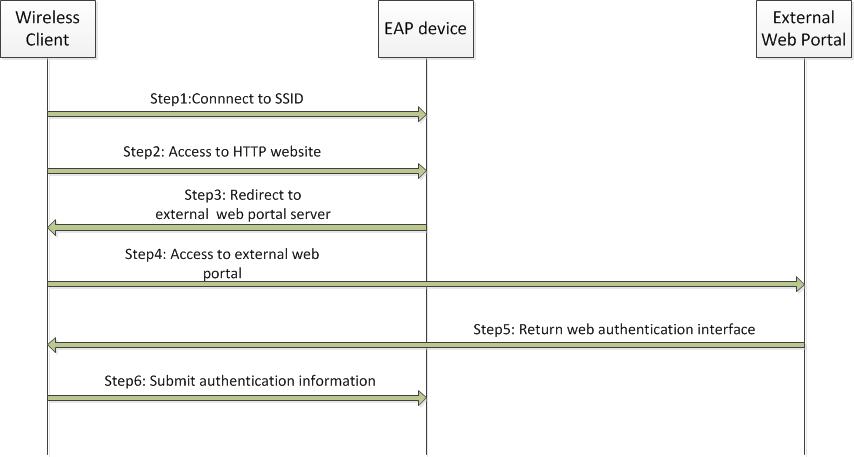
- Wireless client is connected to the SSID of the wireless network and try to access the internet (Step1 and Step2 );
- EAP device will intercept client’s HTTP request and then redirect it to the external web portal server. The parameter “target=ap_ip” will be included in the HTTP response. Then the wireless client will try to access to the external web portal server with parameter “target=ap_ip” in the HTTP request(Step3 and Step4);
- External web portal server will return the web page with authentication form on it. The two <input> elements should be the same with the 4th and 5th line of the demo code. The submit URL should be http://ap_ip/portal/auth(Step5);
- Then the wireless client’s authentication information will be submitted to http://ap_ip/portal/auth (Step6).
The below html template is a simple demo for you to develop your External Web Portal working with EAP Controller:
<!DOCTYPE html PUBLIC "-//W3C//DTD XHTML 1.0 Transitional//EN" "http://www.w3.org/TR/xhtml1/DTD/xhtml1-transitional.dtd">
<form id="form" method="post">
<div><span>username:</span><input type="text" name="username"/> </div>
<div><span>password:</span><input type="password" name="password"/><
/div>
<button type="submit">submit</button>
</form>
<script type="text/javascript">
var submitUrl = "http://" + getQueryString("target") + "/portal/auth";
document.getElementById("form").action = submitUrl;
function getQueryString(name) {
var reg = new RegExp("(^|&)" + name + "=([^&]*)(&|$)", "i");
var r = window.location.search.substr(1).match(reg);
if (r != null) return unescape(r[2]); return null;
}
</script>
Дополнительная информация
Был ли этот FAQ полезен?
Ваш отзыв поможет нам улучшить работу сайта.

TP-Link Community
Still need help? Search for answers, ask questions, and get help from TP-Link experts and other users around the world.