
What are the most frequent asked questions about EAP120/EAP220?
 4227
4227Q1. Can Master EAP work as an access point?
A: Yes. In addition to managing and monitoring Member EAPs, the Master EAP can also function as an access point, providing wireless access to clients.
Q2: What is the maximum number of EAPs in a cluster?
A: The maximum number of EAPs in a cluster is 24 (including the master EAP).
Q3. Can EAP120 and EAP 220 be deployed in the same cluster?
A: No. Only the EAPs of the same model can be clustered. If EAP120 and EAP220 are in the same LAN, EAP120 will automatically form one cluster, while EAP220 will automatically form another cluster. Each cluster has its own Master EAP.
Q4: Can I set up my own portal login page and use a radius server for user authentication instead of the built-in portal?
A: Yes, pro users can also set up external radius server and external web portal server to cooperate with EAP to achieve complex authentication management and advertisement purpose. Refer click here to check how to configure the portal function on the EAP120/EAP220.
Q5. How to power on my EAP120/EAP220?
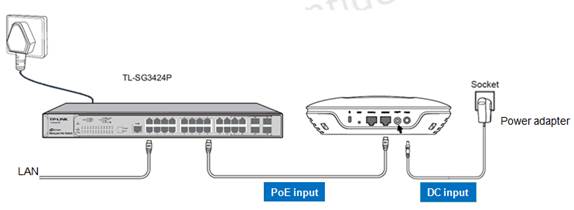
A: The EAP can be powered via a PSE device (e.g., a PoE switch) or its power adapter.
*Via PSE Device

1. Connect the EAP and the PSE device through an Ethernet cable.
2. Press the ON/OFF button on the interface panel of the EAP
*Via Power Adapter
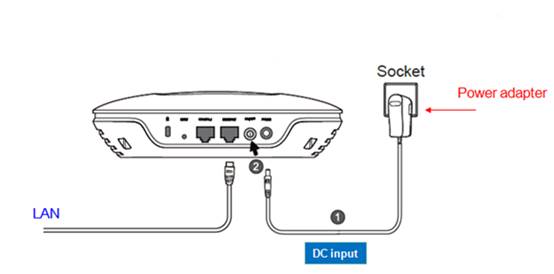

1. Plug one end of the provided power adapter into the power port of the EAP, and the other end to a standard electrical wall socket.
2. Press the ON/OFF button on the interface panel of the EAP.
Note: The EAP can be powered by both DC input and PoE input at the same time. In this case, when one power source fails, the EAP will seamlessly switch to the other source and keep working.
Q6. How to reset EAP120/EAP220 to factory defaults?
A: With the device powered on, press and hold the RESET button for about 8 seconds until the LED flashes red/green/yellow alternatively twice, then release the button. The device will restore to factory default settings.
Q7: What is the Console port on the EAP120/EAP220 for?
A: This port is used to connect to the serial port of a computer or a terminal to check and monitor system information of the device.
Note: CLI commands are not available in current software version. We will release a new version supporting CLI commands soon. Please pay close attention to our official website.
Q8:How to use the Ethernet port on the EAP120/EAP220?
A:This port is used to connect to a router to transmit data or to a PSE (Power Sourcing Equipment), such as a PoE switch, for both data transmission and Power over Ethernet (PoE) through Ethernet cable.
Q9: Can I configure each EAP individually with independent settings?
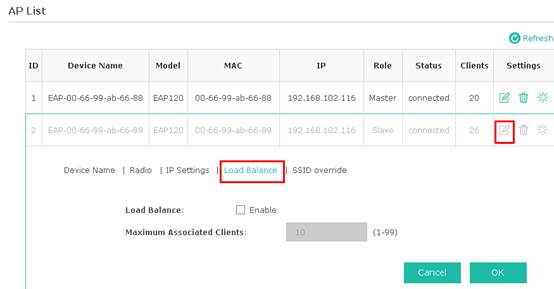
A: By default all the EAPs in the cluster will be synchronized with the same configuration. Yet the Master’s web UI also allows you to configure each EAP individually with independent settings. To configure a specific EAP, navigate to Cluster tab à AP list, and click  at the target column. Then a new box will show up, where you can configure the selected EAP separately.
at the target column. Then a new box will show up, where you can configure the selected EAP separately.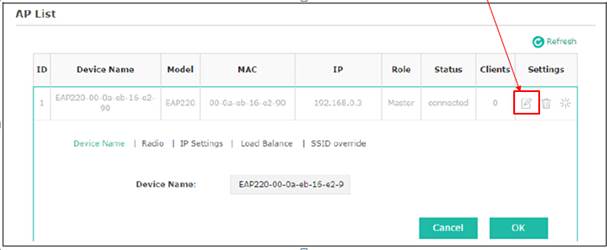
Q10. How can I remove an EAP from a cluster?
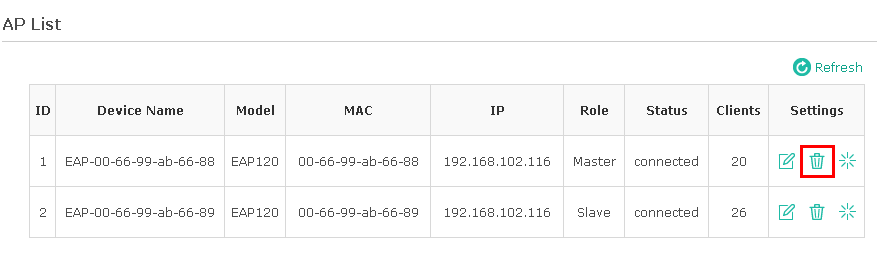
A: In Cluster tab, click trash to remove a specific EAP from the cluster. The management mode of the removed EAP will switch to standalone mode.
Q11. Can I limit the maximum number of associated clients for every EAP?
A: On EAP120 / EAP220, we can limit the maximum number of associated clients for every EAP by enabling Load Balance in Cluster tab à AP list.
Q12: Can an EAP work in repeater / bridge / client / AP router mode?
A:At the current stage, EAP products support access point mode only.
But after the EAP controller comes out, these modes may be added in future firmware, please keep an eye on our official website.
Q13: Why can’t I login to the management page of the EAP using http://192.168.0.254?
A: EAP will fall back to 192.168.0.254 only when there is no DHCP server in LAN. If EAP is already assigned an IP address by DHCP, you must log in via that assigned IP address.
Q14: Why can’t I login to the management page of the EAP via http://tplinkeap.net?
A: 1: Only wireless clients can log in via http://tplinkeap.net.
2: Ensure there is a DHCP server available in LAN.
3: Ensure the client have successfully acquired IP/gateway/DNS configuration from DHCP server.
Q15: Why it shows only 24 devices in the AP list on the web UI when I have 30 EAP120?
A: 1: One cluster can contain at most 24 EAP120 (or 24 EAP220). Thus only 24 EAP120 can join the cluster while the others will fail joining.
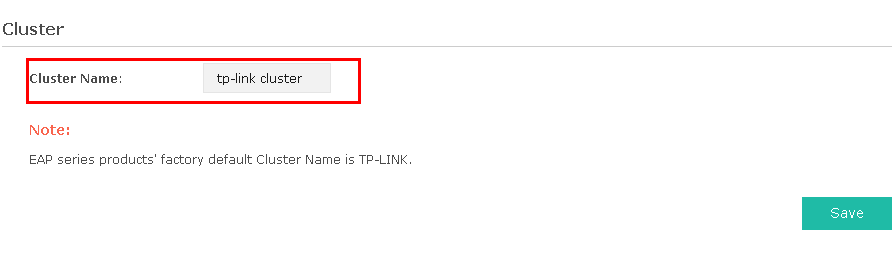
2: If you have more than 24 EAP120, you should power on 24 units to form the 1st cluster. After configuring the 1stcluster, you should change its Cluster Name via Web UI à Cluster Tab. Then you can power on another 6 units to form the 2nd cluster and configure them with similar steps.
Был ли этот FAQ полезен?
Ваш отзыв поможет нам улучшить работу сайта.

Сообщество TP-Link
Нужна помощь? Задавайте вопросы, находите ответы и обращайтесь за помощью к специалистам TP-Link и другим пользователям со всего мира.