
How to Submit a Part Request on the TP-Link Registration System
 488
488Step 1: Open a web browser (Chrome, Edge, Safari), and browse to ‘https://myproducts.tp-link.com’.

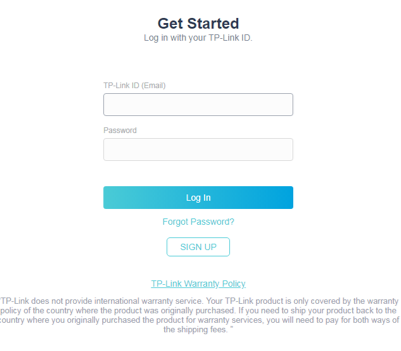
Step 2: Log into the Product Registration System.
*If you have not yet created a TP-Link ID click here
Step 3: Refer to the link here to register the product you need a part for under My Products
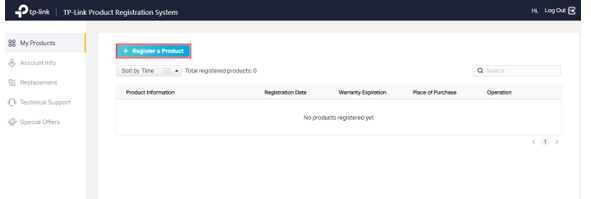
*Note: If you have already registered the product, please skip to Step 4
Step 4: Go to Account Info, then click the Edit icon on the upper right corner to fill out your contact information and add a physical address
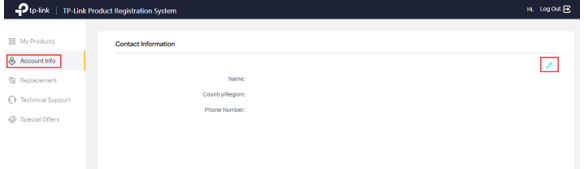
*Note: TP-Link cannot ship to PO Boxes. Addresses must be a physical address.
Step 5: Contact TP-Link technical support to request a part, once it’s been approved, they will create a part request for your product.
*Note: Our RMA team will need to check our inventory to make sure the part is available.
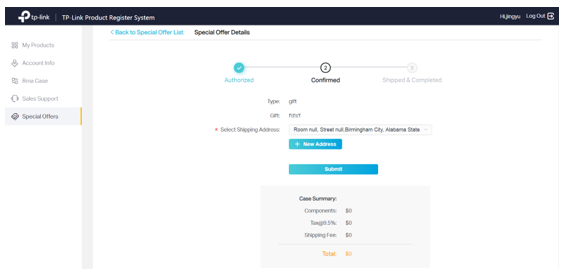
Step 6: If RMA team confirms the part is available, you will see a special offer case under Special Offer, please select your shipping address and submit.
Был ли этот FAQ полезен?
Ваш отзыв поможет нам улучшить работу сайта.

Сообщество TP-Link
Нужна помощь? Задавайте вопросы, находите ответы и обращайтесь за помощью к специалистам TP-Link и другим пользователям со всего мира.