
How to Register a TP-Link Product Using Your TP-Link ID
This page walks you through how to register your TP-Link product in the TP-Link Product Registration System at myproducts.tp-link.com. Registering your product lets you manage your devices, access support, and track warranty information. Before you begin, make sure you have a TP-Link ID. You will also need either a serial number or proof of purchase with the purchase date to complete TP-Link product registration.
Key Takeaways
- You need a TP-Link ID before you can register a product in the TP-Link Product Registration System.
- Registration requires your product's serial number and place of purchase.
- If no serial number is available, you can register using proof of purchase and the purchase date instead.
- After registering, you can view your devices and warranty details on the My Products page.
Why You Should Register Your TP-Link Product
Registering your TP-Link product connects it to your TP-Link ID account so you can manage everything in one place. Here is what TP-Link warranty registration gives you access to:
- Warranty tracking: View your warranty expiration date and registration date directly from the My Products page.
- Support access: Having your product registered makes it easier to get help from TP-Link Technical Support when you need it.
- Device management: See all of your registered products, their details, and registration status from a single dashboard.
Step 1: Log In to the TP-Link Product Registration System
Go to https://myproducts.tp-link.com/us/login and sign in with your TP-Link ID.
If you have not created a TP-Link ID yet, learn how to create a TP-Link ID before continuing.
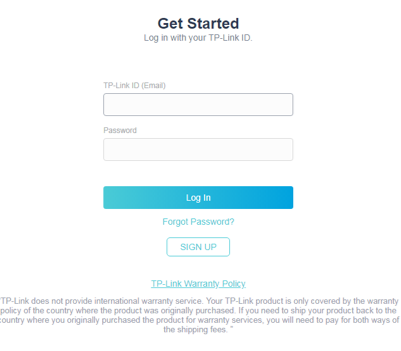
Step 2: Start a New Product Registration
Once logged in, click Register a Product to begin. This opens the registration form, where you will enter your product details.
For help navigating the registration form fields, see how to find your TP-Link product's serial number.
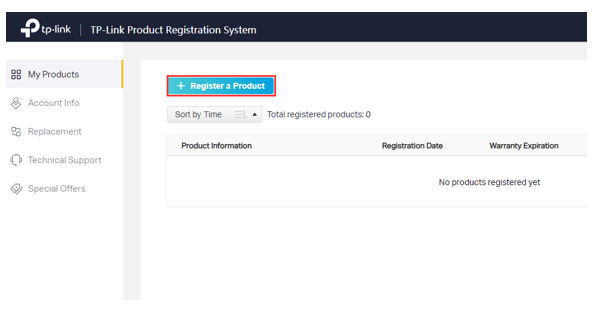
Path A: Register With a Serial Number
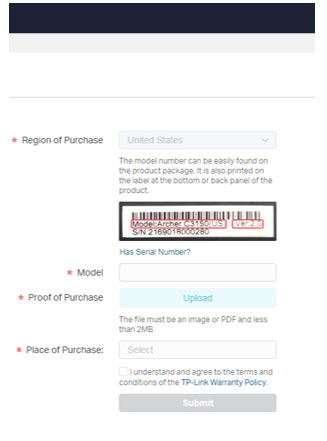
Use this path if a serial number (S/N) is printed on your product label or packaging. The serial number is usually found on the label at the bottom or back panel of the product.
Step 1. Enter the serial number and place of purchase in the registration form. The product model will populate automatically.
Step 2. If you have proof of purchase, upload it during this step. This allows you to enter a purchase date as well.
Step 3. Check the box to confirm you understand and agree to the terms and conditions of the TP-Link Warranty Policy, then click Submit.
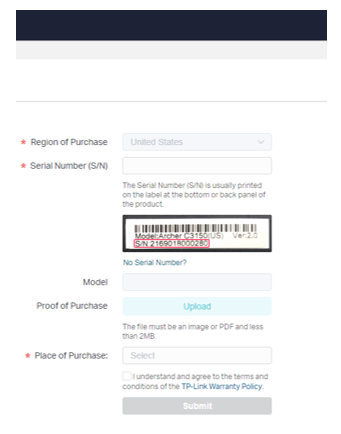
Path B: Register Without a Serial Number
Use this path if you cannot find a serial number on your product or packaging.
Step 1. On the registration form, click No Serial Number?
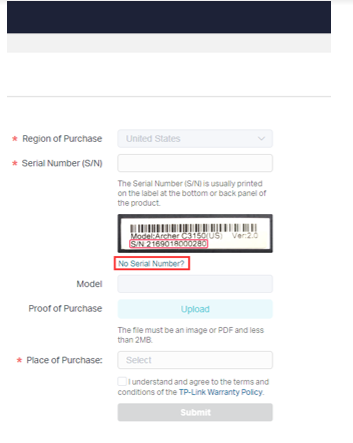
Step 2. Enter your product model, upload your proof of purchase, select your place of purchase, and enter the purchase date. Check the box to confirm you agree to the terms and conditions of the TP-Link Warranty Policy, then click Submit.
Note: Proof of purchase must be an image or PDF file smaller than 2MB.
Viewing Your Registered Products
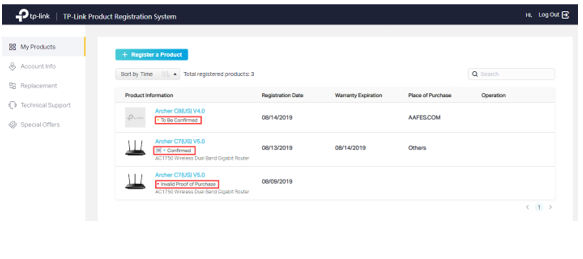
After completing registration, you can view all of your registered devices on the My Products page. The dashboard displays each product's registration date, warranty expiration date, place of purchase, and registration status.
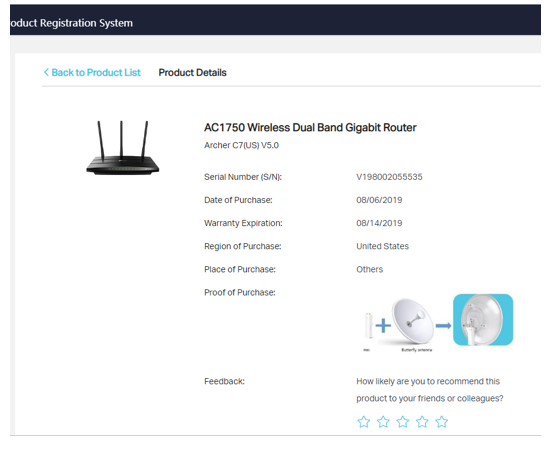
To view detailed information for a specific product, click the model number shown in blue under My Products. The Product Details page lists the serial number, purchase date, warranty expiration, region and place of purchase, and proof of purchase.
Похожие статьи
- Что делать, если беспроводной адаптер Intel PRO 2200BG время от времени теряет связь с беспроводным маршрутизатором TP-Link
- Как настроить TL-WN353G для подключения к беспроводной сети с помощью утилиты TP-Link
- Как найти серийный номер на устройствах TP-Link?
- Как настроить автоматическое получение IP-адресов (по DHCP) на MAC OS?
- Что делать, если не приходит письмо при сбросе пароля или при создании облачной учётной записи?
- Getting to Know the New TP-Link Registration System
Был ли этот FAQ полезен?
Ваш отзыв поможет нам улучшить работу сайта.
Что вам не понравилось в этой статье?
- Недоволен продуктом
- Слишком сложно
- Неверный заголовок
- Не относится к моей проблеме
- Слишком туманное объяснение
- Другое
Спасибо
Спасибо за обращение
Нажмите здесь, чтобы связаться с технической поддержкой TP-Link.
Рекомендуемая продукция


Эта статья подходит для:
- SG2005P-PD
- SG2008
- SG2008P
- SG2210MP
- SG2210P
- SG2218
- SG2218P
- SG2428P
- SG3210
- SG3428
- SG3428MP
- SG3452
- TL-SG2008
- TL-SG2008P
- TL-SG2016P
- TL-SG2210MP
- TL-SG2210P
- TL-SG2218
- TL-SG2218P
- TL-SG2428P
- TL-SG3210
- TL-SG3428
- TL-SG3428MP
- TL-SG3452
- TL-SG3452P
- SX3206HPP
- TL-SX3206HPP
- SG3428X
- SG3452X
- TL-SG3428X
- TL-SG3428XMP
- TL-SG3452X
- TL-SG3452XP
- SG2210XMP-M2
- SG3210X-M2
- SG3210XHP-M2
- SG3218XP-M2
- SG3428X-M2
- SG3428XPP-M2
- TL-SG3210XHP-M2
- TL-SG3428X-M2
- TL-SG3428XPP-M2
- SX3016F
- TL-SG3428XF
- TL-SX3008F
- TL-SX3016F
- SG6428X
- SG6428XHP
- SG6654X
- SG6654XHP
- SX6632YF
- Deco E4
- Deco M4
- Deco M5
- Deco M9 Plus
- Deco P9
- Deco S4
- Deco S7
- Deco X10
- Deco X10-4G
- Deco X1500
- Deco X20
- Deco X20-4G
- Deco X50
- Deco X50-4G
- Deco X50-Outdoor
- Deco X50-PoE
- Deco X55
- Deco X60
- Deco X90
- TL-SG1016DE
- TL-SG1016PE
- TL-SG1024DE
- TL-SG105E
- TL-SG105MPE
- TL-SG105PE
- TL-SG108E
- TL-SG108PE
- TL-SG116E
- TL-SG1210MPE
- TL-SG1218MPE
- TL-SG1428PE
- TL-PA4010 KIT
- TL-PA4010P KIT
- TL-PA7017 KIT
- TL-PA7017P KIT
- TL-WPA4220 KIT
- TL-WPA7517 KIT
- S4500-8GP
- S4500-8GP2F
- Archer T2UB Nano
- UB400
- UB4A
- UB500
- UB5A
- Archer T2U
- Archer T2U Nano
- Archer T2UB Nano
- Archer T3U
- Archer T3U Nano
- Archer TX20U
- TL-WN725N
- TL-WN727N
- TL-WN821N
- TL-WN823N
- ER605
- ER706W
- ER707-M2
- ER7206
- ER8411
- Archer T2E
- Archer T4E
- Archer TX20E
- Archer TX3000E
- Archer TX50E
- Archer TX55E
- TG-3468
- TL-WN781ND
- TL-WN881ND
- TX201
- TX401
- TL-PA4010 KIT
- Archer T2U Plus
- Archer T3U Plus
- Archer T4U
- Archer T4U Plus
- Archer TX20U Plus
- Archer TX20UH
- Archer TX50UH
- TL-WN722N
- TL-WN822N
- MC100CM
- MC111CS
- MC210CS
- MC220L
- Tapo RVA100
- Tapo RVA200
- Tapo RVA300
- Tapo RVA400
- TL-FC111A-20
- TL-FC111B-20
- TL-FC111PB-20
- TL-MC1400
- TL-POE170S
- TL-POE4824G
- TL-SM5110-SR
- TL-SM5220-1M
- OC200
- OC300
- VIGI NVR1004H-4P
- VIGI NVR1008H
- VIGI NVR1008H-8MP
- VIGI NVR1008H-8P
- VIGI NVR1016H
- VIGI NVR1104H-4P
- VIGI NVR2016H
- VIGI NVR2016H-16MP
- VIGI NVR2016H-16P
- VIGI NVR4032H
- Archer A5
- Archer A54
- Archer A6
- Archer A64
- Archer A8
- Archer Air R5
- Archer AX10
- Archer AX12
- Archer AX1500
- Archer AX17
- Archer AX18
- Archer AX1800
- Archer AX23
- Archer AX3000
- Archer AX50
- Archer AX53
- Archer AX5400
- Archer AX55
- Archer AX55 Pro
- Archer AX58
- Archer AX72
- Archer AX73
- Archer BE800
- Archer C20
- Archer C24
- Archer C50
- Archer C54
- Archer C6
- Archer C64
- Archer C6U
- Archer C80
- Archer C86
- TL-WR1502X
- TL-WR820N
- TL-WR840N
- TL-WR841N
- TL-WR842N
- TL-WR844N
- TL-WR845N
- TL-WR902AC
- AP7650
- EAP115-Wall
- EAP230-Wall
- EAP235-Wall
- EAP615-Wall
- EAP650-Wall
- EAP655-Wall
- VIGI C220I
- VIGI C230
- VIGI C230I
- VIGI C230I Mini
- VIGI C240
- VIGI C240I
- VIGI C250
- VIGI C300HP
- VIGI C320I
- VIGI C330
- VIGI C330I
- VIGI C340
- VIGI C340-W
- VIGI C340I
- VIGI C340S
- VIGI C345
- VIGI C350
- VIGI C355
- VIGI C385
- VIGI C420I
- VIGI C430
- VIGI C430I
- VIGI C440
- VIGI C440-W
- VIGI C440I
- VIGI C445
- VIGI C450
- VIGI C455
- VIGI C485
- VIGI C540
- VIGI C540-4G
- VIGI C540-W
- VIGI C540S
- VIGI C540V
- TL-SG1016DE
- TL-SG1016PE
- TL-SG1024DE
- TL-SG105E
- TL-SG105PE
- TL-SG108E
- TL-SG108PE
- TL-SG116E
- TL-SG1210MPE
- TL-SG1218MPE
- TL-SG1428PE
- LS1005
- LS1005G
- LS1008
- LS1008G
- LS105GP
- LS105LP
- LS106LP
- LS109P
- LS1210GP
- LS1005
- LS1005G
- LS1008
- LS1008G
- TL-SF1005D
- TL-SF1008D
- TL-SG1005D
- TL-SG1008D
- TL-SL2428P
- UC400
- UE200
- UE300
- UE300C
- UE306
- UE330
- UH400
- UH700
- UH720
- TL-R470T+
- TL-R480T+
- FC311A-2
- FC311A-20
- FC311B-2
- FC311B-20
- MC100CM
- MC110CS
- MC111CS
- MC112CS
- MC200CM
- MC210CS
- MC220L
- TL-FC111A-20
- TL-FC111B-20
- TL-FC111PB-20
- SM311LM
- SM311LS
- SM321A
- SM321A-2
- SM321B
- SM321B-2
- SM331T
- SM5110-LR
- SM5220-3M
- SM5310-T
- TL-SM321A
- TL-SM5110-SR
- TL-SM5220-1M
- PSM500-AC
- PSM550-AC
- PSM900-AC
- TL-MC1400
- CPE210
- CPE220
- CPE510
- CPE605
- CPE610
- CPE710
- Pharos Control
- LS1005
- LS1005G
- LS1008
- LS1008G
- LS105GP
- LS105LP
- LS106LP
- LS109P
- LS1210GP
- TL-SF1005D
- TL-SF1005LP
- TL-SF1005P
- TL-SF1006P
- TL-SF1008D
- TL-SF1008LP
- TL-SF1008P
- TL-SF1009P
- TL-SF1016
- TL-SF1016D
- TL-SF1016DS
- TL-SF1024
- TL-SF1024D
- TL-SF1024M
- TL-SF1048
- TL-SG1005D
- TL-SG1005LP
- TL-SG1005P
- TL-SG1005P-PD
- TL-SG1006PP
- TL-SG1008D
- TL-SG1008MP
- TL-SG1008P
- TL-SG1016
- TL-SG1016D
- TL-SG1024
- TL-SG1024D
- TL-SG1048
- TL-SG105PP-M2
- TL-SG116P
- TL-SG1210MP
- TL-SG1210P
- TL-SG1210PP
- TL-SG1218MP
- TL-SL1218MP
- TL-SL1218P
- TL-SL1226P
- TL-SL1311MP
- TL-SL1311P
- TL-SF1005D
- TL-SF1005LP
- TL-SF1005P
- TL-SF1006P
- TL-SF1008D
- TL-SF1008LP
- TL-SF1008P
- TL-SF1009P
- TL-SF1016
- TL-SF1016D
- TL-SF1016DS
- TL-SF1024
- TL-SF1024D
- TL-SF1024M
- TL-SF1048
- TL-SG1005D
- TL-SG1005LP
- TL-SG1005P
- TL-SG1005P-PD
- TL-SG1006PP
- TL-SG1008D
- TL-SG1008MP
- TL-SG1008P
- TL-SG1016
- TL-SG1024
- TL-SG1024D
- TL-SG1048
- TL-SG105PP-M2
- TL-SG116P
- TL-SG1210MP
- TL-SG1210P
- TL-SG1210PP
- TL-SG1218MP
- TL-SL1218MP
- TL-SL1226P
- TL-SL1311MP
- Omada Cloud-Based Controller
- Omada Pro Cloud-Based Controller
- Archer VR300
- Archer VR400
- TD-W8961N
- M7000
- M7010
- M7200
- M7350
- M7450
- M7650
- LS105GP
- LS105LP
- LS106LP
- LS109P
- LS1210GP
- POE10E
- POE10R
- POE150S
- POE2412G
- POE260S
- POE380S
- POE4818G
- S4500-8GHP2F
- S4500-8GP
- S4500-8GP2F
- S5500-24GP4F
- S5500-24GP4XF
- S5500-24MPP4XF
- S5500-48GP4F
- S5500-48GP4XF
- S5500-8MHP2XF
- TL-POE160S
- TL-POE170S
- TL-POE4824G
- TL-SF1005LP
- TL-SF1005P
- TL-SF1006P
- TL-SF1008LP
- TL-SF1008P
- TL-SF1009P
- TL-SG1005LP
- TL-SG1005P
- TL-SG1005P-PD
- TL-SG1006PP
- TL-SG1008MP
- TL-SG1008P
- TL-SG1016PE
- TL-SG105MPE
- TL-SG105PE
- TL-SG105PP-M2
- TL-SG108PE
- TL-SG116P
- TL-SG1210MP
- TL-SG1210MPE
- TL-SG1210P
- TL-SG1210PP
- TL-SG1218MP
- TL-SG1218MPE
- TL-SG1428PE
- TL-SL1218MP
- TL-SL1218P
- TL-SL1226P
- TL-SL1311MP
- TL-SL1311P
- TL-SL2428P
- POE10E
- POE10R
- POE150S
- POE2412G
- POE260S
- POE380S
- POE4818G
- TL-POE160S
- TL-POE170S
- TL-POE4824G
- AP9635
- AP9650
- AP9665
- AP9670
- AP9778
- EAP110
- EAP115
- EAP223
- EAP225
- EAP245
- EAP265 HD
- EAP610
- EAP613
- EAP620 HD
- EAP650
- EAP653
- EAP660 HD
- EAP670
- EAP673
- EAP680
- EAP773
- EAP783
- ER605
- ER707-M2
- ER7206
- ER8411
- G36
- G611
- Omada Pro Software Controller
- Omada Software Controller
- VIGI VMS
- Tapo RV10
- Tapo RV10 Plus
- Tapo RV20 Mop Plus
- Tapo RV30
- Tapo RV30 Plus
- Archer MR200
- Archer MR400
- Archer MR500
- Archer MR600
- M7000
- M7450
- TL-MR100
- TL-MR6400
- TL-MR6500v
- Archer MR200
- Archer MR400
- Archer MR500
- Archer MR505
- Archer MR550
- Archer MR600
- Deco X10-4G
- Deco X20-4G
- Deco X50-4G
- M7000
- M7010
- M7200
- M7350
- M7450
- TL-MR100
- TL-MR105
- TL-MR150
- TL-MR3020
- TL-MR6400
- TL-WR842N
- TL-R470T+
- TL-R480T+
- ER706W
- ER7212PC
- CPE210
- CPE220
- CPE510
- CPE605
- CPE610
- CPE710
- TL-WA1201
- TL-WA1801
- TL-WA801N
- AP8635-I
- EAP110-Outdoor
- EAP225-Outdoor
- EAP610-Outdoor
- EAP623-Outdoor HD
- EAP625-Outdoor HD
- EAP650-Outdoor
- Tapo L510E
- Tapo L520E
- Tapo L530E
- Tapo L535E
- Tapo L610
- Tapo L630
- Tapo L900-5
- Tapo L920-5
- Tapo S200B
- Tapo S200D
- Tapo S210
- Tapo S220
- Tapo T100
- Tapo T110
- Tapo T300
- Tapo T310
- Tapo T315
- Tapo A200
- Tapo C100
- Tapo C110
- Tapo C120
- Tapo C125
- Tapo C200
- Tapo C210
- Tapo C211
- Tapo C220
- Tapo C225
- Tapo C310
- Tapo C320WS
- Tapo C325WB
- Tapo C425
- Tapo C500
- Tapo C510W
- Tapo C520WS
- Tapo D230S1
- TC40
- TC60
- TC65
- TC70
- TC71
- TC72
- Tapo P100
- Tapo P110
- Tapo P115
- Tapo P300
- S5500-16XF
- S5500-24F4XF
- S5500-24GP4F
- S5500-24GP4XF
- S5500-24MPP4XF
- S5500-48GP4F
- S5500-48GP4XF
- S5500-8MHP2XF
- S5500-8XF
- T2700G-28TQ
- TL-SG3428
- TL-SG3428X-UPS
- TL-SL2428P
- Archer Air E5
- RE190
- RE200
- RE205
- RE220
- RE300
- RE305
- RE315
- RE450
- RE505X
- RE550
- RE600X
- RE605X
- RE705X
- TL-WA850RE
- TL-WA854RE
- TL-WA855RE
- TL-WA860RE
- HA100
- Pharos Control
- Tapo H100
- Tapo H200

Сообщество TP-Link
Нужна помощь? Задавайте вопросы, находите ответы и обращайтесь за помощью к специалистам TP-Link и другим пользователям со всего мира.
This website uses cookies to improve website navigation, analyze online activities and have the best possible user experience on our website. You can object to the use of cookies at any time. You can find more information in our privacy policy . Don’t show again
Your Privacy Choices
This website uses cookies to improve website navigation, analyze online activities and have the best possible user experience on our website. You can object to the use of cookies at any time. You can find more information in our privacy policy . Don’t show again
These cookies are necessary for the website to function and cannot be deactivated in your systems.
TP-Link
accepted_local_switcher, tp_privacy_banner, tp_privacy_base, tp_privacy_marketing, tp_top-banner, tp_popup-bottom, tp_popup-center, tp_popup-right-middle, tp_popup-right-bottom, tp_productCategoryType
Youtube
id, VISITOR_INFO1_LIVE, LOGIN_INFO, SIDCC, SAPISID, APISID, SSID, SID, YSC, __Secure-1PSID, __Secure-1PAPISID, __Secure-1PSIDCC, __Secure-3PSID, __Secure-3PAPISID, __Secure-3PSIDCC, 1P_JAR, AEC, NID, OTZ
Analysis cookies enable us to analyze your activities on our website in order to improve and adapt the functionality of our website.
The marketing cookies can be set through our website by our advertising partners in order to create a profile of your interests and to show you relevant advertisements on other websites.
Google Analytics & Google Tag Manager
_gid, _ga_<container-id>, _ga, _gat_gtag_<container-id>
Google Ads & DoubleClick
test_cookie, _gcl_au
Meta Pixel
_fbp
Crazy Egg
cebsp_, _ce.s, _ce.clock_data, _ce.clock_event, cebs
lidc, AnalyticsSyncHistory, UserMatchHistory, bcookie, li_sugr, ln_or