
What are the sensitivity settings and how do I control them?
 108271
*Note: All Kasa Cams require and only work with the Kasa for Mobile App
There are two sensitivity settings: Motion and Sound.
Motion sensitivity indicates how little or how much activity must occur to trigger a notification.
Sound sensitivity indicates whether you want to listen for noise or not.
You can access the camera sensitivity settings from the device details page. For motion sensitivity and when sound sensitivity is enabled, your options are more sensitive, normal or less sensitive.
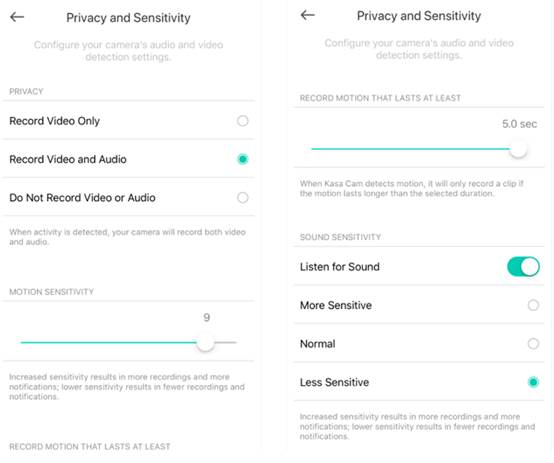
If you need further assistance contact TP-Link Customer Support here.
Был ли этот FAQ полезен?
Ваш отзыв поможет нам улучшить работу сайта.

Сообщество TP-Link
Нужна помощь? Задавайте вопросы, находите ответы и обращайтесь за помощью к специалистам TP-Link и другим пользователям со всего мира.