
What can I do if Range Extender cannot connect to TP-Link Router via EasyMesh?
Introduction
This article provides troubleshooting steps when the Range Extender cannot connect to the router.
Requirements
- TP-Link Router
- Range Extender
Troubleshooting
Step 1. Upgrade the Range Extender to the latest firmware.
Step 2. Disable the router's Guest Wi-Fi and Multi-SSID, then check whether WPS is possible to build the EasyMesh network.
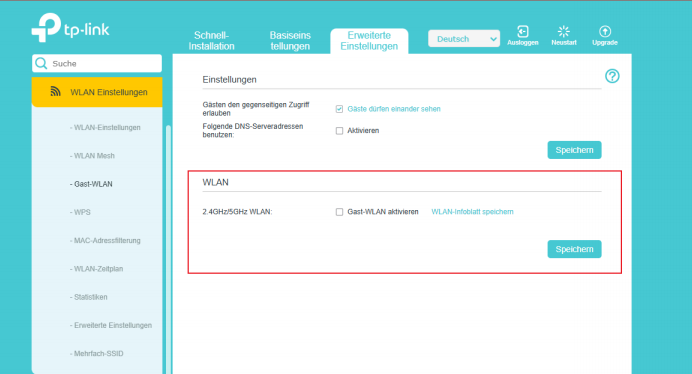
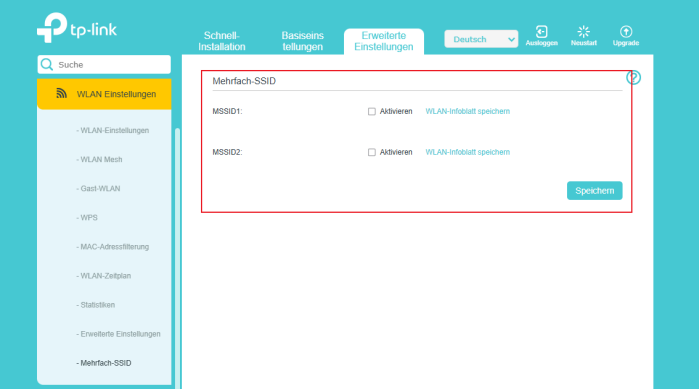
Step 3. Press and hold the WPS buttons on both the Router and Range Extender simultaneously until the Wi-Fi LED begins to flash.
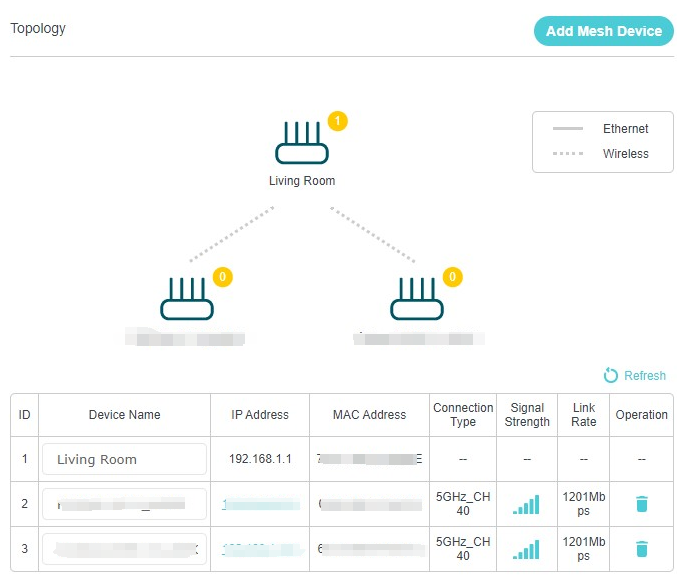
Step 4. Go to Basic > Network Map > Topology to check whether the Range Extender is added.
Get to know more details of each function and configuration please go to Download Center to download the manual of your product.
A fost util acest FAQ?
Părerea ta ne ajută să îmbunătățim acest site.



TP-Link Community
Still need help? Search for answers, ask questions, and get help from TP-Link experts and other users around the world.