
How to Change the Default LAN IP Address on Your Deco
Your Deco's IP address is the address it uses to identify itself on your home network. The default Deco LAN IP address is 192.168.68.1, which comes pre-set on all Deco devices. In some cases, you may need to change this address, for example, if it conflicts with another device or router already using the same IP range on your network. The steps below use the Deco M5 as an example but apply to all supported Deco models.
Key Takeaways
- The default LAN IP address for Deco is 192.168.68.1.
- You may need to change the default IP if it conflicts with another device or router on your network.
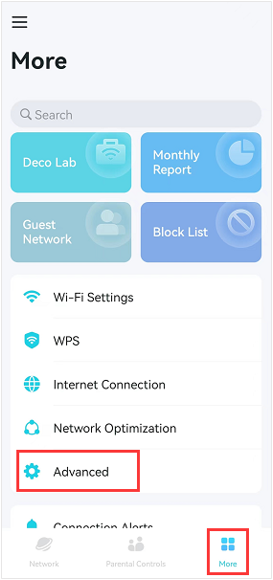
- To change the LAN IP address, open the Deco app, go to More > Advanced > LAN IP, enter your preferred IP address and subnet mask, then tap Save.
- After saving, tap Continue to confirm the change. Your Deco will apply the new LAN IP address.
What Is a LAN IP Address?
A local area network (LAN) IP address is the address your Deco uses to identify itself within your home network. It is how other devices on your network locate and communicate with the Deco. The default LAN IP that comes pre-set on all Deco devices is 192.168.68.1. You may need to change this if it conflicts with another device or router on the same network.
How to Change Your Deco IP Address
Here we take the Deco M5 as an example.
Step 1. Connect your phone to the Deco's Wi-Fi, open the Deco app, tap More, then tap Advanced
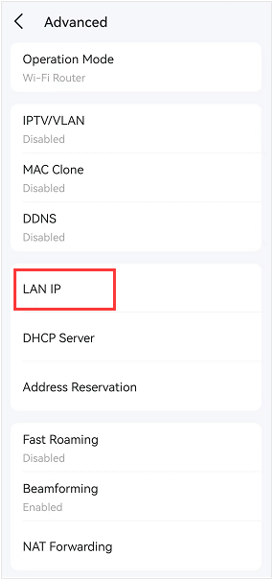
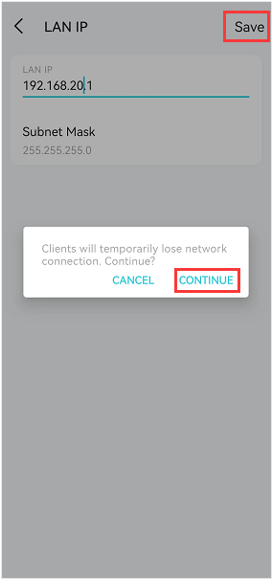
Step 3. Enter your preferred LAN IP address and subnet mask.
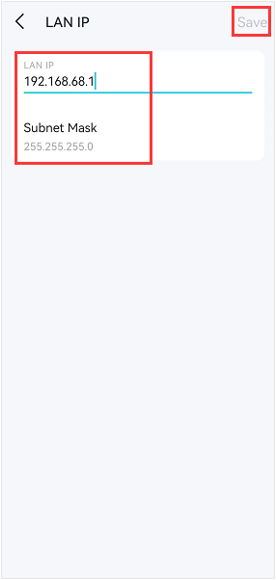
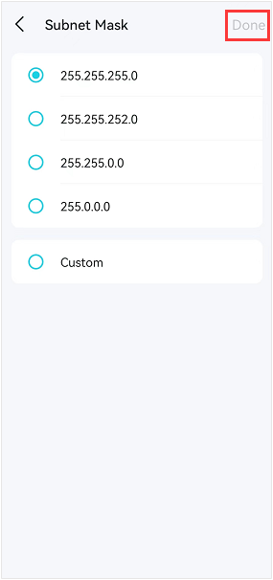
Step 4. Tap Save, then tap Continue to apply the change.
Get to know more details of each function and configuration please go to Download Center to download the manual of your product.
Więcej
Czy ten poradnik FAQ był pomocny?
Twoja opinia pozwoli nam udoskonalić tę stronę.
_US_1.0_F_normal_20260130113012m.png)
_Overview_normal_20261007062201y.png)


TP-Link Community
Still need help? Search for answers, ask questions, and get help from TP-Link experts and other users around the world.
z United States?
Uzyskaj produkty, wydarzenia i usługi przeznaczone dla Twojego regionu.