
Pobierz Tapo C665G KIT
- Przegląd produktów
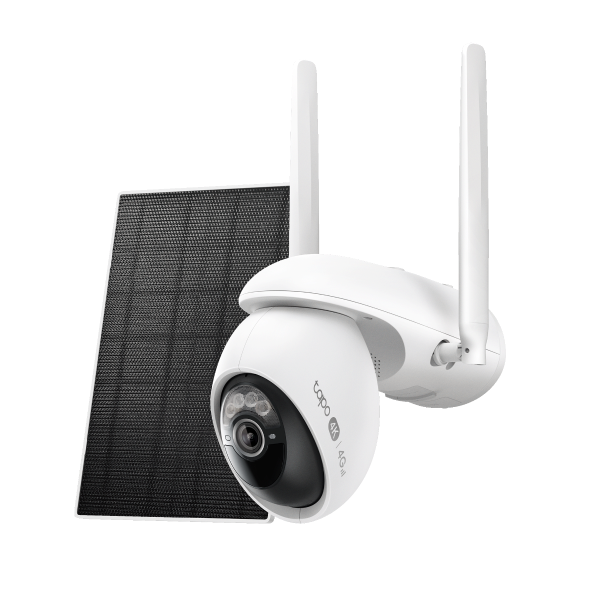 Zestaw obrotowej kamery Wi-Fi/4G LTE do monitoringu zasilanej energią słoneczną
Konfiguracja
-
How to Set Up Your Solar-Powered Pan/Tilt Wi-Fi/4G Security Camera Kit | Tapo C665GKIT
Tapo C665G KIT features Enhanced AI Detections with 4K resolution and 18x digital zoom, allowing it to recognize faces, people, pets, and vehicles with incredible precision and detail. With Starlight Color Night Vision and solar charging, it ensures vivid, round-the-clock surveillance without maintenance worries. Designed for versatility, the camera supports 4G LTE and dual-band Wi-Fi, making it perfect for outdoor locations where Wi-Fi may be unreliable.
Rozwiń więcej Zwiń -
How to Mount Your Solar-Powered Pan/Tilt Wi-Fi/4G Security Camera Kit | Tapo C665GKIT
Tapo C665G KIT features Enhanced AI Detections with 4K resolution and 18x digital zoom, allowing it to recognize faces, people, pets, and vehicles with incredible precision and detail. With Starlight Color Night Vision and solar charging, it ensures vivid, round-the-clock surveillance without maintenance worries. Designed for versatility, the camera supports 4G LTE and dual-band Wi-Fi, making it perfect for outdoor locations where Wi-Fi may be unreliable.
Rozwiń więcej Zwiń
FAQ
- Notifications: How to Set Up and Manage Tapo & Kasa Alerts in the Tapo App
- Co zrobić, jeśli nie mogę skonfigurować kamery Tapo?
- Understanding AI Chat Usage Limits in Aireal
- What Is Wake-Up Sensitivity on the Tapo Battery Camera or Doorbell
- How to Configure Homes and Rooms in the Tapo App
- Jak zresetować kamerę Tapo?
- Jak skasować konto TP-Link Cloud?
- Recommended Carriers with Tapo 4G Camera
- How to Set Up Geofencing on the Tapo/Kasa App
- Jak połączyć moje urządzenia Tapo z Google Home?
- How to Stream Tapo / Kasa Camera on Google Device
- Why Can't I Receive the SMS Verification Code from the Tapo App? How to Fix It
- Jak skonfigurować kamerę Tapo?
- Ogólne pytania dotyczące Tapo Care
- Anulowanie i zwrot środków za usługę Tapo Care
- Jak korzystać z widżetów na iOS, aby kontrolować urządzenia Tapo?
- Co robić, jeśli nie mogę znaleźć mojej kamery Tapo w aplikacji?
- How to Enable 24/7 Capture on Tapo Battery-Powered Cameras
- Jak uzyskać Dziennik systemowy kamery Tapo?
- Tapo SD Card Playback Issues: Fix Video Playback Problems on Your Camera
- Announcement: IFTTT Services Ending for Tapo and Kasa Products
- How to Reset a Forgotten TP-Link ID Password for Tapo and Kasa Devices
- Frequently Asked Questions about Face Management
- How to Redeem Your Tapo Care Redemption Code
- Tapo Camera Battery Draining Fast? Find Out How to Fix It!
- Kasa and Tapo Smart Devices Not Working with Alexa: Troubleshooting Guide
- Jak konfigurować Tryb dom i Tryb poza domem kamery Tapo?
- Dlaczego nie mogę zarejestrować lub aktywować TP‑Link ID?
- Jak dodać nowe kamery do planu Tapo Care?
- Jak podnieść lub obniżyć wersję subskrypcji Tapo Care?
- How to use Encrypt microSD Card Function on Tapo Camera
- How to Fix No Sound and Audio Quality Issues on Your Tapo Camera or Doorbell
- How to Troubleshoot Tapo and Kasa Notifications Not Working or Delayed
- General Questions about Tapo/Kasa Geofencing
- What is Video Summary
- How to fix a flickering issue on Live View of the Tapo Camera
- How to set up routines for Tapo devices via Alexa app
- General questions about Pan & Tilt feature of TP-Link Camera
- How to use Alexa Snapshot with Tapo Cameras
- The most frequent asked questions about TP-Link Sales
- Jak mogę przeprowadzić uwierzytelnianie 3DS podczas zakupu Tapo Care?
- How to unlink third-party accounts from your TP-Link ID
- How to verify if it’s the hardware issue of TP-Link smart home
- Dlaczego firma TP-Link potrzebuje mojego adresu email?
- Why do I receive a "We Noticed a New Login" email?
- How to create 3D Map in the Tapo App for Pad
- Set Privacy Zone for Tapo Camera and Doorbell
- How to update or change the payment method for Tapo Care or Kasa Care
- Co należy zrobić, jeśli nie otrzymuje emaila weryfikacyjnego podczas rejestrowania konta lub resetowania hasła?
- Tapo/Kasa Devices Appear Offline After Changing or Resetting the Router
- Jak włożyć kartę SD do kamery Tapo?
- Jak mogę obejrzeć nagrania z karty SD na komputerze?
- Jak połączyć urządzenia Tapo z Amazon Alexa?
- Co zrobić, jeśli karta SD nie działa prawidłowo w mojej kamerze?
- Co robić, jeśli nie mogę uzyskać działania urządzeń Tapo smart z Google Home lub Amazon Alexa?
- Co robić, jeśli aktualizacja oprogramowania moich urządzeń Tapo smart się nie powiedzie?
- Jak sprawdzić stabilność połączenia sieciowego kamery Tapo?
- Why do I need to give Local Network permission to TP-Link apps in iOS devices?
- Co to jest TP-Link ID i jak je utworzyć?
- Gdzie znajdują się oznaczenia modeli produktów TP-Link?
- How to Find the Serial Number (S/N) on Your TP-Link Device
- Jak sprawdzić wersję sprzętową urządzenia TP-Link?
Informacje o oprogramowaniu
Zapoznaj się z poradnikiem FAQ 3580, aby zaktualizować oprogramowanie.
|
Tapo C665G(EU)_V1_1.2.5 Build 260130 |
|---|
| Data publikacji: 2026-02-26 |
|
Modifications and Bug Fixes: |
|
Tapo C665G(EU)_V1_1.2.4 Build 251218 |
|---|
| Data publikacji: 2026-01-26 |
|
Modifications and Bug Fixes: |
|
Tapo C665G(EU)_V1_1.2.3 Build 251211 |
|---|
| Data publikacji: 2025-12-25 |
|
Modifications and Bug Fixes: |
|
Tapo C665G(EU)_V1_1.2.2 Build 251111 |
|---|
| Data publikacji: 2025-12-03 |
|
Modifications and Bug Fixes: |
|
Tapo C665G(EU)_V1_1.2.1 Build 250923 |
|---|
| Data publikacji: 2025-11-03 |
|
Modifications and Bug Fixes: |
z United States?
Uzyskaj produkty, wydarzenia i usługi przeznaczone dla Twojego regionu.