


Can I Access My Security Cameras Remotely? Methods & Limits
Published: August 11, 2026 | Last Updated: August 11, 2026
Quick Answer
- The cloud route needs no router setup and carries documented limits. On VIGI Cloud VMS, playback stops after 5 minutes with no interaction, and up to 4 people can watch live at once.
- The DDNS and port forwarding route needs the router in front of your recorder to have a public IP address, which many internet connections do not have. Check before planning around it.
- Whichever route you use, remote access is only as strong as the password set when the device was activated, since VIGI devices ship without a usable default one.
Yes. Nearly every current IP camera and network video recorder supports remote viewing, and for most people it works through the manufacturer's app with no router configuration at all. The question worth more of your attention is what each route costs you: the cloud route is easy and comes with published limits on how long a stream runs and how many people can watch, the port forwarding route avoids the cloud and requires a public IP address you may not have, and the VPN route is the most private and the most work. Which one suits you depends on how much setup you are willing to do and how much of your system you are willing to expose.
Table of Contents
Can You Actually Reach Your Cameras From Anywhere?
How Does App and Cloud Access Actually Work?
What Are the Limits of the Cloud Route?
When Would You Use DDNS and Port Forwarding Instead?
Is a VPN Worth the Extra Setup?
What Actually Keeps Remote Access Secure?
Why Does Remote Access Stop Working?
Can You Actually Reach Your Cameras From Anywhere?
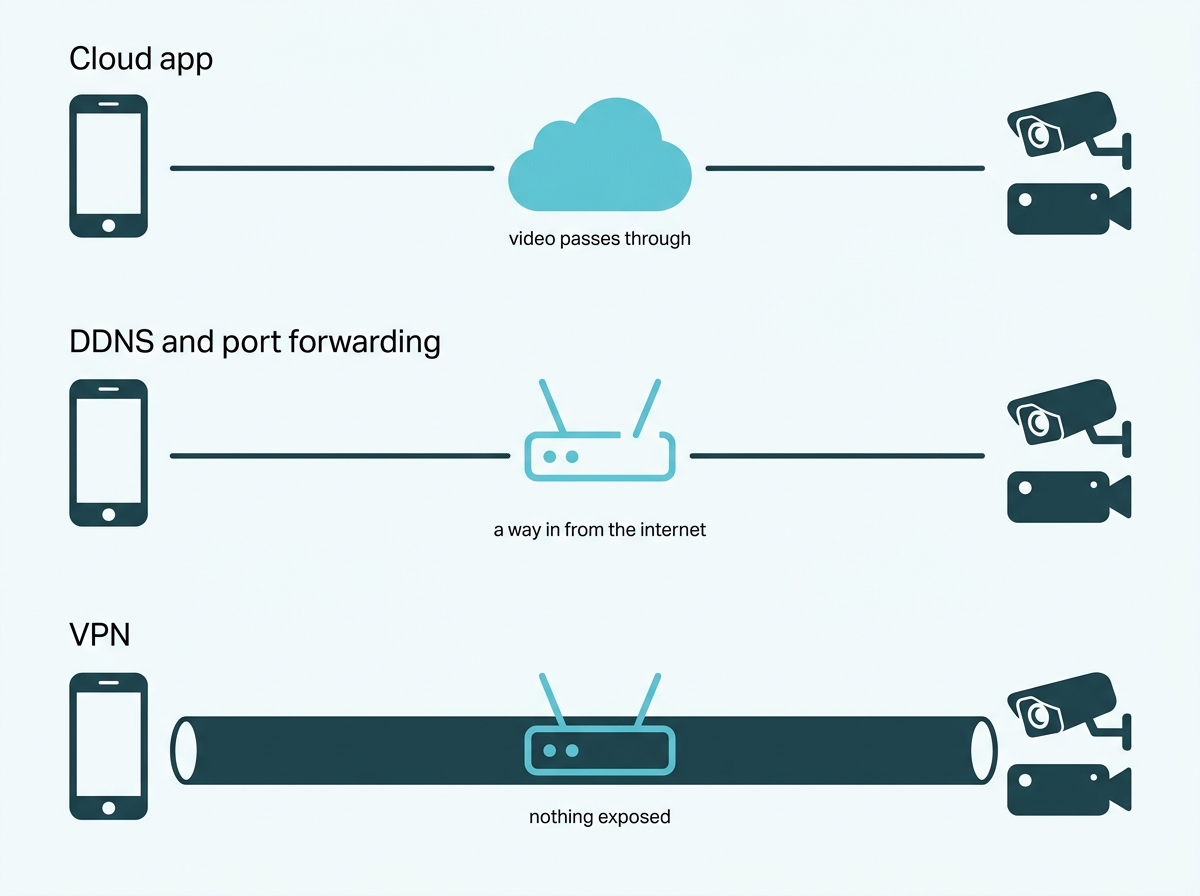
Yes, through one of three routes, and they differ mainly in what they expose to the internet and how much setup they need.
The manufacturer's cloud service and app. You bind the camera or recorder to an account, install the app, and view from anywhere. No router changes. This is how the large majority of systems are used.
A domain name plus port forwarding. You publish a route from the internet to your own recorder, using a dynamic DNS name so the address stays stable, and connect to it directly without a manufacturer's cloud in between.
A VPN into the network. Your phone or laptop joins the local network remotely, and the cameras are never reachable from the public internet at all.
Feature-to-Benefit: The Three Remote Access Routes
|
Route |
Setup effort |
What it needs |
What it exposes |
|
Cloud app |
Low, account-based |
An account and an internet connection at the property |
Nothing directly, though the video passes through the vendor's service |
|
DDNS and port forwarding |
Moderate to high |
A router with a public IP address, and port mapping |
A reachable route from the internet to your recorder |
|
VPN |
Highest |
A VPN server on the network |
Nothing, the cameras stay inside the private network |
The cloud route is the least work and puts your video through a vendor's service; the DDNS route removes the vendor from the path but publishes a way in from the internet and needs a public address to work at all, and the VPN route exposes nothing but requires infrastructure to already exist. Most small deployments use the first, some technical users prefer the second, and organizations with existing network equipment use the third.
Remote viewing is one part of getting a system set up and working, and CCTV & Camera Installation Guide Philippines covers where it sits in that sequence.
What it means for you: pick the route before you buy anything, because the second one has a hard requirement your internet connection may not meet, and finding that out afterwards is a wasted afternoon.
How Does App and Cloud Access Actually Work?
You bind the device to an account, and the vendor's service handles reaching it. On VIGI hardware, that account is a TP-Link ID, and the binding is a setting on the device itself.
On a VIGI NVR, the path is Settings, then Cloud Services, then TP-Link ID, where you enter your credentials and bind. Once bound, the same account works in the VIGI app on a phone and in VIGI Security Manager on a computer, and you can view live and recorded footage from either without touching the router. VIGI Cloud VMS is the browser-based version of the same idea, built for managing several sites and organized around sites and organizations rather than individual devices, and it uses the same TP-Link ID.
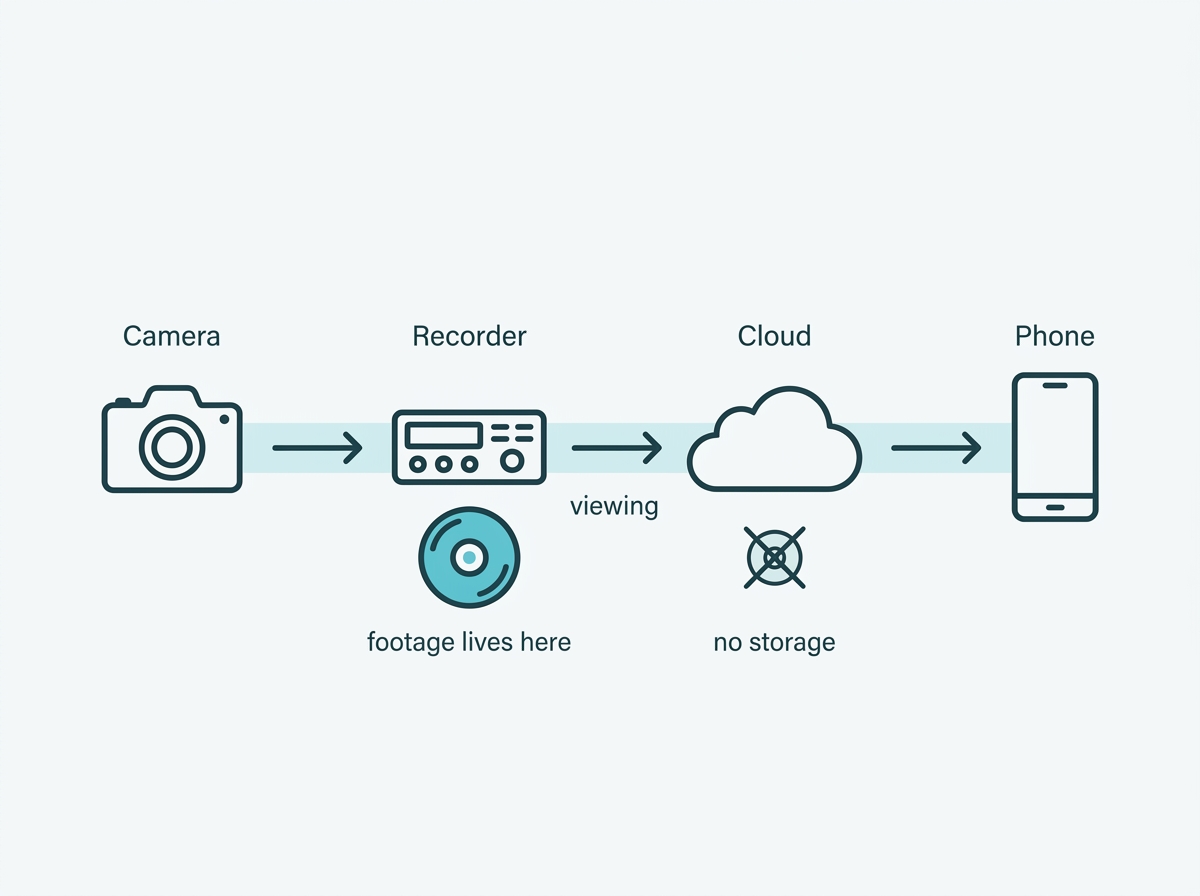
One mechanical detail is worth knowing because it explains the behavior in the next section. TP-Link states that Cloud VMS pulls the video stream from a cloud relay server for playback. Your video is travelling through the vendor's infrastructure rather than directly from camera to phone, which is what makes the setup effortless and also what produces the limits that come with it.
One thing to know before choosing a management platform. TP-Link documents that once a VIGI device is connected to a VIGI VMS system, it is automatically dropped from the TP-Link cloud, and at that point the VIGI app and VIGI Security Manager can no longer manage it remotely. The two management modes are alternatives rather than layers, so this is a decision made once per device rather than a setting to toggle.
What it means for you: if the appeal of remote viewing is that it should just work, the cloud route is the one that does. Understand that the convenience is paid for with a dependency on someone else's service and with the constraints below.
What Are the Limits of the Cloud Route?
Published, specific, and worth knowing before you build a routine around them. TP-Link documents these for VIGI Cloud VMS.
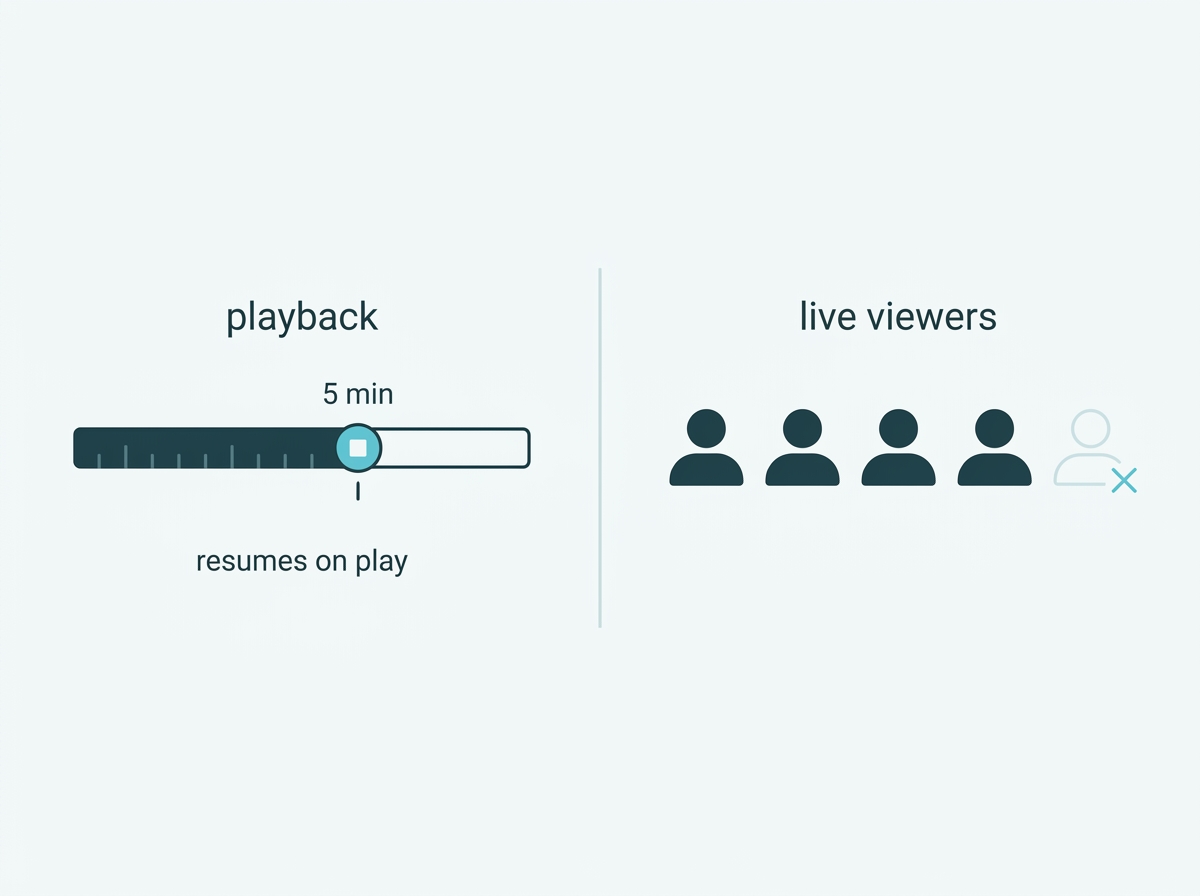
Playback stops after five minutes of inactivity. If video plays continuously for five minutes without any operation, it stops in order to ease congestion on the cloud traffic. Clicking play resumes it. This is expected behavior rather than a fault, and it means the cloud route is built for checking in rather than for leaving a feed running all afternoon.
Four people can watch live at once. That is the documented ceiling for simultaneous live viewing on Cloud VMS.
There is no cloud storage. TP-Link is explicit that Cloud VMS does not store recordings, and recommends using a VIGI NVR to manage cameras and hold the footage, with backup to an FTP server available depending on the recorder model and firmware. So remote access is a way to reach your recordings, not a place they live.
Events and logs age out. Events are kept up to 180 days and the images attached to them up to 7 days, while system logs are kept for 90 days.
Third-party cameras do not join directly. A camera from another manufacturer cannot be added to Cloud VMS on its own. It connects to a VIGI NVR, and Cloud VMS manages the recorder.
What it means for you: if your use is checking a site a few times a day, none of these will ever bother you. If you need a feed on a screen continuously, several people watching at once, or footage held off-site, the cloud route alone will not do it, and the recorder is doing the real work.
When Would You Use DDNS and Port Forwarding Instead?
When you want to reach your own recorder without a vendor service in the middle, and when your connection can actually support it. That second condition rules this route out for a lot of people, and it is better discovered now.
The mechanism is a dynamic DNS name, which binds a memorable address to a public IP that changes. TP-Link publishes the procedure for VIGI recorders under Settings, Network, Platform Access, with the domain created as a second-level name under tplinkdns.com.
The requirements are the important part. The recorder holds a private address on your local network, so the router in front of it has to have a public IP address, and the router has to map the relevant port outward, either through UPnP or through its port forwarding settings. If your internet connection does not give you a public address, which is common on connections that share addresses between customers, there is nothing to bind a domain name to and no configuration that fixes it. Your provider can tell you which you have, and it is a one-question call.
The trade this route makes is that it replaces a dependency on a vendor's cloud with a route from the internet to your equipment. That route is only as safe as the password on the device and the firmware it is running, which is why the next section matters more here than anywhere else.
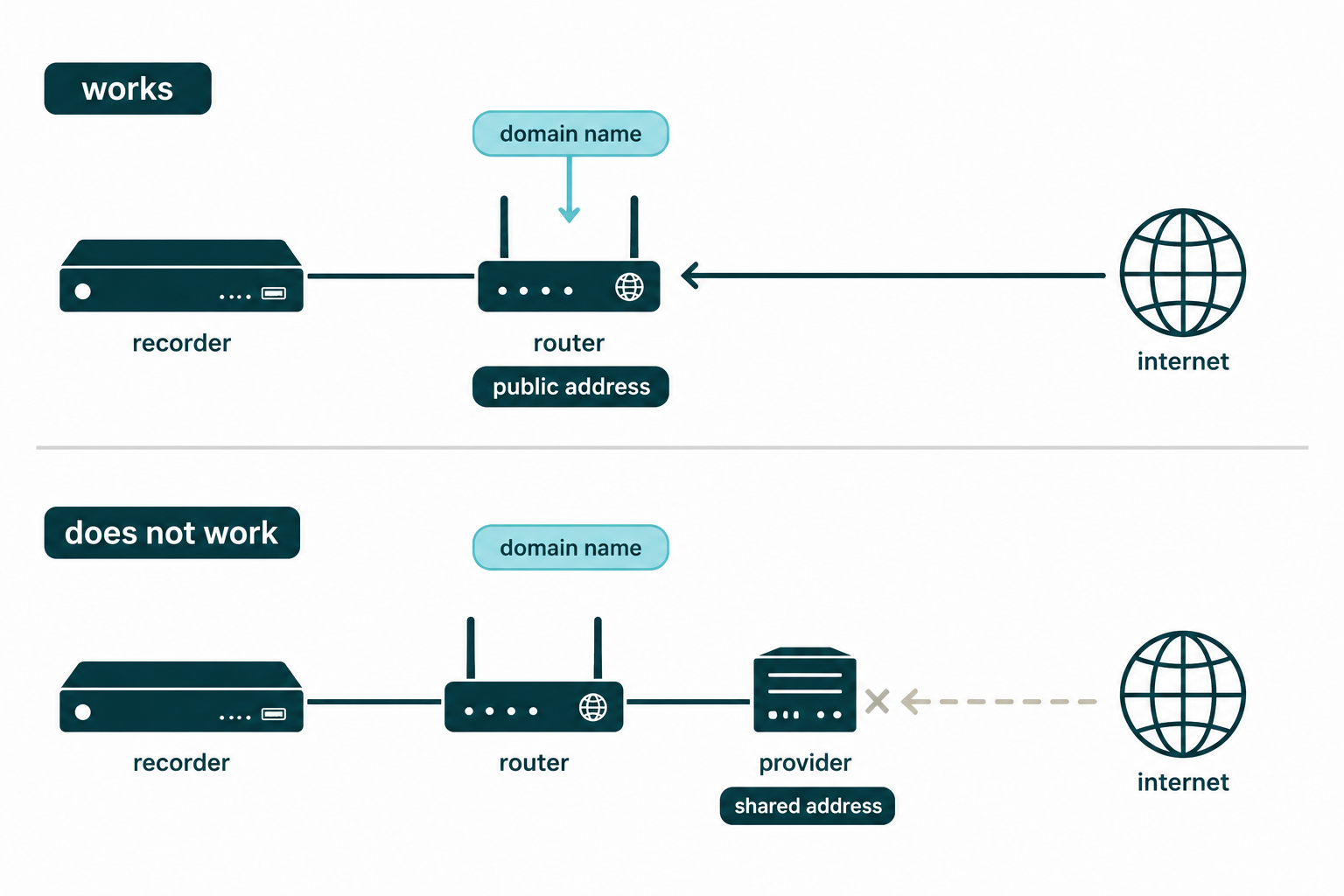
What it means for you: ask your internet provider whether your connection has a public IP address before planning this route. If it does not, your realistic choices are the cloud app or a VPN.
Is a VPN Worth the Extra Setup?
If you already have the equipment for one, yes. If you would be building it purely to view cameras, usually not.
A VPN lets a remote device behave as though it were on the local network. The cameras and the recorder are never reachable from the public internet; there is no open port for anyone to find, and no video passes through a vendor's service. On exposure alone, it is the strongest of the three routes by a clear margin.
The cost is that it needs a VPN server on the network, which usually means a business router or gateway that provides one, plus configuration and a client on each device that will connect. For an organization that already runs one for staff access, adding camera viewing to it is close to free. For a shop with a consumer router, it is a project.
What it means for you: check whether your existing router already offers a VPN server before dismissing this. If it does, you are much closer to the most private option than you think.
What Actually Keeps Remote Access Secure?
The password chosen at activation, current firmware, and controlling who has an account. Those three matter more than which route you picked.
The password is the one you set, not a default. VIGI devices do not ship with a usable default login. Activation requires setting a management password, whether the device is initialized through its web interface, through the VIGI app, or through the VIGI Config Tool, and the app flow asks for a recovery email at the same time. So the common advice to change the default password does not apply here. The real risk is a weak password chosen at setup and never revisited, and that password is what stands between the internet and your footage on every one of the three routes.
Firmware is the other half. Any route that can be reached remotely is worth keeping current, and Cloud VMS supports updating devices in bulk rather than one at a time.
Accounts are the part people forget. Remote access is not one key; it is however many people have credentials. Cloud VMS is built around organizations and sites with managers and users, so access can be given per site and taken back when someone leaves. For a business, this is also a compliance matter, since Philippine privacy rules require access to CCTV footage to be limited to authorized people and require a record of who viewed or copied it. Cloud VMS keeps system logs for 90 days, which is worth knowing when deciding what your own record-keeping needs to cover.
One thing that looks like a problem and is not. Accessing a VIGI camera or recorder over HTTPS on your own network can produce a "Not Secure" warning in some browsers. TP-Link documents this. It is a certificate trust issue rather than a sign that the connection is unprotected, and it is worth knowing before it sends someone hunting for a fault.
What it means for you: review who has an account and how strong the device password is before you worry about which route to use. A weak password on a VPN is worse than a strong one on a cloud app.
Why Does Remote Access Stop Working?
Almost always one of three things, and rarely the camera. Working through them in order will resolve most cases without a support call.
The property lost internet. The camera or recorder needs a working connection to reach the cloud service or to accept an incoming connection. Local recording usually continues if the system has storage, so nothing is being lost, but nothing can be viewed remotely until connectivity returns.
The binding broke. The device has to be bound to the account you are logging into. Unbinding and rebinding the TP-Link ID resolves a surprising share of cases where everything else looks fine.
The viewing side is the problem. The app, the credentials, or, on the DDNS route, the domain no longer pointing at the right address because the public IP changed and the update did not go through.
What it means for you: check the internet at the property first, then the binding, then the phone. That order matches how often each one is actually the cause.
For the step-by-step of getting a phone connected in the first place, see our guide to connecting a camera to your phone. To compare cameras and recorders with remote management built in, browse VIGI cameras or explore VIGI's surveillance solutions.
Frequently Asked Questions
Do I need a static IP address to view my cameras remotely?
Not for the cloud route, which works through the vendor's service regardless of what address your connection has. A public IP address does matter for the DDNS and port forwarding route, where TP-Link's own procedure requires the router in front of the recorder to have one and to map the port outward. Ask your provider which you have before planning that route.
Can I access my cameras if the internet goes down at the property?
No. The camera or recorder needs a working connection to reach the cloud service or accept an incoming connection. Recording continues locally if the system has storage, so footage is still being captured, but remote viewing is unavailable until the connection returns.
Why does the live view stop after a few minutes?
On VIGI Cloud VMS, this is documented behavior rather than a fault. Because the platform pulls the stream from a cloud relay, video that plays for five minutes without any interaction stops in order to ease cloud traffic, and clicking play resumes it. It is designed for checking in rather than for leaving a feed running.
How many people can view the cameras remotely at the same time?
On VIGI Cloud VMS, up to four users can watch live view simultaneously, and the platform supports up to 5,000 user accounts overall. If several people need continuous simultaneous viewing, that is a job for a local setup or a recorder connected to a monitor rather than for remote cloud viewing.
Is remote camera access secure?
It can be, and the password matters more than the route. VIGI devices ship without a usable default login, so the password set during activation is what protects access, and a weak one undermines any route, including a VPN. Keeping firmware current and reviewing who holds an account are the other two things that matter.
Does remote viewing store my footage in the cloud?
Not on VIGI. TP-Link states that Cloud VMS does not support cloud storage and recommends a VIGI NVR to hold recordings, with backup to an FTP server available on some recorder models and firmware versions. Remote access is a way to reach footage, not a place it lives.
Does remote viewing use a lot of mobile data?
Continuous live viewing at high resolution can, since video is streaming to your phone the whole time. Checking in briefly and relying on event notifications rather than leaving a feed open uses substantially less, and lowering the stream quality in the app reduces it further.
Final Thoughts
Remote access is standard on modern systems, so the real question is not whether you can reach your cameras but which route you are willing to live with. The cloud app asks nothing of your router and comes with published limits: playback that pauses after five minutes of inactivity, four people watching live at once, no footage stored in the cloud. Port forwarding removes the vendor from the path and asks for a public IP address your connection may not have. A VPN exposes nothing and asks you to already own the equipment.
None of those is the wrong answer. What is wrong is choosing a route before checking its one hard requirement, which is why the useful order is to confirm whether your connection has a public IP address, then decide.
Underneath all three, the password set when the device was activated is what stands between the internet and your footage. VIGI devices ship without a usable default one, so nobody has to remember to change it, but somebody does have to choose a strong one and review who else holds an account.
If you would rather have this settled than researched, bring a VIGI specialist three things: how many people need to view remotely and whether they need to watch at the same time, whether your connection has a public IP address, and whether you already run a VPN. You will get back a straight answer on which route fits, what it will and will not do, and whether your recorder needs to change to support it.