


VLANs Explained: Security, VLAN Hopping, and 802.1X for Business Networks
Published: August 4, 2026 | Last Updated: August 4, 2026
Quick Answer
-
VLANs contain a breach. A compromised device stays within its VLAN and cannot move laterally without crossing a router or firewall rule.
-
VLAN hopping comes in two forms. Double tagging exploits default native VLAN settings on 802.1Q trunks and can affect switches from any vendor. Switch spoofing depends on automatic trunk negotiation, a vendor-specific feature that does not apply where trunks are configured manually.
-
Authentication is the missing half. On Omada, 802.1X with VLAN Assignment authenticates the device first, then places it into the VLAN matching its credentials rather than the jack it used.
A VLAN divides one physical network into isolated logical segments, so a device on one VLAN cannot reach a device on another unless a router or firewall permits it. That is a real security boundary, but it is also incomplete. A VLAN governs where traffic can go once a device is connected. It says nothing about which devices can connect in the first place, and a VLAN left on default settings can be bypassed with a well-documented attack.
Table of Contents
What Does a VLAN Actually Protect?
Does Switch Spoofing Apply to Every Switch?
Which Layer 2 Attacks Do VLANs Help Against?
How Do You Pair VLANs With Authentication?
What Does a VLAN Actually Protect?
A VLAN protects against lateral movement. A device on one VLAN cannot reach a device on another unless a router or firewall explicitly permits it, so malware that infects one machine is confined to that VLAN instead of spreading across the business.
Without VLANs, every device shares one broadcast domain. A guest on the Wi-Fi is technically on the same network as the POS terminal and the file server, and an attacker who compromises any single device has an unobstructed path to everything else. Our network segmentation guide covers that containment argument in full, along with how to decide which zones you actually need.
Containment is also why VLANs appear throughout compliance work. Under PCI DSS, segmentation is not itself mandatory, but it determines how much of your network falls inside the scope of an assessment. Keeping payment systems on their own VLAN means the assessment covers the cardholder data environment rather than every device you own.
For Philippine businesses holding customer records, the same logic applies under the Data Privacy Act of 2012. The National Privacy Commission expects notification of a qualifying personal data breach within 72 hours of discovery, and how far a breach spreads determines how much personal data is involved and what you have to report. A guest Wi-Fi network sharing a segment with a customer database makes that answer much harder to give.
VLANs require a managed or smart switch, since an unmanaged switch has no VLAN support at all, and our guide to managed and unmanaged switches covers where that line sits. Segmentation sits inside a wider security model, described in our network security guide for Philippine businesses.
What it means for you: a VLAN is a boundary for traffic, not a gate for devices. Both matter, and only one of them is a VLAN.
What Is VLAN Hopping?
VLAN hopping is an attack that lets a device on one VLAN reach another VLAN it was never authorized to touch. There are two techniques, and they are not equally relevant to every network.
Double tagging exploits the native VLAN on 802.1Q trunks. 802.1Q is the standard behind VLAN tagging, so the technique can affect switches from any vendor. Switch spoofing exploits automatic trunk negotiation, which is a vendor-specific feature rather than part of the standard, so it applies only where a switch actually negotiates trunks. Both are well documented, and both are preventable with configuration rather than additional hardware.
What it means for you: before acting on generic VLAN-hardening advice, check which of the two your equipment can actually be exposed to. Half of the standard checklist may not apply to your switches.
How Does Double Tagging Work?
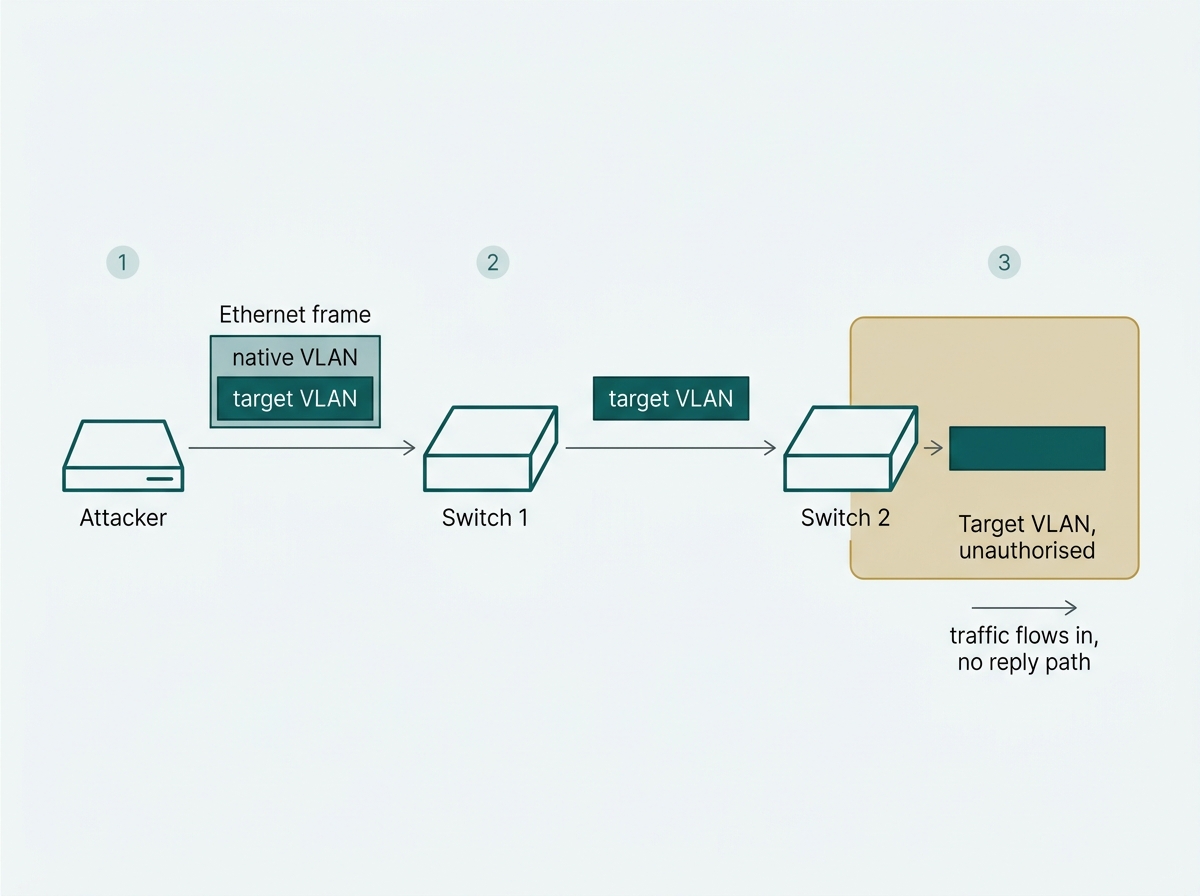
In a double-tagging attack, an attacker sends a frame carrying two VLAN tags. The first switch in the path strips the outer tag, which matches the native VLAN, and forwards the frame with the inner tag still attached. The next switch reads that remaining tag and delivers the frame to a VLAN the attacker was never permitted to reach.
The attack depends on the attacker's port sitting in the same VLAN as the trunk's native VLAN, which is typically VLAN 1 by default. Traffic on the native VLAN travels untagged across a trunk, which is precisely the property the outer tag abuses. It is also one-directional: the attacker can send traffic into the target VLAN but does not receive replies, which makes it useful for injection rather than interactive access, and easy to underestimate for that reason.
The mitigation is configuration, not equipment. Move the native VLAN away from its default value, keep user-facing ports off the default VLAN entirely, and restrict trunk ports to the VLANs that genuinely need to cross them rather than allowing all.
What it means for you: if your user ports are still sitting on the default VLAN, that is the single change worth making before anything else on this page.
Does Switch Spoofing Apply to Every Switch?
No. Switch spoofing depends on a switch running automatic trunk negotiation, and that capability is vendor-specific. Switches that do not implement it give an attacker nothing to negotiate with.
Where it does apply, the attack works like this: an attacker configures their device to imitate a switch and negotiates a trunk link with a port left in its default negotiating mode. Instead of being restricted to the single VLAN that port was meant to serve, the attacker receives traffic for every VLAN the trunk carries. On affected hardware, the mitigation is to disable trunk negotiation on any port that should not be a trunk and to configure trunks explicitly.
Omada switches do not negotiate trunks. Trunk ports are configured manually, so there is no negotiation exchange for an attacker to hijack, and this path is closed structurally rather than by a setting you have to remember to change. That is worth knowing for two reasons: it saves you from looking for a control that is not there, and it matters if you run a mixed-vendor network, since a switch elsewhere in the same environment that does negotiate trunks can still present the exposure.
What it means for you: in a single-vendor Omada network, this is not on your list. In a mixed network, check every non-Omada switch for trunk negotiation.
Which Layer 2 Attacks Do VLANs Help Against?
|
Attack |
How it works |
What VLANs contribute |
What you need alongside VLANs |
|
VLAN hopping, double tagging |
A two-tag frame exploits the native VLAN to reach another VLAN. |
Nothing on their own; this is an attack against VLANs. |
Change the native VLAN off its default and keep user ports off it. |
|
VLAN hopping, switch spoofing |
An attacker imitates a switch to negotiate a trunk. |
Nothing on its own, and not applicable without trunk negotiation. |
Disable trunk negotiation where it exists; not applicable on Omada. |
|
MAC address flooding |
The switch's MAC table is flooded until it fails open and broadcasts. |
Limits the blast radius to one VLAN. |
Port security limits learned MAC addresses per port. |
|
Unauthorized device access |
Any device plugged into an open port joins the network. |
Decides where that device can go once on. |
802.1X, so the device must authenticate before it gets on at all. |
In the first two rows, the VLAN is the target rather than the defense, and the fixes are configuration choices. In the last two, the VLAN helps but is necessary and not sufficient. Against MAC flooding, a VLAN limits how far the damage reaches, but port security is what stops it. Against an unknown device on an open port, a VLAN decides where that device may go while 802.1X decides whether it gets on at all.
What it means for you: the right-hand column is the actual work list. A VLAN plan with none of those paired controls is organization, not security.
How Do You Pair VLANs With Authentication?
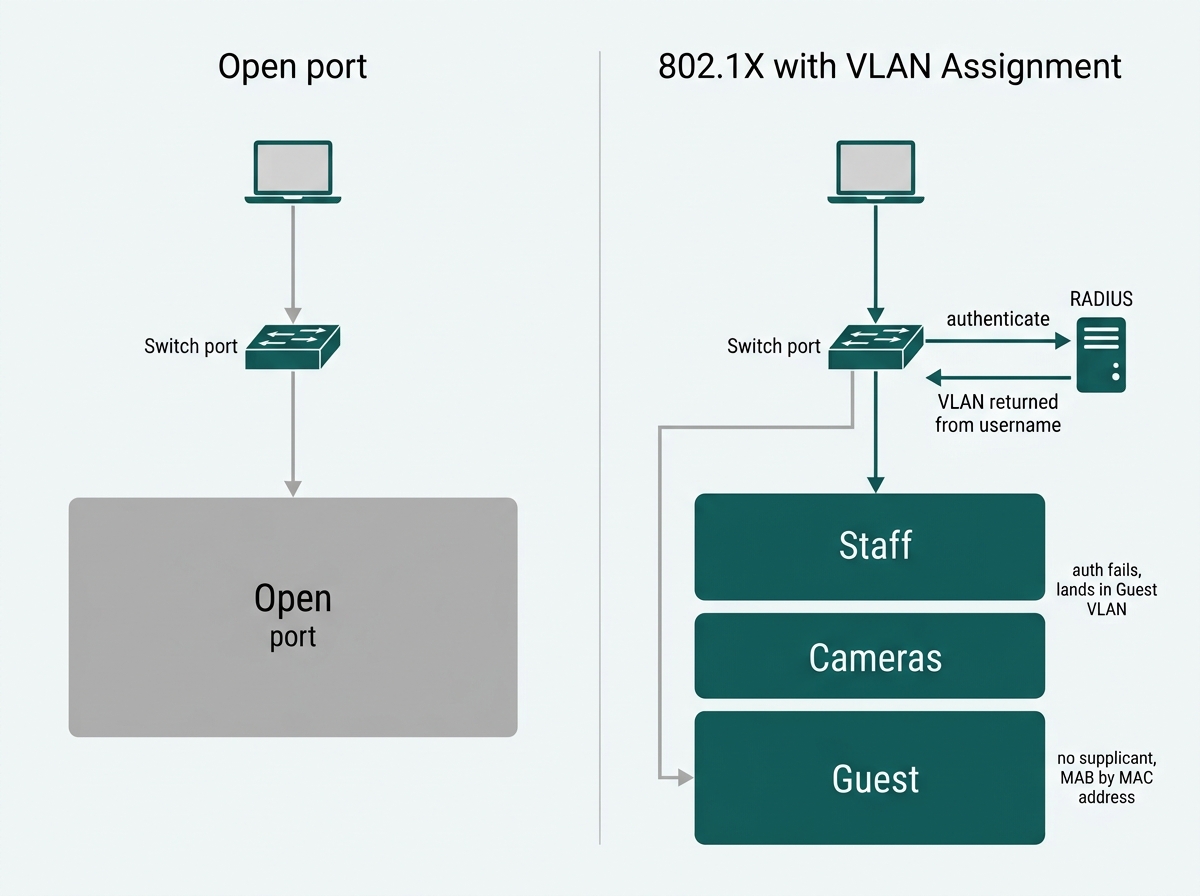
A VLAN controls where traffic goes once a device is on the network. 802.1X controls whether it gets on. Pairing them means a port grants no access until the device or user authenticates, and the VLAN is then assigned from the credentials rather than from which jack happened to be used.
On Omada, this is the VLAN Assignment feature, found under Settings, Authentication, and 802.1X on Omada Controller v5.9 and above. Newer controller releases label the menu Network Settings. You enable 802.1X, select a RADIUS profile, turn on VLAN Assignment, and choose which ports require authentication. Once a client authenticates, the RADIUS server returns the VLAN based on that client's username, so the username-to-VLAN mappings need to exist in the RADIUS database beforehand. A built-in RADIUS profile is available in the controller, so a separate server is not a prerequisite for getting started.
Two features make this workable in a real office rather than only in theory. Guest VLAN assigns a specific VLAN to clients whose authentication fails or times out, so an unrecognized device lands somewhere harmless and defined instead of simply being dropped. MAC Authentication Bypass handles the devices that cannot run an 802.1X supplicant at all, which in most offices means printers, IP cameras, and sensors: their MAC addresses are configured as usernames on the RADIUS server so they authenticate by identity rather than being exempted. Without those two, an 802.1X rollout stalls the moment it meets a printer.
To confirm it is working, show the dot1x auth-state through Tools; the terminal shows which port was authenticated and which VLAN the client was placed into.
For the configuration mechanics behind creating and assigning VLANs, see VLAN configuration explained, and for a broader set of tools businesses use alongside VLANs, see network security tools for business. Each SSID that maps to a VLAN also needs sound wireless encryption behind it, so it helps to know how to choose between WPA2 and WPA3 before you plan your wireless segments. To see the controller platform that supports VLAN assignment and 802.1X authentication together, explore Omada SDN controllers.
What it means for you: decide the Guest VLAN and the MAB list before you enable anything. Those two decisions determine whether the rollout finishes or gets switched back off in week two.
Frequently Asked Questions
Are VLANs enough to secure a business network on their own?
No. VLANs control where traffic can travel once a device is connected, not which devices are allowed on. Pairing VLANs with 802.1X authentication and with firewall rules between segments is what completes the boundary.
What is VLAN hopping?
VLAN hopping lets a device on one VLAN gain unauthorized access to another. It happens either through double tagging, which exploits the native VLAN with a specially crafted two-tag frame, or through switch spoofing, where an attacker imitates a switch to negotiate a trunk link.
How do you prevent VLAN hopping?
For double tagging, change the native VLAN away from its default, keep user-facing ports off the default VLAN, and restrict trunk ports to only the VLANs that need to cross. For switch spoofing, disable automatic trunk negotiation on any hardware that supports it and configure trunks manually.
Does switch spoofing affect Omada switches?
No. Switch spoofing relies on automatic trunk negotiation, which Omada switches do not use. Trunk ports are configured manually, so there is no negotiation exchange for an attacker to hijack. It remains relevant in mixed-vendor networks that include switches which do negotiate trunks.
What about devices that cannot use 802.1X, like printers and IP cameras?
Omada supports MAC Authentication Bypass, where the device's MAC address is configured as its username on the RADIUS server so it can be authenticated without running an 802.1X supplicant. There is also a Guest VLAN option that places clients failing or timing out on authentication into a defined VLAN rather than dropping them.
What is the difference between a VLAN and a firewall for network security?
A VLAN creates the logical segments. A firewall or access control list enforces the rules for what traffic, if any, may pass between them. VLANs without enforcement rules provide organization rather than access control.
Is VLAN hopping still a real risk on modern networks?
Yes, though less so on correctly configured current hardware. Default settings left unchanged, misconfigurations, and legacy equipment keep it relevant, which is why moving user traffic off the default VLAN remains a standard hardening step regardless of vendor.
Final Thoughts
VLANs are a genuine security boundary, but only when they are configured for security rather than for tidiness. The difference between a VLAN that contains a breach and one that can be walked around usually comes down to a small number of settings: whether user traffic still sits on the default VLAN, whether trunk ports carry more VLANs than they need to, and whether anything at all controls which devices reach a port in the first place.
It is also worth knowing which warnings apply to you. Double tagging is a standards-level issue that concerns any 802.1Q trunk. Switch spoofing depends on trunk negotiation, which does not exist on every switch, and generic hardening checklists rarely make that distinction.
Segmentation and authentication are separate layers that only work properly together. The VLAN decides where traffic can go. 802.1X decides who gets in. If you are planning that pairing, the two decisions to make first are which VLAN unauthenticated devices should land in and which of your printers, cameras, and sensors will need MAC Authentication Bypass. Bring that list, plus your current switch and controller versions, to an Omada specialist, and you will get back a VLAN and 802.1X plan you can actually finish deploying. Explore Omada SDN controllers to see where VLAN assignment, RADIUS profiles, and port authentication are configured together, and confirm your controller is on v5.9 or above before you plan around it.