
How to Find the Serial Number (S/N) on Your TP-Link Device
Your TP-Link serial number (S/N) is a unique identifier printed on every TP-Link device. You may need it for product registration, warranty claims, or RMA requests. Knowing how to do a TP-Link SN check is handy. TP-Link serial numbers are 11, 12, or 13 hexadecimal digits. There are two places to find and check your serial number: on the product box or on the label attached to the device itself.
Key Takeaways
- Every TP-Link device has a unique serial number (S/N), an 11-, 12-, or 13-digit hexadecimal code required for product registration, warranty claims, and RMA requests.
- There are two places to find your TP-Link serial number: on the product box or on the label attached to the device itself.
- On most devices, the label is on the bottom or back of the device, and the serial number is labeled "S/N" or "Serial Number."
- For Tapo Robot Vacuums, the serial number is not on the bottom label. You need to remove the dustbin or water tank to find it.
- Some products, including smart bulbs, antennas, and certain mini routers and wireless adapters, do not have a label on the device itself. For these, the serial number is only on the box.
Every TP-Link product has a unique serial number (S/N), which is required when registering on the website or applying for an RMA case number. TP-Link serial numbers are 11, 12, or 13 hexadecimal digits.
This article will guide you to find the serial number of your TP-Link device.
Where to Find Your TP-Link Serial Number
Method 1: Look over the box
You can find the serial number on the device’s box.
We take the Tapo RV20 as an example:
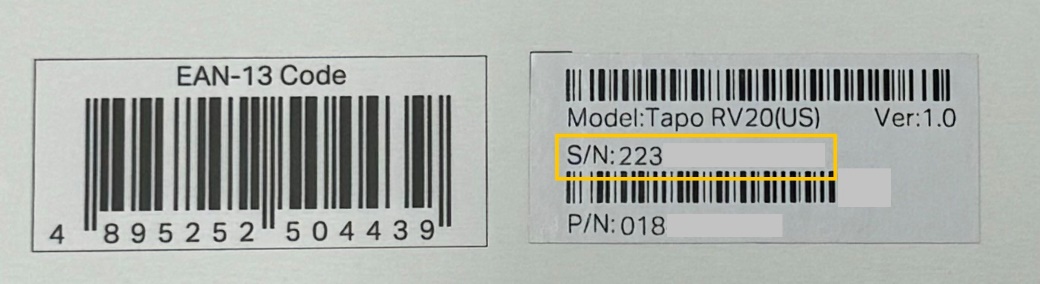
Note: For some products, smart bulbs like LB xxx, Antennas, some Mini routers (like TL-WR702N), or some wireless adapters (like Archer T1U, Archer T2U, Archer T2U Plus, Archer T3U, Archer T3U Plus, Archer T4U V1&V2, TL-WN723N, TL-WN725N, TL-WN823N, etc.), there is no label on the product itself.
Method 2: Look over the device label
You can find the serial number on the device’s label.
For most products, turn the device over to find a label on the back. It is usually labeled “S/N:” or marked as “Serial Number”.
We take the Deco as an example:
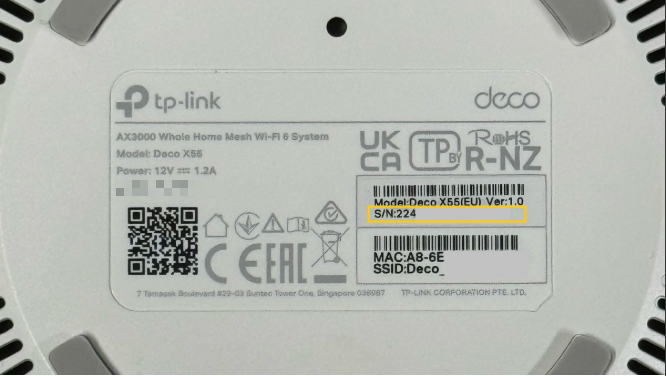
Note: The Tapo Robot Vacuum's serial number is not on the bottom label; you will need to remove the dustbin or water tank to find it.
- For Tapo RV20/RV30/RV20 Max/RV30 Max
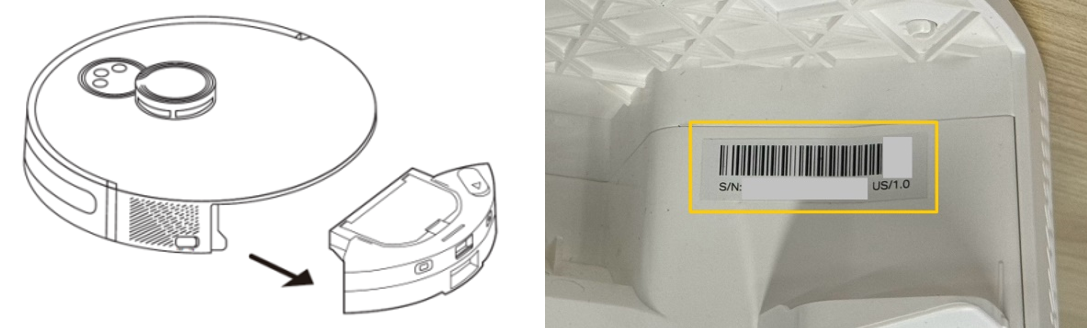
- For Tapo RV50 Series
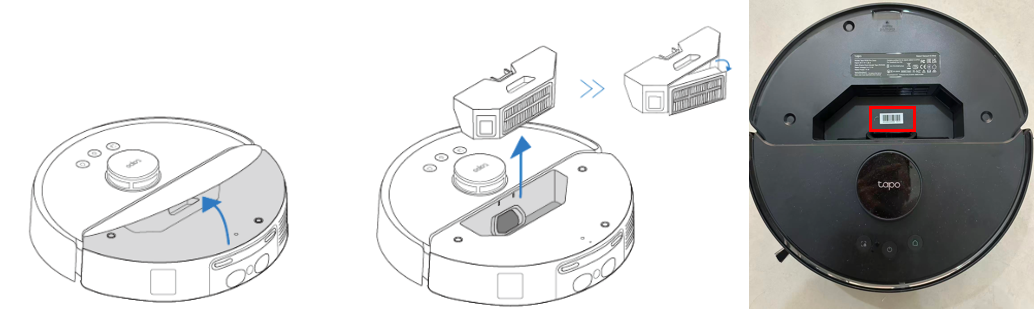
Get to know more details of each function and configuration please go to the Download Center to download the manual of your product.
Looking For More
Is this faq useful?
Your feedback helps improve this site.


TP-Link Community
Still need help? Search for answers, ask questions, and get help from TP-Link experts and other users around the world.