


Introducing Omada Network 6.2 — Enhanced Agility and Smarter O&M to Elevate Network Management
We're excited to release Omada Network 6.2, a major update that enhances operational efficiency and configuration flexibility. This version enables superior network performance with less effort across diverse deployment scenarios, ensuring your network infrastructure remains agile and responsive to evolving business needs.
What Is Omada Network?
Omada Network is a professional network management platform for MSPs and IT admins. It unifies gateways, switches, and access points into a centralized ecosystem managed via cloud, hardware, or software controllers. Through a single interface, it enables end-to-end control—from streamlined configuration and real-time monitoring to proactive O&M and rapid troubleshooting—ensuring reliable performance and seamless scalability for retail, offices, hotels, MDUs, and more.
What's New in Omada Network 6.2?
Omada Network 6.2 (divided into two upgrade versions: 6.2.0 & 6.2.10) focuses on intelligent O&M and streamlined workflows. With enhanced features that improve efficiency and flexibility, this release simplifies network management, enabling faster configuration and more proactive maintenance in demanding environments.
Streamline Troubleshooting with Remote Access
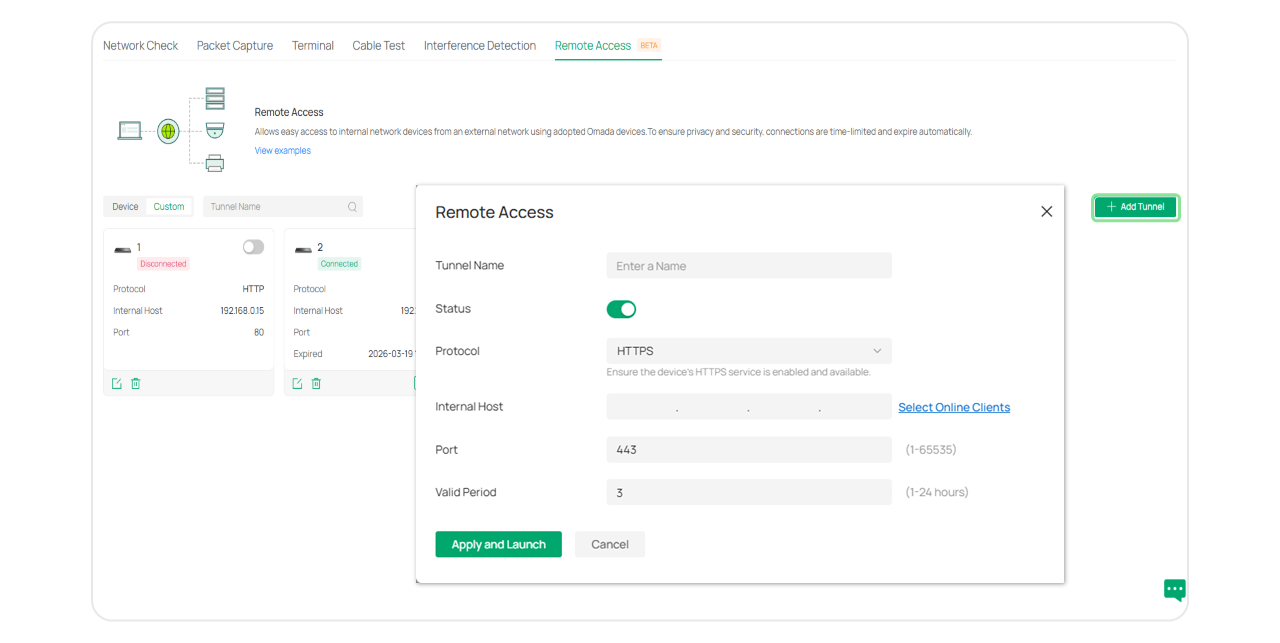
On-site network troubleshooting visits can be a common challenge, especially for devices behind a NAT. The new Remote Access feature helps you establish secure, cloud-brokered tunnels into the internal network. Grant temporary, auto-expiring access to manage Omada devices and supported third-party equipment without needing to be on-site. Save valuable time and operating costs.
Craft Professional, Highly Customized Portal Experiences
We've redesigned the Captive Portal editor for a more intuitive experience. The new interface offers real-time previews and well-organized components. With features like separate PC and mobile background editing and multi-language support, customization is simpler than ever.
See for yourself how easy it is to create a polished, branded portal experience for guests and clients.

Scalable and Simplified VLAN Management
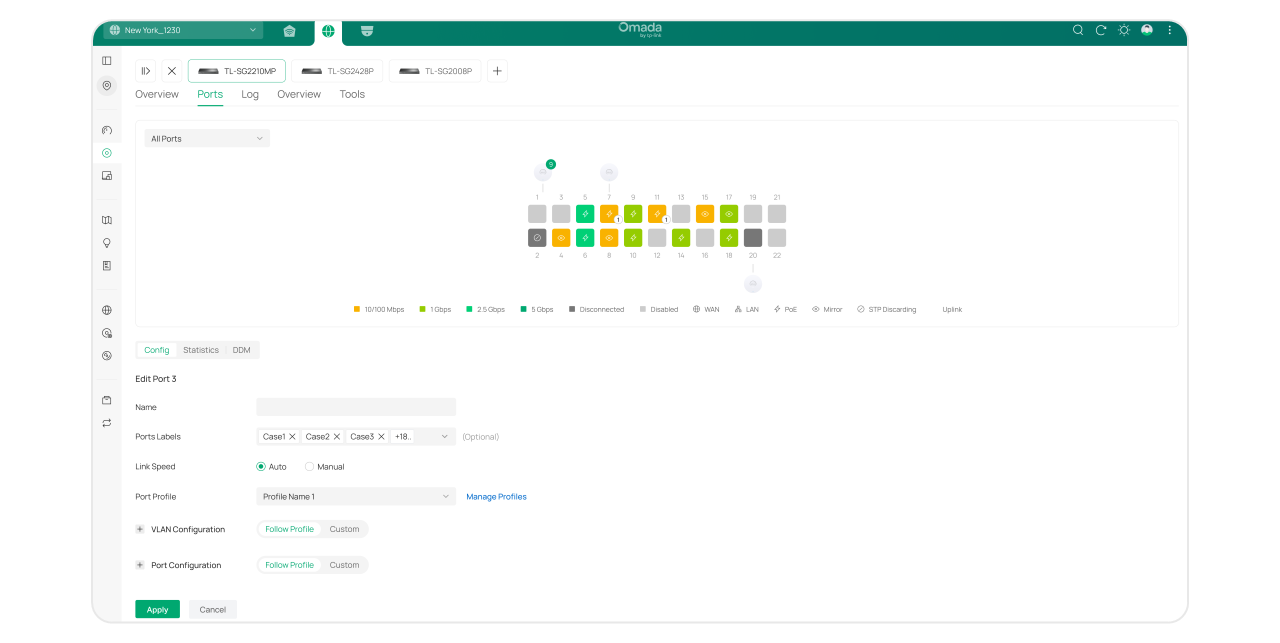
Omada Network 6.2 introduces scalable VLAN Profiles, allowing you to reuse configurations and significantly reduce setup time for large-scale deployments. At the same time, we’ve retained the familiar direct port configuration for quick, one-off tasks. This new dual-mode approach delivers the ultimate flexibility, letting you choose the most efficient method for any network size.
Optimized RRM Maximizes Network Efficiency and Performance
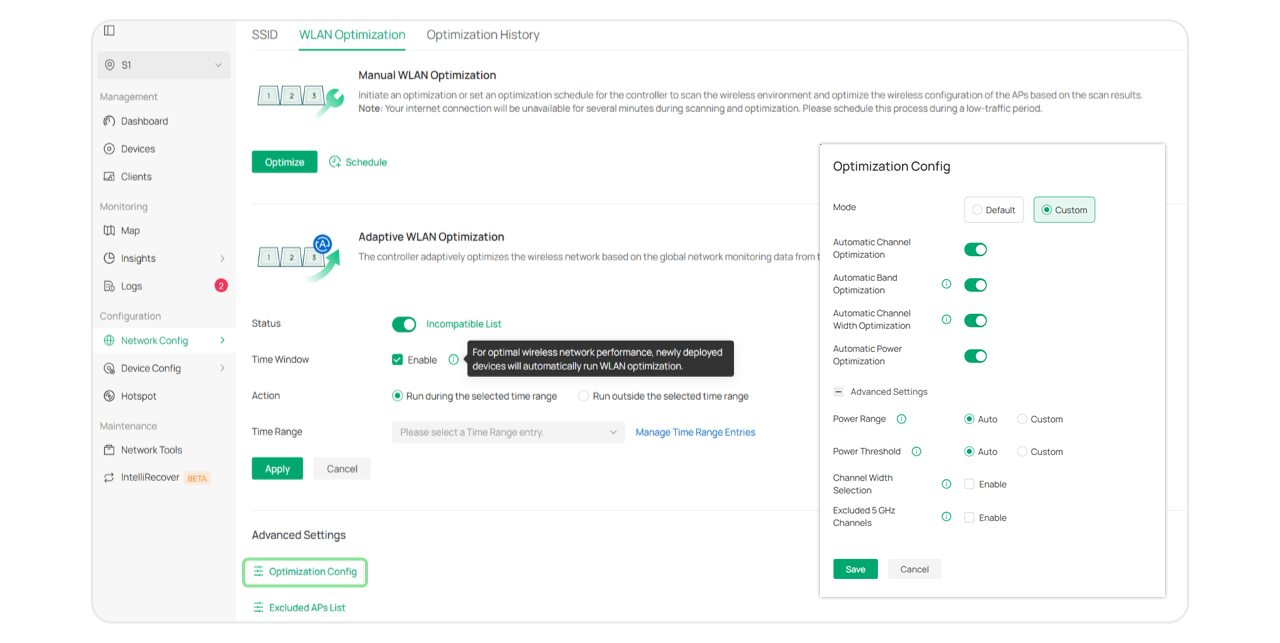
Omada's Radio Resource Management (RRM) is now more proactive and intelligent. It analyzes historical data to create a Site-Wide Optimal RF Plan, automatically optimizing channel and power settings to prevent interference before it impacts users. With flexible modes and new visual dashboards, you gain deeper insight into your wireless environment.
Now you can always make sure your Wi-Fi is performing at its best with minimal manual intervention.

Simplify VPN Deployment with a Smarter Workflow
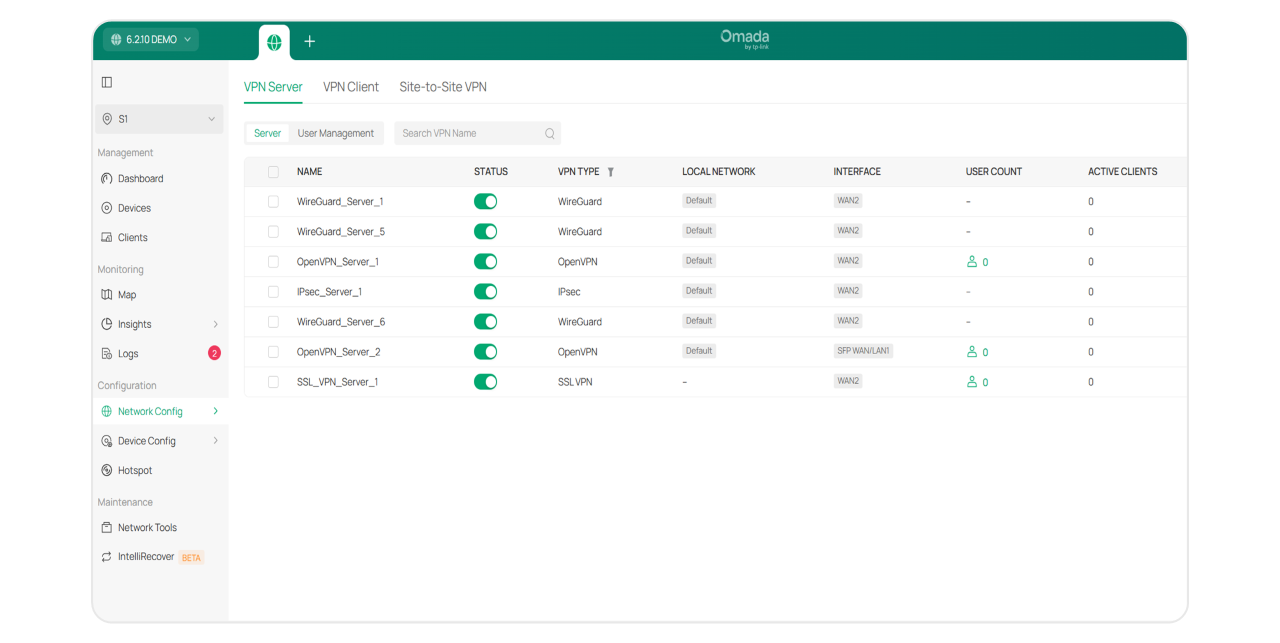
We've redesigned the VPN module with clarity and ease of use in mind. Server, Client, and Site-to-Site VPNs are now clearly separated. Intelligent auto-fill provides sensible defaults. And a quick WireGuard QR code scan helps accelerate remote user onboarding. All of these reduce the technical barrier and speed up deployment for remote access and multi-site connectivity.
Key Additional Updates
Omada Network 6.2 also includes several other practical improvements to refine your daily ops:
- AP Load Balancing: Intelligently distributes clients across access points in high-density areas to prevent connection issues.
- Wi-Fi Calling Support: Improves voice call reliability over Wi-Fi, perfect for areas with weak cellular signals.
- Built-In WAN Speed Test: Quickly assess ISP performance directly from the Omada dashboard without external tools.
- Bridge Adaptation: Simplifies the management of outdoor bridge units directly through the controller, ensuring more stable long-distance connectivity.
- PWA Performance Optimization: Delivers a faster, more responsive user interface, even when managing networks over slow or unstable connections.
Omada Network 6.2 upgrades your network management. From faster deployment and flexible configuration to intelligent, proactive O&M, it goes beyond solving immediate challenges. It delivers true long-term value: reducing OPEX, saving time, and ensuring a consistently superior network experience.
Ready to experience the difference? Explore the new features in Omada Network 6.2 today!
Omada Network 6.2 is split into two upgrade versions: v6.2.0 & v6.2.10.
| v6.2.0 | v6.2.10 | |
| Status | Available in all regions. Download from the website. |
|
| New Features |
Controllers
Gateways
Switches
|
Controllers
EAPs
Switches
|
*Release dates subject to change. The actual release date shall prevail.
About Omada
Omada, derived from the Greek word for 'team,' is a dedicated business solutions brand simplifying the IT landscape with reliable, scalable, and seamlessly integrated technologies. Omada delivers unified networking and surveillance solutions powered by cutting-edge IT innovations. Backed by integrated manufacturing facilities, we provide affordable, high-performance, and reliable solutions tailored for MSPs, SIs, VARs, and clients worldwide, empowering them to outperform their competition and achieve success. By combining accessible, enterprise-grade technology with genuine quality, Omada redefines the future of IT, enabling businesses to thrive with intelligent, future-ready solutions.
Recommended Articles
[Blog] How to Configure SD-WAN via Omada Controller v6.2
[Blog] How to configure VLAN with Omada Network v6 | TP-Link
[Blog] Introducing Omada Design Hub — A Free and Easy Network Planning Tool | TP-Link
[Blog] Introducing Omada Wi-Fi Navi App — An Efficient and Handy Network Diagnostic Tool