
Download voor Tapo C260
Vx.0 = Vx.6/Vx.8/Vx.9(eg:V1.0=V1.6/V1.8/V1.9)
Vx.x0 = Vx.x6/Vx.x8/Vx.x9 (eg:V1.20=V1.26/V1.28/V1.29)
Vx.30 = Vx.32/Vx.33 (eg:V3.30=V3.32/V3.33)
- Product Overview
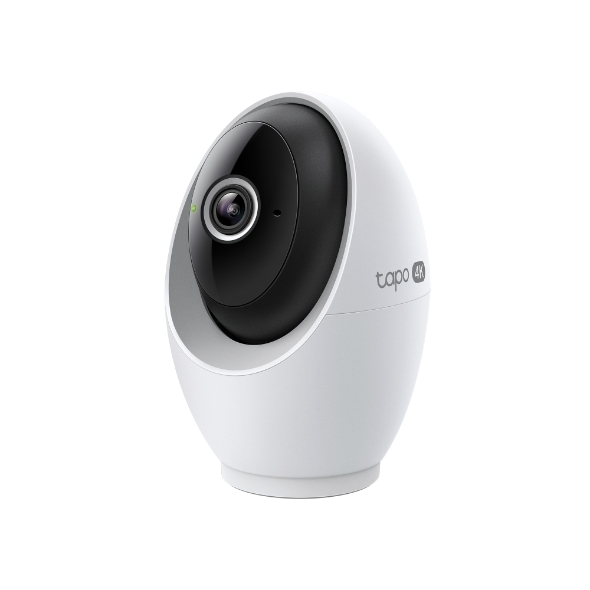 Wifi-bewakingscamera met AI en draai- en kantelfunctie
Setup Video
-
How to Mount Tapo Pan/Tilt AI Home Security Wi-Fi Camera (Tapo C260)
Tapo 4K Clarity, Every Detail, Every Moment, Captured. Tapo C260 records all of life's wonderful moments with exceptional clarity. The free and powerful Al recognizes and tags strangers, family, and friends for easy identification.
More Fold -
How to Set Up Tapo Pan/Tilt AI Home Security Wi-Fi Camera (Tapo C260)
Tapo 4K Clarity, Every Detail, Every Moment, Captured. Tapo C260 records all of life's wonderful moments with exceptional clarity. The free and powerful Al recognizes and tags strangers, family, and friends for easy identification.
More Fold
FAQs
- How to Check the Wi-Fi Signal Strength of Your Tapo and Kasa Device
- How to Connect Tapo and Kasa Devices to Amazon Alexa: Two Setup Methods
- How to Re-Register a Tapo or Kasa Device to Another TP-Link Account
- How to Connect Tapo and Kasa Smart Devices to Google Home
- Which TP-Link Tapo Cameras/Devices Are Compatible with Tapo Hub
- Notifications: How to Set Up and Manage Tapo & Kasa Alerts in the Tapo App
- Tapo Camera Not Connecting to Wi-Fi: How to Fix It
- Understanding AI Chat Usage Limits in Aireal
- How to Configure Homes and Rooms in the Tapo App
- How to Factory Reset Your Tapo Camera: Two Methods
- How to Delete Your TP-Link Account (TP-Link ID)
- How to View Tapo Camera on PC, NAS, or NVR Using RTSP/ONVIF
- How to Set Up Geofencing on the Tapo/Kasa App
- How to Stream Tapo / Kasa Camera on Google Device
- How to troubleshoot Smart Camera Tampering Detection issues
- How to Cast TP-Link Camera/Doorbell to TV via Tapo Smart CentralHub
- Why Can't I Receive the SMS Verification Code from the Tapo App? How to Fix It
- How to Set Up a Tapo Smart Device (Bluetooth) via the Tapo App
- How to Set Up Your Tapo Camera Using the Tapo App
- Algemene vragen over Tapo Care
- How to Enable and Use AI Zoom on Tapo Cameras
- Tapo Care annuleren en terugbetaling
- How to Use Widgets to Control Tapo Devices
- What to Do When You Can't Find Your Tapo Camera on the Tapo App
- How to Get Diagnostic Logs from Tapo Cameras and Doorbells
- Tapo SD Card Playback Issues: Fix Video Playback Problems on Your Camera
- Announcement: IFTTT Services Ending for Tapo and Kasa Products
- Wat doe ik als ik het wachtwoord van mijn cloud-account ben vergeten (Tapo smart-plug, smart-camera, smart-lamp)?
- Frequently Asked Questions about Face Management
- How to Redeem Your Tapo Care Redemption Code
- Kasa and Tapo Smart Devices Not Working with Alexa: Troubleshooting Guide
- Tapo Home Mode and Away Mode: What They Are and How to Set Them Up on Kasa and Tapo Cameras and Doorbells
- Wat moet ik doen als ik geen TP-Link ID kan registreren of activeren?
- Hoe voeg ik nieuwe camera's toe aan mijn Tapo Care-abonnement
- Hoe kan ik mijn Tapo Care-abonnement upgraden of downgraden?
- How to Fix No Sound and Audio Quality Issues on Your Tapo Camera or Doorbell
- How to Troubleshoot Tapo and Kasa Notifications Not Working or Delayed
- General Questions about Tapo/Kasa Geofencing
- How to use Timed Panoramic Photography function in Tapo app
- What is Video Summary
- How to fix a flickering issue on Live View of the Tapo Camera
- How to set up routines for Tapo devices via Alexa app
- How to optimize facial recognition performance of Tapo Security Device
- The most frequent asked questions about TP-Link Sales
- Hoe kan ik 3DS-authenticatie uitvoeren bij het aanschaffen van Tapo Care?
- How to set a static IP for your Tapo Camera/Doorbell
- How to unlink third-party accounts from your TP-Link ID
- How to verify if it’s the hardware issue of TP-Link smart home
- Waarom heeft TP-Link mijn e-mailadres nodig?
- Why do I receive a "We Noticed a New Login" email?
- How to create 3D Map in the Tapo App for Pad
- Set Privacy Zone for Tapo Camera and Doorbell
- How to update or change the payment method for Tapo Care or Kasa Care
- Tapo/Kasa Devices Appear Offline After Changing or Resetting the Router
- Wat is een TP-Link ID en hoe maak ik een TP-Link ID?
- How to Connect Tapo and Kasa Devices to Samsung SmartThings
- Tapo Camera SD Card Installation and Format Guide
- Why do I need to give Local Network permission to TP-Link apps in iOS devices?
- How to view camera SD card recordings on a computer
- Wat moet ik doen als ik geen e-mail ontvang wanneer ik mijn cloud-account heb geregistreerd of mijn wachtwoord heb gereset?
- Wat kan ik doen als ik mijn Tapo smart-apparaten (smart-plug, smart-camera, smart-lamp) niet via Alexa of Google Home kan bedienen
- Wat kan ik doen als de firmware van mijn Tapo smart-apparaten (smart-plug, smart-camera, smart-lamp) niet wordt bijgewerkt?
- How to Fix Tapo or Kasa Camera and Doorbell SD Card Not Formatting or Being Recognized
- How to Reduce Noise on Tapo Cameras
- How to Find the Model Number of Your TP-Link Device
- Hoe vind ik de hardware versie van een TP-Link product?
- How to Find the Serial Number (S/N) on Your TP-Link Device
Firmware Release Note
Refer the FAQ to update firmware.
|
Tapo C260(EU)_V1_1.3.2 Build 260902 |
|---|
| Publicatiedatum: 2026-09-29 |
|
Modifications and Bug Fixes: |
|
Tapo C260(EU)_V1_1.2.3 Build 260805 |
|---|
| Publicatiedatum: 2026-08-25 |
|
Modifications and Bug Fixes: |
|
Tapo C260(EU)_V1_1.1.21 Build 260615 |
|---|
| Publicatiedatum: 2026-07-14 |
|
Modifications and Bug Fixes: |
|
Tapo C260(EU)_V1_1.1.12 Build 260128 |
|---|
| Publicatiedatum: 2026-02-03 |
|
Modifications and Bug Fixes: |
|
Tapo C260(EU)_V1_1.1.9 Build 251226 |
|---|
| Publicatiedatum: 2026-01-26 |
|
Modifications and Bug Fixes: |
|
Tapo C260(EU)_V1_1.1.8 Build 251205 |
|---|
| Publicatiedatum: 2025-12-24 |
|
Modifications and Bug Fixes: |
|
Tapo C260(EU)_V1_1.1.3 Build 251010 |
|---|
| Publicatiedatum: 2025-10-17 |
|
Modifications and Bug Fixes: |
|
Tapo C260(EU)_V1_1.0.21 Build 250728 |
|---|
| Publicatiedatum: 2025-08-26 |
|
Modifications and Bug Fixes: |
|
Tapo C260(EU)_V1_1.0.15 Build 250508 |
|---|
| Publicatiedatum: 2025-05-29 |
|
Modifications and Bug Fixes: |
Apps

- TP-Link Tapo
- TP-Link Tapo provides the easiest way to manage and control your smart life products.


