
What can I do if Range Extender cannot connect to TP-Link Router via EasyMesh?
 48134
48134본 내용은 다음 항목에 적용됩니다:
Introduction
This article provides troubleshooting steps when the Range Extender cannot connect to the router.
Requirements
- TP-Link Router
- Range Extender
Troubleshooting
Step 1. Upgrade the Range Extender to the latest firmware.
Step 2. Disable the router's Guest Wi-Fi and Multi-SSID, then check whether WPS is possible to build the EasyMesh network.
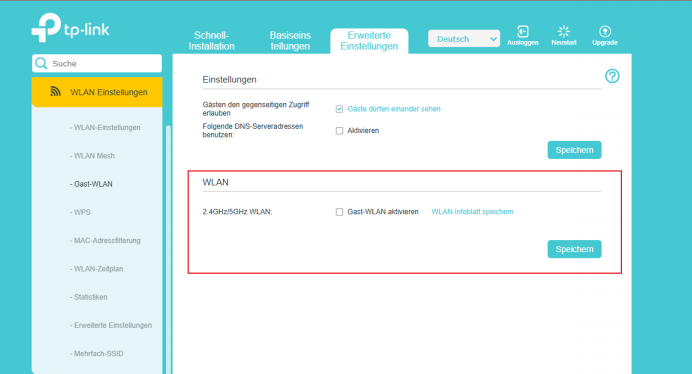
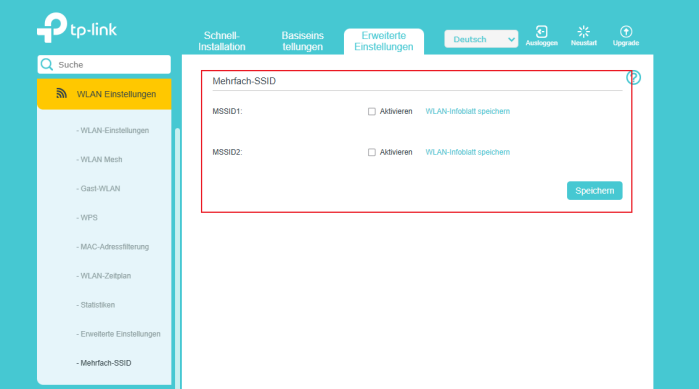
Step 3. Press and hold the WPS buttons on both the Router and Range Extender simultaneously until the Wi-Fi LED begins to flash.
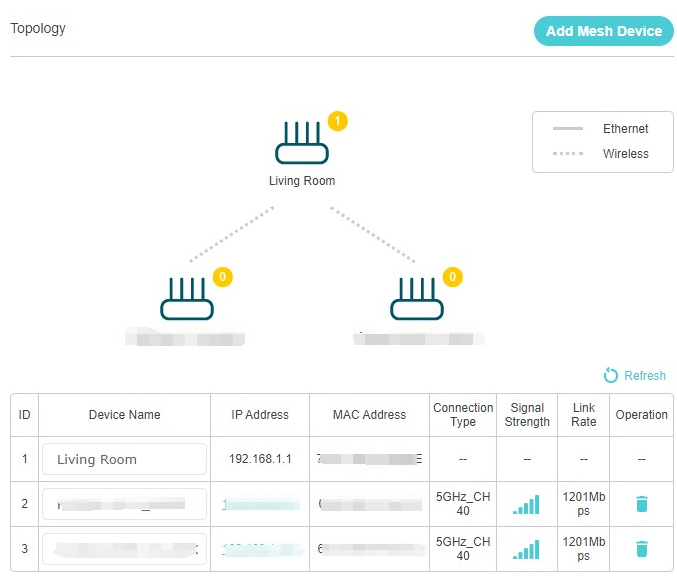
Step 4. Go to Basic > Network Map > Topology to check whether the Range Extender is added.
Get to know more details of each function and configuration please go to Download Center to download the manual of your product.
해당 FAQ가 유용했나요?
여러분의 의견은 사이트 개선을 위해 소중하게 사용됩니다.

