
Tapo 스트립 조명 효과 설정 방법
Tapo 스마트 라이트 스트립의 각 부분이 동시에 여러 가지 색상을 표시하는 역동적이고 생동감 넘치는 조명 패턴을 구현하고 싶다면, 다음 내용을 참고하여 라이트 스트립의 조명 효과를 설정하세요.
핵심 요약
- Tapo 앱의 ‘EFFECTS’ 메뉴 내 ‘추천’ 섹션을 통해 미리 만들어진 애니메이션 조명 효과를 설정된 Tapo 조명 스트립에 적용하세요.
- 효과 메뉴의 ‘사용자 지정’ 섹션으로 이동하여 ‘+’ 추가 버튼을 탭한 후 효과 설정을 조정하여 새로운 사용자 지정 조명 효과를 생성할 수 있습니다.
- 호환되는 Tapo 라이트 스트립에서 ‘다중 색상’ 기능을 사용하여 모든 LED 비드에 최대 8가지 색상을 동시에 설정할 수 있습니다.
- Tapo 라이트 스트립의 ‘색상 페인팅’ 기능을 사용하여 라이트 스트립의 각 세그먼트에 개별 색상을 설정할 수 있습니다.
- 지원되는 Tapo 라이트 스트립에서 새 효과 생성 페이지 하단으로 스크롤하여 사용자 지정 조명 효과 속도를 조정할 수 있습니다.
조명 효과 설정 방법
여기서는 Tapo L930을 예로 들어 설명합니다.
시나리오 1: “추천”에서 선택하기
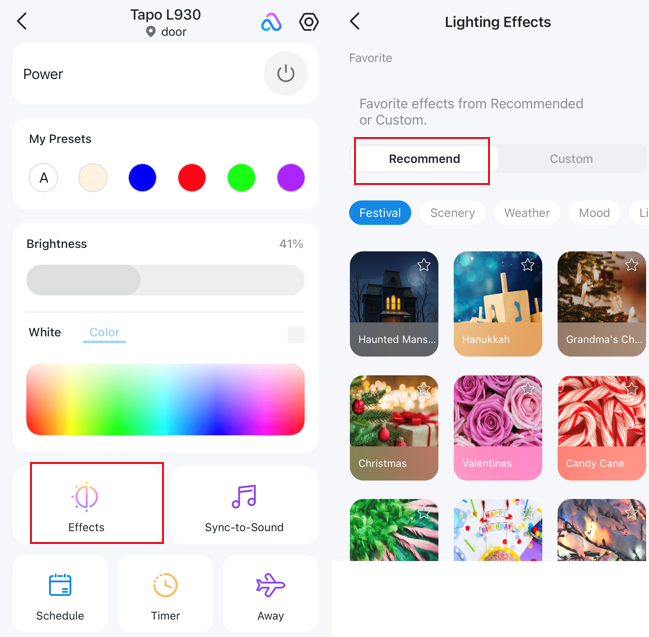
홈 페이지로 이동한 후 왼쪽의 ‘효과’ 아이콘을 클릭하고, ‘추천’으로 이동하여 수십 가지의 애니메이션 조명 효과 중에서 선택하여 스마트 라이트 스트립에 적용하세요.
시나리오 2: 직접 맞춤 설정하기
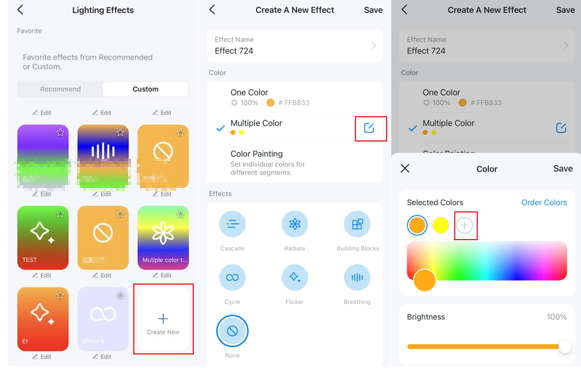
'추천' 효과의 설정을 변경하려면 '사용자 지정'으로 이동하세요. '+' 버튼을 클릭하여 새로운 효과를 생성할 수 있습니다. 효과 설정에서 효과 이름, 색상, 컬러 페인팅 및 속도를 조정할 수 있습니다.
다중 색상: 다중 색상 기능을 지원하는 모델의 경우, 모든 LED 비드에 최대 8가지 색상을 동시에 설정할 수 있습니다.
컬러 페인팅: 각 세그먼트에 개별 색상을 설정할 수 있습니다.
속도: 이 기능을 지원하는 모델의 경우, ‘새 효과 만들기’ 페이지 하단으로 스크롤하면 속도를 조정할 수 있는 옵션이 표시됩니다.
이 문서에는 기계 번역이 적용되었으며, 정확한 내용을 확인하려면 원본 영문 문서를 참고하시기 바랍니다.
더 알아보기
해당 FAQ가 유용했나요?
여러분의 의견은 사이트 개선을 위해 소중하게 사용됩니다.



TP-Link Community
Still need help? Search for answers, ask questions, and get help from TP-Link experts and other users around the world.