
Tapo T300(EU)1.0_V1_Setup Guide
Tapo T300 Smart Water Leak Sensor
Welcome to the setup guide.
To ensure equal access for all users, we offer this accessible setup guide. This guide is designed to meet accessibility needs, enabling a successful setup. It will introduce the appearance of your sensor and then guide you through the setup process.
Step 1. Know about your smart sensor
In this section, we will describe the sensor's appearance, including its button and label.
1. You can find the sensor and two included AAA/LR03 batteries in the package.
2. Next, place the sensor on a flat, horizontal surface, like a shelf or desktop, with the circular device button facing upward and positioned on your left, and the battery compartment at the bottom.
3. After positioning your sensor correctly, we will introduce the device to you.
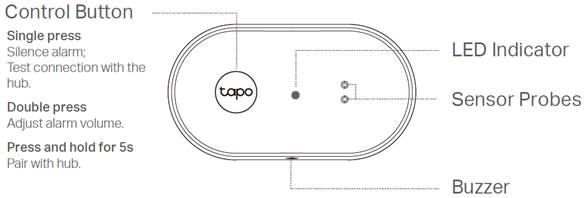
Control Button: A circular button located on the upper-left side of the sensor.
Press once: Silence the alarm; test the connection to the hub.
Press twice: Adjust the alarm volume; the volume cycles through High, Normal, Low, and Mute.
Press and hold for 5 seconds: Pair the sensor with the hub.
LED: Located at the top center of the sensor. It shows your device status. You can check the device status in the Tapo app.
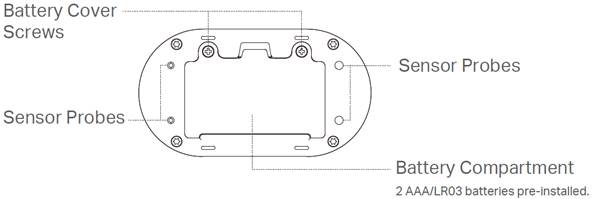
6 Sensor Probes: Raised cylindrical probes used to detect water leaks. Two on the upper-right side of the product. Four around the bottom perimeter of the product.
Buzzer: Some small holes on the front of the product for playing sounds.
Battery Compartment: Located at the bottom of the product. Two screws are located on the battery compartment cover. They secure the batteries in place.
Product "Label": The product label is through laser engraving on the bottom of your device.
Step 2. Set Up
1. Get the Tapo app from the App Store or Google Play, then log in. Or you can visit https://www.tapo.com/app/download-app to download the Tapo app.

2. Power up your sensor. Wait 2 seconds for the sensor to start up.
3. Tap the + button in the app and select your device model. Follow the app instructions to complete the setup.
If you need help, please visit https://www.tapo.com/support/ for technical support, the user guide, FAQs, warranty & more.
For details on Tapo app accessibility, please check Accessibility Support.
English: Safety Information
• Do not ingest battery, Chemical Burn Hazard
• Keep the device away from fire or hot environments.
• Do not attempt to disassemble, repair, or modify the device. If you need service, please contact us.
• Do not use the device where wireless devices are not allowed.
Please read and follow the above safety information when operating the device. We cannot guarantee that no accidents or damage will occur due to improper use of the device. Please use this product with care and operate at your own risk.
Warning
Avoid replacement of a battery with an incorrect type that can defeat a safeguard.
Avoid disposal of a battery into fire or a hot oven, or mechanically crushing or cutting of a battery, that can result in an explosion.
Do not leave a battery in an extremely high temperature surrounding environment that can result in an explosion or the leakage of flammable liquid or gas; Do not leave a battery subjected to extremely low air pressure that may result in an explosion or the leakage of flammable liquid or gas.