How do I set up IP & MAC Binding on TL-WR820N?
 76326
76326IP & MAC Binding (also known as ARP Binding) is useful for controlling access of a specific computer in the LAN by binding the IP address and the MAC address of the device together. IP & MAC binding also prevents other devices from using a specific IP address.
1. Visit http://tplinkwifi.net, and log in with the password you set for the router.
How do I log in web-based interface/utility of TL-WR820N?
2. Go to Advanced > Network > IP & MAC Binding.
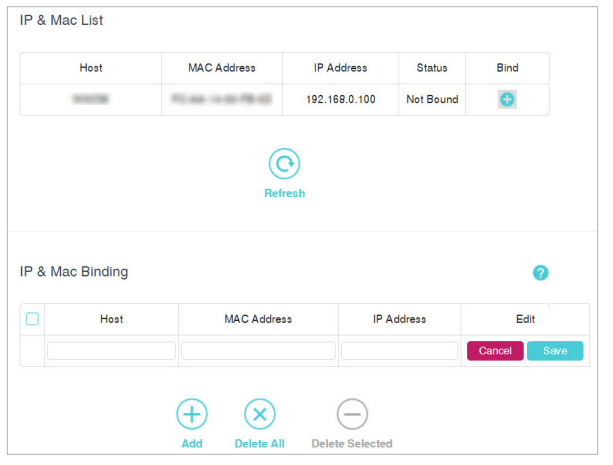
3. In the IP & MAC List, find your device and click Bind. Or you can click Add under the IP & MAC Binding table and manually add an binding entry.
Get to know more details of each function and configuration please go to Download Center to download the manual of your product.
Vos commentaires nous aideront à améliorer ce site.
SubscriptionTP-Link prend votre vie privée au sérieux. Pour plus de détails sur la politique de confidentialité de TP-Link, veuillez consultez la page suivante Politique de confidentialité de TP-Link .