
What’s the Function of 'Disable NAT'?
1. How to disable NAT?
Step 1 Login the management page of router. Please refer to [FAQ ID: 87] , if you don’t know how to login on the management page.
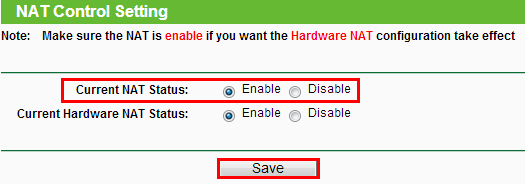
Step 2 Click NAT on the left panel
Step 3 Find the radio button of “Current NAT Status”
2. What’s the function of “Disable NAT”?
If NAT is turned off, the device will work on pure-router mode which can transmit data only. Please DO NOT turn it off unless your ISP supports this mode, otherwise you will lose Internet connection.
Notice:
The default status of NAT is Enabled, so without special demand, please don't select the Disable option.
Byla tato FAQ užitečná?
Vaše zpětná vazba nám pomůže zlepšit naše webové stránky


TP-Link Community
Still need help? Search for answers, ask questions, and get help from TP-Link experts and other users around the world.