
How to enable data roaming of 4G LTE Mobile Wi-Fi via Phone web management interface (new logo)
Follow the steps below, here takes M7350 as demonstration:
If you are out of your carrier service area, you can use this feature as needed.
1. Please refer to How to log in the management interface of 4G LTE Mobile Wi-Fi? (new logo)
2. Go to Dial-up.
3. Enable Data Roaming.
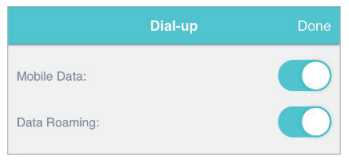
4. Tap Done.
Get to know more details of each function and configuration please go to Download Center to download the manual of your product.
Byla tato FAQ užitečná?
Vaše zpětná vazba nám pomůže zlepšit naše webové stránky



TP-Link Community
Still need help? Search for answers, ask questions, and get help from TP-Link experts and other users around the world.