
Application Requirement/Choose WAN Connection Type on my TP-Link router
 373377
Note: This article is not relevant to you if you have any of the following conditions.
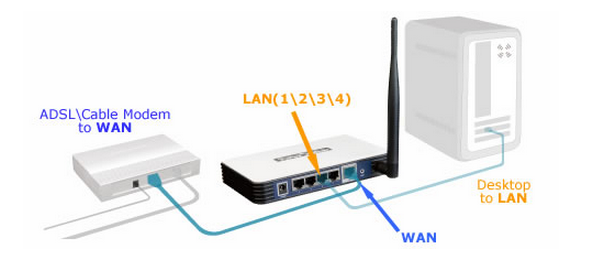

Please see the article How do I install TP-Link router to work with ADSL Modem(dynamic IP)
III You already have a Cable/Fiber Modem and the Internet access is automatic but it is only available for one user, cannot be shared.
Please see the article How do I install TP-Link router to work with Cable/Fiber Modem(dynamic IP)
IV You get the internet access by plugging the Ethernet cable going through the wall directly to a computer.
i Your computer can get internet access automatically from Ethernet cable going through the wall without any other activity.
Please see the article How do I install TP-Link router to work with Cable/Fiber Modem(dynamic IP)
ii Your internet service provider offers you a username and password. Before you buy the TP-Link router, you need to use a third-party or windows built-in PPPoE dialing up software to access the internet.
Please see the article How do I install TP-Link router to work with DSL Modem(PPPOE )
iii Your internet service provider provides static IP address for you. Before you buy the TP-Link router, you need to configure ip address manually on a computer to access the internet.
Please see the article How do I install TP-Link router to work with Modem(static IP)
Finden Sie diese FAQ hilfreich?
Mit Ihrer Rückmeldung tragen Sie dazu bei, dass wir unsere Webpräsenz verbessern.
14.0-A_normal_1584497163963a.png)


Von United States?
Erhalten Sie Produkte, Events und Leistungen speziell für Ihre Region