What Is a Network Gateway? Definition and How It Works
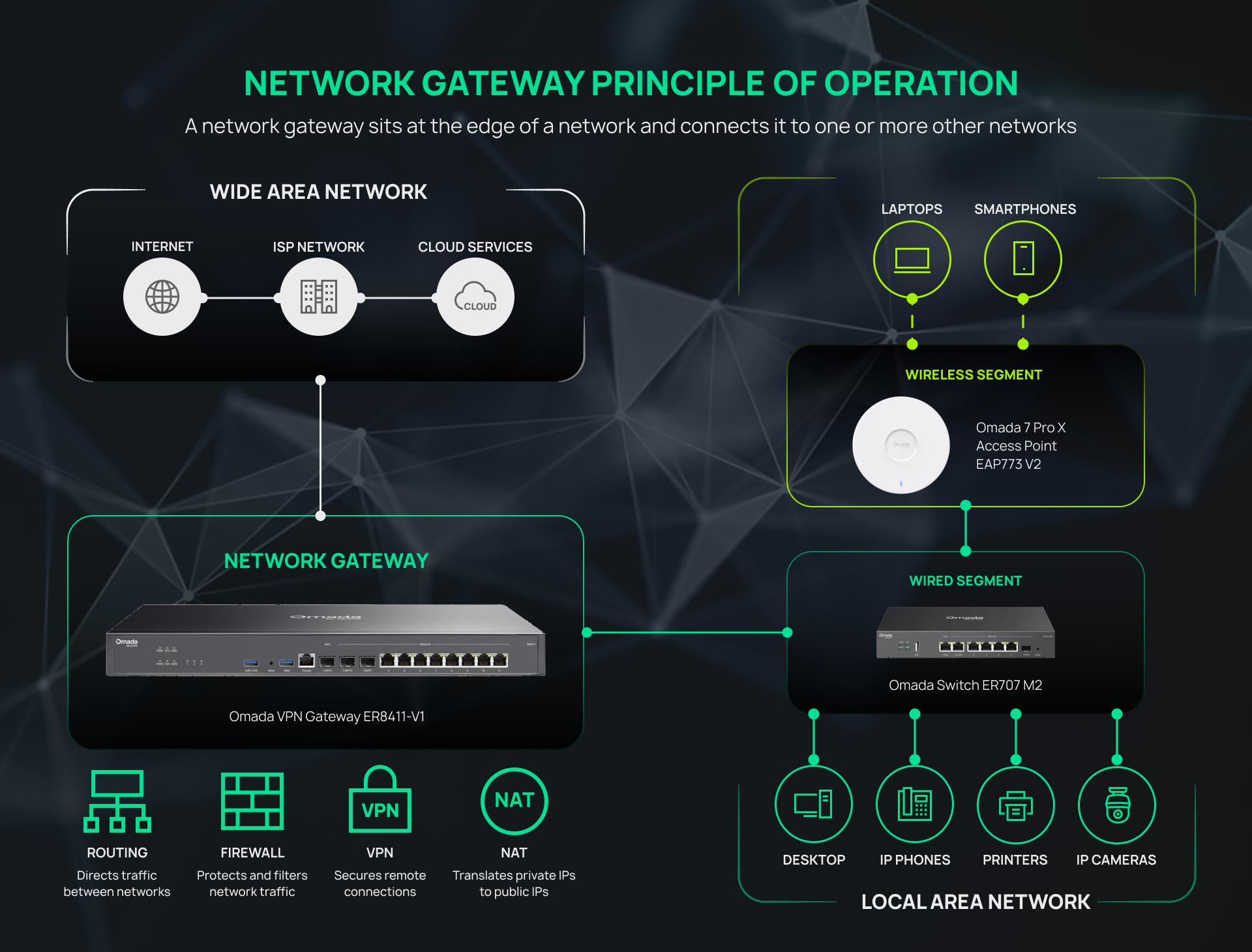
A network gateway is a hardware device or software application that connects two separate networks, allowing devices on each side to communicate. It routes traffic between networks and, depending on its role, may also translate between different protocols or addressing schemes. The gateway typically sits at the edge of the local network, connecting internal systems to the internet or another external network.
This article covers what a network gateway does, how it works, the most common types of gateways, and how it compares to a router, modem, and firewall. Whether you're an IT manager, an MSP standardizing hardware across sites, or a system integrator specifying equipment for a client, this guide will help you match gateway capabilities to your network's actual requirements.
Key Takeaways
- A network gateway sits at the edge of a network and connects it to one or more other networks, most commonly a LAN to the internet.
- Gateways do more than route traffic. Depending on the deployment, they may also perform protocol translation, enforce security policies, and terminate VPN connections.
- Network gateways can be physical appliances, virtual appliances, or cloud-based services.
- Common gateway types include wireless, IoT, security, VoIP, and cloud/API gateways, each of which solves a different connectivity problem.
- For business networks, the right gateway depends on site count, segmentation needs, VPN requirements, and how the device will be managed.
What Is a Network Gateway?
A network gateway is the entry and exit point between two networks. It forwards traffic between networks and can translate between different protocols, addressing schemes, or network architectures.
The term gateway refers to both a networking function and the device or software performing that function. A gateway can be a dedicated hardware appliance, a router with gateway functionality, a virtual appliance, or cloud-based software. What makes something a gateway is its role, not its form factor.
Depending on its purpose, a gateway may operate at multiple layers of the OSI (Open Systems Interconnection) networking model, unlike routers, which primarily operate at Layer 3, and switches, which primarily operate at Layer 2.
How Does a Network Gateway Work?
Once traffic reaches a network gateway, what happens next depends on its role. The gateway may route traffic between networks, perform network address translation (NAT), enforce security policies, or translate between different protocols.
Take, for example, an office device sending a request to a cloud service. The gateway receives the packet from the local network, applies any required processing, such as NAT, protocol conversion, or VPN encryption, and forwards it through the WAN interface. On the return journey, the gateway reverses those processes as needed before delivering the packet to the requesting device.
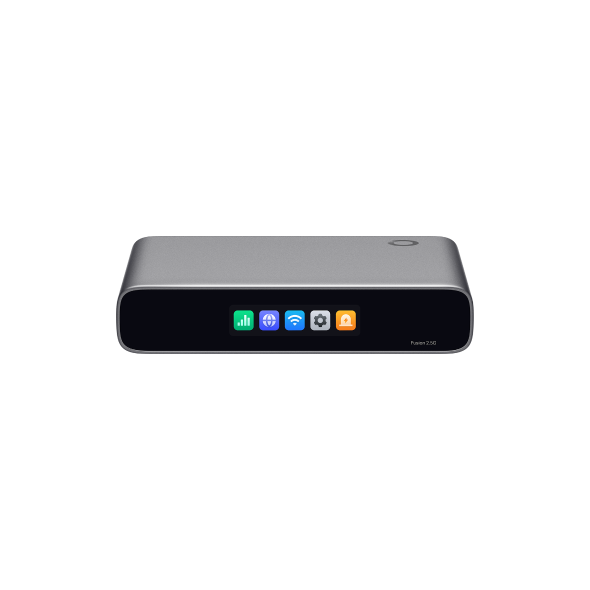
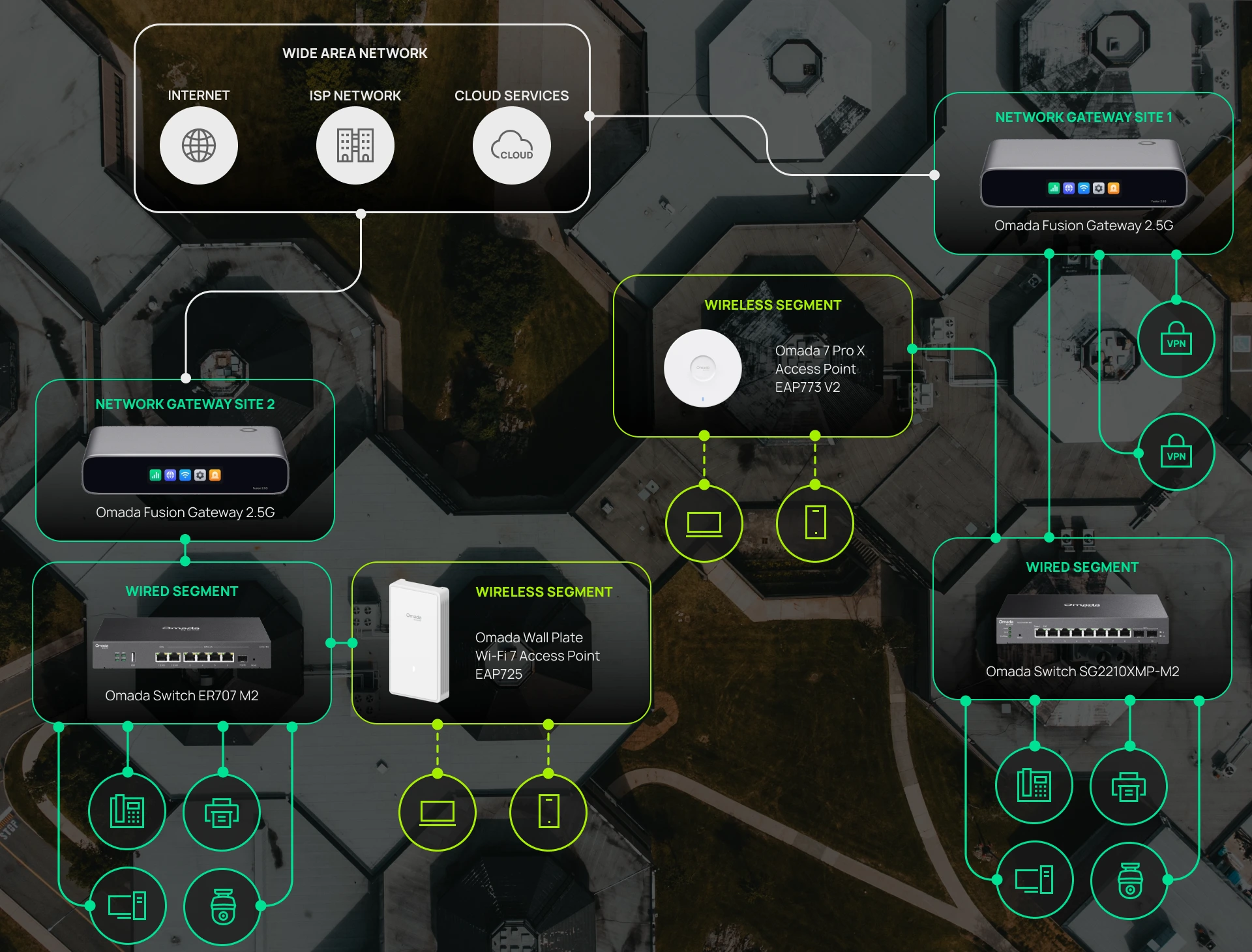
In most business deployments, gateways don't operate in isolation. Routing, firewall, VPN termination, and gateway functions are typically combined into a single appliance at the network edge. Some gateway appliances, such as the Omada Fusion Gateway collection, also combine gateway and controller functions into a single integrated appliance, rather than requiring separate hardware.
What Are the Main Types of Network Gateways?
Gateways are generally categorized by what they connect or by the specific function they perform. The types below cover the ones you're most likely to encounter in a business networking context.
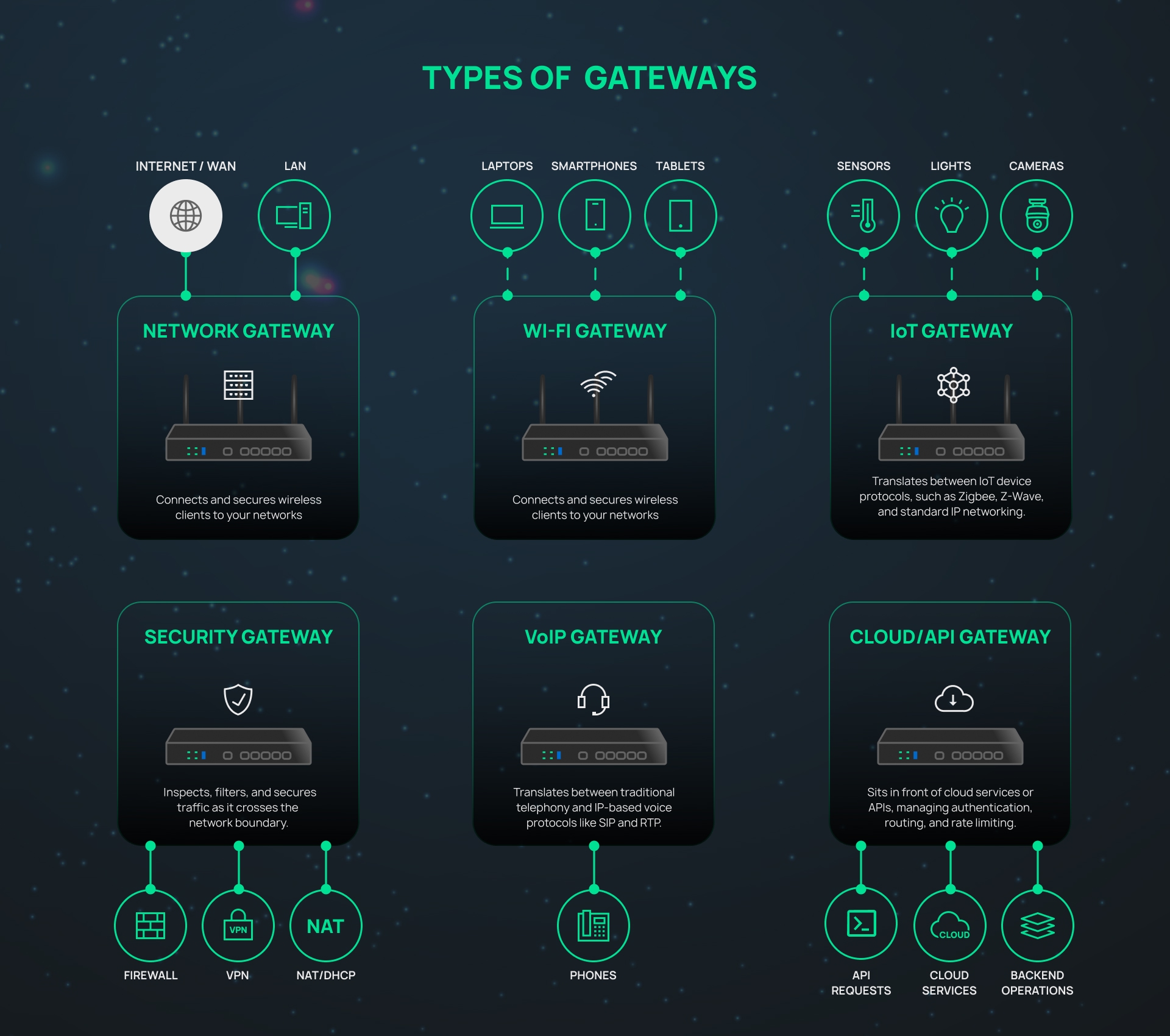
Wireless (Wi-Fi) Gateway
A wireless gateway typically combines a modem, router, and Wi-Fi access point into a single device, handling both ISP termination and local Wi-Fi from one appliance. This form factor is common in SMB and home office environments, where a single unit replaces the separate modem, router, and access point setup found in larger deployments.
A Wi-Fi gateway often refers to this type of all-in-one device, and it's frequently the first networking appliance a small office deploys when moving beyond a consumer-grade setup.
IoT Gateway
An IoT gateway translates between IoT device protocols, such as Zigbee, Z-Wave, or MQTT, and standard IP networking, commonly found in retail (smart sensors, BLE beacons), building automation, and industrial settings.
Security Gateway
A security gateway inspects, filters, and secures traffic as it crosses the network boundary. This category includes secure web gateways (SWGs) and unified threat management (UTM) appliances. It overlaps with firewall functionality but isn't identical to a firewall.
VoIP Gateway
A VoIP gateway translates between traditional telephony, such as PSTN (Public Switched Telephone Network) trunks, analog phone lines, or ISDN, and IP-based voice protocols like SIP and RTP. This type remains common in hospitality and professional services environments that still run legacy phone infrastructure.
Cloud/API Gateway
A cloud or API gateway sits in front of cloud services or APIs, managing authentication, routing, and rate limiting between clients and backend services. This is the gateway software developers usually mean when they use the term "gateway."
Other Gateway Types Worth Knowing
A few additional types round out the category. Bidirectional gateways pass traffic both ways, while unidirectional gateways restrict traffic to one direction for security isolation. Media gateways translate voice or multimedia traffic between different communication networks. Email gateways filter and route email traffic for spam control or compliance.
Network Gateway vs. Router, Modem, and Firewall: What's the Difference?
In practice, a gateway, router, modem, and firewall often live inside the same physical box, but each performs a distinct function. A gateway connects your network to other networks, while a router directs traffic, a modem establishes the internet connection, and a firewall inspects and filters network traffic.
| Device | Primary Function | OSI Layer | Where It Sits | Typical Example |
|---|---|---|---|---|
| Gateway | Connects two networks and may translate between different protocols | Any layer (2–7) | Edge of the network | Business VPN gateway |
| Router | Directs traffic between networks using IP addresses | Layer 3 | Edge or core of the network | Standalone router |
| Modem | Converts signals between ISP infrastructure and Ethernet | Layer 1 | Between the ISP line and the local network | Cable modem |
| Firewall | Inspects and filters traffic based on security rules | Layer 3–7 | Network boundary or between segments | Next-generation firewall appliance |
These terms can be confused because modern consumer and SMB devices routinely combine multiple roles into a single appliance. This single device can terminate the ISP connection, route traffic, apply firewall rules, and manage VPN tunnels all at once.
However, distinguishing between them matters when sizing equipment for business use, since segmentation, VPN throughput, and security policy depend on which functions your hardware performs and how much capacity it has for each.
For a deeper look at how network segmentation and routing work together, see this comparison of Layer 3 versus Layer 2+ switching.
Key Features and Capabilities of a Network Gateway
When evaluating a business gateway, the features below are what determine whether it fits your environment.
Protocol Translation and Routing
Routing traffic between networks and, where required, protocol translation are the core networking capabilities of a gateway. Every other capability builds on these core networking functions.
Security and Traffic Filtering
Business gateways commonly include stateful inspection to track connection state and block unsolicited inbound traffic, deep packet inspection to analyze packet contents for threats, intrusion prevention to block known attack patterns in real time, and content or URL filtering to restrict access to malicious or non-business websites.
VPN Termination
Site-to-site and remote-access VPN termination let a gateway establish encrypted tunnels between locations or for individual remote workers, which matters for MSPs standardizing remote access and multi-site SMBs connecting branches back to headquarters. Common protocols include IPsec, OpenVPN, and WireGuard.
VLAN Segmentation and Network Isolation
A gateway enforces security policies governing traffic between VLANs, keeping guest, employee, IoT, and VoIP traffic properly separated. In a retail environment, this means point-of-sale traffic stays isolated from guest Wi-Fi, so customer transactions remain secure during busy periods.
Centralized Management and Multi-Site Deployment
Centralized management is one of the key features that separates many business-grade gateways from consumer appliances. A gateway managed through a cloud, hardware, or software controller lets an administrator configure, monitor, and troubleshoot it alongside switches and access points from one interface.
Within the Omada ecosystem, gateways can be centrally managed alongside switches and access points, or run in standalone mode. For businesses looking to simplify network management, Omada's Fusion Gateway series combines gateway functionality with a built-in controller for centralized management of the entire network.
Throughput and Port Speeds
As ISP plans increasingly offer multi-gigabit speeds, WAN port speed and gateway throughput can both become bottlenecks if the hardware hasn't kept pace. To avoid creating new limitations inside the network, businesses upgrading to multi-gig internet should also consider multi-gig switches, especially in high-bandwidth environments such as schools, hotels, and offices.
Network Gateway Business Cases
What a gateway needs to do depends on the environment in which it's deployed. Here's how that plays out across a few common business scenarios:
- Multi-site SMB: A business with a central office and branch locations uses a gateway at each site to establish VPN tunnels back to headquarters, enforce security policies between VLANs, and stay under centralized management. This is where Omada's gateway lineup, including the Fusion Gateway series, reduces hardware footprint at smaller branch sites while supporting site-to-site VPN and centralized visibility.
- MSP-managed networks: An MSP standardizing on a single gateway platform across dozens of client sites benefits from zero-touch provisioning, so new locations come online with minimal on-site configuration, plus remote troubleshooting that avoids costly site visits.
- Hospitality or retail deployments: A hotel or retail location typically needs guest Wi-Fi isolated from point-of-sale systems, with IoT sensors or cameras on their own VLAN. The gateway enforces the security policies that keep these network segments isolated from one another.
How to Choose the Right Network Gateway
The right gateway for your setup depends on a handful of factors:
- Site count: Single-location businesses have different requirements than those managing branch offices or dozens of MSP client sites.
- WAN speed and redundancy: Multi-WAN load balancing, failover, or cellular backup for locations with unreliable fixed broadband.
- VPN and segmentation requirements: Site-to-site VPN, remote-access VPN, and VLAN needs affect which gateway tier makes sense.
- Management model: Local standalone management, a cloud controller, or an SDN controller platform.
- Client and device count: Larger deployments need gateways sized for that load, not just enough ports.
- Budget and licensing: Upfront hardware costs against ongoing licensing, especially for MSPs standardizing across sites.
Omada's current gateway lineup includes the Fusion Gateway series and 4G/5G Wi-Fi gateways for integrated and wireless-capable deployments, along with the Wired ER Gateway series for dedicated VPN gateways in higher-throughput environments.
Planning Your Network Gateway Deployment
A network gateway connects separate networks, allowing devices and systems using different protocols or addressing schemes to communicate. It sits at the edge of your local network as the point where internal systems meet the outside world. Which type makes the most sense for your deployment depends on what's on either side of that connection, whether that's a wireless-first branch office, an IoT-heavy retail floor, or a multi-site business running VPN tunnels between locations.
For business networks specifically, centralized management and proper segmentation tend to matter more day-to-day than raw throughput numbers alone. A gateway that's easy to manage across sites and correctly isolates network segments will serve an IT manager or MSP better than one that's simply fast but harder to administer at scale.
If you're ready to compare options, see Omada's standard gateway lineup and Fusion Gateway series to find the right fit for your site count, VPN needs, and management preferences.
Frequently Asked Questions
What is a network gateway in simple terms?
A network gateway is the device that connects your local network to another network, most often the internet. It routes traffic between them and, where required, translates between different protocols or addressing schemes.
What is the difference between a network gateway and a router?
A router directs traffic between networks using IP addresses and operates at Layer 3. A gateway does that too, but can also operate at other layers and often adds protocol translation.
Is a modem the same as a gateway?
No. A modem converts signals between your internet service provider's infrastructure and your local Ethernet network, while a gateway connects networks and may route traffic or translate between different protocols or addressing schemes. Many devices combine both functions into one box.
Do I need a separate gateway and firewall?
It depends on your security requirements and network size. Many business gateways include firewall functionality sufficient for SMB environments, but larger networks or strict compliance requirements often call for a dedicated firewall.
What does a network gateway do in a business network?
It connects internal systems to the internet or other sites, enforces security policies between VLANs, terminates VPN tunnels for remote workers or branch offices, and gives administrators a central point to manage WAN connectivity and network policies.